 Eiji Kitamura [X](https://twitter.com/agektmr) [GitHub](https://github.com/agektmr) [Mastodon](https://infosec.exchange/@agektmr) [Bluesky](https://bsky.app/profile/agektmr.com)  Natalia Markoborodova [X](https://twitter.com/nmarkoborodova) [GitHub](https://github.com/ewewraw) [LinkedIn](https://www.linkedin.com/in/natalia-markoborodova) [Bluesky](https://bsky.app/profile/nmarkoborodova.bsky.social)
Published: May 21, 2026
[Video](https://www.youtube.com/watch?v=xzMx2khmGJ4)
At Google I/O 2026, we talked about a web where signing in isn't a chore. It
should be a secure, simplified entry point that actually makes users feel safe.
This post recaps how you can fix your account flows, cut the friction, and
protect people from the start.
## Quick access
- [Why modernization matters](https://developer.chrome.com/blog/io26-web-identity.md.txt#why-modernization-matters)
- [Streamline account creation](https://developer.chrome.com/blog/io26-web-identity.md.txt#streamline-account-creation)
- [Frictionless attribute verification](https://developer.chrome.com/blog/io26-web-identity.md.txt#frictionless-attribute-verification)
- [Implement passkeys for seamless sign-in](https://developer.chrome.com/blog/io26-web-identity.md.txt#implement-passkeys)
- [Strategic passkey adoption](https://developer.chrome.com/blog/io26-web-identity.md.txt#strategic-passkey-adoption)
- [Passkey management and resilient recovery](https://developer.chrome.com/blog/io26-web-identity.md.txt#passkey-management)
## Why modernization matters
High-friction flows (like messy sign-up forms, that annoying "forgot password"
loop, or a wall of sign-in buttons) kill the mood. They are "context-switch
killers" that drive users away. Old-school passwords and one-time passwords
(OTPs) also leave people wide open to phishing.
Every second of friction is an opportunity for a user to drop off. Modernizing
your authentication protects your systems and your users. By smoothing out every
touchpoint in the identity journey, you naturally increase your conversion
rates. For example, [pixiv achieved a staggering *99% login success
rate*](https://web.dev/case-studies/pixiv-passkeys) (a 29% improvement over
passwords) after implementing passkeys. Moving away from weak credentials makes
things faster and safer.
## Streamline account creation
The first interaction a user has with your app sets the mood. Streamlining
account creation is the first step towards improving adoption and safety.
### Identity federation as the primary account creation method
You can let your users skip the tedious account creation forms by using
[identity
federation](https://developers.google.com/identity/gsi/web/guides/fedcm-migration),
which lets users sign up with a trusted provider like Google. This provides a
robust and streamlined sign-up experience that gets users into your app without
the "chore" of typical registration.
Federation means users don't have to type their name or email manually. Since
the provider already verified them, you can skip redundant steps to verify them
independently and get more people through the door.
In addition, adopting a federated identity solution lets you inherit the
security level of a dedicated IdP (Identity Provider). Because IdPs specialize
in identity and security, relying on their infrastructure eliminates the risk of
building authentication from scratch.
### Adopt the Federated Credential Management (FedCM) API
If you act as an IdP, we recommend adopting the [FedCM
API](https://developer.chrome.com/docs/identity/fedcm/overview). It handles the interaction through the
browser UI, which protects privacy by preventing tracking while giving users a
one-tap sign-in, and [declutters the
UI](https://developer.chrome.com/docs/identity/fedcm/overview#improved_user_experience) by displaying only
relevant accounts.
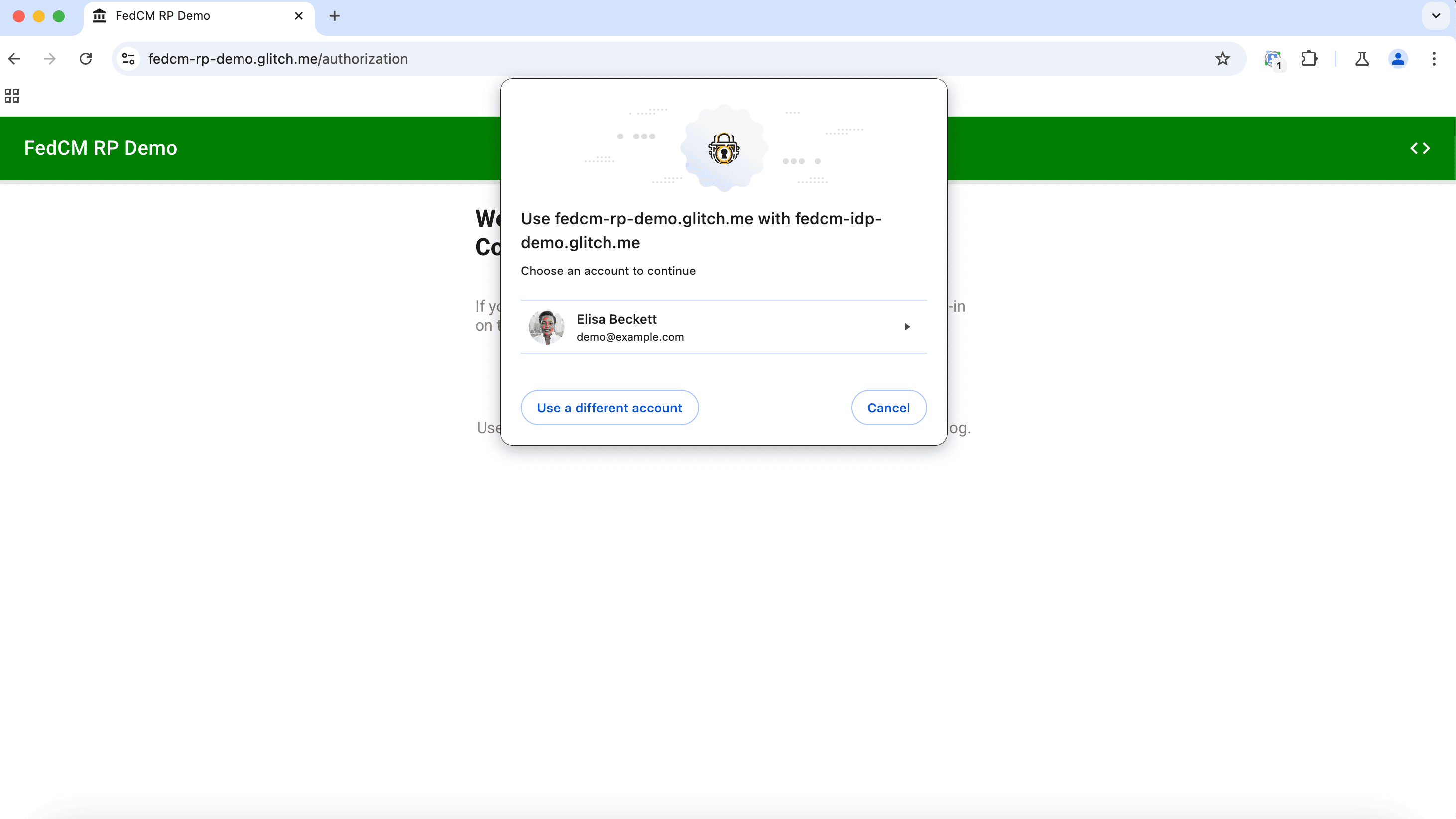 FedCM: Active mode UI dialog. Learn more about [available UI modes](https://developer.chrome.com/docs/identity/fedcm/overview.md.txt#fedcm_ui_modes) that FedCM provides.
### The "Federate-then-upgrade" pattern
Federate-then-upgrade combines the speed of federation with the long-term
security of passkeys. If you *prompt for a passkey right after a federated
sign-up*, the user's next login is phishing-resistant from day one.
### Optimize forms for Autofill
If manual forms are necessary, use descriptive `name` and `id` attributes and
correct `autocomplete` values to allow the browser to fill the fields for the
user. This reduces the cognitive load and potential for typos during the sign-up
process. See our [Sign-up form best
practices](https://web.dev/articles/sign-up-form-best-practices) for more
details on form optimization.
```html
```
> [!NOTE]
> **Note:** Don't forget to do the same thing on your password update forms to take advantage of [Automated Password Change](https://developer.chrome.com/docs/identity/automated-password-change.md.txt).
## Frictionless attribute verification
Making users leave your app to check a code in their email reduces conversion
rates. This context switch is where people get distracted and never come back.
### Meet the Email Verification Protocol (EVP)
The [Email Verification Protocol
(EVP)](https://developer.chrome.com/blog/email-verification-protocol-origin-trial), an emerging feature,
allows your application to obtain a verified email address directly through the
browser.
To opt in to use this feature, append a hidden input field with the
`autocomplete="email-verification-token"` attribute and with a `challenge`. The
browser parses the email domain from the input and requests that the email
issuer verify the user has control of this email. Upon successful verification,
the browser presents a verified email claim that your backend can verify
instantly. For the user, this flow happens seamlessly; they only see a
notification upon email verification.
EVP removes the need for friction that drives people away (like magic links or
email OTPs) for sign-in, sign-up, and password reset.
```html
```
Note that it's up to individual email service providers to support the EVP.
Check with your specific provider to see if they plan to support EVP. If you own
a custom domain, you may connect it to a supporting email provider to support
EVP too.
Since this is still in an experimental stage, we appreciate your feedback on
this feature in the [GitHub
repository](https://github.com/WICG/email-verification-protocol).
Example of the Email Verification Protocol (EVP) flow.
### Digital Credentials API
For sensitive details like a legal name or age, the [Digital Credentials
API](https://developer.chrome.com/blog/digital-credentials-api-shipped) provides a way to request verified
data from a user's wallet through browser mediation using *selective disclosure*.
This means you can verify a user is over a certain age, without actually
receiving their full date of birth or legal name, preserving their privacy.
See [Digital Credentials API: Secure and private identity on the web](https://developer.chrome.com/blog/digital-credentials-api-shipped.md.txt).
## Implement passkeys for seamless sign-in
Passkeys are more than just a replacement for passwords. They are a fundamental
shift toward seamless phishing-resistant authentication.
### Immediate UI Mode
From Chrome 149, [Immediate UI Mode](https://developer.chrome.com/blog/webauthn-immediate-ui.md.txt) is available.
It allows the website to check for credentials the moment a user navigates to
your site. If a passkey or password is available in the password manager, the
browser mediates the flow with a list of available accounts in a sign-in dialog
immediately.
This eliminates the need for a user to select a sign-in method. By proactively
offering the credential for the selected account, you create a frictionless
"one-tap" experience that feels like magic to the user.
```javascript
const credential = await navigator.credentials.get({
password: true,
uiMode: 'immediate',
publicKey: publicKeyObject,
});
```
See, [Immediate UI mode for logins](https://developer.chrome.com/docs/identity/immediate-ui-mode.md.txt).
### Passkey form autofill: Use form autofill while transitioning to passkeys
For users on a website that's in transition from passwords to passkeys, [passkey
form autofill](https://web.dev/articles/passkey-form-autofill) allows passkeys
to appear in Autofill suggestions when the input field is focused. This means
that if a user already has a passkey, the moment they focus the username field
in a sign-in form. If they don't, they can still use the saved password.
Example of passkey selection through form autofill.
To enable this, annotate your username field with `autocomplete="username webauthn"`
and set the `mediation` value to `'conditional'` when you call
`navigator.credentials.get()`.
This is a critical bridge during the transition to a passwordless future, as it
familiarizes users with passkeys in a familiar interface.
See the [Passkeys authentication
checklist](https://web.dev/articles/passkey-checklist#passkeys_authentication).
## Strategic passkey adoption
Adoption is often a matter of timing. Prompting a user at the right moment can
significantly increase the likelihood of them enrolling a passkey.
### Automatic passkey creation
Nobody wants to dig through their security settings just to set up a new login
method. For existing password users, how and when should you prompt users to
upgrade to passkeys?
That's where [automatic passkey
creation](https://developer.chrome.com/docs/identity/webauthn-conditional-create) comes in. With Conditional
Create the browser can automatically upgrade password users to passkeys the
exact moment a user logs in with their password manager.
Passkey request flow with conditional create. Passkey request flow with conditional create.
By passing `mediation: 'conditional'` to the `navigator.credentials.create()`
API, triggered by the user's recent successful sign-in using the password saved
to the password manager, the browser generates a new passkey natively without
forcing them through extra setup screens.
Zero-friction enrollment means users don't have to make a conscious decision to
improve their security. It happens automatically, protecting them without
requiring any extra effort. For example, [adidas saw an 8% uplift in passkey
creations](https://web.dev/case-studies/adidas-passkeys) using this zero-prompt
strategy.
```javascript
await navigator.credentials.create({
mediation: 'conditional',
publicKey: { ... },
});
```
See the [Passkeys registration
checklist](https://web.dev/articles/passkey-checklist#passkeys_registration)
## Passkey management and resilient recovery
It is important for users to have their credentials readily available across
devices, websites, and services. As well as managing them and making sure they
can recover their accounts if a device is lost or stolen.
### Cross-platform consistency
If you have multiple properties (for example, an Android app and a website, or
multiple websites) that share a login system, you can improve the experience for
your users. With *seamless credential sharing*, password managers can suggest
the right credential to your user across all of your properties.
[Seamless credential
sharing](https://developers.google.com/identity/credential-sharing/set-up)
consists of two technologies: Digital Asset Links for passwords and Related
Origin Requests for passkeys.
Using [Digital Asset
Links](https://developers.google.com/identity/credential-sharing/set-up) ensures
passwords created on the web are available in your Android app, and the other
way around. It also lets password managers suggest an already saved credential
across different domains you own that share the same authentication backend.
Use [Related Origin
Requests](https://web.dev/articles/webauthn-related-origin-requests) to make
passkeys available across different domains and apps through your user's
credentials manager.
This is just one more way you can make the sign-in experience smoother for your
users.
### Empower users with a passkey management page
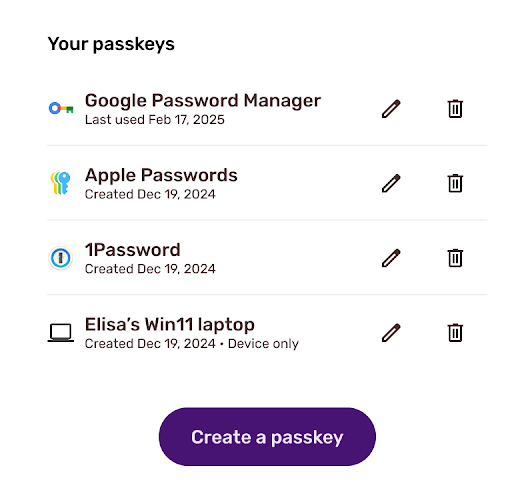
For sophisticated passkey experience, we suggest you create a dedicated
[passkeys management page](https://web.dev/articles/passkey-management) with
support for clear provider names, usage times, and controls. This helps users
manage their settings with confidence. Transparency builds trust.
See the [Passkeys management
checklist](https://web.dev/articles/passkey-checklist#passkeys_management).
### Resilient account recovery
Devices can be lost or upgraded. Passkeys are inherently resilient because they
use hardware-level protection and are also typically synced in the cloud,
allowing users to restore them on a new device. However, having a fallback like
a verified email address ensures your users never lose access to their digital
lives.
Instead of making someone sit on hold for a help desk call, you can prove
they're the owner using signals you already trust, such as identity federation
or email verification.
Combining these signals into a recovery strategy lets you restore access on the
spot. Once they're back, get a new passkey registered immediately so they're
protected from phishing again.
## Protecting sessions with DBSC
To protect users from account hijacks, keeping their session cookies safe is
another important layer of defense. [Device Bound Session Credentials
(DBSC)](https://developer.chrome.com/docs/web-platform/device-bound-session-credentials) is a way for you to
bind a session to the hardware. This mitigates session hijacking because even if
a cookie is stolen, only the same device can request a re-issue of the cookie,
effectively adding another layer of security to your session.
DBSC is an experimental feature, now available on Windows. You can learn more
about this update in the [Device Bound Session Credentials on Windows
announcement](https://developer.chrome.com/blog/dbsc-windows-announcement). We are also working on expanding
DBSC support to macOS.
## Passkeys agent skills
We've included passkey skills that cover many aspects described in this post in
our [Modern Web Guidance project](https://goo.gle/mwg). We'll soon publish a
blog post specifically about passkey skills.
## Ready to build the future of authentication?
Explore our deep-dive guides and start modernizing today:
- [The passkey deployment checklist](https://web.dev/articles/passkey-checklist)
- [Chrome Developers - Identity](https://developer.chrome.com/docs/identity)