 Pete LePage [X](https://twitter.com/petele) [GitHub](https://github.com/petele) [Mastodon](https://techhub.social/@petele) [Homepage](https://petelepage.com/)
[Video](https://www.youtube.com/watch?v=ksWDVurubwE)
In Chrome 73, we've added support for:
- Creating portable content easier with [signed HTTP exchanges](https://developer.chrome.com/blog/new-in-chrome-73.md.txt#sxg).
- Dynamically changing styles becomes way easier with [constructable style sheets](https://developer.chrome.com/blog/new-in-chrome-73.md.txt#constructable-style-sheets).
- Support for Progressive Web Apps arrives for on Mac, bringing support for PWAs to [all desktop and mobile platforms](https://developer.chrome.com/blog/new-in-chrome-73.md.txt#pwas-everywhere), making it easy to create installable apps, delivered through the web.
And there's [plenty more](https://developer.chrome.com/blog/new-in-chrome-73.md.txt#more)!
I'm [Pete LePage](https://petelepage.com/). Let's dive in and see
what's new for developers in Chrome 73!
## Change log
This covers only some of the key highlights, check the links below for
additional changes in Chrome 73.
- [Chromium source repository change list](https://chromium.googlesource.com/chromium/src/+log/72.0.3626.82..73.0.3683.74)
- [ChromeStatus.com updates for Chrome 73](https://www.chromestatus.com/features#milestone%3D73)
- [Chrome 73 deprecations \& removals](https://developers.google.com/web/updates/2019/02/chrome-73-deps-rems)
- [Chrome 73 media updates](https://developers.google.com/web/updates/2019/02/chrome-73-media-updates)
- [What's new in JavaScript in Chrome 73](https://v8.dev/blog/v8-release-73)
## Progressive Web Apps work everywhere
Progressive Web Apps provide an installable, app-like experience, built and
delivered directly via the web. In Chrome 73, we've added support for macOS,
bringing support for
[Progressive Web Apps to all desktop platforms](https://developers.google.com/web/progressive-web-apps/desktop) -
Mac, Windows, ChromeOS and Linux, as well as mobile, simplifying web app
development.
A Progressive Web App is fast, and reliably so; always loading and performing
at the same speed, regardless of network connection. They provide rich,
engaging experiences via modern web features that take full advantage of the
device capabilities.

Users can install your PWA from Chrome's context menu, or you can directly
promote the installation experience using the
[`beforeinstallprompt`](https://developers.google.com/web/fundamentals/app-install-banners/) event. Once
installed, a PWA integrates with the OS to behave like a native application:
users find and launch them from the same place as other apps, they run in
their own window, they appear in the task switcher, their icons can show
notification badging, and so on.
We want to [close the capability gap](https://developers.google.com/web/updates/capabilities)
between the web and native to provide a solid foundation for modern
applications delivered on the web. We're working to add new web platform
capabilities that give you access to things like the
[file system](https://developers.google.com/web/updates/2018/11/writable-files),
[wake lock](https://developers.google.com/web/updates/2018/12/wakelock), adding an
[ambient badge to the address bar](https://bugs.chromium.org/p/chromium/issues/detail?id=782120)
to let users know your PWA can be installed, policy installation for enterprises,
and [plenty more](https://developers.google.com/web/updates/capabilities#in-flight).
If you're already building a mobile PWA, a desktop PWA is no different. In fact,
if you've used responsive design, you're likely good to go already. Your single
codebase will work across desktop and mobile. If you're just starting out with
PWAs, you'll be surprised at how easy it is to create them!
1. [Add a manifest](https://developers.google.com/web/fundamentals/web-app-manifest/)
2. [Create a set of icons](https://developers.google.com/web/fundamentals/web-app-manifest/#icons)
3. [Add a boilerplate service worker](https://developers.google.com/web/tools/workbox/)
Then, iterate from there.
## Signed HTTP Exchanges
Signed HTTP Exchanges (SXG), part of an emerging technology called
[Web Packages](https://github.com/WICG/webpackage) is now available in Chrome 73.
A Signed HTTP Exchange makes it possible to create "portable" content that can
be delivered by other parties, and this is the key aspect, it retains the
integrity and attribution of the original site.
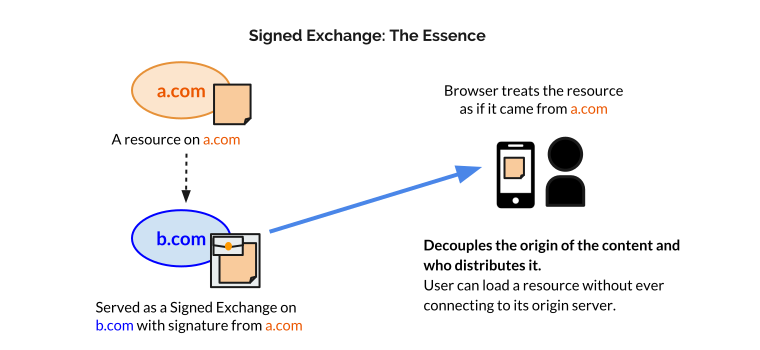
This decouples the origin of the content from the server that delivers it,
but because it's signed, it's like it's being delivered from your server.
When the browser loads this Signed Exchange, it can safely show your URL in the
address bar because the signature in the exchange indicates the content
originally came from your origin.
Signed HTTP exchanges enables faster content delivery for users, making it
possible to get the benefits of a CDN without having to cede control of your
certificate's private key. The AMP team is planning to use signed HTTP
exchanges on Google search result pages to improve AMP URLs and speed up clicks
on search results.
Check out Kinuko's [Signed HTTP Exchanges](https://developers.google.com/web/updates/2018/11/signed-exchanges)
post for details on how to get started.
## Constructable style sheets
Constructable Stylesheets, new in Chrome 73, gives us a new way to create and
distribute reusable styles, which is particularly important when using
Shadow DOM.
It's always been possible to create stylesheets using JavaScript. Create a
`