![Houssein Djirdeh](https://web.dev/images/authors/houssein.jpg) Houssein Djirdeh [X](https://twitter.com/hdjirdeh) [GitHub](https://github.com/housseindjirdeh) [Homepage](https://houssein.me/)

<br />

[Video](https://www.youtube.com/watch?v=zZPNwx0m07U)

In 2021, the Chrome Aurora team introduced the [Script
component](https://developer.chrome.com/blog/script-component) to improve the
loading performance of third-party scripts in Next.js. Since its launch, we've
expanded its capabilities to make loading third-party resources easier and
faster for developers.

This blog post provides an overview on the newer features we've released, most
notably the
[@next/third-parties](https://www.npmjs.com/package/@next/third-parties)
library, as well as an outline of future initiatives on our roadmap.

## Performance implications of third-party scripts

> [!NOTE]
> **Note:** According to the [2022 Web Almanac](https://almanac.httparchive.org/en/2022/third-parties#definitions), a third-party is an entity external to the primary site/user relationship, and involves aspects of a site not directly controlled by its owner but included with their approval.

[41% of all third-party requests](https://console.cloud.google.com/bigquery?sq=1018750324929:5bcd7a85486f481dbeb35fe07d76dceb) in Next.js sites are scripts. Unlike other content
types, scripts can take a considerable amount of time to download and execute,
which can block rendering and delay user interactivity. Data from the Chrome
User Experience Report (CrUX) shows that Next.js sites that load more third-party
scripts have lower [Interaction to Next Paint
(INP)](https://web.dev/articles/inp) and [Largest Contentful Paint
(LCP)](https://web.dev/articles/lcp) pass rates.
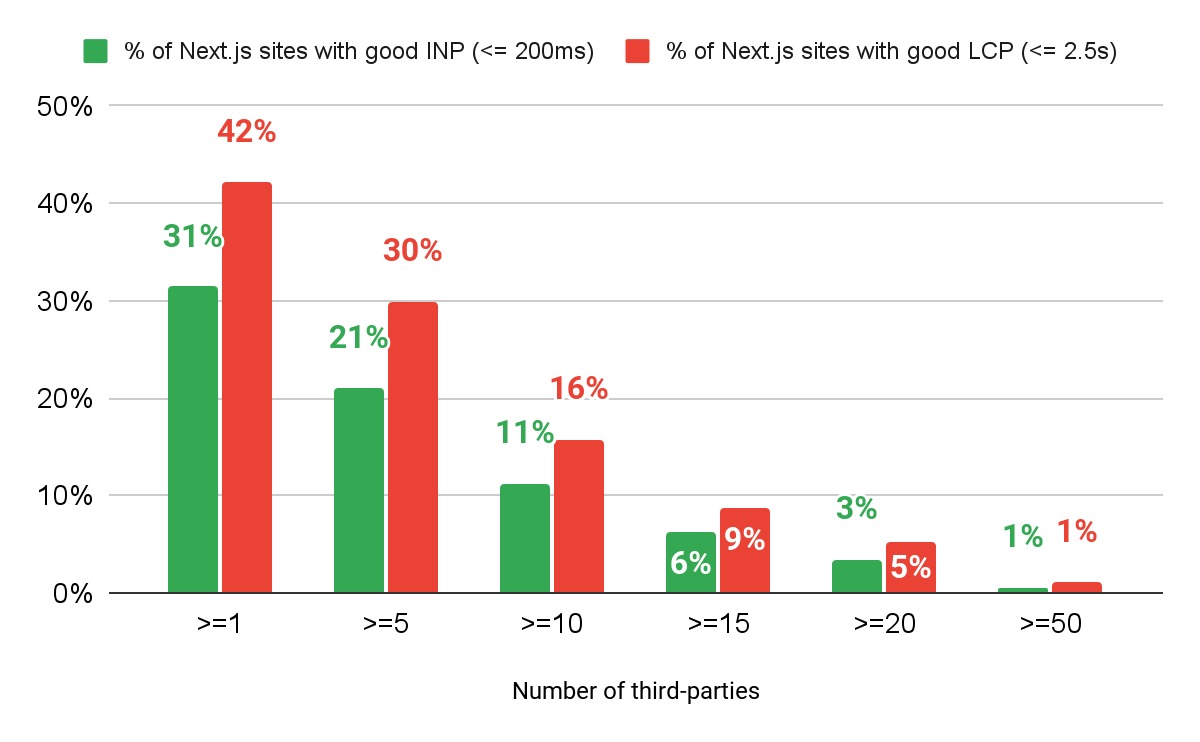
![Bar chart that shows a decline in percentage of Next.js achieving good INP and LCP scores in proportion to the number of third-parties loaded](https://developer.chrome.com/static/blog/next-third-parties/image/chart-inp-lcp.png) December 2023 CrUX report (110,823 sites)

The correlation observed in this chart does not imply causation. However, local
experiments provide additional evidence that third-party scripts significantly
impact page performance. For instance, the chart below compares various labs
metrics when a Google Tag Manager container---comprising 18 randomly selected
tags---is added to [Taxonomy](http://tx.shadcn.com), a popular Next.js example
app.
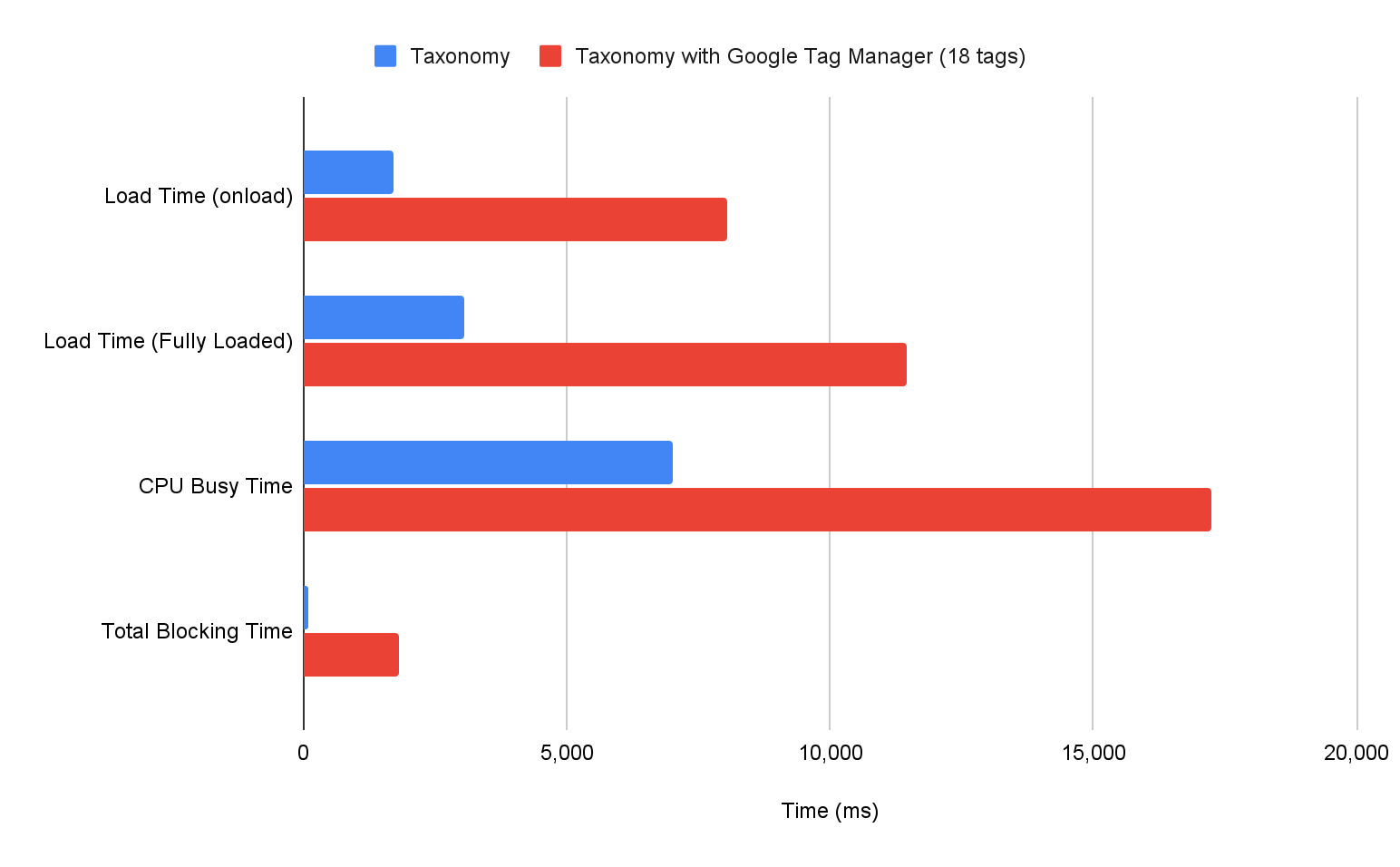
![Bar chart that shows the difference in various lab metrics when a site is loaded with and without Google Tag Manager](https://developer.chrome.com/static/blog/next-third-parties/image/wpt-chart.png) WebPageTest (Mobile 4G - Virginia USA)

The [WebPageTest](https://docs.webpagetest.org/metrics/page-metrics/) documentation
provides details on how these timings are measured. From a quick glance, it's
clear that all of these lab metrics are impacted by the GTM container. For
example, [Total Blocking Time (TBT)](https://web.dev/articles/tbt)---a useful lab
proxy that approximates INP---saw a nearly 20-fold increase.

## Script component

When we shipped the `<Script>` component in Next.js, we made sure to introduce
it through a user-friendly API that closely resembles the traditional `<script>`
element. By using it, developers can co-locate a third-party script in any
component in their application, and Next.js will take care of sequencing the
script after critical resources have loaded.

```html
<!-- By default, script will load after page becomes interactive -->
<Script src="https://example.com/sample.js" />

<!-- Script is injected server-side and fetched before any page hydration occurs -->
<Script strategy="beforeInteractive" src="https://example.com/sample.js" />

<!-- Script is fetched later during browser idle time -->
<Script strategy="lazyOnload" src="https://example.com/sample.js" />
```

Tens of thousands of Next.js applications---including popular sites such as
[Patreon](https://www.patreon.com/), [Target](https://www.target.com/), and
[Notion](https://www.notion.so/)---use the `<Script>` component. Despite its
effectiveness, some developers have raised concerns about the following
things:

- Where to place the `<Script>` component in a Next.js app while adhering to the varying installation instructions of different third-party providers *(developer experience)*.
- Which loading strategy is the most optimal to use for different third-party scripts *(user experience)*.

To address both of these concerns, we launched `@next/third-parties`---a
specialized library offering a set of optimized components and utilities
tailored for popular third-parties.

## Developer experience: making third-party libraries easier to manage

Many third-party scripts are used in a significant percentage of Next.js sites, with
Google Tag Manager being the most popular, used by
[66% of sites respectively](https://console.cloud.google.com/bigquery?sq=1018750324929:820205cd1dc04ed194631f1282d85165).
`@next/third-parties` builds on top of the `<Script>`
component by introducing higher-level wrappers designed to simplify usage for
these common use cases.

```jsx
import { GoogleAnalytics } from "@next/third-parties/google";

export default function RootLayout({ children }) {
  return (
    <html lang="en">
      <body>{children}</body>
      <GoogleTagManager gtmId="GTM-XYZ" />
    </html>
  );
}
```

Google Analytics---another widely used third-party script
([52% of Next.js sites](https://console.cloud.google.com/bigquery?sq=1018750324929:b4fe161bf7a54e4da1682d7e101d738a))---also has a dedicated component of its own.

```jsx
import { GoogleAnalytics } from "@next/third-parties/google";

export default function RootLayout({ children }) {
  return (
    <html lang="en">
      <body>{children}</body>
      <GoogleAnalytics gaId="G-XYZ" />
    </html>
  );
}
```

`@next/third-parties` simplifies the process of loading commonly used scripts,
but it also extends our ability to develop utilities for other third-party
categories, such as embeds. For instance, Google Maps and YouTube embeds are
used in
[8%](https://console.cloud.google.com/bigquery?sq=1018750324929:ced515ca958e461eafd86db0be9940c7)
and
[4%](https://console.cloud.google.com/bigquery?sq=1018750324929:d799dd9f21ff4c7ba456290ca5811654)
of Next.js websites respectively, and we've also shipped components to make them
easier to load.

```jsx
import { GoogleMapsEmbed } from "@next/third-parties/google";
import { YouTubeEmbed } from "@next/third-parties/google";

export default function Page() {
  return (
    <>
      <GoogleMapsEmbed
        apiKey="XYZ"
        height={200}
        width="100%"
        mode="place"
        q="Brooklyn+Bridge,New+York,NY"
      />
      <YouTubeEmbed videoid="ogfYd705cRs" height={400} params="controls=0" />
    </>
  );
}
```

## User experience: making third-party libraries load faster

In a perfect world, every widely-adopted third-party library would be fully
optimized, making any abstractions that improve their performance unnecessary.
However, until that becomes a reality, we can try to improve their user
experience when integrated through popular frameworks like Next.js. We can
experiment with different loading techniques, ensure that scripts are sequenced
in the right manner, and ultimately share our feedback with third-party
providers to encourage upstream changes.

Take YouTube embeds, for example. Where some alternative implementations have
far better performance than the native embed. Currently, the `<YouTubeEmbed>`
component exported by `@next/third-parties` uses
[lite-youtube-embed](https://github.com/paulirish/lite-youtube-embed), which,
when demonstrated in a "Hello, World" Next.js comparison, loads considerably
faster.
![GIF that shows page load comparison between the YouTube Embed component and a regular YouTube iframe](https://developer.chrome.com/static/blog/next-third-parties/image/wpt-comparison.gif) WebPageTest (Mobile 4G - Virginia USA)

Similarly, for Google Maps, we include `loading="lazy"` as a default attribute for
the embed to ensure that the map only loads when it is a certain distance from
the viewport. This may seem like an obvious attribute to include---especially
since the Google Maps
[documentation](https://developers.google.com/maps/documentation/embed/get-started)
includes it in their example code snippet---but only
[45% of Next.js sites](https://console.cloud.google.com/bigquery?sq=1018750324929:5c8e014bd842459c852f74008d662ff1) that embed Google Maps are using `loading="lazy"`.

### Running third-party scripts in a web worker

One advanced technique we're exploring in `@next/third-parties` is making it
easier to offload the third-party scripts to a web worker. Popularized by
libraries such as [Partytown](https://partytown.builder.io/), this can reduce
the impact of third-party scripts on page performance substantially by
relocating them entirely off the main thread.

The following animated GIF shows the variations in long tasks and main thread
blocking time when applying different `<Script>` strategies to a GTM container
within a Next.js site. Note that, while switching between strategy options only
delays the timing of when these scripts execute, relocating them to a web worker
completely eliminates their time on the main thread.
![GIF that shows differences in main thread blocking time for the different Script strategies](https://developer.chrome.com/static/blog/next-third-parties/image/main-thread.gif) WebPageTest (Mobile 4G - Virginia USA)

In this particular example, moving the execution of the GTM container and its
associated tag scripts to a web worker **reduced TBT by 92%**.

It is worth noting that, if not managed carefully, this technique can silently
break many third-party scripts, making debugging challenging. In the upcoming
months, we'll validate if any third-party components offered by
`@next/third-parties` function correctly when run in a web worker. If so, we'll
work towards providing an easy, and optional way, for developers to use this
technique.

## Next steps

In the process of developing this package, it became evident that there was a
need to centralize third-party loading recommendations so that other frameworks
could also benefit from the same underlying techniques used. This led us to
build [Third Party
Capital](https://github.com/GoogleChromeLabs/third-party-capital), a library
that uses JSON to describe third-party loading techniques, which currently
serves as the foundation for `@next/third-parties`.

As our next steps, we'll continue to focus on improving the components provided
for Next.js as well as expand our efforts to include similar utilities in other
popular frameworks and CMS platforms. We're currently in collaboration with Nuxt
maintainers, and are planning to release similar third-party utilities tailored
to their ecosystem in the near future.

If one of the third-parties you use in your Next.js app is supported by
`@next/third-parties`,
[install the package](https://nextjs.org/docs/app/building-your-application/optimizing/third-party-libraries#getting-started)
and give it a shot! We would love to hear your feedback on
[GitHub](https://github.com/vercel/next.js/issues/new/choose).