> Documentation index: https://developer.chrome.com/blog/llms.txt
 Jan Dušek Web Developer [LinkedIn](https://www.linkedin.com/in/jan-dušek-b21a1a11b)  Ondřej Žára Team Lead [GitHub](https://github.com/ondras) [Bluesky](https://bsky.app/profile/ondras.zarovi.cz) [Homepage](https://ondras.zarovi.cz/)  Yu Tsuno [LinkedIn](https://www.linkedin.com/in/yu-tsuno-a6182116b)
Published: November 16, 2026
Seznam is a Czech technology company and identity provider whose services reach
about 90% of the Czech population. One Seznam account works across services on
[seznam.cz](https://seznam.cz), its subdomains, and standalone domains such as
[mapy.com](https://mapy.com), [sport.cz](https://sport.cz), and
[stream.cz](https://stream.cz). Browsers keep these sites apart. To make one
account still feel like one product, Seznam built its sign-in around first-party
redirects, Federated Credential Management (FedCM), and WebAuthn Related Origin
Requests. The result is an 84.5% adjusted sign-in completion rate after domain
consolidation (rising from 53% to 69% in browsers outside Chromium), and a
passkey created on one Seznam domain works on the others. Developers and
identity architects operating multiple domains can apply these same patterns to
unify sign-in without relying on third-party cookies.
## The challenge: One account, many sites
Picture someone who signs in on `seznam.cz` in the morning, opens `mapy.com` to
plan a weekend trip, and checks a match result on `sport.cz` at lunch. For that
person, it's all Seznam. For the browser, these are three unrelated sites, and
each one keeps its own cookies, saved passwords, and passkeys.
Seznam already handled authentication in one place. Services send users to
`login.seznam.cz`, where the login team maintains Google Sign-In, Bank iD,
passkeys, and other methods, so individual services don't have to. That
centralization fixed the maintenance problem. Three others remained:
- **Sessions stop at the site boundary.** Signing in at `login.seznam.cz` doesn't sign anyone in to `sport.cz`. Background requests that could share the session depend on third-party cookies, and those work only when the browser and the user's privacy settings allow them.
- **The login page has two addresses.** For historical reasons, the same login form runs on `login.seznam.cz` and on the legacy `login.szn.cz`. Both share a backend, but the browser sees two sites, so a password or passkey saved on one isn't offered on the other.
- **Each passkey belongs to a single site.** A passkey is bound to its relying party ID (RP ID). Users manage passkeys at `ucet.seznam.cz` and at `account.mapy.com`. By default, a passkey created on `mapy.com` doesn't work on a Seznam login page.
This fragmentation was impractical at best, and Seznam discovered two concrete
problems with the split-domain approach:
- Some browsers cleared cookies on the legacy `login.szn.cz` domain because users visited it infrequently.
- Propagating session-related secrets across origins required several complex redirects.
Seznam wanted to carry the signed-in state to every service through first-party
contexts, so it would keep working under any browser privacy setting and users
wouldn't have to sign in again.
## The solution: Sign in once, then carry the session
Seznam kept one place to authenticate and focused on moving the result to
wherever the user goes next. Each technique in this section handles one part of
the problem, and each one relies on a first-party context.
### Hand off the session with first-party redirects
After a user signs in, the login service creates a short-lived secret, called a
ticket, backed by server-side storage. A top-level redirect carries the ticket
to the target domain, where the backend exchanges it for a local session cookie.
Each hop is an ordinary navigation, so the backend sets every cookie in a
first-party context. Most users never notice it happening.
One DNS detail makes this handoff work across unrelated domains. For each
service domain, such as `sport.cz`, Seznam creates a `login.sport.cz` record
that points to the central login backend. A request to
`login.sport.cz/ticket/TICKET` reaches the login backend,
but it's served from a `sport.cz` host, so the backend can set a session cookie
for all of `sport.cz`.
You can watch the chain in the Chrome DevTools **Network** panel. Turn on
**Preserve log** , sign in, and filter for `ticket`.
 Network panel showing the redirect chain after sign-in.
The following abbreviated requests and responses show each hop for a user who
signs in and continues to `sport.cz`. The first two hops sign the user in on
both login domains. The last one signs them in to the service.
```console
GET https://login.seznam.cz/continue
HTTP/1.1 302 FOUND
Location: https://login.szn.cz/ticket/TICKET
Set-Cookie: session=SESSION_ID; Domain=seznam.cz; Secure; HttpOnly
GET https://login.szn.cz/ticket/TICKET
HTTP/1.1 302 FOUND
Location: https://login.sport.cz/ticket/TICKET
Set-Cookie: session=SESSION_ID; Domain=szn.cz; Secure; HttpOnly
GET https://login.sport.cz/ticket/TICKET
HTTP/1.1 302 FOUND
Location: https://login.sport.cz/loginDone
Set-Cookie: session=SESSION_ID; Domain=sport.cz; Secure; HttpOnly
```
Replace the following:
- `TICKET`: the short-lived secret created by the login service.
- `SESSION_ID`: the local session cookie value.
### Try the quiet options before asking the user
When someone arrives at a Seznam service without a local session, the service
can redirect the browser to the central login. If a valid central session
exists, the login service runs the same ticket handoff and sends the user back
signed in. If not, the browser comes back signed out. This redirect is a
top-level navigation, so it works whatever the browser's third-party cookie
settings are.
Services also embed a JavaScript library from the login team. The library
provides a consistent account interface, and when no session exists yet, it
works through a fallback list from least to most visible:
1. The library queries the service's own login subdomain to check whether a session exists.
2. If no local session exists, the library sends a credentialed cross-origin request to `login.seznam.cz`.
3. If that request fails, the library falls back to FedCM.
4. If no automatic option succeeds, the **Sign in with Seznam** button opens the central login in a pop-up or redirects the page.
On `sport.cz`, the first check looks like this:
```javascript
const badgeResponse = await fetch("https://login.sport.cz/badge", {
credentials: "include",
});
```
If that request finds no session, the library tries the central login domain:
```javascript
const autologinResponse = await fetch("https://login.seznam.cz/autologin", {
method: "POST",
credentials: "include",
headers: { accept: "application/json" },
});
```
The second request works only when the browser permits third-party cookies and
the endpoint is configured for credentialed Cross-Origin Resource Sharing (CORS).
When that request fails, FedCM takes over. The [FedCM and Seznam case
study](https://developer.chrome.com/blog/private-user-authentication-fedcm-seznam) describes how Seznam uses
FedCM with external partners. The same approach also covers Seznam's own
services.
### Share one passkey across domains with Related Origin Requests
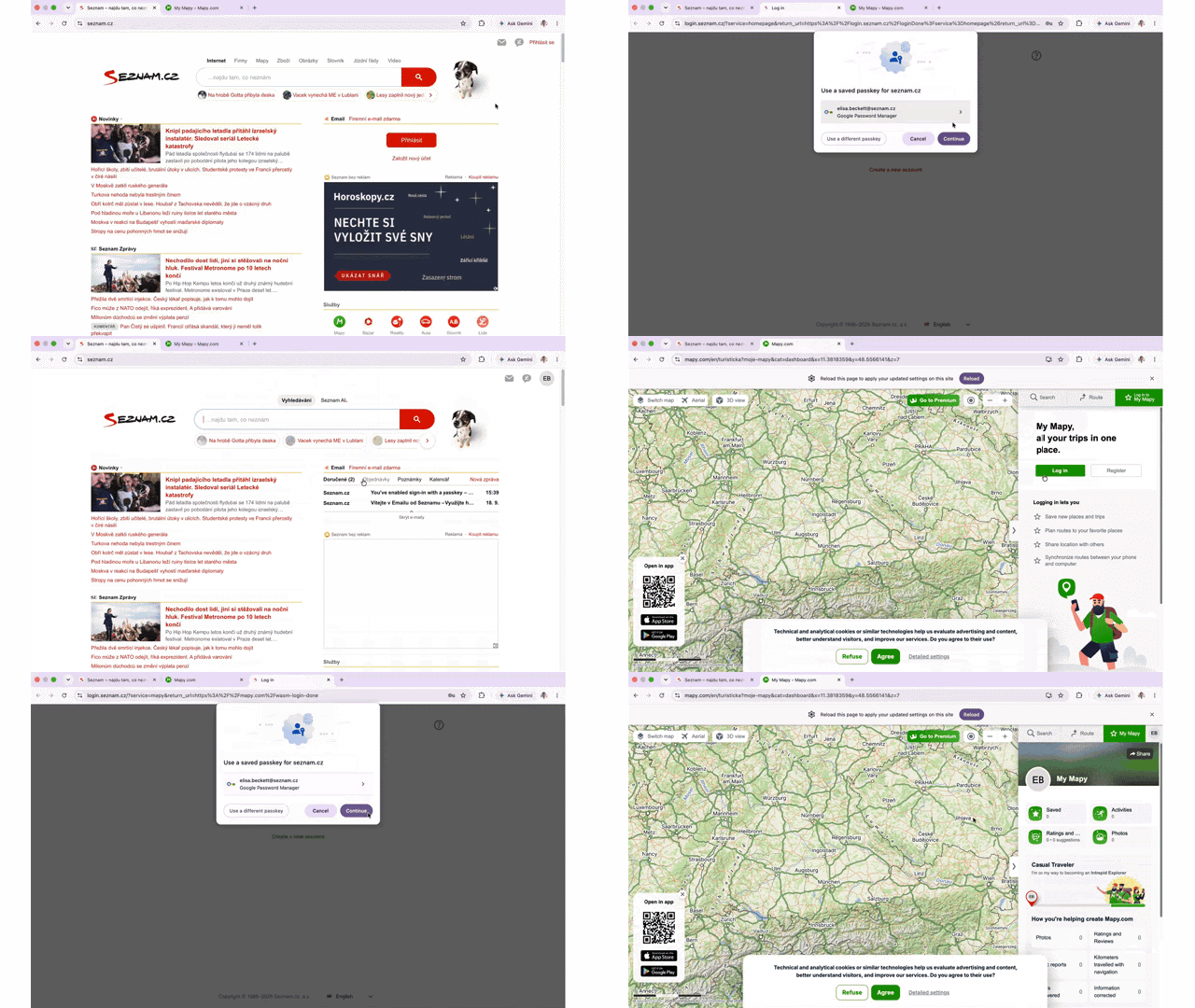 Signing in on `seznam.cz` and reusing the session and passkey across Seznam domains.
Users create and manage passkeys in their Seznam account, which runs at
`ucet.seznam.cz` and at `account.mapy.com`. Seznam set one rule: every passkey
uses `seznam.cz` as its RP ID, no matter which account origin creates it. A
passkey created on either origin then works on `login.seznam.cz`.
For `ucet.seznam.cz`, that setup is standard WebAuthn, because a subdomain can
use its parent domain as the RP ID. `account.mapy.com` is a different site, so
the browser normally rejects `seznam.cz` as its RP ID. Related Origin Requests
remove that block. Seznam publishes a `/.well-known/webauthn` file on
`seznam.cz` that lists the origins allowed to use its RP ID:
```json
{
"origins": [
"https://account.mapy.com",
"https://login.szn.cz"
]
}
```
When `account.mapy.com` calls WebAuthn with the following relying party
configuration, the browser fetches the file, finds the origin on the list, and
continues:
```json
{
"rp": {
"id": "seznam.cz",
"name": "Seznam.cz"
}
}
```
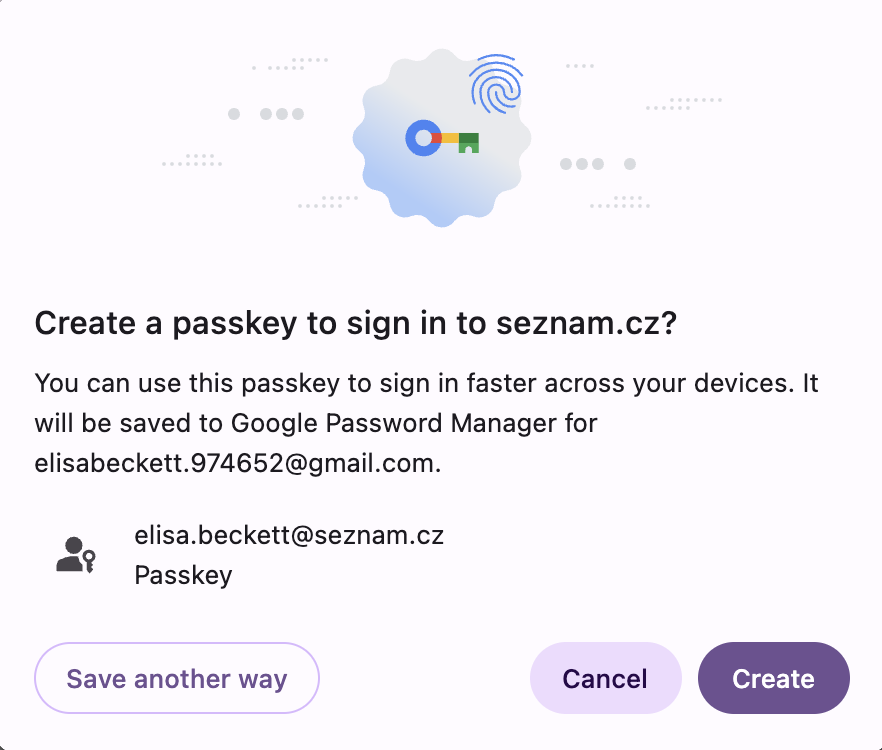 Creating a passkey on a related origin for the `seznam.cz` relying party ID.
Chrome processes at most five [effective top-level domain plus one
(eTLD+1)](https://web.dev/articles/url-parts#etld1) labels from this file and
ignores the rest. For a company with as many domains as Seznam, that five-label
limit sounded like a problem, but it wasn't. Only the origins that create or
manage passkeys need to be on the list. Other services sign users in through the
central login.
### Keep a fallback for browsers without Related Origin Requests
Because Related Origin Requests weren't available in every browser when Seznam
built this sign-in flow, the login page also uses [WebAuthn within a
cross-origin iframe](https://web.dev/articles/webauthn-within-iframe).
On the sign-in page, the iframe is the small key button next to **Continue**.
Users see a button. They don't see that it's loaded from a different origin.
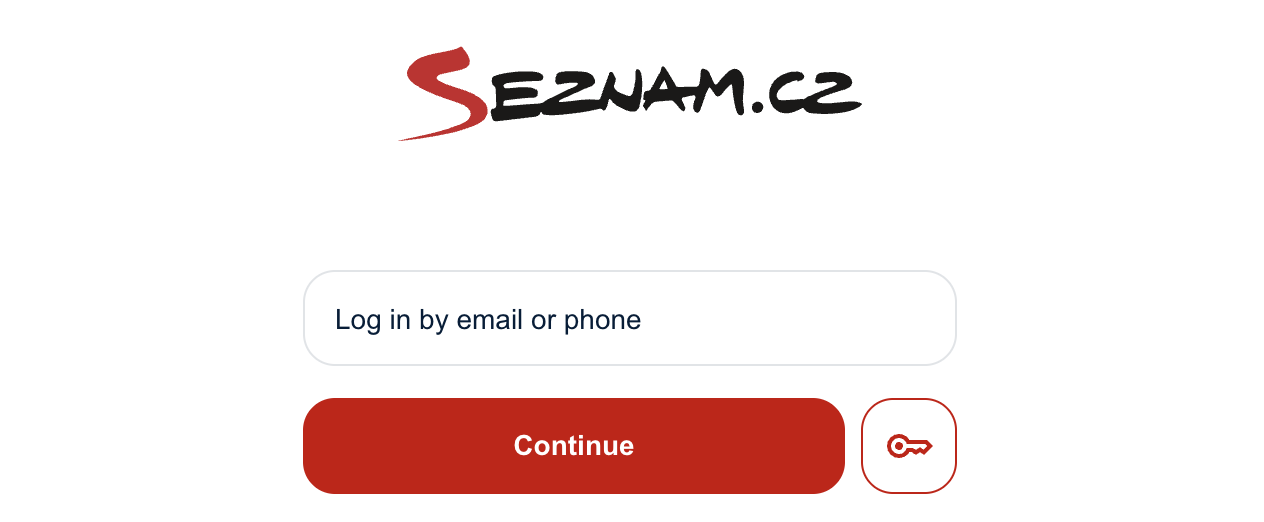 The cross-origin iframe key button next to **Continue** on the sign-in page.
```html
```
The iframe loads a minimal document from `login.seznam.cz` that contains a
`