 Kyra Seevers
Published: April 2, 2025
What happens when you click a link? It turns purple!
Since the early days of the internet,
sites have relied on the
[CSS `:visited` selector](https://developer.mozilla.org/docs/Web/CSS/:visited)
to apply
custom styles to links which users have clicked on before. Using the `:visited`
selector, sites can improve their user experience and help their users navigate
the web. However, as the customizability of visited links has increased over
time, so too has
[the growing number of attacks discovered by security researchers](https://github.com/explainers-by-googlers/Partitioning-visited-links-history?tab=readme-ov-file#citations).
These attacks can reveal which links a user has visited and leak details about
their web browsing activity. This security problem has plagued the web for over
20 years, and browsers have
[deployed various stop-gaps](https://developer.mozilla.org/docs/Web/CSS/Privacy_and_the_:visited_selector)
to mitigate these history detection attacks. While the attacks are slowed down
by these mitigations, they are not eliminated.
From Chrome 136, Chrome is the first major browser to render these attacks
obsolete. This is accomplished by partitioning `:visited` link history.
## What is `:visited` link partitioning?
To display which links you have visited previously, the browser must keep track
of pages you've visited over time---this is called your `:visited` history. You can
style visited links differently from unvisited ones using the CSS `:visited`
selector:
```css
:visited {
color: purple;
background-color: yellow;
}
```
Historically, `:visited` history was *unpartitioned* . This meant that there were
no restrictions on where `:visited` history could be displayed using the `:visited`
selector. If you clicked a link, it would show as :visited on every site
displaying that link. This was the core design flaw which enabled attacks to
reveal information about the user's browsing history.
Consider the following example. You are browsing on Site A and click a link
to go to Site B. In this scenario, Site B would be added to your `:visited`
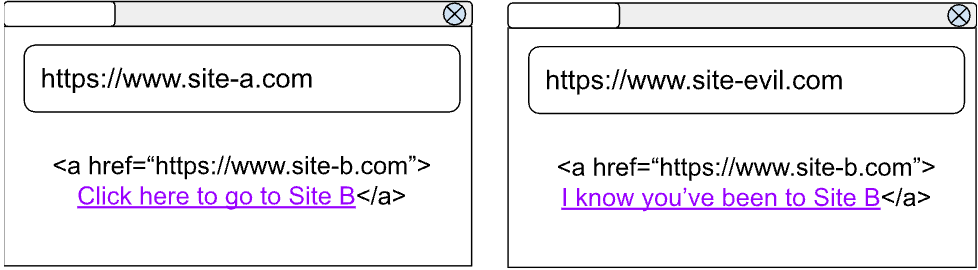
history. Later, you might visit Site Evil, which creates a link to Site B as
well. Without partitioning, Site Evil would display that link to Site B as
`:visited`---even though you hadn't clicked the link on Site Evil. Then, Site Evil
could use a security exploit to learn whether the link was styled as `:visited`,
therefore learning that you've visited Site B in the past---leaking information
about your browsing history.
Before partitioning, when you clicked a link:
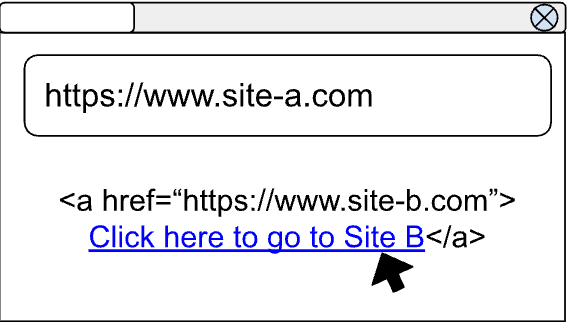
It would show as :visited on every site displaying that link!
Partitioning protects your browsing history by only showing a link as visited if
you've clicked on that link from this site before. If you haven't interacted
with this site previously, its links won't be styled as `:visited`.
Consider the prior example, but with partitioning enabled. You are browsing on
Site A and click a link to go to Site B, the combination of "Site A + Site B"
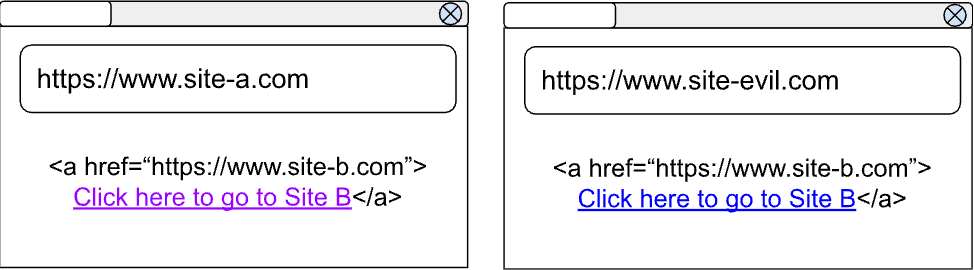
is stored in your :visited history. This way, when you visit Site Evil, its link
to Site B won't be shown as `:visited` because it doesn't match both parts of
our "Site A + Site B" entry (the context where you originally clicked on the
link). Since there's no browsing history displayed on Site Evil, it can't take
advantage of any exploits. Therefore, your browser history is safe!
After partitioning, when you click a link:
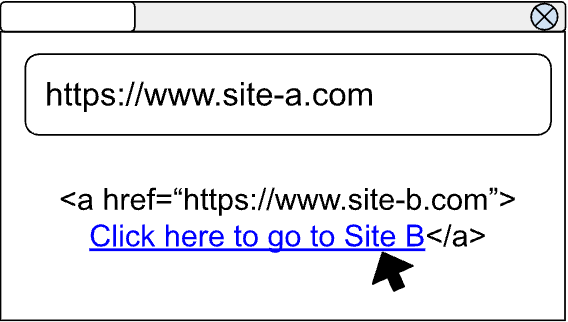
It is only displayed as `:visited` where you have clicked on it before!
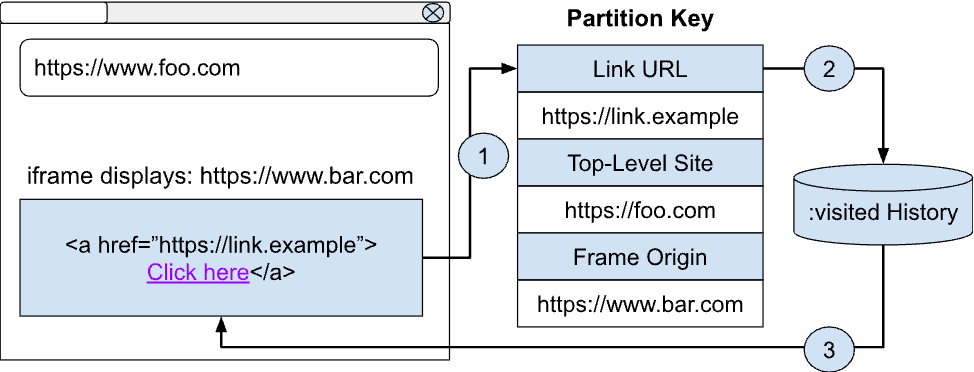
In brief, partitioning refers to storing your links with additional
information about where they were clicked. In Chrome, this is: link URL,
[top-level site](https://developer.mozilla.org/docs/Glossary/Site),
and
[frame origin](https://developer.mozilla.org/docs/Glossary/Origin). With
partitioning enabled, your `:visited` history is no longer a global list that any
site can query. Instead, your `:visited` history is "partitioned" or separated by
the context where you visited that link from in the first place.
## What about links to other pages on the same site?
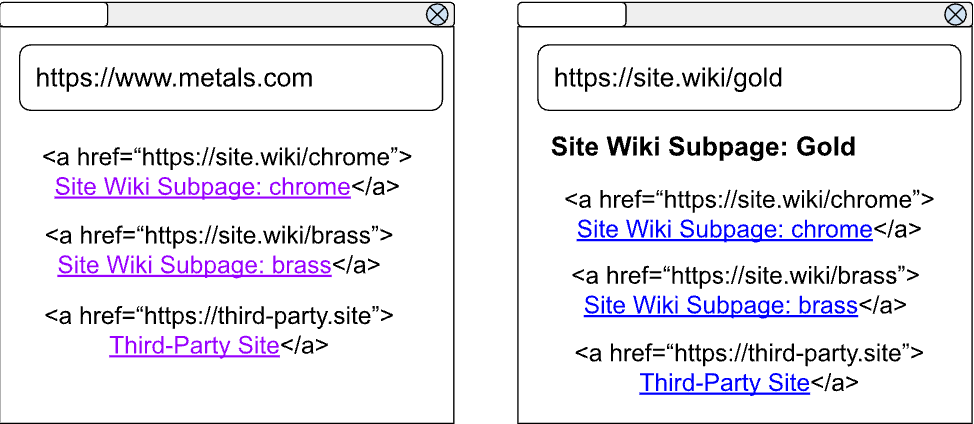
When you're browsing the internet, you may end up clicking on many links which
all point back to different subpages on the same site. For example, when
researching different types of metals, you might visit the `Site.Wiki` pages for
"chrome" and "brass".
Under a rigid implementation of partitioning, users on the `Site.Wiki` page for
gold wouldn't have the links to the chrome and brass pages displayed as
`:visited`. This is because the user clicked on each of these pages from a
top-level site that does not match the `Site.Wiki` page for gold.
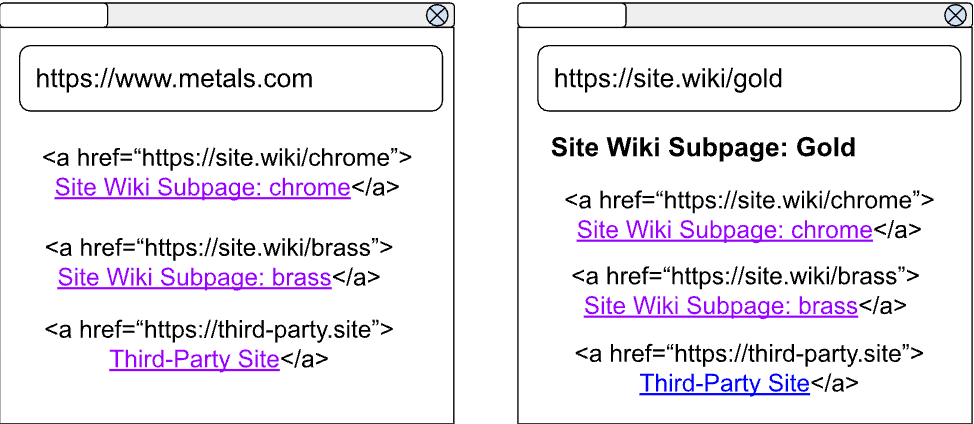
To improve user experience in this scenario while still providing the privacy
and security protections of partitioning, we introduced a carveout for
*self-links* . In brief, a site can display its own subpages as `:visited`, even
if these links were not clicked in this context before. Because sites have
other methods of tracking whether a user has visited its subpages, no new
information is given to these sites with the introduction of self-links.
Partitioning still protects against cross-site tracking and enforces the
same-origin policy. But it is important to note that this only applies to links
to a site's own subpages. Links to third-party sites or in third-party iframes
are not eligible for this exception.
After the "self-links" carveout:
## Implementation status
These improvements to `:visited` security and privacy are available beginning in
Chrome Version 136. Chrome is the first browser to implement these protections
for users.
## Engage and share feedback
- [The original proposal.](https://github.com/explainers-by-googlers/Partitioning-visited-links-history),
- [Raise questions and participate in discussions.](https://github.com/explainers-by-googlers/Partitioning-visited-links-history/issues)
- [File a bug in the Chromium tracker](https://issues.chromium.org/u/2/issues?q=customfield1222907:%22Blink%3EHistory%3EVisitedLinks%22) if you believe something is not working as expected.