 José Luis Zapata [GitHub](https://github.com/zapata131) [LinkedIn](https://www.linkedin.com/in/zapata131) [Bluesky](https://bsky.app/profile/zapata131.bsky.social) [Homepage](https://www.zapata131.com)
Published: Aug 19, 2025
WebAuthn immediate mediation is a new web capability designed to *streamline
user sign-in flows*. This origin trial provides an overview of the feature, its
benefits, and implementation details, inviting you to participate and help shape
the future of web authentication.
## Background
Authentication on the web often introduces friction, complicating user sign-in.
Existing WebAuthn flows, while powerful, struggle with "Sign-in" buttons,
especially when credentials aren't immediately available, leading to standard
form fallbacks.
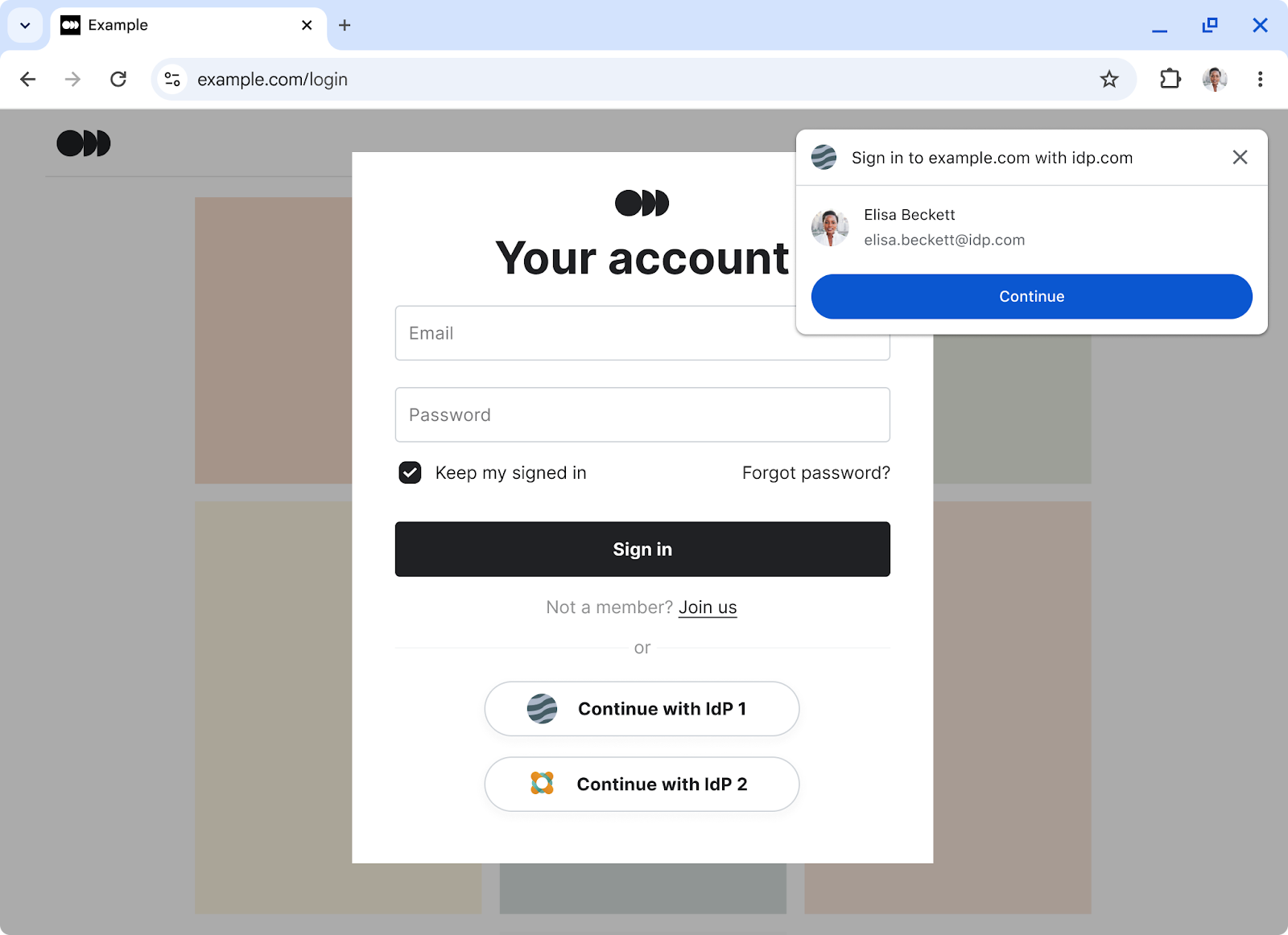
This new feature introduces a *low-friction sign-in flow* , similar to
`preferImmediatelyAvailableCredentials` APIs on mobile. It simplifies sign-in,
often before standard login forms, by reducing friction and enhancing user
experience.
## How it works
WebAuthn immediate mediation enables a more direct and efficient sign-in
experience. It allows the browser to instantly offer available credentials, or
to immediately signal their absence without prompting for cross-device or
security key authentication, which simplifies implementation for developers.
### The `immediate` mediation type
We are introducing an `immediate` mediation type for
`navigator.credentials.get()` requests. When this option is set, the promise
rejects with `NotAllowedError` if no locally-available credentials are found. If
credentials are present, the browser handles the authentication process as
normal.
This flexibility allows sites to adapt their sign-in flow, gracefully providing
alternative methods when immediate credentials aren't available.
Importantly, browsers can still return `NotAllowedError` to uphold user privacy
and security, preventing issues like fingerprinting or tracking.
### Feature detection
You can detect if immediate mediation is available using
`PublicKeyCredential.getClientCapabilities()`. Developers can check for the
`immediateGet` capability on the returned `capabilities` object.
```javascript
async function checkImmediateMediationAvailability() {
try {
const capabilities = await PublicKeyCredential.getClientCapabilities();
if (capabilities.immediateGet && window.PasswordCredential) {
console.log("Immediate Mediation with passwords supported.");
} else if (capabilities.immediateGet) {
console.log("Immediate Mediation without passwords supported.");
} else { console.log("Immediate Mediation unsupported."); }
} catch (error) {
console.error("Error getting client capabilities:", error);
}
}
```
**Note:** To help with broader browser support, a polyfill for
`getClientCapabilities()` is available from the [WebAuthn Polyfills GitHub
repository](https://github.com/MasterKale/webauthn-polyfills).
### Example implementation
To use the API, call `navigator.credentials.get()` with `mediation:
'immediate'`. We recommend including `password: true` in the request, as most
users likely have a saved password today and can immediately benefit from this
experience.
```javascript
button.addEventListener('click', async (event) => {
event.preventDefault();
event.stopPropagation();
const cred = await navigator.credentials.get({
password: true,
publicKey: {
challenge, // Your server-generated challenge
rpId: 'example.com' // Your Relying Party ID
},
mediation: 'immediate',
});
});
```
Developers should handle the `NotAllowedError` in a `catch` block to provide a
graceful fallback sign-in experience.
### A step-by-step flow for immediate mediation
WebAuthn immediate mediation supports two primary use cases to streamline user
sign-in: enabling a dedicated "Sign in with passkey" button that suppresses
unwanted fallback options, and facilitating a dynamic sign-in flow that offers
credentials proactively before a user-critical action.
#### Use case 1: Explicit sign in with sign-in button
This scenario focuses on providing a dedicated sign-in button, ensuring a clean
user experience without unexpected prompts or going through a sign-in page.
The user tries to sign in using a button in a store page, the browser immediately offers their credentials for signing in. Flow showing Chrome offering already saved credentials when the user clicks the sign-in button.
1. **User initiates sign-in:** The user clicks a "Sign in" button. The relying party then calls `navigator.credentials.get()` with `mediation:
"immediate"`.
2. **Browser prompts for credential selection (if available):** The browser checks for any locally-available passkeys or requested passwords. If it finds any, it immediately presents a modal UI for the user to choose an account. Accounts are ranked by last-used timestamp, then alphabetically. **Note**: If both passwords and passkeys from multiple password managers are found for the same account, the browser prioritizes passkeys. When multiple passkeys exist for the same account from different providers, the last used passkey is prioritized.
3. **Successful sign-in:** The user selects the passkey from the browser UI. If the browser requires verification, it prompts the user to verify their identity using their previously set up method (such as a PIN, biometric input, or pattern). The sign-in completes successfully.
4. **Fallback path: no passkey or user dismissal:** If no local passkeys or requested passwords are available for the site, or if the user dismisses the browser UI, the browser throws a `NotAllowedError` to the relying party, and the browser doesn't show any UI for cross-device or security key options. The relying party can then proceed with its standard sign-in page or offer alternative authentication mechanisms.
#### Use case 2: Implicit sign-in flow before a user action
This scenario enables a proactive sign-in experience, offering passkeys and
passwords before a user performs an action that requires an authenticated state,
such as checking out.
The user tries to check out in a store page, the browser immediately offers their credentials for signing in. Flow showing Chrome offering already saved credentials when the user makes an action that needs them to be signed in.
1. **User initiates action requiring sign-in:** The user clicks a button for an action that requires them to be signed in (for example, a "Checkout" button). The relying party then calls `navigator.credentials.get()` with `mediation: "immediate"`.
2. **Browser prompts for credential selection (if available):** The browser
checks for any locally-available passkeys or passwords. If it finds them, it
immediately presents a modal UI for the user to choose an account. Accounts
are ranked by last-used timestamp, then alphabetically, and deduplicated to
show a single entry per account.
**Note**: When both passwords and passkeys from multiple password managers
are found for the same account, the browser prioritizes passkeys. When
multiple passkeys exist for the same account from different providers, the
last used passkey is prioritized.
3. **Successful sign-in:** The user selects a credential from the browser UI.
If the browser requires verification, it prompts the user to verify their
identity using their previously set up method (such as a PIN, biometric
input, or pattern). The sign-in completes successfully.
4. **Fallback path: no credentials or user dismissal:** If no local credentials
are available for the site, or if the user dismisses the browser UI, the
browser throws a `NotAllowedError` to the relying party, and the browser
doesn't show any UI. The user's sign-in experience remains unchanged from
today. The relying party can then ask the user for more details (for
example, email address) or show alternative authentication mechanisms such
as a password form, SMS verification, or a WebAuthn modal request that
supports cross-device authenticators.
## Benefits
WebAuthn immediate mediation offers several key advantages for developers and
users:
- **Frictionless sign-in:** It provides a smoother, lower-friction sign-in experience for users who have immediately available passkeys or passwords saved in their browser or password manager.
- **Intelligent sign-in:** The API enables a sign-in flow when the user wants to perform activities that require them to be signed in. These adapt intelligently to the user's credential status. It offers immediate authentication when possible, avoiding unnecessary redirects and streamlining the flow.
- **Improved credential management**: When multiple password managers offer credentials for the same account, the browser intelligently selects the most appropriate option, simplifying credential management for users.
- **Reduced user confusion:** By presenting known credentials directly, the feature minimizes user confusion often associated with multiple sign-in options or standard forms.
- **Seamless fallback:** It ensures a seamless fallback to standard sign-in pages for users without immediate credentials, meaning their experience remains unchanged from current flows.
## Privacy and security
WebAuthn immediate mediation enables sites to identify the presence of
immediately available credentials before a user explicitly authorizes a sign-in
attempt. To safeguard user privacy and prevent potential misuse, we implement
several critical measures:
- **User gesture requirement:** The API call requires a user gesture (any transient user activation). This makes silent probing and fingerprinting difficult for sites.
- **Incognito and private sessions:** In incognito or private sessions, any immediate mediation request throws `NotAllowedError`.
- **Restrictions on `allowCredentials` lists:** Requests using [`allowCredentials`](https://web.dev/articles/webauthn-discoverable-credentials#allow-credentials) lists throw `NotAllowedError`. This prevents sites from inferring user interaction history or tracking users across sessions.
- **Cancellation:** Setting the `signal` parameter on a request with immediate mediation is invalid. This prevents sites from programmatically dismissing any browser UI.
## Try it out
We encourage you to experiment with WebAuthn immediate mediation.
### Status in Chrome
This feature is progressing through the Chromium development cycle:
- **Desktop:** Dev Trial in Chrome 136, with an Origin Trial from Chrome 139 to 141.
- **Android:** Dev Trial in Chrome 140.
### For local testing
To test WebAuthn immediate mediation locally:
1. **Download Chrome 139:** Obtain and open the latest version of Chrome on your desktop.
2. **Enable the Immediate Mediation flag:** Navigate to `chrome://flags/#web-authentication-immediate-get` in the address bar and enable the "Web Authentication Immediate Get" flag.
3. **Prepare credentials:** Ensure you have usable passkeys and passwords saved:
- Passwords saved in Google Password Manager.
- Passkeys saved in Google Password Manager (requires signing in and syncing Chrome with a Google account), Windows Hello, or iCloud keychain.
### For public testing (origin trial)
To test WebAuthn immediate mediation with the origin trial in a public
environment:
1. **Sign up:** Visit the Chrome Origin Trials page and sign up for the ["WebAuthn immediate mediation" trial](https://developer.chrome.com/origintrials#/view_trial/1128714656609730561).
2. **Add token to HTTP headers:** Include the provided origin trial token in your site's HTTP headers: `HTML
Origin-Trial: [YOUR_TRIAL_TOKEN]`
**Note:** You can also [provide your tokens programmatically with
JavaScript](https://developer.chrome.com/docs/web-platform/origin-trials#programmatic).
### Testing scenarios
We provide a reference implementation and encourage you to build your own
prototype to test various scenarios.
- **Reference demo:** You can try the reference implementation at [`https://deephand.github.io/webauthn-immediate-demo/`](https://deephand.github.io/webauthn-immediate-demo/).
- **Implement a prototype:** When implementing a prototype on your site, ensure you make the `navigator.credentials.get()` call with `mediation:
'immediate'` after a user click (for example, a "Sign In" button, or any interaction that requires the user to be signed in).
- **Flow 1: Sign in without password or passkey:** If you have no passkeys or passwords available for the site, clicking "Sign In" leads directly to your standard sign-in page, with no browser UI appearing.
- **Flow 2: Sign in with an immediately-available local passkey:** If you have a passkey saved for the site, clicking "Sign In" should trigger the Immediate Mediation UI, offering the passkey for selection.
- **Flow 3: Sign in with a local passkey or password:** If you have both passkeys and passwords saved, enable the "Request password" option (by setting `password: true` in your code). Clicking "Sign in" should then offer both the passkey and password options in the Immediate Mediation UI.