 Thomas Steiner [GitHub](https://github.com/tomayac) [LinkedIn](https://www.linkedin.com/in/thomassteinerlinkedin) [Mastodon](https://toot.cafe/@tomayac) [Bluesky](https://bsky.app/profile/tomayac.com) [Homepage](https://blog.tomayac.com/)
Published: October 1, 2025
Before any of the [built-in AI](https://developer.chrome.com/docs/ai/built-in)
APIs can be used, the underlying model and any customizations (such as
fine-tunings) must be downloaded, the compressed data must be extracted, and
all of this must be loaded into memory. It's best practice to alert the user
to the time required to perform these downloads.
The following examples use the [Prompt API](https://developer.chrome.com/docs/ai/prompt-api.md.txt), but the
concepts can be applied to all other
[built-in AI APIs](https://developer.chrome.com/docs/ai/built-in-apis.md.txt).
## Monitor and share download progress
Every built-in AI API uses the `create()` function to start a session. The
`create()` function has a `monitor` option so you can
[access download progress](https://developer.chrome.com/docs/ai/prompt-api.md.txt#model_download)
to share it with the user.
> [!NOTE]
> **Note:** The download progress monitor considers the model and all customizations as one resource, reporting on these pieces as one.
While built-in AI APIs are [built for client-side
AI](https://developer.chrome.com/docs/ai/client-side), where data is processed
in the browser and on the user's device, some applications can allow for data to
be processed on a server. How you address your user in the model download
progress is dependent on that question: does the data processing *have* to be
run locally only or not? If this is true, your application is client-side only.
If not, your application could use a [hybrid
implementation](https://developer.chrome.com/docs/ai/inform-users-of-model-download#hybrid_implementation).
> [!NOTE]
> **Note:** To test the user experience as if the model wasn't downloaded yet, launch Chrome with the `--user-data-dir` flag set to an empty temporary directory to [override your regular user data directory](https://chromium.googlesource.com/chromium/src/+/main/docs/user_data_dir.md#command-line).
### Client-side only
In some scenarios, client-side data processing is required. For example, a
healthcare application that allows for patients to ask questions about their
personal information likely wants that information to remain private to the
user's device. The user has to wait until the model and all customizations are
downloaded and ready before they can use any data processing features.
In this case, if the model isn't already available, you should expose download
progress information to the user.
```html
```
Now to make this functional, a bit of JavaScript is required. The code first
resets the progress interface to the initial state (progress hidden and zero),
checks if the API is supported at all, and then
[checks the API's availability](https://developer.chrome.com/docs/ai/get-started.md.txt#model_download):
- The API is `'unavailable'`: Your application cannot be used client-side on this device. Alert the user that the feature is unavailable.
- The API is `'available'`: The API can be used immediately, no need to show the progress UI.
- The API is `'downloadable'` or `'downloading'`: The API can be used once the download is complete. Show a progress indicator and update it whenever the `downloadprogress` event fires. After the download, show the indeterminate state to signal to the user that the browser is getting the model extracted and loaded into memory.
> [!CAUTION]
> **Caution:** Always pass the same options to the `availability()` function that you use in `prompt()` or `promptStreaming()`. This is critical to align model language and modality capabilities.
```javascript
const createButton = document.querySelector('.create');
const promptButton = document.querySelector('.prompt');
const progress = document.querySelector('progress');
const output = document.querySelector('output');
let sessionCreationTriggered = false;
let localSession = null;
const createSession = async (options = {}) => {
if (sessionCreationTriggered) {
return;
}
progress.hidden = true;
progress.value = 0;
try {
if (!('LanguageModel' in self)) {
throw new Error('LanguageModel is not supported.');
}
const availability = await LanguageModel.availability({
// ⚠️ Always pass the same options to the `availability()` function that
// you use in `prompt()` or `promptStreaming()`. This is critical to
// align model language and modality capabilities.
expectedInputs: [{ type: 'text', languages: ['en'] }],
expectedOutputs: [{ type: 'text', languages: ['en'] }],
});
if (availability === 'unavailable') {
throw new Error('LanguageModel is not available.');
}
let modelNewlyDownloaded = false;
if (availability !== 'available') {
modelNewlyDownloaded = true;
progress.hidden = false;
}
console.log(`LanguageModel is ${availability}.`);
sessionCreationTriggered = true;
const llmSession = await LanguageModel.create({
monitor(m) {
m.addEventListener('downloadprogress', (e) => {
progress.value = e.loaded;
if (modelNewlyDownloaded && e.loaded === 1) {
// The model was newly downloaded and needs to be extracted
// and loaded into memory, so show the undetermined state.
progress.removeAttribute('value');
}
});
},
...options,
});
sessionCreationTriggered = false;
return llmSession;
} catch (error) {
throw error;
} finally {
progress.hidden = true;
progress.value = 0;
}
};
createButton.addEventListener('click', async () => {
try {
localSession = await createSession({
expectedInputs: [{ type: 'text', languages: ['en'] }],
expectedOutputs: [{ type: 'text', languages: ['en'] }],
});
promptButton.disabled = false;
} catch (error) {
output.textContent = error.message;
}
});
promptButton.addEventListener('click', async () => {
output.innerHTML = '';
try {
const stream = localSession.promptStreaming('Write me a poem');
for await (const chunk of stream) {
output.append(chunk);
}
} catch (err) {
output.textContent = err.message;
}
});
```
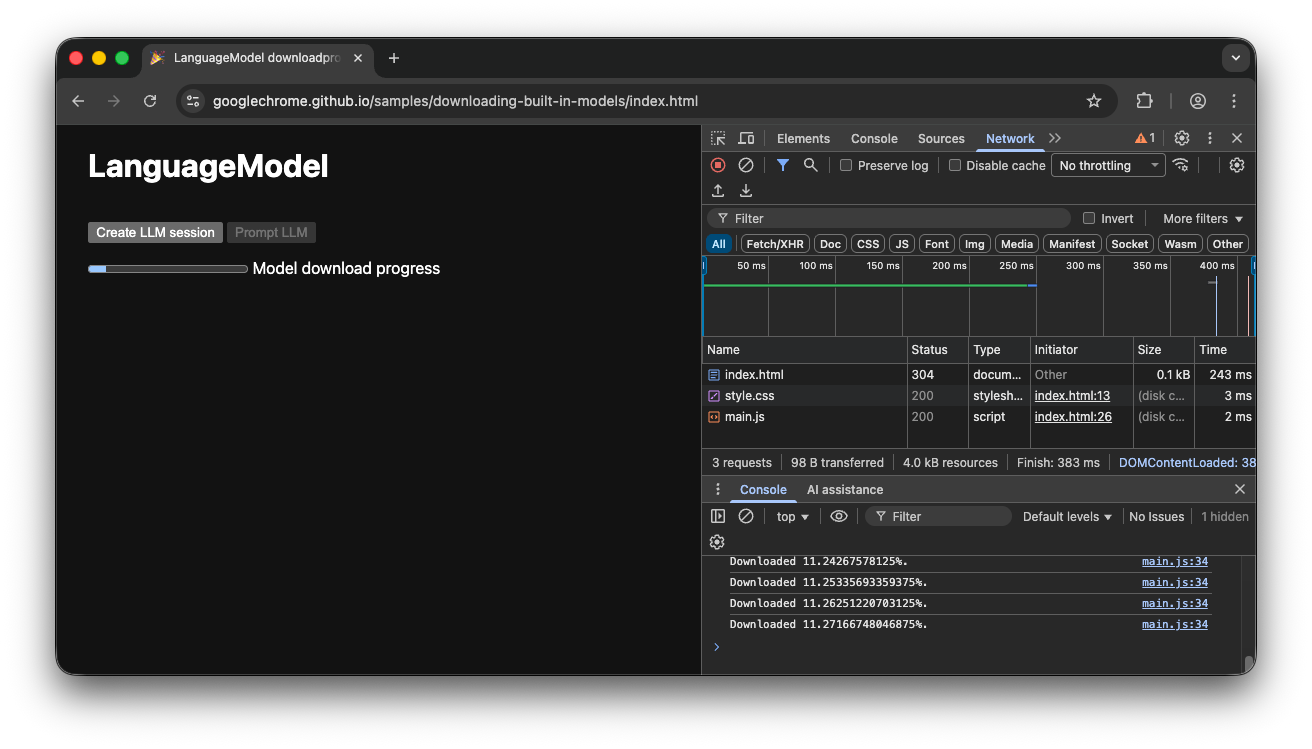
If the user enters the app while the model is actively downloading to the
browser, the progress interface indicates where the browser is in the download
process based on the *still missing* data.
### Client-side demo
Take a look at the
[demo](https://googlechrome.github.io/samples/downloading-built-in-models/index.html)
that shows this flow in action. If the built-in AI API (in this example, the
Prompt API) isn't available, the app can't be used. If the built-in AI model
still needs to be downloaded, a progress indicator is shown to the user. You can
see the
[source code](https://github.com/GoogleChrome/samples/tree/gh-pages/downloading-built-in-models)
on GitHub.
### Hybrid implementation
If you prefer to use client-side AI, but can temporarily send data to the cloud,
you can set up a hybrid implementation. This means users can experience features
immediately, while in parallel downloading the local model. Once the model is
downloaded, dynamically switch to the local session.
> [!NOTE]
> **Note:** A real-world example of this pattern is the shopping site [Miravia](https://developer.chrome.com/blog/summarizer-redbus-miravia.md.txt#best_practices), which initially uses a server-side model to summarize product reviews while the built-in model is downloading. Once ready, the site switches to performing inference locally.
You can use any server-side implementation for hybrid, but it's probably best to
stick with the same model family in both the cloud and locally to ensure you get
comparable result quality.
[Getting started with the Gemini API and Web apps](https://developers.google.com/learn/pathways/solution-ai-gemini-getting-started-web)
highlights the various approaches for the Gemini API.
> [!NOTE]
> **Note:** The following example uses the Google Gen AI SDK. Using the [Google Gen AI SDK for JavaScript and TypeScript](https://github.com/googleapis/js-genai) to call the Gemini API directly from a web client is only for prototyping and experimentation. When you start to seriously develop your app beyond prototyping (especially as you prepare for production), transition to using [Firebase AI
> Logic](https://firebase.google.com/docs/ai-logic) and its SDK for Web.
### Hybrid demo
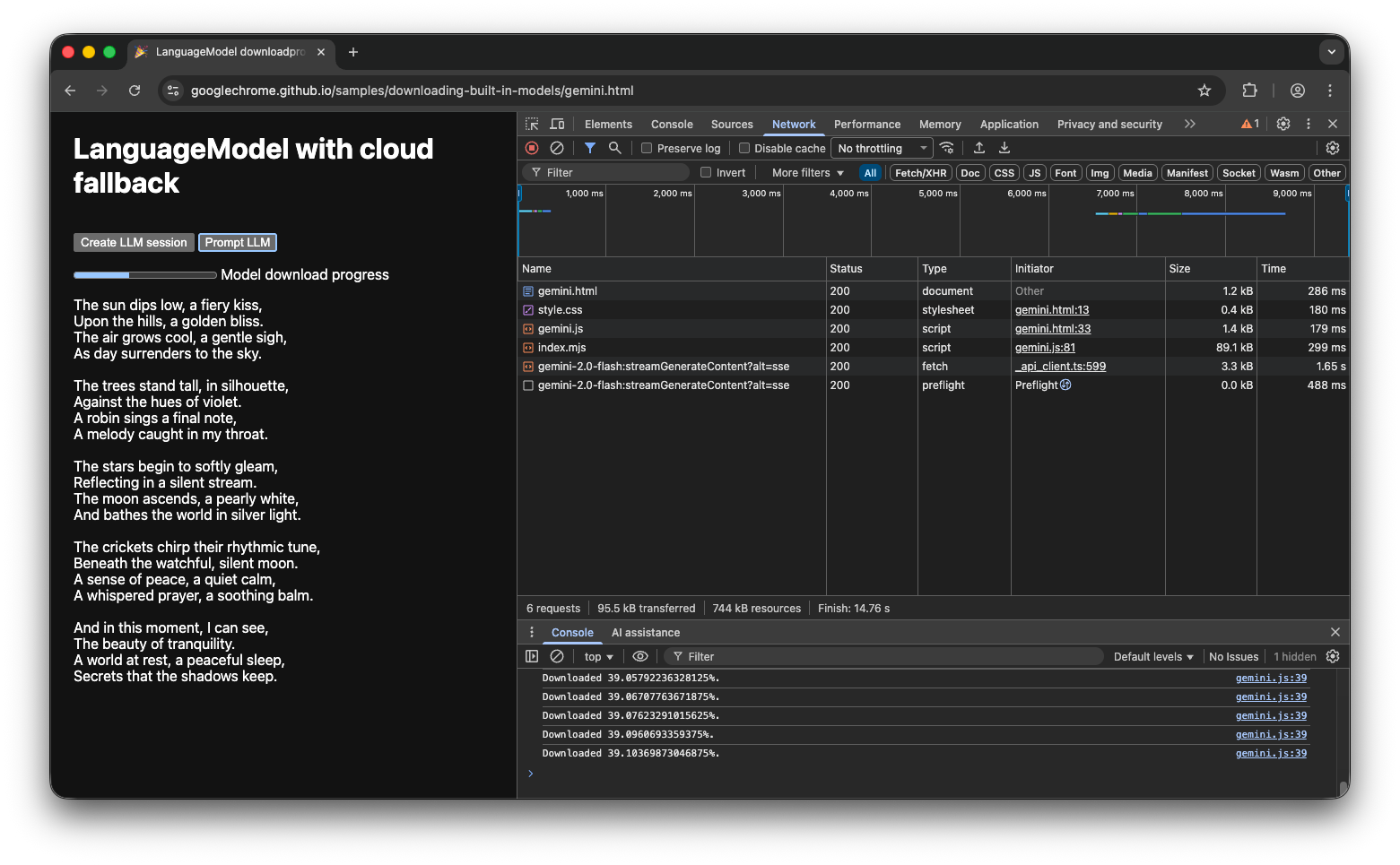
The
[demo](https://googlechrome.github.io/samples/downloading-built-in-models/gemini.html)
shows this flow in action. If the built-in AI API isn't available, the demo
falls back to the Gemini API in the cloud. If the built-in model still needs to
be downloaded, a progress indicator is shown to the user and the app uses the
Gemini API in the cloud until the model is downloaded. Take a look at the
[full source code on GitHub](https://github.com/GoogleChrome/samples/tree/gh-pages/downloading-built-in-models).
## Conclusion
What category does your app fall into? Do you require 100% client-side
processing or can you use a hybrid approach? After you've answered this
question, the next step is to implement the model download strategy that works
best for you.
Be sure your users always know when and if they can use your app client-side yet
by showing them model download progress as outlined in this guide.
Remember that this isn't just a one-time challenge: if the browser purges the
model due to storage pressure or when a new model version becomes available, the
browser needs to download the model again. Whether you follow either the
client-side or hybrid approach, you can be sure that you build the best possible
experience for your users, and let the browser handle the rest.