## Description
Use the `userScripts` API to execute user scripts in the User Scripts context.
## Permissions
`userScripts`
To use the User Scripts API, `browser.userScripts`, add the `"userScripts"` permission to your manifest.json and `"host_permissions"` for sites you want to run scripts on.
{
"name": "User script test extension",
"manifest_version": 3,
"minimum_chrome_version": "120",
"permissions": [
"userScripts"
],
"host_permissions": [
"*://example.com/*"
]
}
## Availability
Chrome 120+ browser.\* since Chrome 148 MV3+
## Concepts and usage
A user script is a snippet of code injected into a web page to modify its appearance or behavior. Unlike other extension features, such as [Content Scripts](https://developer.chrome.com/docs/extensions/develop/concepts/content-scripts) and the [`browser.scripting` API](https://developer.chrome.com/docs/extensions/reference/api/scripting), the User Scripts API lets you run arbitrary code. This API is required for extensions that run scripts provided by the user that cannot be shipped as part of your extension package.
### Enable usage of the userScripts API
After your extension receives the permission to use the userScripts API, users
must enable a specific toggle to allow your extension to use the API. The
specific toggle required, and the API's behavior when disabled, vary by Chrome
version.
Use the following check to determine which toggle the user needs to enable, for
example, during new user onboarding:
let version = Number(navigator.userAgent.match(/(Chrome|Chromium)\/([0-9]+)/)?.[2]);
if (version >= 138) {
// Allow User Scripts toggle will be used.
} else {
// Developer mode toggle will be used.
}
The following sections describe the different toggles and how to enable them.
#### Chrome versions prior to 138 (Developer mode toggle)
As an extension developer, you already have Developer
mode enabled in your installation of Chrome. Your
users must also enable Developer mode.
You can copy and paste the following
instructions into your extension's documentation for your users
1. Go to the Extensions page by entering `chrome://extensions` in a new tab. (By design `chrome://` URLs are not linkable.)
2. Enable Developer Mode by clicking the toggle switch next to **Developer mode**.
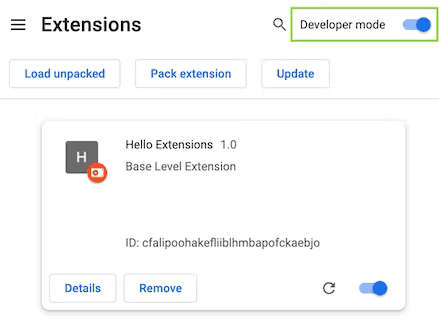
Extensions page (chrome://extensions)
> [!NOTE]
> **Note:** If Developer mode is not enabled, accessing `browser.userScripts` shows an error. You can use this error to determine API availability, see [Check for API
> availability](https://developer.chrome.com/docs/extensions/reference/api/userScripts#check-for-api-availability).
#### Chrome versions 138 and newer (Allow User Scripts toggle)
The **Allow User Scripts** toggle is on each extension's
details page (for example, chrome://extensions/?id=YOUR_EXTENSION_ID).
You can copy and paste the following instructions
into your extension's documentation for your users:
1. Go to the Extensions page by entering `chrome://extensions` in a new tab. (By design `chrome://` URLs are not linkable.)
2. Click the "Details" button on the extension card to view detailed information about the extension.
3. Click the toggle switch next to **Allow User Scripts**.
 Allow User Scripts toggle (chrome://extensions/?id=abc...)
> [!NOTE]
> **Note:** If the **Allow User Scripts** toggle is not enabled, `browser.userScripts` is undefined. This undefined state (similar to how other APIs behave) only resets when an extension script context reloads. For example, if a user revokes access while your service worker is running, `browser.userScripts` remains defined. However, in this scenario, attempting to call any of its methods throws an error.
### Check for API availability
We recommend the following check to determine if the userScripts API is enabled,
as it works in all Chrome versions. This check attempts to call a
`browser.userScripts()` method that should always succeed when the API is
available. If this call throws an error, the API is not available:
function isUserScriptsAvailable() {
try {
// Method call which throws if API permission or toggle is not enabled.
browser.userScripts.getScripts();
return true;
} catch {
// Not available.
return false;
}
}
### Work in isolated worlds
Both user and content scripts can run in an isolated world or in the main world. An isolated world is an execution environment that isn't accessible to a host page or other extensions. This lets a user script change its JavaScript environment without affecting the host page or other extensions' user and content scripts. Conversely, user scripts (and content scripts) are not visible to the host page or the user and content scripts of other extensions. Scripts running in the main world are accessible to host pages and other extensions and are visible to host pages and to other extensions. To select the world, pass `"USER_SCRIPT"` or `"MAIN"` when calling [`userScripts.register()`](https://developer.chrome.com/docs/extensions/reference/api/userScripts#method-register).
To configure a [content security policy](https://developer.mozilla.org/docs/Web/HTTP/CSP) for the `USER_SCRIPT` world, call `userScripts.configureWorld()`:
browser.userScripts.configureWorld({
csp: "script-src 'self'"
});
### Messaging
Like content scripts and offscreen documents, user scripts communicate with other parts of an extension using [messaging](https://developer.chrome.com/docs/extensions/mv3/messaging) (meaning they can call `runtime.sendMessage()` and `runtime.connect()` as any other part of an extension would). However, they're received using dedicated event handlers (meaning, they don't use `onMessage` or `onConnect`). These handlers are called [`runtime.onUserScriptMessage`](https://developer.chrome.com/docs/extensions/reference/api/runtime#event-onUserScriptMessage) and [`runtime.onUserScriptConnect`](https://developer.chrome.com/docs/extensions/reference/api/runtime#event-onUserScriptConnect). Dedicated handlers make it easier to identify messages from user scripts, which are a less-trusted context.
Before sending a message, you must call [`configureWorld()`](https://developer.chrome.com/docs/extensions/reference/api/userScripts#method-configureWorld) with the `messaging` argument set to `true`. Note that both the `csp` and `messaging` arguments can be passed at the same time.
browser.userScripts.configureWorld({
messaging: true
});
### Extension updates
User scripts are cleared when an extension updates. You can add them back by running code in the [`runtime.onInstalled`](https://developer.chrome.com/docs/extensions/reference/runtime#event-onInstalled) event handler in the extension service worker. Respond only to the [`"update"` reason](https://developer.chrome.com/docs/extensions/reference/api/runtime#type-OnInstalledReason:%7E:text=as%20an%20installation.-,%22update%22,-Specifies%20the%20event) passed to the event callback.
## Example
This example is from the [userScript sample](https://github.com/GoogleChrome/chrome-extensions-samples/tree/main/api-samples/userScripts) in our samples repository.
### Register a script
The following example shows a basic call to `register()`. The first argument is an array of objects defining the scripts to be registered. There are more options than are shown here.
browser.userScripts.register([{
id: 'test',
matches: ['*://*/*'],
js: [{code: 'alert("Hi!")'}]
}]);
## Types
### ExecutionWorld
The JavaScript world for a user script to execute within.
#### Enum
"MAIN"
Specifies the execution environment of the DOM, which is the execution environment shared with the host page's JavaScript.
"USER_SCRIPT"
Specifies the execution environment that is specific to user scripts and is exempt from the page's CSP.
### InjectionResult
Chrome 135+ browser.\* since Chrome 148
#### Properties
- documentId string
The document associated with the injection.
- error string optional
The error, if any. `error` and `result` are mutually exclusive.
- frameId number
The frame associated with the injection.
- result any optional
The result of the script execution.
### InjectionTarget
Chrome 135+ browser.\* since Chrome 148
#### Properties
- allFrames boolean optional
Whether the script should inject into all frames within the tab. Defaults to false. This must not be true if `frameIds` is specified.
- documentIds string\[\] optional
The IDs of specific documentIds to inject into. This must not be set if `frameIds` is set.
- frameIds number\[\] optional
The IDs of specific frames to inject into.
- tabId number
The ID of the tab into which to inject.
### RegisteredUserScript
#### Properties
- allFrames boolean optional
If true, it will inject into all frames, even if the frame is not the top-most frame in the tab. Each frame is checked independently for URL requirements; it will not inject into child frames if the URL requirements are not met. Defaults to false, meaning that only the top frame is matched.
- excludeGlobs string\[\] optional
Specifies wildcard patterns for pages this user script will NOT be injected into.
- excludeMatches string\[\] optional
Excludes pages that this user script would otherwise be injected into. See [Match Patterns](https://developer.chrome.com/extensions/develop/concepts/match-patterns) for more details on the syntax of these strings.
- id string
The ID of the user script specified in the API call. This property must not start with a '_' as it's reserved as a prefix for generated script IDs.
- includeGlobs string\[\] optional
Specifies wildcard patterns for pages this user script will be injected into.
- js [ScriptSource](https://developer.chrome.com/docs/extensions/reference/api/userScripts#type-ScriptSource)\[\] optional
The list of ScriptSource objects defining sources of scripts to be injected into matching pages. This property must be specified for ${ref:register}, and when specified it must be a non-empty array.
- matches string\[\] optional
Specifies which pages this user script will be injected into. See [Match Patterns](https://developer.chrome.com/extensions/develop/concepts/match-patterns) for more details on the syntax of these strings. This property must be specified for ${ref:register}.
- runAt [RunAt](https://developer.chrome.com/docs/extensions/reference/extensionTypes/#type-RunAt) optional
Specifies when JavaScript files are injected into the web page. The preferred and default value is `document_idle`.
- world [ExecutionWorld](https://developer.chrome.com/docs/extensions/reference/api/userScripts#type-ExecutionWorld) optional
The JavaScript execution environment to run the script in. The default is `` `USER_SCRIPT` ``.
- worldId string optional
Chrome 133+ browser.\* since Chrome 148
Specifies the user script world ID to execute in. If omitted, the script will execute in the default user script world. Only valid if `world` is omitted or is `USER_SCRIPT`. Values with leading underscores (`_`) are reserved.
### ScriptSource
#### Properties
- code string optional
A string containing the JavaScript code to inject. Exactly one of `file` or `code` must be specified.
- file string optional
The path of the JavaScript file to inject relative to the extension's root directory. Exactly one of `file` or `code` must be specified.
### UserScriptFilter
#### Properties
- ids string\[\] optional
[`getScripts`](https://developer.chrome.com/docs/extensions/reference/api/userScripts#method-getScripts) only returns scripts with the IDs specified in this list.
### UserScriptInjection
Chrome 135+ browser.\* since Chrome 148
#### Properties
- injectImmediately boolean optional
Whether the injection should be triggered in the target as soon as possible. Note that this is not a guarantee that injection will occur prior to page load, as the page may have already loaded by the time the script reaches the target.
- js [ScriptSource](https://developer.chrome.com/docs/extensions/reference/api/userScripts#type-ScriptSource)\[\]
The list of ScriptSource objects defining sources of scripts to be injected into the target.
- target [InjectionTarget](https://developer.chrome.com/docs/extensions/reference/api/userScripts#type-InjectionTarget)
Details specifying the target into which to inject the script.
- world [ExecutionWorld](https://developer.chrome.com/docs/extensions/reference/api/userScripts#type-ExecutionWorld) optional
The JavaScript "world" to run the script in. The default is `USER_SCRIPT`.
- worldId string optional
Specifies the user script world ID to execute in. If omitted, the script will execute in the default user script world. Only valid if `world` is omitted or is `USER_SCRIPT`. Values with leading underscores (`_`) are reserved.
### WorldProperties
#### Properties
- csp string optional
Specifies the world csp. The default is the `` `ISOLATED` `` world csp.
- messaging boolean optional
Specifies whether messaging APIs are exposed. The default is `false`.
- worldId string optional
Chrome 133+ browser.\* since Chrome 148
Specifies the ID of the specific user script world to update. If not provided, updates the properties of the default user script world. Values with leading underscores (`_`) are reserved.
## Methods
### configureWorld()
```typescript
browser.userScripts.configureWorld(
properties: WorldProperties,
): Promise
```
Configures the `` `USER_SCRIPT` `` execution environment.
#### Parameters
- properties [WorldProperties](https://developer.chrome.com/docs/extensions/reference/api/userScripts#type-WorldProperties)
Contains the user script world configuration.
#### Returns
- Promise\
Promise that resolves once the world has been configured.
### execute()
Chrome 135+ browser.\* since Chrome 148
```typescript
browser.userScripts.execute(
injection: UserScriptInjection,
): Promise
```
Injects a script into a target context. By default, the script will be run at `document_idle`, or immediately if the page has already loaded. If the `injectImmediately` property is set, the script will inject without waiting, even if the page has not finished loading. If the script evaluates to a promise, the browser will wait for the promise to settle and return the resulting value.
#### Parameters
- injection [UserScriptInjection](https://developer.chrome.com/docs/extensions/reference/api/userScripts#type-UserScriptInjection)
#### Returns
- Promise\<[InjectionResult](https://developer.chrome.com/docs/extensions/reference/api/userScripts#type-InjectionResult)\[\]\>
### getScripts()
```typescript
browser.userScripts.getScripts(
filter?: UserScriptFilter,
): Promise
```
Returns all dynamically-registered user scripts for this extension.
#### Parameters
- filter [UserScriptFilter](https://developer.chrome.com/docs/extensions/reference/api/userScripts#type-UserScriptFilter) optional
If specified, this method returns only the user scripts that match it.
#### Returns
- Promise\<[RegisteredUserScript](https://developer.chrome.com/docs/extensions/reference/api/userScripts#type-RegisteredUserScript)\[\]\>
Promise that resolves with the registered scripts. The promise will be rejected if an error occurs.
### getWorldConfigurations()
Chrome 133+ browser.\* since Chrome 148
```typescript
browser.userScripts.getWorldConfigurations(): Promise
```
Retrieves all registered world configurations.
#### Returns
- Promise\<[WorldProperties](https://developer.chrome.com/docs/extensions/reference/api/userScripts#type-WorldProperties)\[\]\>
Promise that resolves with the registered world configurations.
### register()
```typescript
browser.userScripts.register(
scripts: RegisteredUserScript[],
): Promise
```
Registers one or more user scripts for this extension.
#### Parameters
- scripts [RegisteredUserScript](https://developer.chrome.com/docs/extensions/reference/api/userScripts#type-RegisteredUserScript)\[\]
Contains a list of user scripts to be registered.
#### Returns
- Promise\
Promise that resolves once scripts have been fully registered. The promise will be rejected if an error occurs.
### resetWorldConfiguration()
Chrome 133+ browser.\* since Chrome 148
```typescript
browser.userScripts.resetWorldConfiguration(
worldId?: string,
): Promise
```
Resets the configuration for a user script world. Any scripts that inject into the world with the specified ID will use the default world configuration.
#### Parameters
- worldId string optional
The ID of the user script world to reset. If omitted, resets the default world's configuration.
#### Returns
- Promise\
Promise that resolves when the configuration is reset.
### unregister()
```typescript
browser.userScripts.unregister(
filter?: UserScriptFilter,
): Promise
```
Unregisters all dynamically-registered user scripts for this extension.
#### Parameters
- filter [UserScriptFilter](https://developer.chrome.com/docs/extensions/reference/api/userScripts#type-UserScriptFilter) optional
If specified, this method unregisters only the user scripts that match it.
#### Returns
- Promise\
Promise that resolves once scripts have been fully unregistered. The promise will be rejected if an error occurs.
### update()
```typescript
browser.userScripts.update(
scripts: RegisteredUserScript[],
): Promise
```
Updates one or more user scripts for this extension.
#### Parameters
- scripts [RegisteredUserScript](https://developer.chrome.com/docs/extensions/reference/api/userScripts#type-RegisteredUserScript)\[\]
Contains a list of user scripts to be updated. A property is only updated for the existing script if it is specified in this object. If there are errors during script parsing/file validation, or if the IDs specified do not correspond to a fully registered script, then no scripts are updated.
#### Returns
- Promise\
Promise that resolves once scripts have been fully updated. The promise will be rejected if an error occurs.