 Demián Renzulli [X](https://twitter.com/drenzulli) [GitHub](https://github.com/demianrenzulli)  Barry Pollard [X](https://twitter.com/tunetheweb) [GitHub](https://github.com/tunetheweb) [Mastodon](https://mastodon.social/@tunetheweb) [Bluesky](https://bsky.app/profile/tunetheweb.com) [Homepage](https://www.tunetheweb.com)
Published: August 10, 2023, Last updated: October 16, 2026
The [`unload` event](https://developer.mozilla.org/docs/Web/API/Window/unload_event)
has been [deprecated](https://chromestatus.com/feature/5579556305502208)
by gradually changing the default so that `unload` handlers stop firing on pages
unless a page explicitly opts in to re-enable them.
## Deprecation timeline
> [!IMPORTANT]
> **Important:** This deprecation is [now complete in Chrome](https://developer.chrome.com/blog/unload-deprecated-in-chrome.md.txt) The `unload` event will no longer fire by default and `unload` handlers won't execute, unless a site has explicitly opted out to re-enable them. Note that they may still fire on iOS devices for Chrome users since that uses the WebKit browser engine the same as Safari rather than Blink, the full Chrome browser engine.
We noted that unload behavior would likely be subject to changes as early as
January 2019, when we announced our
[intent to implement a back/forward cache](https://groups.google.com/a/chromium.org/g/blink-dev/c/OVROmzNUng0/m/1gTmi-I3EQAJ).
In parallel to the implementation work, we conducted a large outreach which
resulted in a significant drop of
[unload usage](https://chromestatus.com/metrics/feature/timeline/popularity/203).
To complement this outreach, we also started to offer ways to test the effect of
deprecating unload from Chrome 115:
- In the wild testing using the [Permission-Policy API for unload](https://developer.chrome.com/docs/web-platform/deprecating-unload.md.txt#permissions-policy) in Chrome 115 (July 2023)
- Local testing by enabling an `unload` deprecation flag (`chrome://flags/#deprecate-unload`) in Chrome 117 (September 2023)
Throughout 2024 we addressed several issues blocking the start of the rollout
and throughout 2025 we rolled out the deprecation to the top 50 sites:
| Milestone | Milestone date | Top-50 Sites | % of other origins |
|---|---|---|---|
| 135 | Mar 26, 2025 | 1 (`www.google.com`) | 0 |
| 139 | Jul 30, 2025 | 5 | 0 |
| 140 | Aug 27, 2025 | 10 | 0 |
| 141 | Sep 24, 2025 | 25 | 0 |
| 142 | Oct 22, 2025 | 50 | 0 |
Top-50 sites deprecation timeline.
In 2026 started to roll this out to all origins, over 8 milestones (or about 32
weeks), as detailed in the following table and this is now complete as of Chrome 155.
| Milestone | Milestone date | Top-50 Sites | % of Chrome page loads for all sites |
|---|---|---|---|
| 146 | Mar 10, 2026 | 50 | 1 |
| 147 | Apr 7, 2026 | 50 | 5 |
| 148 | May 5, 2026 | 50 | 10 |
| 149 | Jun 2, 2026 | 50 | 20 |
| 150 | Jun 30, 2026 | 50 | 40 |
| 151 | Jul 28, 2026 | 50 | 60 |
| 152 | Aug 25, 2026 | 50 | 80 |
| 155 | Oct 6, 2026 | 50 | 100 |
All sites deprecation timeline.
The full rollout was based on page loads (with consistency over time), rather
than individual users or sites to avoid impacting users or sites more than
others as [detailed in the Intent to Deprecate](https://groups.google.com/a/chromium.org/g/blink-dev/c/dvusqw9-IhI/m/lpsu5-01CQAJ).
Note that we also offer a [menu of opt-out options](https://developer.chrome.com/docs/web-platform/deprecating-unload.md.txt#options_comparison) in case
this deprecation timeline didn't provide sufficient time to migrate away
from unload.
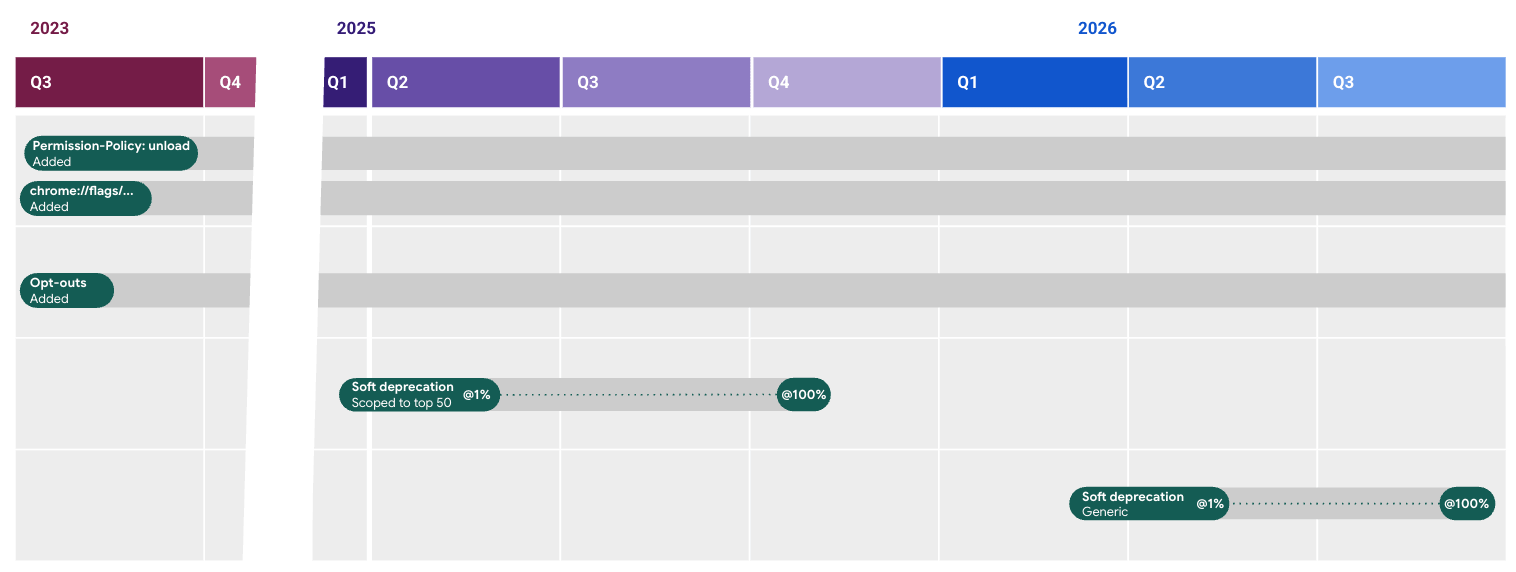 Timeline of the unload deprecation.
## Background
`unload` was designed to fire when the document is being unloaded. In theory, it
can be used to run code any time a user is navigating away from a page, or as an
end of session callback.
Scenarios where this event was most commonly used include:
- **Saving user data**: Save data before leaving the page.
- **Performing cleanup tasks**: Closing open resources before abandoning the page.
- **Sending analytics**: Sending data related to user interactions at the end of the session.
However the `unload` event is
[extremely unreliable](https://developer.chrome.com/articles/page-lifecycle-api#the-unload-event).
On desktop Chrome and Firefox, `unload` is reasonably reliable but it has a
negative impact on a site's performance by preventing the usage of
[bfcache (back/forward cache)](https://web.dev/articles/bfcache#never_use_the_unload_event).
On mobile browsers `unload` often doesn't run as tabs are frequently
backgrounded and then killed. For this reason browsers choose to prioritize the
bfcache on mobile over `unload`, making them even more unreliable. Safari also
uses this behaviour on desktop.
The Chrome team believes using the previous mobile model of prioritizing bfcache over
`unload` on desktop [would be disruptive](https://github.com/fergald/docs/blob/master/explainers/permissions-policy-deprecate-unload.md#unload-as-specced-is-a-footgun)
by making it more unreliable there too, when previously this has been reasonably
reliable in Chrome (and Firefox). Instead, Chrome worked to remove the
`unload` event completely.
## Why deprecate the `unload` event?
Deprecating `unload` is a key step in a much bigger recognition of the web we
live in now. The `unload` event gives a false sense of control of the app
lifecycle that is increasingly untrue of how we browse the web in the
modern computing world.
Mobile operating systems frequently freeze or unload web pages to conserve
memory and desktop browsers are doing this more and more now too for the same
reasons. Even without operating system interventions, users themselves
frequently tab switch and kill old tabs without formally "leaving pages".
Removing the `unload` event as obsolete is a recognition that we as web
developers need to ensure our paradigm matches that of the real world and not
depend on outdated concepts that no longer hold true---if they ever did.
## Alternatives to `unload` events
Instead of `unload` it is recommended to use:
- [`visibilitychange`](https://developer.chrome.com/articles/page-lifecycle-api#event-visibilitychange): To determine when the visibility of a page changes. This event happens when the user switches tabs, minimizes the browser window, or opens a new page. Consider the [`hidden` state](https://developer.chrome.com/articles/page-lifecycle-api#advice-hidden) the last reliable time to save app and user data.
- [`pagehide`](https://developer.chrome.com/articles/page-lifecycle-api#event-pagehide): To determine when the user has navigated away from the page. This event happens when the user navigates away from the page, reloads the page, or closes the browser window. The `pagehide` event is not fired when the page is minimized or switched to another tab. Note that, as `pagehide` does not make a page ineligible for the back/forward cache, it is possible a page can be restored after this event fires. If you're cleaning up any resources in this event, then they may have to be restored on page restore.
The [`beforeunload`](https://developer.mozilla.org/docs/Web/API/Window/beforeunload_event)
event has a slightly different use case to `unload` in that it's a cancellable
event. It is often used to warn users of unsaved changes when navigating away.
This event is also unreliable as it won't fire if a background tab is killed.
It's recommended to limit use of `beforeunload` and
[only add it conditionally](https://developer.chrome.com/blog/page-lifecycle-api#the-beforeunload-event).
Instead, use the previously mentioned events for most `unload` replacements.
For more details, see [this advice on never using the `unload` handler](https://developer.chrome.com/articles/page-lifecycle-api#the-unload-event).
## Detect usage of `unload`
There are different tools to help you find appearances of the `unload` event on
pages. This allows sites to discover if they are using this event---either in
their own code, or using libraries---and so may be affected by the upcoming
deprecation.
### Chrome DevTools
[Chrome DevTools](https://developer.chrome.com/docs/devtools) includes a
[`back-forward-cache` audit](https://developer.chrome.com/docs/devtools/application/back-forward-cache.md.txt) to
help you identify issues that may prevent your page from being eligible for
back/forward cache, including the usage of the `unload` handler.
To test back/forward cache, follow these steps:
1. On your page, [open DevTools](https://developer.chrome.com/docs/devtools/open.md.txt), then navigate to
**Application** \> **Background services** \> **Back/forward cache**.
2. Click **Test back/forward cache** Chrome automatically takes you to
`chrome://terms/` and back to your page. Alternatively, you can click the
browser's back and forward buttons.
If your page isn't eligible for back/forward caching, the **Back/forward cache**
tab shows you a list of issues. Under **Actionable** , you can see if you are
using `unload`:
 Chrome DevTools Back/forward cache testing tool.
### Reporting API
The [Reporting API](https://www.w3.org/TR/reporting-1/) can be used to in
conjunction with a read-only Permission Policy to detect usage of `unload`
from your website users.
For more details see [Using Reporting API to find unloads](https://github.com/fergald/docs/blob/master/explainers/permissions-policy-deprecate-unload.md#using-reportingapi-to-find-unloads)
### Bfcache `notRestoredReasons` API
The [`notRestoredReasons` property](https://developer.chrome.com/docs/web-platform/bfcache-notrestoredreasons.md.txt),
added to the [`PerformanceNavigationTiming`](https://developer.mozilla.org/docs/Web/API/PerformanceNavigationTiming)
class, reports information on whether documents were blocked from using the
[bfcache](https://web.dev/articles/bfcache) on navigation, and why. This is an
example of how the response object warning of an existing `unload` listener
looks like:
```javascript
{
children: [],
id: null,
name: null,
reasons: [
{"reason", "unload-listener"}
],
src: null,
url: "https://www.example.com/page/"
}
```
## Control access to `unload`
Chrome has completed deprecating the `unload` event, however a small number of sites have opted out. You can use different tools to control this behavior given the deprecation is now complete by default.
The following options allow you to enable or disable `unload` handlers to test
how your site would work without them so you can prepare for the upcoming
deprecation. There are different types of policies:
- [Permissions Policy](https://github.com/w3c/webappsec-permissions-policy/blob/main/permissions-policy-explainer.md): This is a platform API for site owners to control access to features, at a site or an individual page level, using HTTP headers.
- [Enterprise policies](https://chromeenterprise.google/policies/): Tools for IT admins to configure Chrome for their organization or business. They can be configured using an administrator panel, like the [Google Admin Console](https://support.google.com/a/answer/182076).
- [Chrome flags](https://developer.chrome.com/docs/web-platform/chrome-flags.md.txt): This allows an individual developer to change the `unload` deprecation setting to test impact on various sites.
### Permissions Policy
A Permissions Policy [was added from Chrome 115](https://chromestatus.com/feature/5760325231050752)
to allow sites to opt-out of using `unload` handlers and immediately benefit
from the bfcache to improve site performance. See
[these examples on how to set this for your site](https://github.com/fergald/docs/blob/master/explainers/permissions-policy-unload.md#examples).
This allowed sites to get ahead of the `unload` deprecation, but since this was only supported in Chromium-based browsers, it is now only useful for earlier versions of Chrome.
This Permission Policy was [extended in Chrome 117](https://chromestatus.com/feature/5579556305502208)
to allow sites to do the reverse, and to opt-in to continuing to try to fire
`unload` handlers even after Chrome deprecated it by default. See [these examples on how to continue to allow unload handlers to fire for your site](https://github.com/fergald/docs/blob/master/explainers/permissions-policy-deprecate-unload.md#reenabling-unload-for-a-frame).
While we would encourage site owners to move away from using `unload` handlers
given their unreliability, we plan to support this opt-out for the considerable
future for sites that need to use it. Note that opting back in does not make
`unload` handlers any more reliable on mobile---it just restores the current
status quo.
### Enterprise policy
Enterprises that have software that depends on the `unload` event to function
correctly can use the [`ForcePermissionPolicyUnloadDefaultEnabled` policy](https://chromium-review.googlesource.com/c/chromium/src/+/4730081)
to prevent the gradual deprecation for devices under their control. By enabling
this policy, `unload` will continue to default to enabled for all origins. A
page may still set a stricter policy if it wants. Like the Permissions Policy
opt-out, this is a tool to mitigate potential breaking changes. Again, we would
encourage site owners to stop depending on `unload` handlers, but Chrome plans
to support this enterprise opt-out for the considerable future for sites that
need to use it.
### Options comparison
The following table summarizes the different uses of the options discussed previously:
| | Allow exceptions to deprecation | Prevent deprecation fully |
|---|---|---|
| Permissions Policy *(applies to pages/sites)* | Yes | Yes |
| Enterprise policy *(applies to devices)* | No | Yes |
| Chrome flags *(applies to individual users)* | No | No |
| Chrome command line switches *(applies to individual users)* | No | Yes |
## Conclusion
`unload` handlers have been deprecated in Chrome. They have been unreliable for a long
time and were not guaranteed to be fired on all cases where a document gets
destroyed. Additionally, `unload` handlers are incompatible with
[bfcache](https://web.dev/articles/bfcache).
Sites that make use of `unload` handlers should understand the limitations of this API and that it is no longer available by default in Chrome by removing or migrating
them or, as a last resort, opting out of the deprecation.
## Acknowledgements
*Thanks to Kenji Baheux, Fergal Daly, Adriana Jara, and Jeremy Wagner for helpful review feedback.*