Address common problems with trial tokens in meta tags, headers, and scripts.
 Sam Dutton [X](https://twitter.com/sw12) [GitHub](https://github.com/samdutton) [Mastodon](https://techhub.social/@samdutton) [Bluesky](https://bsky.app/profile/samdutton.bsky.social) [Homepage](https://samdutton.com)
This guide assumes a working knowledge of
[origin trials in Chrome](https://developer.chrome.com/docs/web-platform/origin-trials). For a detailed FAQ,
refer to the
[Origin trials guide for web developers](https://github.com/GoogleChrome/OriginTrials/blob/gh-pages/developer-guide.md#faq).
If you encounter a bug with origin trials in Chrome,
[submit a new issue](https://github.com/GoogleChrome/OriginTrials/issues/new)
on the Chrome origin trials GitHub repository.
## Checklist
To troubleshoot an origin trial, work through each of the issues using the supplied links.
[You're testing in
Chrome, not Chromium or another browser](https://developer.chrome.com/docs/web-platform/origin-trial-troubleshooting#chrome)
[The origin trial is enabled
for the Chrome versions accessing your site](https://developer.chrome.com/docs/web-platform/origin-trial-troubleshooting#version)
[The origin trial is not
disabled by Chrome settings](https://developer.chrome.com/docs/web-platform/origin-trial-troubleshooting#settings)
[Keywords and syntax are correct](https://developer.chrome.com/docs/web-platform/origin-trial-troubleshooting#syntax)
[Token isn't missing
characters at the start or end](https://developer.chrome.com/docs/web-platform/origin-trial-troubleshooting#whole)
[First-party token
origin matches page origin](https://developer.chrome.com/docs/web-platform/origin-trial-troubleshooting#origin-first)
[First-party token is served
from the origin that uses it](https://developer.chrome.com/docs/web-platform/origin-trial-troubleshooting#token-first)
[Third-party token origin
matches script origin](https://developer.chrome.com/docs/web-platform/origin-trial-troubleshooting#origin-third)
[Third-party script uses a
third-party token](https://developer.chrome.com/docs/web-platform/origin-trial-troubleshooting#token-third)
[Third-party
token is provided with an external script, not a meta tag, HTTP header or inline script](https://developer.chrome.com/docs/web-platform/origin-trial-troubleshooting#token-third-script)
[Origin trial feature access
is supported for the method used to provide a trial token](https://developer.chrome.com/docs/web-platform/origin-trial-troubleshooting#token-method)
[Subdomain matching is enabled for a
token used on a subdomain](https://developer.chrome.com/docs/web-platform/origin-trial-troubleshooting#subdomain)
[The token is
still valid](https://developer.chrome.com/docs/web-platform/origin-trial-troubleshooting#token-still-valid)
[The origin trial hasn't
ended](https://developer.chrome.com/docs/web-platform/origin-trial-troubleshooting#trial-ended)
[The origin trial is available for the current user](https://developer.chrome.com/docs/web-platform/origin-trial-troubleshooting#user)
[Origin trial
usage restrictions haven't been exceeded](https://developer.chrome.com/docs/web-platform/origin-trial-troubleshooting#usage-restrictions)
[Iframes provide their own
tokens](https://developer.chrome.com/docs/web-platform/origin-trial-troubleshooting#iframe)
[Permissions
policies are correctly configured](https://developer.chrome.com/docs/web-platform/origin-trial-troubleshooting#permissions-policies)
[Worker access is enabled](https://developer.chrome.com/docs/web-platform/origin-trial-troubleshooting#workers)
[Token is provided before feature is accessed](https://developer.chrome.com/docs/web-platform/origin-trial-troubleshooting#token-before-access)
## Use Chrome DevTools to check tokens
DevTools provides origin trial information in the **Application** panel, for
the selected frame.

Expand the top frame to inspect origin trial tokens available for a subframe. For example, for the
demo page at [ot-iframe.glitch.me](https://ot-iframe.glitch.me), you can see that the page in the
iframe provides a token.

- **Token Status** : Whether the page has a valid token. Note that for some origin trials there may be other factors, such as geographical restrictions, that mean the origin trial feature is not available, despite the presence of a valid token. [Chrome DevTools status codes](https://developer.chrome.com/docs/web-platform/origin-trial-troubleshooting#devtools-status) explains the meaning of each of the codes for origin trials.
- **Origin** : The [Web Origin](https://web.dev/same-site-same-origin#origin) registered for the token.
- **Expiry Time** : the maximum (latest) possible expiry date and time for the token, which (for the most part) matches the end of the trial. This is not the same as the Valid Until date for the token displayed in [My Registrations](https://developer.chrome.com/origintrials#/trials/my), which shows how long the token is valid for, and [can be extended](https://github.com/GoogleChrome/OriginTrials/blob/gh-pages/developer-guide.md#21-what-does-the-valid-until-date-mean-for-my-tokens).
- **Usage Restriction** : Usage limits, which [can be set](https://github.com/GoogleChrome/OriginTrials/blob/gh-pages/developer-guide.md#20-what-are-the-options-for-usage-restrictions-on-tokens) for some trials.
- **Third Party** : Whether [third-party matching](https://github.com/GoogleChrome/OriginTrials/blob/gh-pages/developer-guide.md#18-how-can-i-enable-an-experimental-feature-as-embedded-content-on-different-domains) is enabled for the token. This is available for some origin trials, where a trial feature needs to be accessed on multiple sites from third-party scripts.
- **Match Sub-Domains** : Whether [subdomain matching](https://github.com/GoogleChrome/OriginTrials/blob/gh-pages/developer-guide.md#13-i-have-multiple-testingstaging-domains-or-subdomains-that-are-programmatically-generated-do-i-need-to-request-a-token-for-every-subdomain) is enabled for the token. This enables an origin trial feature to be tested on multiple subdomains of an origin, without requiring a different token for every subdomain.
Chrome DevTools displays a warning next to the trial name if the trial is:
unavailable for the current user, the token has expired, or if there are other
restrictions.

> [!IMPORTANT]
> **Key Point:** If a page provides an origin trial dynamically with a script, it may be initially hidden in the Application panel. You may need to reload Chrome DevTools, which doesn't require reloading the page. For examples of pages that include an origin trial token, see the [demos](https://developer.chrome.com/docs/web-platform/origin-trial-troubleshooting#demos).
### Status codes
You may encounter the following status codes in Chrome DevTools.
- **Expired** : Token has passed its expiration date. To re-enable the origin
trial, the token must be renewed. Generate a new token with a new expiration
date.
[Source code](https://source.chromium.org/chromium/chromium/src/+/main:third_party/blink/common/origin_trials/trial_token_validator.cc;l=97)
- **FeatureDisabled** : Trial is disabled for use.
[Source code](https://source.chromium.org/chromium/chromium/src/+/main:third_party/blink/common/origin_trials/trial_token_validator.cc;l=100)
- **FeatureDisabledForUser** : This token has been designated as disabled for
the current user with an alternative usage restriction. See the "User Subset
Exclusions" section of the [design doc](https://docs.google.com/document/d/1xALH9W7rWmX0FpjudhDeS2TNTEOXuPn4Tlc9VmuPdHA).
[Source code 1](https://source.chromium.org/chromium/chromium/src/+/main:third_party/blink/common/origin_trials/trial_token_validator.cc;l=106) and [Source code 2](https://source.chromium.org/chromium/chromium/src/+/main:third_party/blink/public/common/origin_trials/trial_token.h;l=155)
- **Insecure** : The request origin is insecure, and the trial is not enabled for
insecure origins. As explained in the [origin trial token validator code](https://source.chromium.org/chromium/chromium/src/+/main:third_party/blink/common/origin_trials/trial_token_validator.cc;l=200):
'For third-party tokens, both the current origin and the script origin must be
secure. Due to subdomain matching, the token origin might not be an exact
match for one of the provided script origins, and the result doesn't indicate
which specific origin was matched. This means it's not a direct lookup to find
the appropriate script origin. To avoid re-doing all the origin comparisons,
there are shortcuts that depend on how many script origins were provided.
There must be at least one, or the third party token would not be validated
successfully.'
[Source code](https://source.chromium.org/chromium/chromium/src/+/main:third_party/blink/common/origin_trials/trial_token_validator.cc;l=200)
- **InvalidSignature** : The token has an invalid or malformed signature.
[Source code](https://source.chromium.org/chromium/chromium/src/+/main:third_party/blink/common/origin_trials/trial_token_validator_unittest.cc;l=105)
- **Malformed** : Token is malformed and could not be parsed.
[Source code](https://source.chromium.org/chromium/chromium/src/+/main:third_party/blink/common/origin_trials/trial_token.cc;l=88)
> [!CAUTION]
> **Caution:** For `InvalidSignature` or `Malformed` errors, the token may conform to a valid format but not be recognized by the current browser or browser version. It's possible that the token is usable by a different browser.
- **NotSupported** : The origin trial defined by the token is not supported in
the Chromium embedder. An embedder can be a browser (such as Chrome or Edge),
a WebView, or some other user agent.
[Source code](https://source.chromium.org/chromium/chromium/src/+/main:third_party/blink/common/origin_trials/trial_token_validator.cc;l=258)
- **Success** : The token is well-formed, has not expired, matches an
origin trial feature, and is requested from an expected origin.
[Source code](https://source.chromium.org/chromium/chromium/src/+/main:third_party/blink/common/origin_trials/trial_token.cc;l=84)
- **TokenDisabled** : Token has been marked as disabled and cannot be used.
[Source code](https://source.chromium.org/chromium/chromium/src/+/main:third_party/blink/common/origin_trials/trial_token_validator.cc;l=103)
- **TrialNotAllowed** : The origin trial is
[unavailable for the current user](https://developer.chrome.com/docs/web-platform/origin-trial-troubleshooting#user).
[Source code](https://source.chromium.org/chromium/chromium/src/+/main:third_party/blink/renderer/core/origin_trials/origin_trial_context.cc;drc=96a0ae6d349eb7dd0288df76491b717cb65422f9;l=486)
- **UnknownTrial** : The token specifies a feature name that does not match any
known trial.
[Source code](https://source.chromium.org/chromium/chromium/src/+/main:third_party/blink/common/origin_trials/trial_token_validator.cc;l=178)
- **WrongOrigin** : The request origin does not match the origin specified in
the token. This can include the scheme, hostname, or port. This status is also
be displayed if a [third-party token](https://developer.chrome.com/docs/web-platform/origin-trial-troubleshooting#token-third-script) is provided in an
HTTP header, meta tag, or inline script, rather than from an external
JavaScript file.
[Source code](https://source.chromium.org/chromium/chromium/src/+/main:third_party/blink/common/origin_trials/trial_token.cc;drc=610603f89f0dd4da794848e4f8670a179efbcf38;l=262)
- **WrongVersion** : You're using the wrong token version. Only token version 2
and 3 are supported.
[Source code](https://source.chromium.org/chromium/chromium/src/+/main:third_party/blink/common/origin_trials/trial_token.cc;l=137)
*** ** * ** ***
## Required conditions for origin trials
If your origin trial isn't working as expected, make sure you've met the
following conditions.
### You're testing in Chrome, not Chromium or another browser
Chrome origin trials are designed to work for Chrome users. Chrome origin trial
tokens won't enable features in other browsers, including Chromium and
Chromium-based browsers. This is because Chrome origin trials are specific to
features made available in Chrome for experimentation.
> [!CAUTION]
> **Caution:** Some origin trials are only available in certain Chrome channels. Some origin trials are limited to desktop, Android, and WebView, and may be unavailable to certain platforms or operating systems. In particular, **Chrome on iOS** and **iPadOS** aren't supported, as they're built on [WKWebView](https://developer.apple.com/documentation/webkit/wkwebview). All browsers on iOS and iPadOS [must use WebKit](https://developer.apple.com/app-store/review/guidelines/#2.5.6), the same engine used by Safari.
Origin trials are also available for
[Firefox](https://wiki.mozilla.org/Origin_Trials) and
[Microsoft Edge](https://docs.microsoft.com/microsoft-edge/origin-trials/).
Enrollment in a Firefox or Edge origin trial won't enable a feature in Chrome.
### The origin trial is enabled for the Chrome versions accessing your site
Access to origin trials is limited to specific versions of Chrome. This may mean
a trial feature is only available to pre-Stable Chrome channels: Canary, Dev and
Beta.
You can check version availability from the
[registration page](https://developer.chrome.com/origintrials#/trials/active)
for the trial:

You can check the Chrome version you're using from
.
### The origin trial is not disabled by Chrome settings
If an individual user reports that a feature doesn't work for them, check that
the feature is not disabled in their Chrome settings. For example, certain
[Privacy Sandbox](https://developers.google.com/privacy-sandbox)
features can be disabled from the `chrome://settings/adPrivacy` page.
### Keywords and syntax are correct
Make sure to use appropriate keywords and syntax for origin trial tokens.
> [!CAUTION]
> **Caution:** These examples truncate the token value. Make sure to **check the whole token** , or at least the start and end of it! It's easy to accidentally leave out a character. A complete token looks like this: `txt Bj3DysCv1VjknU4jJvkDEwnQZK/vmse1rcd5jZogunrkwtKW92 vmygya6gyKe5GveTObBy3NT5DiC8yiiXnXGwMAAABZeyJvcmlnaW9i7 iJodHXwczovL3NpbXBsLmluZm86NDQzIiwiZmVhdHVyZSI6Ik5BIiwi ZXhwaXH5IjoxNjMxNjYzOTk5LCJpc1N1YmRvbWFpbiI6dHJ1ZX0=`
For first-party usage, a token can be provided in an `origin-trial` meta tag:
Alternatively, a token can be provided in an `Origin-Trial` response header.
Here's an example using [Express](https://expressjs.com/) in Node.js:
app.use(function(req, res, next) {
res.setHeader('Origin-Trial', 'Aj4DysCv3VjknU3...')
next();
});
Tokens can also be provided
[with JavaScript](https://github.com/GoogleChrome/OriginTrials/blob/gh-pages/developer-guide.md#16-can-i-provide-tokens-by-running-script):
function addTrialToken(tokenContents) {
const tokenElement = document.createElement('meta');
tokenElement.httpEquiv = 'origin-trial';
tokenElement.content = tokenContents;
document.head.appendChild(tokenElement);
}
> [!CAUTION]
> **Caution:** For first-party usage, tokens can be provided with an `origin-trial` meta tag, an `Origin-Trial` response header, or with JavaScript. Third-party tokens **must** be provided with JavaScript.
### First-party token origin matches page origin
Make sure the **Web Origin** value selected when you register for a trial
matches the origin of the page that has the meta tag or header which provides
the token.
For example, if you selected `https://example.com` as the **Web Origin**:

You might get a token value like this:

Check that this value matches the token used on the page you're troubleshooting.
For a token provided in a meta tag, check the HTML:
For a token provided in a header, you can check the token value from the
[Chrome DevTools Network panel](https://developer.chrome.com/docs/devtools/network) under **Response Headers**:

### First-party token is served from the origin that uses it
To enable access to an origin trial feature for code included in a page served
from your origin, provide a trial token in a meta tag, header, or with
JavaScript from the same origin.
The origin registered for a token must match the origin that serves it.
> [!NOTE]
> **Note:** The **Third-party matching** option is only provided for origin trials where it makes sense to try out a feature in a third-party context. Not every origin trial offers third-party tokens.
### Third-party token origin matches script origin
You can register to participate in an origin trial for scripts that are injected on other origins.
For example, if you want scripts that are served from
`javascript-library.example` to take part in an origin trial, you need to
register a token with third-party matching for `javascript-library.example`.

The origin value for a third-party token must match the origin of the script
that injects it.
### Third-party script uses a third-party token
You cannot enable a third-party script to participate in an origin trial on your
site by only registering a token for your origin and forgetting the script.
Third-party scripts need to use tokens with third-party matching enabled,
injected with the script itself. These tokens cannot be included in a meta tag
or header on your site. The JavaScript may look like the following:
// Add a third-party OT token
function addTrialToken(tokenContents) {
const tokenElement = document.createElement('meta');
tokenElement.httpEquiv = 'origin-trial';
tokenElement.content = tokenContents;
document.head.appendChild(tokenElement);
}
### Third-party token is provided with an external script, not a meta tag, HTTP header or inline script
Third-party tokens are validated against the origin of the script that injected
them. However, inline scripts and `` tags in static markup don't have an
origin.
This means that a third-party token must be provided with an external script,
not in a `` tag or inline script. It doesn't matter if the external script
that injects the token comes from the same origin as the containing page or a
different origin, as long as the origin of the script matches an origin
registered for the trial.
See a demo of this at [ot-iframe-3p.glitch.me](https://ot-iframe-3p.glitch.me).
> [!NOTE]
> **Note:** You can [add multiple tokens](https://developer.chrome.com/docs/web-platform/origin-trials#multiple) to the same page, for the same origin trial or for different trials.
### Origin trial feature access is supported for the method used to provide a trial token
Some types of access to origin trial features require you to provide a trial
token in a specific way. For example, the only way to enable
[origin trial access for service workers and shared workers](https://developer.chrome.com/docs/web-platform/origin-trial-troubleshooting#workers) is to
provide a token in an `Origin-Trial` header.
### Subdomain matching is enabled for a token used on a subdomain
If an origin trial feature doesn't seem to be working for some pages on your site, check that
tokens are correctly set up for the subdomains serving them.
When you register for an origin trial, you can optionally choose to match all subdomains of the
origin:

You can also match subdomains for third-party tokens:

Subdomain tokens [are not issued](https://github.com/GoogleChrome/OriginTrials/blob/gh-pages/developer-guide.md#13-i-have-multiple-testingstaging-domains-or-subdomains-that-are-programmatically-generated-do-i-need-to-request-a-token-for-every-subdomain)
for origins in the [Public Suffix List](https://publicsuffix.org/). For example,
you cannot register an origin such as `https://appspot.com` or
`https://github.io`, though you can register for domains within that origin,
such as `https://example.appspot.com` or `https://example.github.io`.
### The token is still valid
Tokens are valid for six weeks after they're created. Beyond that, you must
submit feedback in order to extend the **Valid Until** date.
[Origin Trials Guide for Web Developers](https://github.com/GoogleChrome/OriginTrials/blob/gh-pages/developer-guide.md#22-how-do-i-keep-my-tokens-active-for-the-entire-trial)
explains how to make sure your token is valid for an entire origin trial.
> [!NOTE]
> **Note:** There is always a gap after the end of the final origin trial for a feature, and when the feature begins rolling out to all Chrome users. Usually, it's two weeks. In other words, there is always a time when a feature is no longer available in origin trial and not yet available by default. Read more about [trial timelines](https://www.chromium.org/blink/origin-trials/running-an-origin-trial).
You can check for active tokens on your Chrome Origin Trials
[My Registrations page](https://developer.chrome.com/origintrials#/trials/my):

Chrome DevTools displays Status `Success` if the token is still valid:

If your token has expired, DevTools displays the status `Expired` and your
[My Registrations page](https://developer.chrome.com/origintrials#/trials/my)
displays an **Expired Tokens** section.

### The origin trial is ongoing
You can check the end date for an origin trial from its [registration page](https://developer.chrome.com/origintrials#/trials/active):
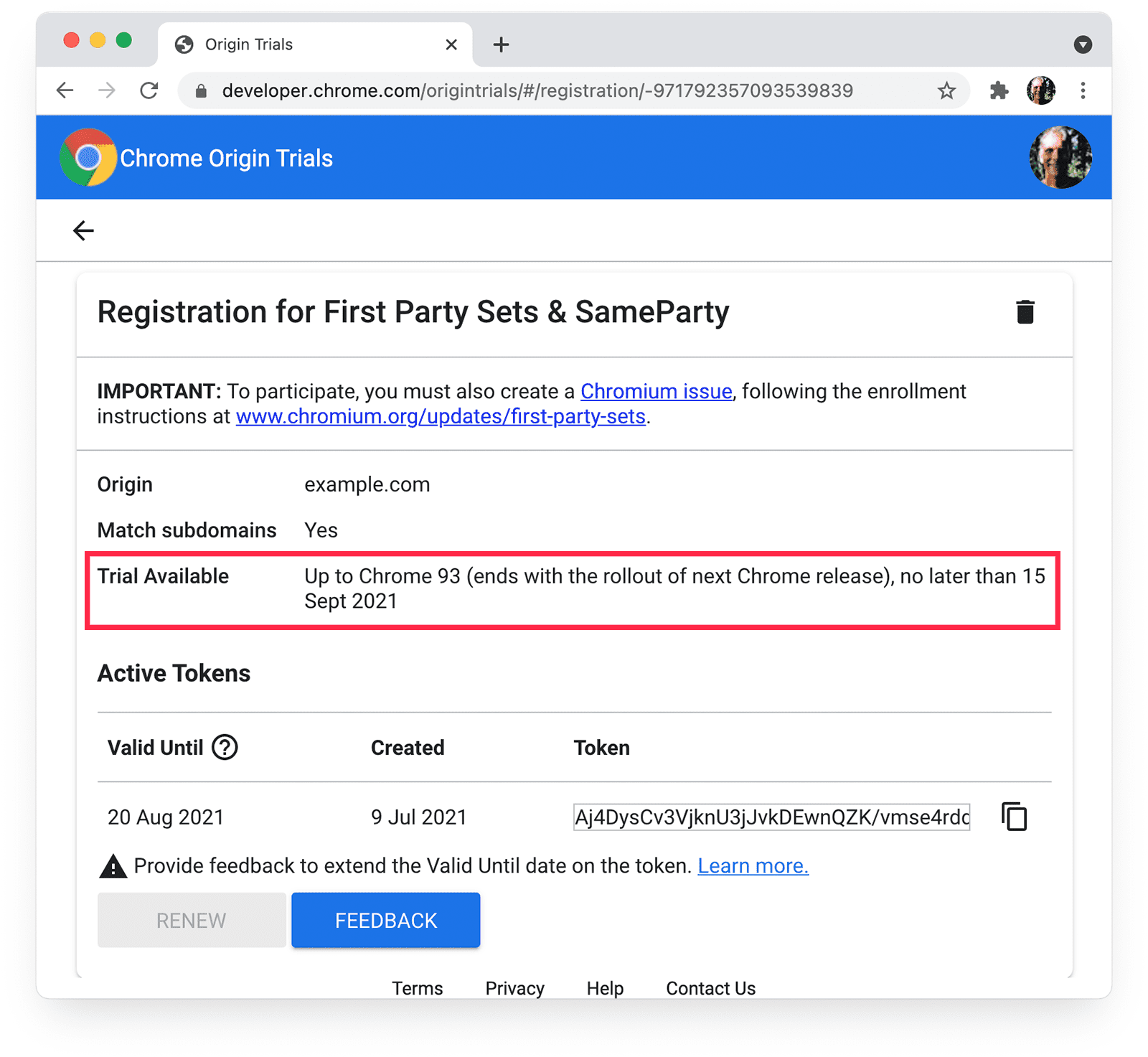
For trials that have ended, DevTools displays something like this:

You are sent automated emails when feedback is required or a token is about to
expire, but not when the trial ends.
> [!CAUTION]
> **Caution:** There may be more than one origin trial for a feature. Some features undergo multiple origin trials before being rolled out to Chrome Stable for all users. Check the [blink-dev mailing list](https://groups.google.com/a/chromium.org/g/blink-dev) for updates on the status of the feature you're testing.
### The origin trial is available for the current user
Some origin trials are unavailable to certain users, even if a valid token is
provided.
If a trial isn't available for the current user, Chrome DevTools displays a
`TrialNotAllowed` warning:
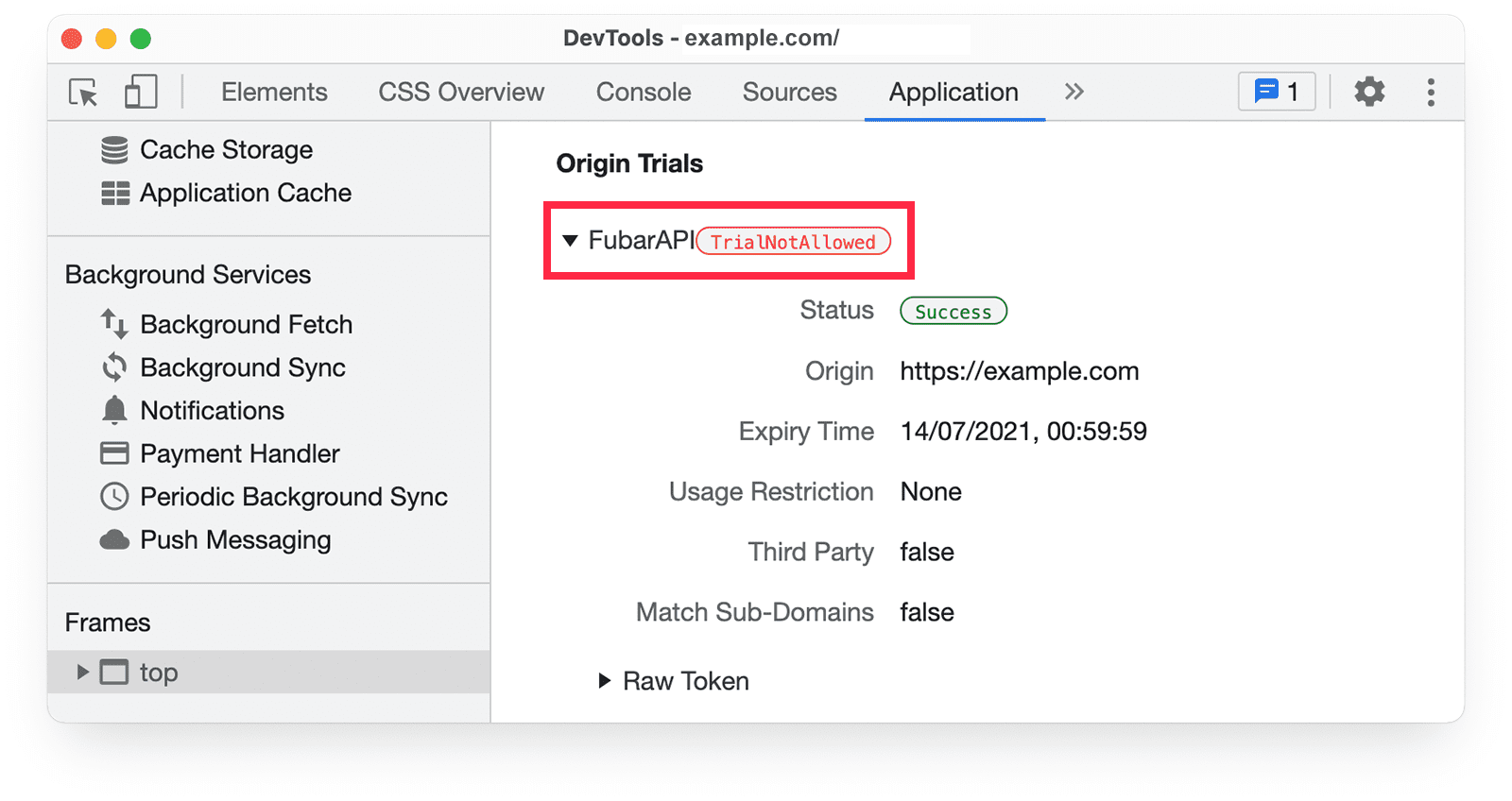
Information about usage restrictions and availability is provided for each
origin trial.
As with any web platform feature, you should use
[feature detection](https://developer.mozilla.org/docs/Learn/Tools_and_testing/Cross_browser_testing/Feature_detection)
to confirm that an origin trial feature is supported before you use it.
### Origin trial usage restrictions haven't been exceeded
By default, an origin trial feature is enabled on any page that has a valid
token for the trial.
Except in rare cases, origin trial usage is
[limited to a maximum of 0.5% of all Chrome page loads](https://github.com/GoogleChrome/OriginTrials/blob/gh-pages/developer-guide.md#19-are-there-any-usage-limits-on-experimental-features).
The origin trial feature is disabled if total usage by all Chrome users exceeds
that amount. DevTools displays the token status as disabled.
There are no usage limits for deprecation trials, as they don't introduce
new features, and therefore don't pose a risk of making a significant proportion
of the web dependent on a trial feature.
> [!NOTE]
> **Note:** The **Expected Usage** field on the trial registration page doesn't impact your origin trial token. It's purely informational for Chrome's origin trial team.
Some trials provide an option to limit usage, which means origin trial features
are disabled for some users. This option is made available from the registration
page for an origin trial that offers it:

If you notice that access by your users to an origin trial feature is lower
than expected, make sure that **Standard Limit** is selected.
> [!IMPORTANT]
> **Key Point:** Access to trials is limited to specific versions of Chrome. In some cases, this may mean a trial feature is only available to pre-Stable Chrome channels: Canary, Dev and Beta. Check that the origin trial is [enabled for the Chrome versions](https://developer.chrome.com/docs/web-platform/origin-trial-troubleshooting#version) accessing your site.
### Iframes provide their own tokens
To allow access to an origin trial feature, an iframe must provide a token in a
meta tag, an HTTP header, or [programmatically](https://developer.chrome.com/docs/web-platform/origin-trial-troubleshooting#programmatic). Iframes don't
inherit access to features enabled for pages that contain them.
[ot-iframe.glitch.me](https://ot-iframe.glitch.me) demonstrates access to an origin trial feature
from an iframe. [ot-iframe-3p.glitch.me](https://ot-iframe-3p.glitch.me) provides multiple
cross-origin iframe examples.
> [!CAUTION]
> **Caution:** When you register for a trial, don't select **Third-party matching** just because you plan to access a trial feature from an iframe! A [third-party token](https://developer.chrome.com/docs/web-platform/third-party-origin-trials#register_for_a_third-party_origin_trial) only activates a trial feature if it's provided in an external JavaScript file, included with a `