 Philip Walton [X](https://twitter.com/philwalton) [GitHub](https://github.com/philipwalton) [LinkedIn](https://www.linkedin.com/in/waltonphilip) [Mastodon](https://toot.cafe/@philipwalton) [Bluesky](https://bsky.app/profile/philipwalton.com) [Homepage](https://philipwalton.com/)
Published: December 1, 2023, Last updated: October 16, 2026
Browser Support
- ' d='M96 183a64 64 0 0 1-23-23L17 64a128 128 0 0 0 111 192l55-96a64 64 0 0 1-87 23Z'/%3E%3Cpath fill='url(%23b)' d='M192 128a64 64 0 0 1-9 32l-55 96A128 128 0 0 0 239 64H128a64 64 0 0 1 64 64Z'/%3E%3Ccircle cx='128' cy='128' r='52' fill='%231a73e8'/%3E%3Cpath fill='url(%23c)' d='M96 73a64 64 0 0 1 32-9h111a128 128 0 0 0-222 0l56 96a64 64 0 0 1 23-87Z'/%3E%3C/svg%3E)
- ' xlink:href='%23A'%3E%3Cstop offset='.76' stop-opacity='0'/%3E%3Cstop offset='.95' stop-opacity='.5'/%3E%3Cstop offset='1'/%3E%3C/radialGradient%3E%3CradialGradient id='F' cx='2523' cy='4680' r='20243' gradientTransform='matrix(-.03715 .99931 -2.12836 -.07913 13579 3530)' xlink:href='%23A'%3E%3Cstop offset='0' stop-color='%2335c1f1'/%3E%3Cstop offset='.11' stop-color='%2334c1ed'/%3E%3Cstop offset='.23' stop-color='%232fc2df'/%3E%3Cstop offset='.31' stop-color='%232bc3d2'/%3E%3Cstop offset='.67' stop-color='%2336c752'/%3E%3C/radialGradient%3E%3CradialGradient id='G' cx='24247' cy='7758' r='9734' gradientTransform='matrix(.28109 .95968 -.78353 .22949 24510 -16292)' xlink:href='%23A'%3E%3Cstop offset='0' stop-color='%2366eb6e'/%3E%3Cstop offset='1' stop-color='%2366eb6e' stop-opacity='0'/%3E%3C/radialGradient%3E%3Cpath id='H' d='M24105 20053a9345 9345 0 01-1053 472 10202 10202 0 01-3590 646c-4732 0-8855-3255-8855-7432 0-1175 680-2193 1643-2729-4280 180-5380 4640-5380 7253 0 7387 6810 8137 8276 8137 791 0 1984-230 2704-456l130-44a12834 12834 0 006660-5282c220-350-168-757-535-565z'/%3E%3Cpath id='I' d='M11571 25141a7913 7913 0 01-2273-2137 8145 8145 0 01-1514-4740 8093 8093 0 013093-6395 8082 8082 0 011373-859c312-148 846-414 1554-404a3236 3236 0 012569 1297 3184 3184 0 01636 1866c0-21 2446-7960-8005-7960-4390 0-8004 4166-8004 7820 0 2319 538 4170 1212 5604a12833 12833 0 007684 6757 12795 12795 0 003908 610c1414 0 2774-233 4045-656a7575 7575 0 01-6278-803z'/%3E%3Cpath id='J' d='M16231 15886c-80 105-330 250-330 566 0 260 170 512 472 723 1438 1003 4149 868 4156 868a5954 5954 0 003027-839 6147 6147 0 001133-850 6180 6180 0 001910-4437c26-2242-796-3732-1133-4392-2120-4141-6694-6525-11668-6525-7011 0-12703 5635-12798 12620 47-3654 3679-6605 7996-6605 350 0 2346 34 4200 1007 1634 858 2490 1894 3086 2921 618 1067 728 2415 728 2952s-271 1333-780 1990z'/%3E%3Cuse fill='url(%23B)' xlink:href='%23H'/%3E%3Cuse fill='url(%23D)' opacity='.35' xlink:href='%23H'/%3E%3Cuse fill='url(%23C)' xlink:href='%23I'/%3E%3Cuse fill='url(%23E)' opacity='.4' xlink:href='%23I'/%3E%3Cuse fill='url(%23F)' xlink:href='%23J'/%3E%3Cuse fill='url(%23G)' xlink:href='%23J'/%3E%3C/svg%3E)
- ' gradientUnits='userSpaceOnUse'%3E%3Cstop offset='.2' stop-color='%239059ff' stop-opacity='0'/%3E%3Cstop offset='.3' stop-color='%238c4ff3' stop-opacity='.1'/%3E%3Cstop offset='.8' stop-color='%237716a8' stop-opacity='.5'/%3E%3Cstop offset='1' stop-color='%236e008b' stop-opacity='.6'/%3E%3C/radialGradient%3E%3CradialGradient id='ff-g' cx='239.1' cy='34.6' r='171.6' gradientUnits='userSpaceOnUse'%3E%3Cstop offset='0' stop-color='%23ffe226'/%3E%3Cstop offset='.1' stop-color='%23ffdb27'/%3E%3Cstop offset='.3' stop-color='%23ffc82a'/%3E%3Cstop offset='.5' stop-color='%23ffa930'/%3E%3Cstop offset='.7' stop-color='%23ff7e37'/%3E%3Cstop offset='.8' stop-color='%23ff7139'/%3E%3C/radialGradient%3E%3CradialGradient id='ff-h' cx='374' cy='-74.3' r='732.2' gradientUnits='userSpaceOnUse'%3E%3Cstop offset='.1' stop-color='%23fff44f'/%3E%3Cstop offset='.5' stop-color='%23ff980e'/%3E%3Cstop offset='.6' stop-color='%23ff5634'/%3E%3Cstop offset='.7' stop-color='%23ff3647'/%3E%3Cstop offset='.9' stop-color='%23e31587'/%3E%3C/radialGradient%3E%3CradialGradient id='ff-i' cx='304.6' cy='7.1' r='536.4' gradientTransform='rotate(84 303 4)' gradientUnits='userSpaceOnUse'%3E%3Cstop offset='0' stop-color='%23fff44f'/%3E%3Cstop offset='.1' stop-color='%23ffe847'/%3E%3Cstop offset='.2' stop-color='%23ffc830'/%3E%3Cstop offset='.3' stop-color='%23ff980e'/%3E%3Cstop offset='.4' stop-color='%23ff8b16'/%3E%3Cstop offset='.5' stop-color='%23ff672a'/%3E%3Cstop offset='.6' stop-color='%23ff3647'/%3E%3Cstop offset='.7' stop-color='%23e31587'/%3E%3C/radialGradient%3E%3CradialGradient id='ff-j' cx='235' cy='98.1' r='457.1' gradientUnits='userSpaceOnUse'%3E%3Cstop offset='.1' stop-color='%23fff44f'/%3E%3Cstop offset='.5' stop-color='%23ff980e'/%3E%3Cstop offset='.6' stop-color='%23ff5634'/%3E%3Cstop offset='.7' stop-color='%23ff3647'/%3E%3Cstop offset='.9' stop-color='%23e31587'/%3E%3C/radialGradient%3E%3CradialGradient id='ff-k' cx='355.7' cy='124.9' r='500.3' gradientUnits='userSpaceOnUse'%3E%3Cstop offset='.1' stop-color='%23fff44f'/%3E%3Cstop offset='.2' stop-color='%23ffe141'/%3E%3Cstop offset='.5' stop-color='%23ffaf1e'/%3E%3Cstop offset='.6' stop-color='%23ff980e'/%3E%3C/radialGradient%3E%3ClinearGradient id='ff-a' x1='446.9' y1='76.8' x2='47.9' y2='461.8' gradientUnits='userSpaceOnUse'%3E%3Cstop offset='.1' stop-color='%23fff44f'/%3E%3Cstop offset='.1' stop-color='%23ffe847'/%3E%3Cstop offset='.2' stop-color='%23ffc830'/%3E%3Cstop offset='.4' stop-color='%23ff980e'/%3E%3Cstop offset='.4' stop-color='%23ff8b16'/%3E%3Cstop offset='.5' stop-color='%23ff672a'/%3E%3Cstop offset='.5' stop-color='%23ff3647'/%3E%3Cstop offset='.7' stop-color='%23e31587'/%3E%3C/linearGradient%3E%3ClinearGradient id='ff-l' x1='442.1' y1='74.8' x2='102.6' y2='414.3' gradientUnits='userSpaceOnUse'%3E%3Cstop offset='.2' stop-color='%23fff44f' stop-opacity='.8'/%3E%3Cstop offset='.3' stop-color='%23fff44f' stop-opacity='.6'/%3E%3Cstop offset='.5' stop-color='%23fff44f' stop-opacity='.2'/%3E%3Cstop offset='.6' stop-color='%23fff44f' stop-opacity='0'/%3E%3C/linearGradient%3E%3C/defs%3E%3Cpath d='M479 166c-11-25-32-52-49-60a249 249 0 0 1 25 73c-27-68-73-95-111-155a255 255 0 0 1-8-14 44 44 0 0 1-4-9 1 1 0 0 0 0-1 1 1 0 0 0-1 0c-60 35-81 101-83 134a120 120 0 0 0-66 25 71 71 0 0 0-6-5 111 111 0 0 1-1-58c-25 11-44 29-58 44-9-12-9-52-8-60l-8 4a175 175 0 0 0-24 21 210 210 0 0 0-22 26 203 203 0 0 0-32 73l-1 2-2 15a229 229 0 0 0-4 34v1a240 240 0 0 0 477 40l1-9c5-41 0-84-15-121zM202 355l3 1-3-1zm55-145zm198-31z' fill='url(%23ff-a)'/%3E%3Cpath d='M479 166c-11-25-32-52-49-60 14 26 22 53 25 72v1a207 207 0 0 1-206 279c-113-3-212-87-231-197-3-17 0-26 2-40-2 11-3 14-4 34v1a240 240 0 0 0 477 40l1-9c5-41 0-84-15-121z' fill='url(%23ff-b)'/%3E%3Cpath d='M479 166c-11-25-32-52-49-60 14 26 22 53 25 72v1a207 207 0 0 1-206 279c-113-3-212-87-231-197-3-17 0-26 2-40-2 11-3 14-4 34v1a240 240 0 0 0 477 40l1-9c5-41 0-84-15-121z' fill='url(%23ff-c)'/%3E%3Cpath d='m362 195 1 1a130 130 0 0 0-22-29C266 92 322 5 331 0c-60 35-81 101-83 134l9-1c45 0 84 25 105 62z' fill='url(%23ff-d)'/%3E%3Cpath d='M257 210c-1 6-22 26-29 26-68 0-80 41-80 41 3 35 28 64 57 79l4 2 7 3a107 107 0 0 0 31 6c120 6 143-143 57-186 22-4 45 5 58 14-21-37-60-62-105-62l-9 1a120 120 0 0 0-66 25l17 16c16 16 58 33 58 35z' fill='url(%23ff-e)'/%3E%3Cpath d='M257 210c-1 6-22 26-29 26-68 0-80 41-80 41 3 35 28 64 57 79l4 2 7 3a107 107 0 0 0 31 6c120 6 143-143 57-186 22-4 45 5 58 14-21-37-60-62-105-62l-9 1a120 120 0 0 0-66 25l17 16c16 16 58 33 58 35z' fill='url(%23ff-f)'/%3E%3Cpath d='m171 151 5 3a111 111 0 0 1-1-58c-25 11-44 29-58 44 1 0 36 0 54 11z' fill='url(%23ff-g)'/%3E%3Cpath d='M18 261a242 242 0 0 0 231 197 207 207 0 0 0 206-279c8 56-20 110-64 146-86 71-169 43-186 31l-3-1c-50-24-71-70-67-110-42 0-57-35-57-35s38-28 89-4c46 22 90 4 90 4 0-2-42-19-58-35l-17-16a71 71 0 0 0-6-5l-5-3c-18-11-52-11-54-11-9-12-9-51-8-60l-8 4a175 175 0 0 0-24 21 210 210 0 0 0-22 26 203 203 0 0 0-32 73c0 1-9 38-5 57z' fill='url(%23ff-h)'/%3E%3Cpath d='M341 167a130 130 0 0 1 22 29 46 46 0 0 1 4 3c55 50 26 121 24 126 44-36 72-90 64-146-27-68-73-95-111-155a255 255 0 0 1-8-14 44 44 0 0 1-4-9 1 1 0 0 0 0-1 1 1 0 0 0-1 0c-9 5-65 92 10 167z' fill='url(%23ff-i)'/%3E%3Cpath d='M367 199a46 46 0 0 0-4-3l-1-1c-13-9-36-18-58-15 86 44 63 193-57 187a107 107 0 0 1-31-6 131 131 0 0 1-11-5c17 12 99 39 186-31 2-5 31-76-24-126z' fill='url(%23ff-j)'/%3E%3Cpath d='M148 277s12-41 80-41c7 0 28-20 29-26s-44 18-90-4c-51-24-89 4-89 4s15 35 57 35c-4 40 16 85 67 110l3 1c-29-15-54-44-57-79z' fill='url(%23ff-k)'/%3E%3Cpath d='M479 166c-11-25-32-52-49-60a249 249 0 0 1 25 73c-27-68-73-95-111-155a255 255 0 0 1-8-14 44 44 0 0 1-4-9 1 1 0 0 0 0-1 1 1 0 0 0-1 0c-60 35-81 101-83 134l9-1c45 0 84 25 105 62-13-9-36-18-58-14 86 43 63 192-57 186a107 107 0 0 1-31-6 131 131 0 0 1-11-5l-3-1 3 1c-29-15-54-44-57-79 0 0 12-41 80-41 7 0 28-20 29-26 0-2-42-19-58-35l-17-16a71 71 0 0 0-6-5 111 111 0 0 1-1-58c-25 11-44 29-58 44-9-12-9-52-8-60l-8 4a175 175 0 0 0-24 21 210 210 0 0 0-22 26 203 203 0 0 0-32 73l-1 2-2 15a279 279 0 0 0-4 34v1a240 240 0 0 0 477 40l1-9c5-41 0-84-15-121zm-24 13z' fill='url(%23ff-l)'/%3E%3C/svg%3E)
- ' xlink:href='%23s-b'%3E%3Cstop offset='0' stop-color='%2324a5f3' stop-opacity='0' /%3E%3Cstop offset='1' stop-color='%231e8ceb' /%3E%3C/radialGradient%3E%3CradialGradient id='s-j' cx='109.3' cy='13.8' r='93.1' gradientTransform='matrix(-.02 1.1 -1.04 -.02 137 -115)' xlink:href='%23s-b'%3E%3Cstop offset='0' stop-opacity='0' /%3E%3Cstop offset='1' stop-color='%235488d6' stop-opacity='0' /%3E%3Cstop offset='1' stop-color='%235d96eb' /%3E%3C/radialGradient%3E%3C/defs%3E%3Crect width='220' height='220' x='22' y='-107' fill='url(%23s-a)' ry='49' transform='matrix(.57 0 0 .57 187 256)' /%3E%3Cg transform='translate(194 190)'%3E%3Ccircle cx='67.8' cy='67.7' fill='url(%23s-c)' paint-order='stroke fill markers' r='54' /%3E%3Ccircle cx='-69.9' cy='69.3' fill='url(%23s-i)' transform='translate(138 -2)' r='54' /%3E%3C/g%3E%3Cellipse cx='120' cy='14.2' fill='url(%23s-j)' rx='93.1' ry='93.7' transform='matrix(.58 0 0 .58 192 250)' /%3E%3Cg transform='matrix(.58 0 0 .57 197 182)'%3E%3Cpath fill='%23cac7c8' d='M46 192h1l72-48-7-9-66 57Z' /%3E%3Cpath fill='%23fbfffc' d='M46 191v1l66-57-7-9-59 65Z' /%3E%3Cpath fill='url(%23s-d)' d='m119 144-7-9 66-57-59 66Z' /%3E%3Cpath fill='%23fb645c' d='m105 126 7 9 66-57-1-1-72 49Z' /%3E%3C/g%3E%3Cpath stroke='%23fff' stroke-linecap='round' stroke-miterlimit='1' stroke-width='1.3' d='m287 278 3-2m-12-17 8-2m-8-3h4m-4-13 8 2m-8 3h4m-1-13 7 3m-4-11 7 4m-2-11 6 6m0-12 6 7m1-11 4 6m4-10 3 7m5-9 2 7m15-7-1 7m10-5-3 7m11-4-4 7m11-2-5 6m16 7-7 4m10 4-7 3m10 6-8 1m8 16-8-2m5 10-7-3m4 11-7-4m2 11-6-5m0 11-5-6m-2 11-4-7m-4 11-3-8m-6 10-1-8m-16 8 2-8m-10 5 3-7m-11 4 4-7m-11 2 5-6m-8 3 3-3m4 8 2-3m5 8 2-4m6 7 1-4m8 5v-4m8 4v-4m9 3-1-4m9 1-2-4m9 0-2-4m9-2-3-3m8-4-3-2m8-5-4-2m7-6-4-1m5-8h-4m4-8h-4m3-9-4 1m1-9-4 2m-1-9-3 2m-2-9-3 3m-4-8-2 3m-5-8-2 4m-6-6-1 3m-8-5v4m-8-4v4m-9-2 1 3m-9 0 2 3m-9 1 2 3m-9 2 3 3m-8 4 3 2m-8 5 4 2m-7 6 4 1m-4 25 4-1m-2 5 7-3m-6 7 4-2m-2 6 7-4m-13-21h8m41-41v-8m0 99v-8m49-42h-8' transform='translate(-65 8)' /%3E%3C/svg%3E)
Modern browsers today will sometimes suspend pages or discard them entirely when
system resources are constrained. In the future, browsers want to do this
proactively, so they consume less power and memory. The [Page Lifecycle API](https://wicg.github.io/page-lifecycle/spec.html)
provides lifecycle hooks so your pages can safely handle these browser
interventions without affecting the user experience. Take a look at the API to
see whether you should be implementing these features in your application.
## Background
Application lifecycle is a key way that modern operating systems manage
resources. On Android, iOS, and recent Windows versions, apps can be started and
stopped at any time by the OS. This allows these platforms to streamline and
reallocate resources where they best benefit the user.
On the web, there has historically been no such lifecycle, and apps can be kept
alive indefinitely. With large numbers of web pages running, critical system
resources such as memory, CPU, battery, and network can be oversubscribed,
leading to a bad end-user experience.
While the web platform has long had events that related to lifecycle states
--- like [`load`](https://developer.mozilla.org/docs/Web/Events/load),
[`unload`](https://developer.mozilla.org/docs/Web/Events/unload), and
[`visibilitychange`](https://developer.mozilla.org/docs/Web/Events/visibilitychange)
--- these events only allow developers
to respond to user-initiated lifecycle state changes. For the web to work
reliably on low-powered devices (and be more resource conscious in general on
all platforms) browsers need a way to proactively reclaim and re-allocate system
resources.
In fact, browsers today already do [take active measures to conserve resources](https://developer.mozilla.org/docs/Web/API/Page_Visibility_API#Policies_in_place_to_aid_background_page_performance)
for pages in background tabs, and many browsers (especially Chrome) would like
to do a lot more of this --- to lessen their overall resource footprint.
The problem is developers have no way to prepare for these types of
system-initiated interventions or even know that they're happening. This means
browsers need to be conservative or risk breaking web pages.
The [Page Lifecycle API](https://wicg.github.io/page-lifecycle/spec.html)
attempts to solve this problem by:
- Introducing and standardizing the concept of lifecycle states on the web.
- Defining new, system-initiated states that allow browsers to limit the resources that can be consumed by hidden or inactive tabs.
- Creating new APIs and events that allow web developers to respond to transitions to and from these new system-initiated states.
This solution provides the predictability web developers need to build
applications resilient to system interventions, and it allows browsers to more
aggressively optimize system resources, ultimately benefiting all web users.
The rest of this post will introduce the new Page Lifecycle features
and explore how they relate to all the existing web platform states
and events. It will also give recommendations and best-practices for the types
of work developers should (and should not) be doing in each state.
## Overview of Page Lifecycle states and events
All Page Lifecycle states are discrete and mutually exclusive, meaning a page
can only be in one state at a time. And most changes to a page's lifecycle state
are generally observable via DOM events (see [developer recommendations for each state](https://developer.chrome.com/docs/web-platform/page-lifecycle-api.md.txt#developer_recommendations_for_each_state) for the exceptions).
Perhaps the easiest way to explain the Page Lifecycle states --- as well as
the events that signal transitions between them --- is with a diagram:
[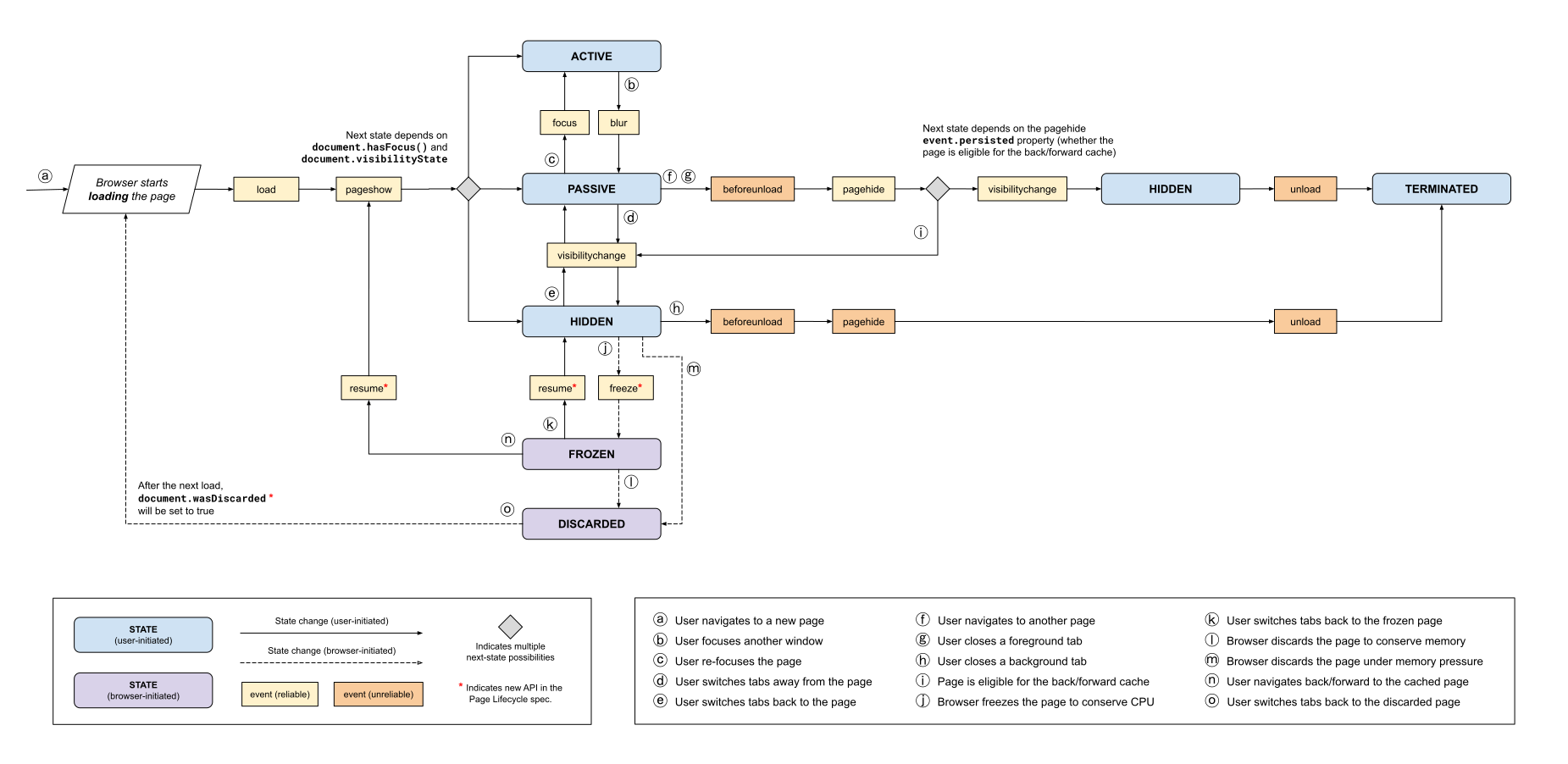](https://developer.chrome.com/docs/web-platform/image/page-lifecycle-api-state.svg) Page Lifecycle API state and event flow.
### States
The following table explains each state in detail. It also lists the possible
states that can come before and after as well as the events developers can
use to observe changes.
| State | Description |
|---|---|
| **Active** | A page is in the *active* state if it is visible and has input focus. **Possible previous states:** [passive](https://developer.chrome.com/docs/web-platform/page-lifecycle-api.md.txt#state-passive) *(via the [`focus`](https://developer.chrome.com/docs/web-platform/page-lifecycle-api.md.txt#event-focus) event)* [frozen](https://developer.chrome.com/docs/web-platform/page-lifecycle-api.md.txt#state-frozen) *(via the [`resume`](https://developer.chrome.com/docs/web-platform/page-lifecycle-api.md.txt#event-resume) event, then the [`pageshow`](https://developer.chrome.com/docs/web-platform/page-lifecycle-api.md.txt#event-pageshow) event)* **Possible next states:** [passive](https://developer.chrome.com/docs/web-platform/page-lifecycle-api.md.txt#state-passive) *(via the[`blur`](https://developer.chrome.com/docs/web-platform/page-lifecycle-api.md.txt#event-blur) event)* |
| **Passive** | A page is in the *passive* state if it is visible and does not have input focus. **Possible previous states:** [active](https://developer.chrome.com/docs/web-platform/page-lifecycle-api.md.txt#state-active) *(via the [`blur`](https://developer.chrome.com/docs/web-platform/page-lifecycle-api.md.txt#event-blur) event)* [hidden](https://developer.chrome.com/docs/web-platform/page-lifecycle-api.md.txt#state-hidden) *(via the [`visibilitychange`](https://developer.chrome.com/docs/web-platform/page-lifecycle-api.md.txt#event-visibilitychange) event)* [frozen](https://developer.chrome.com/docs/web-platform/page-lifecycle-api.md.txt#state-frozen) *(via the [`resume`](https://developer.chrome.com/docs/web-platform/page-lifecycle-api.md.txt#event-resume) event, then the [`pageshow`](https://developer.chrome.com/docs/web-platform/page-lifecycle-api.md.txt#event-pageshow) event)* **Possible next states:** [active](https://developer.chrome.com/docs/web-platform/page-lifecycle-api.md.txt#state-active) *(via the [`focus`](https://developer.chrome.com/docs/web-platform/page-lifecycle-api.md.txt#event-focus) event)* [hidden](https://developer.chrome.com/docs/web-platform/page-lifecycle-api.md.txt#state-hidden) *(via the [`visibilitychange`](https://developer.chrome.com/docs/web-platform/page-lifecycle-api.md.txt#event-visibilitychange) event)* |
| **Hidden** | A page is in the *hidden* state if it is not visible (and has not been frozen, discarded, or terminated). **Possible previous states:** [passive](https://developer.chrome.com/docs/web-platform/page-lifecycle-api.md.txt#state-passive) *(via the [`visibilitychange`](https://developer.chrome.com/docs/web-platform/page-lifecycle-api.md.txt#event-visibilitychange) event)* [frozen](https://developer.chrome.com/docs/web-platform/page-lifecycle-api.md.txt#state-frozen) *(via the [`resume`](https://developer.chrome.com/docs/web-platform/page-lifecycle-api.md.txt#event-resume) event, then the [`pageshow`](https://developer.chrome.com/docs/web-platform/page-lifecycle-api.md.txt#event-pageshow) event)* **Possible next states:** [passive](https://developer.chrome.com/docs/web-platform/page-lifecycle-api.md.txt#state-passive) *(via the [`visibilitychange`](https://developer.chrome.com/docs/web-platform/page-lifecycle-api.md.txt#event-visibilitychange) event)* [frozen](https://developer.chrome.com/docs/web-platform/page-lifecycle-api.md.txt#state-frozen) *(via the [`freeze`](https://developer.chrome.com/docs/web-platform/page-lifecycle-api.md.txt#event-freeze) event)* [discarded](https://developer.chrome.com/docs/web-platform/page-lifecycle-api.md.txt#state-discarded) *(no events fired)* [terminated](https://developer.chrome.com/docs/web-platform/page-lifecycle-api.md.txt#state-terminated) *(no events fired)* |
| **Frozen** | In the *frozen* state the browser suspends execution of [freezable](https://wicg.github.io/page-lifecycle/spec.html#html-task-source-dfn) [tasks](https://html.spec.whatwg.org/multipage/webappapis.html#queue-a-task) in the page's [task queues](https://html.spec.whatwg.org/multipage/webappapis.html#task-queue) until the page is unfrozen. This means things like JavaScript timers and fetch callbacks don't run. Already-running tasks can finish (most importantly the [`freeze`](https://developer.chrome.com/docs/web-platform/page-lifecycle-api.md.txt#event-freeze) callback), but they may be limited in what they can do and how long they can run. Browsers freeze pages as a way to preserve CPU/battery/data usage; they also do it as a way to enable faster [back/forward navigations](https://developer.chrome.com/docs/web-platform/page-lifecycle-api.md.txt#back-forward-cache) --- avoiding the need for a full page reload. **Possible previous states:** [hidden](https://developer.chrome.com/docs/web-platform/page-lifecycle-api.md.txt#state-hidden) *(via the [`freeze`](https://developer.chrome.com/docs/web-platform/page-lifecycle-api.md.txt#event-freeze) event)* **Possible next states:** [active](https://developer.chrome.com/docs/web-platform/page-lifecycle-api.md.txt#state-active) *(via the [`resume`](https://developer.chrome.com/docs/web-platform/page-lifecycle-api.md.txt#event-resume) event, then the [`pageshow`](https://developer.chrome.com/docs/web-platform/page-lifecycle-api.md.txt#event-pageshow) event)* [passive](https://developer.chrome.com/docs/web-platform/page-lifecycle-api.md.txt#state-passive) *(via the [`resume`](https://developer.chrome.com/docs/web-platform/page-lifecycle-api.md.txt#event-resume) event, then the [`pageshow`](https://developer.chrome.com/docs/web-platform/page-lifecycle-api.md.txt#event-pageshow) event)* [hidden](https://developer.chrome.com/docs/web-platform/page-lifecycle-api.md.txt#state-hidden) *(via the [`resume`](https://developer.chrome.com/docs/web-platform/page-lifecycle-api.md.txt#event-resume) event)* [discarded](https://developer.chrome.com/docs/web-platform/page-lifecycle-api.md.txt#state-discarded) *(no events fired)* |
| **Terminated** | A page is in the *terminated* state once it has started being unloaded and cleared from memory by the browser. No [new tasks](https://html.spec.whatwg.org/multipage/webappapis.html#queue-a-task) can start in this state, and in-progress tasks may be killed if they run too long. **Possible previous states:** [hidden](https://developer.chrome.com/docs/web-platform/page-lifecycle-api.md.txt#state-hidden) *(via the [`pagehide`](https://developer.chrome.com/docs/web-platform/page-lifecycle-api.md.txt#event-pagehide) event)* **Possible next states:** NONE |
| **Discarded** | A page is in the *discarded* state when it is unloaded by the browser in order to conserve resources. No tasks, event callbacks, or JavaScript of any kind can run in this state, as discards typically occur under resource constraints, where starting new processes is impossible. In the *discarded* state the tab itself (including the tab title and favicon) is usually visible to the user even though the page is gone. **Possible previous states:** [hidden](https://developer.chrome.com/docs/web-platform/page-lifecycle-api.md.txt#state-frozen) *(no events fired)* [frozen](https://developer.chrome.com/docs/web-platform/page-lifecycle-api.md.txt#state-frozen) *(no events fired)* **Possible next states:** NONE |
### Events
Browsers dispatch a lot of events, but only a small portion of them signal a
possible change in Page Lifecycle state. The following table outlines all events
that pertain to lifecycle and lists what states they may transition to and from.
| Name | Details |
|---|---|
| [`focus`](https://developer.mozilla.org/docs/Web/Events/focus) | A DOM element has received focus. ***Note:** a `focus` event does not necessarily signal a state change. It only signals a state change if the page did not previously have input focus.* **Possible previous states:** [passive](https://developer.chrome.com/docs/web-platform/page-lifecycle-api.md.txt#state-passive) **Possible current states:** [active](https://developer.chrome.com/docs/web-platform/page-lifecycle-api.md.txt#state-active) |
| [`blur`](https://developer.mozilla.org/docs/Web/Events/blur) | A DOM element has lost focus. ***Note:** a `blur` event does not necessarily signal a state change. It only signals a state change if the page no longer has input focus (i.e. the page did not just switch focus from one element to another).* **Possible previous states:** [active](https://developer.chrome.com/docs/web-platform/page-lifecycle-api.md.txt#state-active) **Possible current states:** [passive](https://developer.chrome.com/docs/web-platform/page-lifecycle-api.md.txt#state-passive) |
| [`visibilitychange`](https://developer.mozilla.org/docs/Web/Events/visibilitychange) | The document's [`visibilityState`](https://developer.mozilla.org/docs/Web/API/Document/visibilityState) value has changed. This can happen when a user navigates to a new page, switches tabs, closes a tab, minimizes or closes the browser, or switches apps on mobile operating systems. **Possible previous states:** [passive](https://developer.chrome.com/docs/web-platform/page-lifecycle-api.md.txt#state-passive) [hidden](https://developer.chrome.com/docs/web-platform/page-lifecycle-api.md.txt#state-hidden) **Possible current states:** [passive](https://developer.chrome.com/docs/web-platform/page-lifecycle-api.md.txt#state-passive) [hidden](https://developer.chrome.com/docs/web-platform/page-lifecycle-api.md.txt#state-hidden) |
| [`freeze`](https://wicg.github.io/page-lifecycle/spec.html#sec-api) **\*** | The page has just been frozen. Any [freezable](https://wicg.github.io/page-lifecycle/spec.html#html-task-source-dfn) task in the page's task queues won't be started. **Possible previous states:** [hidden](https://developer.chrome.com/docs/web-platform/page-lifecycle-api.md.txt#state-hidden) **Possible current states:** [frozen](https://developer.chrome.com/docs/web-platform/page-lifecycle-api.md.txt#state-frozen) |
| [`resume`](https://wicg.github.io/page-lifecycle/spec.html#sec-api) **\*** | The browser has resumed a *frozen* page. **Possible previous states:** [frozen](https://developer.chrome.com/docs/web-platform/page-lifecycle-api.md.txt#state-frozen) **Possible current states:** [active](https://developer.chrome.com/docs/web-platform/page-lifecycle-api.md.txt#state-active) *(if followed by the [`pageshow`](https://developer.mozilla.org/docs/Web/Events/pageshow) event)* [passive](https://developer.chrome.com/docs/web-platform/page-lifecycle-api.md.txt#state-passive) *(if followed by the [`pageshow`](https://developer.mozilla.org/docs/Web/Events/pageshow) event)* [hidden](https://developer.chrome.com/docs/web-platform/page-lifecycle-api.md.txt#state-hidden) |
| [`pageshow`](https://developer.mozilla.org/docs/Web/Events/pageshow) | A session history entry is being traversed to. This could be either a brand new page load or a page taken from the [back/forward cache](https://developer.chrome.com/docs/web-platform/page-lifecycle-api.md.txt#back-forward-cache). If the page was taken from the back/forward cache, the event's `persisted` property is `true`, otherwise it is `false`. **Possible previous states:** [frozen](https://developer.chrome.com/docs/web-platform/page-lifecycle-api.md.txt#state-frozen) *(a [`resume`](https://developer.chrome.com/docs/web-platform/page-lifecycle-api.md.txt#event-resume) event would have also fired)* **Possible current states:** [active](https://developer.chrome.com/docs/web-platform/page-lifecycle-api.md.txt#state-active) [passive](https://developer.chrome.com/docs/web-platform/page-lifecycle-api.md.txt#state-passive) [hidden](https://developer.chrome.com/docs/web-platform/page-lifecycle-api.md.txt#state-hidden) |
| [`pagehide`](https://developer.mozilla.org/docs/Web/Events/pagehide) | A session history entry is being traversed from. If the user is navigating to another page and the browser is able to add the current page to the [back/forward cache](https://developer.chrome.com/docs/web-platform/page-lifecycle-api.md.txt#back-forward-cache) to be reused later, the event's `persisted` property is `true`. When `true`, the page is entering the *frozen* state, otherwise it is entering the *terminated* state. **Possible previous states:** [hidden](https://developer.chrome.com/docs/web-platform/page-lifecycle-api.md.txt#state-hidden) **Possible current states:** [frozen](https://developer.chrome.com/docs/web-platform/page-lifecycle-api.md.txt#state-frozen) *(`event.persisted` is true, [`freeze`](https://developer.chrome.com/docs/web-platform/page-lifecycle-api.md.txt#event-freeze) event follows)* [terminated](https://developer.chrome.com/docs/web-platform/page-lifecycle-api.md.txt#state-terminated) *(`event.persisted` is false, [`unload`](https://developer.mozilla.org/docs/Web/Events/unload) event follows)* |
| [`beforeunload`](https://developer.mozilla.org/docs/Web/Events/beforeunload) | The window, the document and its resources are about to be unloaded. The document is still visible and the event is still cancelable at this point. ***Important:** the `beforeunload` event should only be used to alert the user of unsaved changes. Once those changes are saved, the event should be removed. It should never be added unconditionally to the page, as doing so can hurt performance in some cases. See the [legacy APIs section](https://developer.chrome.com/docs/web-platform/page-lifecycle-api.md.txt#legacy_lifecycle_apis_to_avoid) for details.* **Possible previous states:** [hidden](https://developer.chrome.com/docs/web-platform/page-lifecycle-api.md.txt#state-hidden) **Possible current states:** [terminated](https://developer.chrome.com/docs/web-platform/page-lifecycle-api.md.txt#state-terminated) |
| [`unload`](https://developer.mozilla.org/docs/Web/Events/unload) | The page is being unloaded. ***Warning:** using the `unload` event is never recommended because it's unreliable and can hurt performance in some cases. It has been [deprecated in Chrome](https://developer.chrome.com/docs/blog/unload-deprecated-in-chrome). See the [legacy APIs section](https://developer.chrome.com/docs/web-platform/page-lifecycle-api.md.txt#legacy_lifecycle_apis_to_avoid) for more details.* **Possible previous states:** [hidden](https://developer.chrome.com/docs/web-platform/page-lifecycle-api.md.txt#state-hidden) **Possible current states:** [terminated](https://developer.chrome.com/docs/web-platform/page-lifecycle-api.md.txt#state-terminated) |
**\*** Indicates a new event defined by the Page Lifecycle API
### New features added in Chrome 68
The previous chart shows two states that are system-initiated rather than
user-initiated: [frozen](https://developer.chrome.com/docs/web-platform/page-lifecycle-api.md.txt#state-frozen) and [discarded](https://developer.chrome.com/docs/web-platform/page-lifecycle-api.md.txt#state-discarded).
As mentioned previously, browsers today already occasionally freeze and discard
hidden tabs (at their discretion), but developers have no way of knowing when
this is happening.
In Chrome 68, developers can now observe when a hidden tab is frozen and
unfrozen by listening for the [`freeze`](https://wicg.github.io/page-lifecycle/spec.html#sec-api)
and [`resume`](https://developer.chrome.com/docs/web-platform/page-lifecycle-api.md.txt#event-resume) events on `document`.
```javascript
document.addEventListener('freeze', (event) => {
// The page is now frozen.
});
document.addEventListener('resume', (event) => {
// The page has been unfrozen.
});
```
From Chrome 68 the `document` object now includes a
[`wasDiscarded`](https://wicg.github.io/page-lifecycle/spec.html#sec-api)
property on desktop Chrome ([Android support is being tracked in this issue](https://issues.chromium.org/issues/40268039)). To determine whether a page was discarded while in a hidden
tab, you can inspect the value of this property at page load time (note:
discarded pages must be reloaded to use again).
```javascript
if (document.wasDiscarded) {
// Page was previously discarded by the browser while in a hidden tab.
}
```
For advice on what things are important to do in the `freeze` and `resume`
events, as well as how to handle and prepare for pages being discarded, see
[developer recommendations for each state](https://developer.chrome.com/docs/web-platform/page-lifecycle-api.md.txt#developer_recommendations_for_each_state).
The next several sections offer an overview of how these new features fit into
the existing web platform states and events.
## How to observe Page Lifecycle states in code
In the [active](https://developer.chrome.com/docs/web-platform/page-lifecycle-api.md.txt#state-active), [passive](https://developer.chrome.com/docs/web-platform/page-lifecycle-api.md.txt#state-passive), and [hidden](https://developer.chrome.com/docs/web-platform/page-lifecycle-api.md.txt#state-hidden)
states, it's possible to run JavaScript code that determines the current
Page Lifecycle state from existing web platform APIs.
```javascript
const getState = () => {
if (document.visibilityState === 'hidden') {
return 'hidden';
}
if (document.hasFocus()) {
return 'active';
}
return 'passive';
};
```
The [frozen](https://developer.chrome.com/docs/web-platform/page-lifecycle-api.md.txt#state-frozen) and [terminated](https://developer.chrome.com/docs/web-platform/page-lifecycle-api.md.txt#state-terminated) states, on the
other hand, can only be detected in their respective event listener
([`freeze`](https://developer.chrome.com/docs/web-platform/page-lifecycle-api.md.txt#event-freeze) and [`pagehide`](https://developer.chrome.com/docs/web-platform/page-lifecycle-api.md.txt#event-pagehide)) as the state is
changing.
### How to observe state changes
Building on the `getState()` function defined previously, you can observe all Page
Lifecycle state changes with the following code.
```javascript
// Stores the initial state using the `getState()` function (defined above).
let state = getState();
// Accepts a next state and, if there's been a state change, logs the
// change to the console. It also updates the `state` value defined above.
const logStateChange = (nextState) => {
const prevState = state;
if (nextState !== prevState) {
console.log(`State change: ${prevState} >>> ${nextState}`);
state = nextState;
}
};
// Options used for all event listeners.
const opts = {capture: true};
// These lifecycle events can all use the same listener to observe state
// changes (they call the `getState()` function to determine the next state).
['pageshow', 'focus', 'blur', 'visibilitychange', 'resume'].forEach((type) => {
window.addEventListener(type, () => logStateChange(getState()), opts);
});
// The next two listeners, on the other hand, can determine the next
// state from the event itself.
window.addEventListener('freeze', () => {
// In the freeze event, the next state is always frozen.
logStateChange('frozen');
}, opts);
window.addEventListener('pagehide', (event) => {
// If the event's persisted property is `true` the page is about
// to enter the back/forward cache, which is also in the frozen state.
// If the event's persisted property is not `true` the page is
// about to be unloaded.
logStateChange(event.persisted ? 'frozen' : 'terminated');
}, opts);
```
This code does three things:
- Sets the initial state using the `getState()` function.
- Defines a function that accepts a next state and, if there's a change, logs the state changes to the console.
- Adds [capturing](https://developer.mozilla.org/docs/Web/API/EventTarget/addEventListener#capture) event listeners for all necessary lifecycle events, which in turn call `logStateChange()`, passing in the next state.
One thing to note about the code is that all the event listeners are added
to `window` and they all pass
[`{capture: true}`](https://developer.mozilla.org/docs/Web/API/EventTarget/addEventListener#Syntax).
There are a few reasons for this:
- Not all Page Lifecycle events have the same target. `pagehide`, and `pageshow` are fired on `window`; `visibilitychange`, `freeze`, and `resume` are fired on `document`, and `focus` and `blur` are fired on their respective DOM elements.
- Most of these events don't bubble, which means it's impossible to add non-capturing event listeners to a common ancestor element and observe all of them.
- The capture phase executes before the target or bubble phases, so adding listeners there helps ensure they run before other code can cancel them.
## Developer recommendations for each state
As developers, it's important to both understand Page Lifecycle states *and*
know how to observe them in code because the type of work you should (and should
not) be doing depends largely on what state your page is in.
For example, it clearly doesn't make sense to display a transient notification
to the user if the page is in the hidden state. While this example is pretty
obvious, there are other recommendations that aren't so obvious that are worth
enumerating.
| State | Developer recommendations |
|---|---|
| **`Active`** | The *active* state is the most critical time for the user and thus the most important time for your page to be [responsive to user input](https://developers.google.com/web/updates/2018/05/first-input-delay). Any non-UI work that may block the main thread should be deprioritized to [idle periods](https://developers.google.com/web/updates/2015/08/using-requestidlecallback) or [offloaded to a web worker](https://developers.google.com/web/fundamentals/performance/rendering/optimize-javascript-execution#reduce_complexity_or_use_web_workers). |
| **`Passive`** | In the *passive* state the user is not interacting with the page, but they can still see it. This means UI updates and animations should still be smooth, but the timing of when these updates occur is less critical. When the page changes from *active* to *passive*, it's a good time to persist unsaved application state. |
| **`Hidden`** | When the page changes from *passive* to *hidden*, it's possible the user won't interact with it again until it's reloaded. The transition to *hidden* is also often the last state change that's reliably observable by developers (this is especially true on mobile, as users can close tabs or the browser app itself, and the `beforeunload`, `pagehide`, and `unload` events are not fired in those cases). This means you should treat the *hidden* state as the likely end to the user's session. In other words, persist any unsaved application state and send any unsent analytics data. You should also stop making UI updates (since they won't be seen by the user), and you should stop any tasks that a user wouldn't want running in the background. |
| **`Frozen`** | In the *frozen* state, [freezable tasks](https://html.spec.whatwg.org/multipage/webappapis.html#queue-a-task) in the [task queues](https://html.spec.whatwg.org/multipage/webappapis.html#task-queue) are suspended until the page is unfrozen --- which may never happen (e.g. if the page is discarded). This means when the page changes from *hidden* to *frozen* it's essential that you stop any timers or tear down any connections that, if frozen, could affect other open tabs in the same origin, or affect the browser's ability to put the page in the [back/forward cache](https://developer.chrome.com/docs/web-platform/page-lifecycle-api.md.txt#back-forward-cache). In particular, it's important that you: - Close all open [IndexedDB](https://developer.mozilla.org/docs/Web/API/IndexedDB_API) connections. - Close open [BroadcastChannel](https://developer.mozilla.org/docs/Web/API/Broadcast_Channel_API) connections. - Close active [WebRTC](https://developer.mozilla.org/docs/Web/API/WebRTC_API) connections. - Stop any network polling or close any open [Web Socket](https://developer.mozilla.org/docs/Web/API/WebSockets_API) connections. - Release any held [Web Locks](https://github.com/inexorabletash/web-locks). You should also persist any dynamic view state (e.g. scroll position in an infinite list view) to [`sessionStorage`](https://developer.mozilla.org/docs/Web/API/Window/sessionStorage) (or [IndexedDB via `commit()`](https://developer.mozilla.org/docs/Web/API/IDBTransaction/commit)) that you'd want restored if the page were discarded and reloaded later. If the page transitions from *frozen* back to *hidden*, you can reopen any closed connections or restart any polling you stopped when the page was initially frozen. |
| **`Terminated`** | You generally don't need to take any action when a page transitions to the *terminated* state. Since pages being unloaded as a result of user action always go through the *hidden* state before entering the *terminated* state, the *hidden* state is where session-ending logic (e.g. persisting application state and reporting to analytics) should be performed. Also (as mentioned in the [recommendations for the *hidden* state](https://developer.chrome.com/docs/web-platform/page-lifecycle-api.md.txt#advice-hidden)), it's very important for developers to realize that the transition to the *terminated* state cannot be reliably detected in many cases (especially on mobile), so developers who depend on termination events (e.g. `beforeunload`, `pagehide`, and `unload`) are likely losing data. |
| **`Discarded`** | The *discarded* state is not observable by developers at the time a page is being discarded. This is because pages are typically discarded under resource constraints, and unfreezing a page just to allow script to run in response to a discard event is simply not possible in most cases. As a result, you should prepare for the possibility of a discard in the change from *hidden* to *frozen*, and then you can react to the restoration of a discarded page at page load time by checking `document.wasDiscarded`. |
Once again, since reliability and ordering of lifecycle events is not
consistently implemented in all browsers, the easiest way to follow the advice
in the table is to use
[PageLifecycle.js](https://github.com/GoogleChromeLabs/page-lifecycle).
## Legacy lifecycle APIs to avoid
The following events should be avoided where at all possible.
### The unload event
> [!WARNING]
> **Warning:** Never use the `unload` event on modern browsers. It has been [deprecated in Chrome](https://developer.chrome.com/blog/unload-deprecated-in-chrome.md.txt).
Many developers treat the `unload` event as a guaranteed callback and use it as
an end-of-session signal to save state and send analytics data, but doing this
is **extremely unreliable** , especially on mobile! The `unload` event does not
fire in many typical unload situations, including closing a tab from the tab
switcher on mobile or closing the browser app from the app switcher.
For this reason, it's always better to rely on the
[`visibilitychange`](https://developer.chrome.com/docs/web-platform/page-lifecycle-api.md.txt#event-visibilitychange) event to determine when a session
ends, and consider the hidden state the
[last reliable time to save app and user data](https://developer.chrome.com/docs/web-platform/page-lifecycle-api.md.txt#advice-hidden).
Furthermore, the mere presence of a registered `unload` event handler (via
either `onunload` or `addEventListener()`) can prevent browsers from being able
to put pages in the [back/forward cache](https://developer.chrome.com/docs/web-platform/page-lifecycle-api.md.txt#back-forward-cache) for faster
back and forward loads.
In all modern browsers, it's recommended to always use the
[`pagehide`](https://developer.chrome.com/docs/web-platform/page-lifecycle-api.md.txt#event-pagehide) event to detect possible page unloads (a.k.a the
[terminated](https://developer.chrome.com/docs/web-platform/page-lifecycle-api.md.txt#state-terminated) state) rather than the `unload` event. If you
need to support Internet Explorer versions 10 and lower, you should feature
detect the `pagehide` event and only use `unload` if the browser doesn't support
`pagehide`:
```javascript
const terminationEvent = 'onpagehide' in self ? 'pagehide' : 'unload';
window.addEventListener(terminationEvent, (event) => {
// Note: if the browser is able to cache the page, `event.persisted`
// is `true`, and the state is frozen rather than terminated.
});
```
### The beforeunload event
> [!CAUTION]
> **Caution:** Never add a `beforeunload` listener unconditionally or use it as an end-of-session signal. Only add it when a user has unsaved work, and remove it as soon as that work has been saved.
The `beforeunload` event has a similar problem to the `unload` event, in that,
historically, the presence of a `beforeunload` event could prevent pages from
being eligible for [back/forward cache](https://developer.chrome.com/docs/web-platform/page-lifecycle-api.md.txt#back-forward-cache). Modern browsers
don't have this restriction. Though some browsers, as a precaution, won't fire
the `beforeunload` event when attempting to put a page into the back/forward
cache, which means the event is not reliable as an end-of-session signal.
Additionally, some browsers (including [Chrome](https://issues.chromium.org/issues/40513391))
require a user-interaction on the page before allowing the `beforeunload` event
to fire, further affecting its reliability.
One difference between `beforeunload` and `unload` is that there are
legitimate uses of `beforeunload`. For example, when you want to warn the user
that they have unsaved changes they'll lose if they continue unloading the page.
Since there are valid reasons to use `beforeunload`, it's recommended that you
*only* add `beforeunload` listeners when a user has unsaved changes and then
remove them immediately after they are saved.
In other words, don't do this (since it adds a `beforeunload` listener
unconditionally):
```javascript
addEventListener('beforeunload', (event) => {
// A function that returns `true` if the page has unsaved changes.
if (pageHasUnsavedChanges()) {
event.preventDefault();
// Legacy support for older browsers.
event.returnValue = true;
}
});
```
Instead do this (since it only adds the `beforeunload` listener when it's
needed, and removes it when it's not):
```javascript
const beforeUnloadListener = (event) => {
event.preventDefault();
// Legacy support for older browsers.
event.returnValue = true;
};
// A function that adds a `beforeunload` listener if there are unsaved changes.
onPageHasUnsavedChanges(() => {
addEventListener('beforeunload', beforeUnloadListener);
});
// A function that removes the `beforeunload` listener when the page's unsaved
// changes are resolved.
onAllChangesSaved(() => {
removeEventListener('beforeunload', beforeUnloadListener);
});
```
## FAQs
**Why isn't there a "loading" state?**
The Page Lifecycle API defines states to be discrete and mutually exclusive.
Since a page can be loaded in either the active, passive, or hidden state, and
since it can change states---or even be terminated---before it finishes loading, a
separate loading state does not make sense within this paradigm.
**My page does important work when it's hidden, how can I stop it from being frozen or discarded?**
There are lots of legitimate reasons web pages shouldn't be frozen while running
in the hidden state. The most obvious example is an app that plays music.
There are also situations where it would be risky for Chrome to discard a page,
like if it contains a form with unsubmitted user input, or if it has a
`beforeunload` handler that warns when the page is unloading.
For the moment, Chrome is going to be conservative when discarding pages and
only do so when it's confident it won't affect users. For example, pages that
have been observed to do any of the following while in the hidden state won't
be discarded unless under extreme resource constraints:
- Playing audio
- Using WebRTC
- Updating the table title or favicon
- Showing alerts
- Sending push notifications
For the current list features used to determine whether a tab can be safely
frozen or discarded, see: [Heuristics for Freezing \& Discarding](https://docs.google.com/document/d/1QJpuBTdllLVflMJSov0tlFX3e3yfSfd_-al2IBavbQM/edit?usp=sharing)
in Chrome.
> [!NOTE]
> **Note:** In the case of pages that update the title or favicon to alert users of unread notifications, we have a [proposal to enable
> these kinds of updates from service worker](https://github.com/WICG/page-lifecycle/issues/24), which would allow Chrome to freeze or discard the page but still show changes to the tab title or favicon.
**What is the back/forward cache?**
The [back/forward cache](https://web.dev/articles/bfcache) is a term used to describe a
navigation optimization some browsers implement that makes using the back and
forward buttons faster.
When a user navigates away from a page, these browsers freeze a version of that
page so that it can be quickly resumed in case the user navigates back using
the back or forward buttons. Remember that adding an `unload`
event handler [prevents this optimization from being possible](https://developer.chrome.com/docs/web-platform/page-lifecycle-api.md.txt#legacy_lifecycle_apis_to_avoid).
For all intents and purposes, this freezing is functionally the same as
the freezing browsers perform to conserve CPU/battery; for that reason it's
considered part of the [frozen](https://developer.chrome.com/docs/web-platform/page-lifecycle-api.md.txt#state-frozen) lifecycle state.
**If I can't run asynchronous APIs in the frozen or terminated states, how can I save data to IndexedDB?**
In frozen and terminated states,
[freezable tasks](https://wicg.github.io/page-lifecycle/spec.html#html-task-source-dfn)
in a page's [task queues](https://html.spec.whatwg.org/multipage/webappapis.html#task-queue)
are suspended, which means asynchronous and callback-based APIs cannot be
reliably used.
While most IndexedDB APIs are callback-based, the
[`commit()`](https://developer.mozilla.org/docs/Web/API/IDBTransaction/commit)
method on the
[`IDBTransaction`](https://developer.mozilla.org/docs/Web/API/IDBTransaction)
interface provides a way to initiate the commit process on an active
transaction without waiting for events from outstanding requests to be
dispatched. This
provides a reliable way to save data to an IndexedDB database in a `freeze` or
`visibilitychange` event listener because the commit is run right away rather
than being queued in a separate task.
> [!NOTE]
> **Note:** when using the `commit()` method in situations where the browser has already begun to freeze or terminate a page, the transaction's `onsuccess` callback may not run---**even if the transaction has committed successfully** . This means that tests using the `commit()` method in these situations will generally need to reload the page to assert that the data was saved.
## Testing your app in the frozen and discarded states
To test how your app behaves in the frozen and discarded states, you can visit
`chrome://discards` to actually freeze or discard any of your
open tabs.
[](https://developer.chrome.com/docs/web-platform/image/chrome-discards-ui.png) Chrome Discards UI
This allows you to ensure your page correctly handles the `freeze` and `resume`
events as well as the `document.wasDiscarded` flag when pages are reloaded after
a discard.
## Summary
Developers who want to respect the system resources of their user's devices
should build their apps with Page Lifecycle states in mind. It's critical that
web pages are not consuming excessive system resources in situations that the
user wouldn't expect
The more developers start implementing the new Page Lifecycle APIs, the safer it
will be for browsers to freeze and discard pages that aren't being used. This
means browsers will consume less memory, CPU, battery, and network resources,
which is a win for users.