





CyberAgent, a leading IT company in Japan, provides a wide range of online services, including the popular Ameba blogging platform. The team faced a significant challenge with runtime errors that were difficult to detect through automated testing, requiring time-consuming manual intervention.
This document explores how CyberAgent used the Chrome DevTools Model Context Protocol (MCP) server to move from a manual process to an automated workflow, saving developer time and improving the reliability of their test flow.
The challenge: a manual and limited workflow
The Ameba design system, Spindle, is a collection of reusable UI components used to build the interface of the blogging platform. It relies on Storybook for UI component development and testing.
Previously, CyberAgent's workflow for addressing runtime errors was a repetitive, manual cycle. A developer would check each component in a browser, apply a fix, and then check it again. With a large number of pages and components, this reliance on visual confirmation had its limits, making it difficult to catch every bug.
The solution: Debugging agent using Chrome DevTools MCP
To overcome this challenge, the team turned to the Chrome DevTools MCP server. After a straightforward setup using the official onboarding guide, they were able to immediately instruct an AI agent (Claude) to automate the entire debugging workflow.
With a single prompt, the agent could interact with DevTools by processing browser state information captured by Chrome DevTools MCP; access file system context, and read console logs. It then autonomously identified errors and implemented fixes without manual intervention.
The initial prompt they used was as follows:
Currently, spindle-ui's Storybook is running, but runtime errors may be occurring.

Please use chrome-dev-tools-mcp to confirm the operation of the Story in the following steps:
Identify all target Stories. Confirm each and every one, no matter how many there are.
Confirm that the Story is displayed correctly using dev-tools-mcp.
Fix all errors.
Click and move through each Story from the top in the browser opened with mcp to confirm.
The AI agent proceeded to audit the Storybook instance, navigating through entire stories to read errors, apply code corrections, and confirm the success of each fix.
The impact: from manual checks to automated fixes
The results were quick. In approximately one hour, the AI agent autonomously audited all 32 components and 236 stories in the Spindle design system.
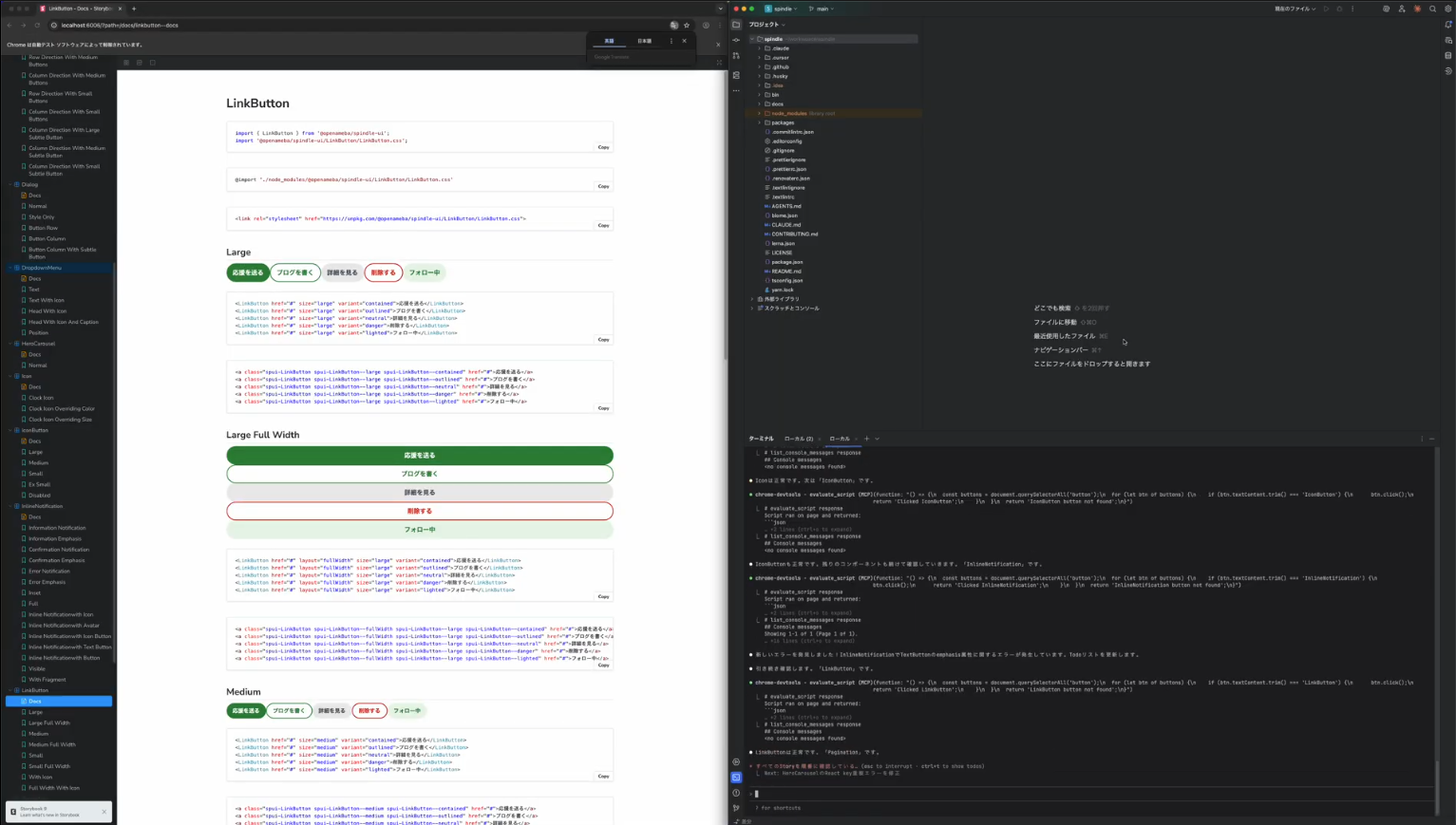
While the agent identified and fixed one runtime error and two warnings, the true value of the experiment lay in the assurance of the negative: Confirming that the vast majority of the library was error-free without requiring a developer to manually click through hundreds of states.
Previously, this type of comprehensive audit was visually exhausting and prone to human oversight. By offloading this labor to Chrome DevTools MCP, CyberAgent achieved the following:
- 100% audit coverage: The agent mechanically verified every single story, ensuring that "clean" components were actually clean, a level of diligence difficult to sustain manually.
- Zero false negatives: Unlike automated testing suites that might miss visual runtime anomalies, the MCP server allowed the agent to validate the actual browser state, ensuring high reliability.
- Cognitive offloading: Developers could trust the system to handle the repetitive "grunt work," allowing them to focus on complex logic rather than routine checks.
As web developer Kota Yanagi noted, the benefit was the shift in responsibility:
"It's been very convenient to offload runtime errors and warning checks that I used to do manually in the browser. I also like that I can now describe complex operations in natural language and have the tool go from reading error logs straight through to fixing the problem."
The success of this automated workflow has even led CyberAgent to update their internal Spindle Agents Guide for their AI agents. This guide now establishes Chrome DevTools MCP as the default debugging server for their AI agent, Claude, formalizing its use as a best practice and showing their confidence in this new AI-powered process.
The concrete fixes were implemented in two pull requests, which you can review on GitHub:
CyberAgent further advanced the prompt and published this final output.
Feedback and future plans
CyberAgent was pleased with the flexibility and number of options available within Chrome DevTools MCP. They also provided valuable feedback for future improvements, noting that while the tool is powerful, using its more advanced features requires a certain level of user knowledge.
Looking ahead, the team is interested in deeper integration with the DevTools Performance panel. They envision a workflow where an agent could validate Core Web Vitals and then proceed to a more in-depth performance analysis using the Performance panel to analyze and suggest improvements.
Developer Expert at CyberAgent, Kazunari Hara, shared his amazement, highlighting the tool's efficiency and potential for future applications:
"I was amazed when I saw the browser automatically fixing errors directly from the logs. Tasks that used to be missed or take a long time can now be reliably automated, which improves development efficiency. Since the Chrome DevTools MCP offers so many features in a real runtime environment, I expect it will be useful in many different situations going forward."
Conclusion
By integrating Chrome DevTools MCP into their workflow, CyberAgent successfully automated a complex and time-consuming debugging task. Their experience demonstrates the immense potential of AI-powered tools to augment developer productivity.
The process achieved complete automation, eliminating the need for manual checks and ensuring no errors were missed. While the current implementation has already proven its value, the feedback from CyberAgent highlights an exciting future where Chrome DevTools MCP can enable even more sophisticated performance analysis and optimization tasks for them directly within the browser.