


Published: May 21, 2026
At Google I/O 2026, we talked about a web where signing in isn't a chore. It should be a secure, simplified entry point that actually makes users feel safe. This post recaps how you can fix your account flows, cut the friction, and protect people from the start.
Quick access
- Why modernization matters
- Streamline account creation
- Frictionless attribute verification
- Implement passkeys for seamless sign-in
- Strategic passkey adoption
- Passkey management and resilient recovery
Why modernization matters
High-friction flows (like messy sign-up forms, that annoying "forgot password" loop, or a wall of sign-in buttons) kill the mood. They are "context-switch killers" that drive users away. Old-school passwords and one-time passwords (OTPs) also leave people wide open to phishing.
Every second of friction is an opportunity for a user to drop off. Modernizing your authentication protects your systems and your users. By smoothing out every touchpoint in the identity journey, you naturally increase your conversion rates. For example, pixiv achieved a staggering 99% login success rate (a 29% improvement over passwords) after implementing passkeys. Moving away from weak credentials makes things faster and safer.
Streamline account creation
The first interaction a user has with your app sets the mood. Streamlining account creation is the first step towards improving adoption and safety.
Identity federation as the primary account creation method
You can let your users skip the tedious account creation forms by using identity federation, which lets users sign up with a trusted provider like Google. This provides a robust and streamlined sign-up experience that gets users into your app without the "chore" of typical registration.
Federation means users don't have to type their name or email manually. Since the provider already verified them, you can skip redundant steps to verify them independently and get more people through the door.
In addition, adopting a federated identity solution lets you inherit the security level of a dedicated IdP (Identity Provider). Because IdPs specialize in identity and security, relying on their infrastructure eliminates the risk of building authentication from scratch.
Adopt the Federated Credential Management (FedCM) API
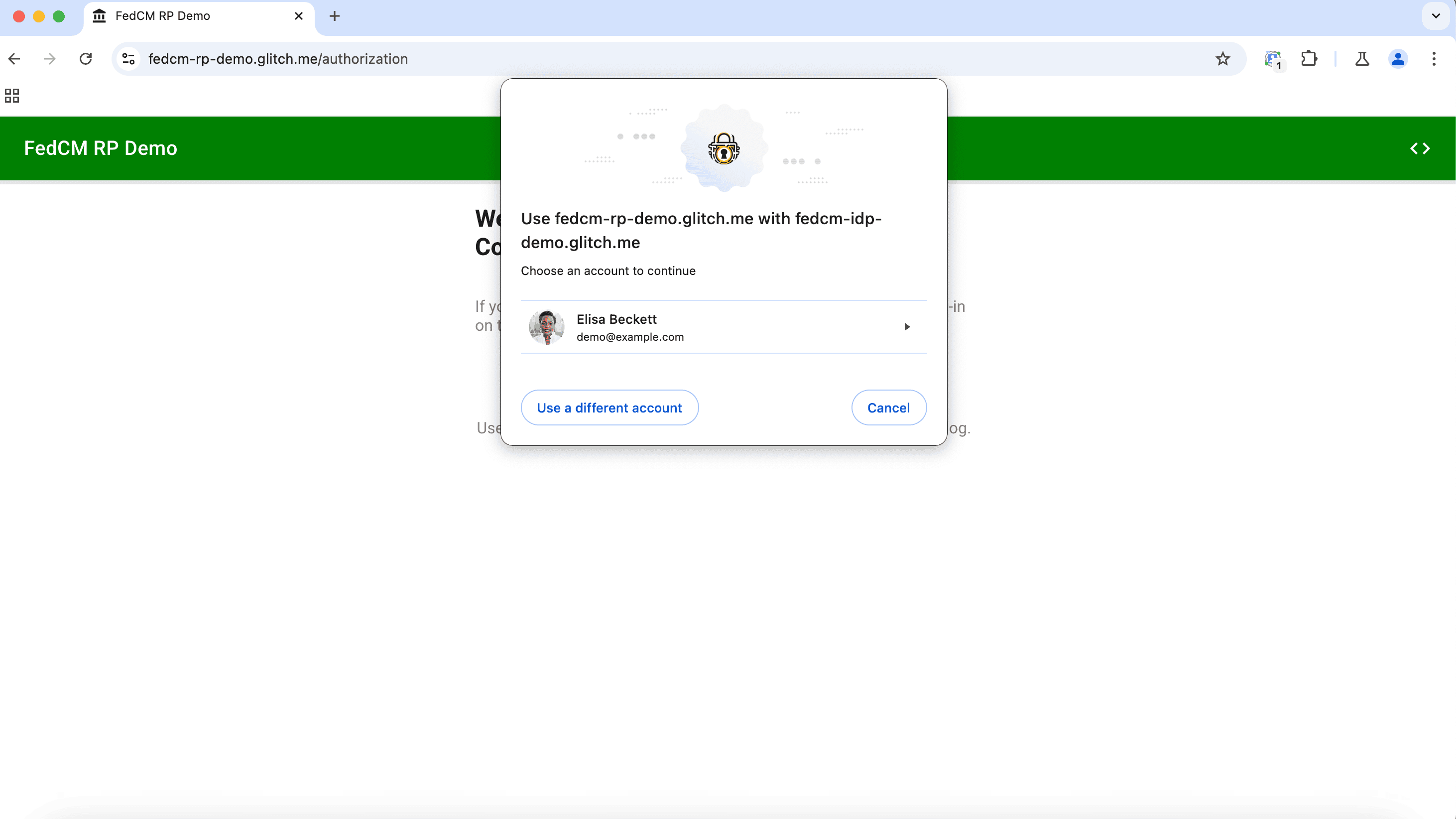
If you act as an IdP, we recommend adopting the FedCM API. It handles the interaction through the browser UI, which protects privacy by preventing tracking while giving users a one-tap sign-in, and declutters the UI by displaying only relevant accounts.
The "Federate-then-upgrade" pattern
Federate-then-upgrade combines the speed of federation with the long-term security of passkeys. If you prompt for a passkey right after a federated sign-up, the user's next login is phishing-resistant from day one.
Optimize forms for Autofill
If manual forms are necessary, use descriptive name and id attributes and
correct autocomplete values to allow the browser to fill the fields for the
user. This reduces the cognitive load and potential for typos during the sign-up
process. See our Sign-up form best
practices for more
details on form optimization.
<label for="email">Email</label>
<input type="email" id="email" name="email" autocomplete="email">

<label for="password">New Password</label>
<input type="password" id="password" name="password" autocomplete="new-password">
Frictionless attribute verification
Making users leave your app to check a code in their email reduces conversion rates. This context switch is where people get distracted and never come back.
Meet the Email Verification Protocol (EVP)
The Email Verification Protocol (EVP), an emerging feature, allows your application to obtain a verified email address directly through the browser.
To opt in to use this feature, append a hidden input field with the
autocomplete="email-verification-token" attribute and with a challenge. The
browser parses the email domain from the input and requests that the email
issuer verify the user has control of this email. Upon successful verification,
the browser presents a verified email claim that your backend can verify
instantly. For the user, this flow happens seamlessly; they only see a
notification upon email verification.
EVP removes the need for friction that drives people away (like magic links or email OTPs) for sign-in, sign-up, and password reset.
<input id="email" type="email" autocomplete="email">
<input type="hidden" name="token" challenge="1234" autocomplete="email-verification-token">
Note that it's up to individual email service providers to support the EVP. Check with your specific provider to see if they plan to support EVP. If you own a custom domain, you may connect it to a supporting email provider to support EVP too.
Since this is still in an experimental stage, we appreciate your feedback on this feature in the GitHub repository.
Digital Credentials API
For sensitive details like a legal name or age, the Digital Credentials API provides a way to request verified data from a user's wallet through browser mediation using selective disclosure. This means you can verify a user is over a certain age, without actually receiving their full date of birth or legal name, preserving their privacy.
See Digital Credentials API: Secure and private identity on the web.
Implement passkeys for seamless sign-in
Passkeys are more than just a replacement for passwords. They are a fundamental shift toward seamless phishing-resistant authentication.
Immediate UI Mode
From Chrome 149, Immediate UI Mode is available. It allows the website to check for credentials the moment a user navigates to your site. If a passkey or password is available in the password manager, the browser mediates the flow with a list of available accounts in a sign-in dialog immediately.
This eliminates the need for a user to select a sign-in method. By proactively offering the credential for the selected account, you create a frictionless "one-tap" experience that feels like magic to the user.
const credential = await navigator.credentials.get({
  password: true,
  uiMode: 'immediate',
  publicKey: publicKeyObject,
});
See, Immediate UI mode for logins.
Passkey form autofill: Use form autofill while transitioning to passkeys
For users on a website that's in transition from passwords to passkeys, passkey form autofill allows passkeys to appear in Autofill suggestions when the input field is focused. This means that if a user already has a passkey, the moment they focus the username field in a sign-in form. If they don't, they can still use the saved password.
To enable this, annotate your username field with autocomplete="username webauthn"
and set the mediation value to 'conditional' when you call
navigator.credentials.get().
This is a critical bridge during the transition to a passwordless future, as it familiarizes users with passkeys in a familiar interface.
See the Passkeys authentication checklist.
Strategic passkey adoption
Adoption is often a matter of timing. Prompting a user at the right moment can significantly increase the likelihood of them enrolling a passkey.
Automatic passkey creation
Nobody wants to dig through their security settings just to set up a new login method. For existing password users, how and when should you prompt users to upgrade to passkeys?
That's where automatic passkey creation comes in. With Conditional Create the browser can automatically upgrade password users to passkeys the exact moment a user logs in with their password manager.
By passing mediation: 'conditional' to the navigator.credentials.create()
API, triggered by the user's recent successful sign-in using the password saved
to the password manager, the browser generates a new passkey natively without
forcing them through extra setup screens.
Zero-friction enrollment means users don't have to make a conscious decision to improve their security. It happens automatically, protecting them without requiring any extra effort. For example, adidas saw an 8% uplift in passkey creations using this zero-prompt strategy.
await navigator.credentials.create({
  mediation: 'conditional',
  publicKey: { ... },
});
See the Passkeys registration checklist
Passkey management and resilient recovery
It is important for users to have their credentials readily available across devices, websites, and services. As well as managing them and making sure they can recover their accounts if a device is lost or stolen.
Cross-platform consistency
If you have multiple properties (for example, an Android app and a website, or multiple websites) that share a login system, you can improve the experience for your users. With seamless credential sharing, password managers can suggest the right credential to your user across all of your properties.
Seamless credential sharing consists of two technologies: Digital Asset Links for passwords and Related Origin Requests for passkeys.
Using Digital Asset Links ensures passwords created on the web are available in your Android app, and the other way around. It also lets password managers suggest an already saved credential across different domains you own that share the same authentication backend.
Use Related Origin Requests to make passkeys available across different domains and apps through your user's credentials manager.
This is just one more way you can make the sign-in experience smoother for your users.
Empower users with a passkey management page
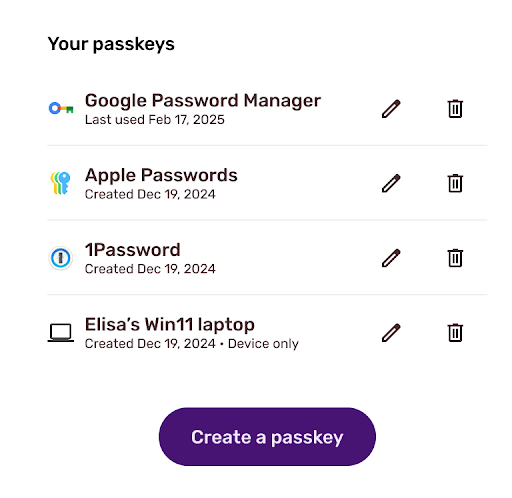
For sophisticated passkey experience, we suggest you create a dedicated passkeys management page with support for clear provider names, usage times, and controls. This helps users manage their settings with confidence. Transparency builds trust.
See the Passkeys management checklist.
Resilient account recovery
Devices can be lost or upgraded. Passkeys are inherently resilient because they use hardware-level protection and are also typically synced in the cloud, allowing users to restore them on a new device. However, having a fallback like a verified email address ensures your users never lose access to their digital lives.
Instead of making someone sit on hold for a help desk call, you can prove they're the owner using signals you already trust, such as identity federation or email verification.
Combining these signals into a recovery strategy lets you restore access on the spot. Once they're back, get a new passkey registered immediately so they're protected from phishing again.
Protecting sessions with DBSC
To protect users from account hijacks, keeping their session cookies safe is another important layer of defense. Device Bound Session Credentials (DBSC) is a way for you to bind a session to the hardware. This mitigates session hijacking because even if a cookie is stolen, only the same device can request a re-issue of the cookie, effectively adding another layer of security to your session.
DBSC is an experimental feature, now available on Windows. You can learn more about this update in the Device Bound Session Credentials on Windows announcement. We are also working on expanding DBSC support to macOS.
Passkeys agent skills
We've included passkey skills that cover many aspects described in this post in our Modern Web Guidance project. We'll soon publish a blog post specifically about passkey skills.
Ready to build the future of authentication?
Explore our deep-dive guides and start modernizing today: