

Published: July 28, 2026
Chrome 151 introduces more widgets for the Agent walkthrough in AI assistance,
detailed CSS specificity breakdowns in the Styles tab, support for the
::interest-button pseudo-element, and major updates to the DevTools MCP
server.
DevTools for agents
Across recent releases up to v1.6.0, Chrome DevTools for agents has significantly expanded its debugging capabilities for coding agents like Antigravity, Claude, Codex and more.
Updates across versions v1.4.0 through v1.6.0 include:
- Improved memory debugging: The new
get_heapsnapshot_duplicate_stringstool detects memory waste caused by redundant string allocations in JavaScript heaps.get_heapsnapshot_detailsreturns total object counts and memory size aggregates, filterable heap snapshot aggregates, GC root retaining paths, and enables memory diffing across snapshots. - GCF format encoding (
experimentalGcfFormat): Added support for GCF-encoded tool responses to optimize bandwidth and parsing efficiency for supporting clients. - Concurrent multi-agent page routing & isolated contexts:
--experimentalPageIdRoutingenables parallel subagents to operate on different browser tabs concurrently using explicitpageIdrouting.--isolatedmode andisolatedContextparameters create temporary Chrome profiles and storage per session.
To learn more and get started, visit the DevTools for agents repository on GitHub.
AI assistance
Image/Screencast: The AI assistance panel showing the new Network Track inline widget and interactive walkthrough with GFM table support.
The AI assistance panel continues to evolve, providing more detail in Agent walkthroughs with specialized Network Track widget (rendering inline performance network activity with one-click navigation to zoom into the time range in the Performance panel) and a Network Requests List widget (displaying structured request parameters in interactive tables).
Additionally response messages now fully support rendering GitHub Flavored Markdown (GFM) tables for formatted tabular data summaries.
CSS specificity breakdown and ::interest-button support
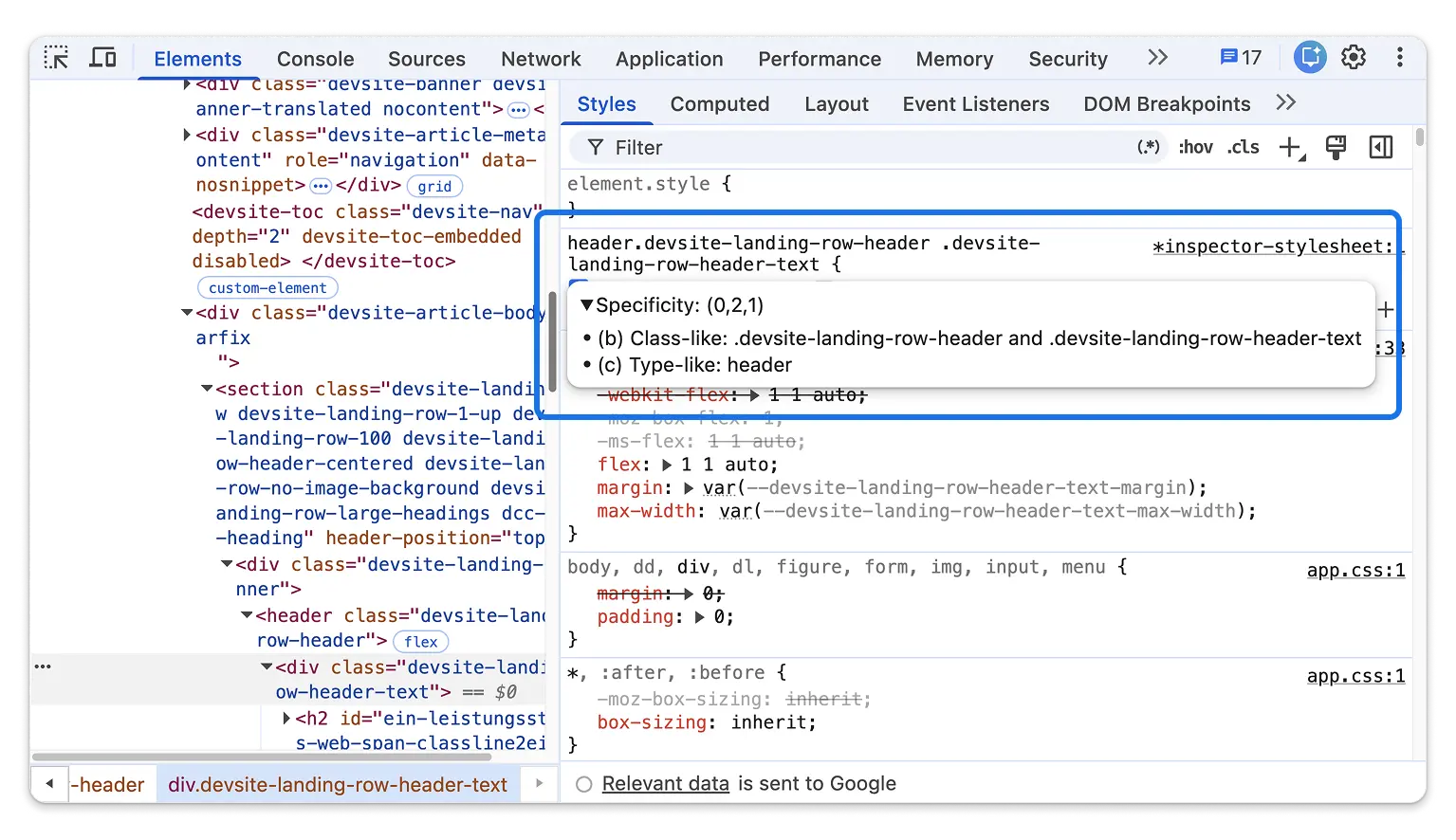
The Elements panel brings deeper CSS inspection and authoring tools for modern web platform APIs:
- Detailed CSS specificity breakdowns: Hovering over selector names in the
Styles tab now displays a detailed tooltip breaking down how each
class, ID, element, or pseudo-class contributes to the
(a, b, c)specificity calculation. This was a community contribution, thanks to @hjanuschka! ::interest-buttonpseudo-element: DevTools now fully parses and presents the new::interest-buttonCSS pseudo-element (part of the HTMLinteresttargetspecification) in the Elements tree outline and Styles tab.- Asynchronous target linking for HTML relation attributes: HTML
attributes like
popovertarget,interesttarget, andcommandfornow asynchronously fetch and visually link their target DOM nodes inline. - Lazy rendering for large stylesheets: The Styles tab now uses lazy property decoration when an element exceeds 200 CSS properties, reducing render block times from several seconds down to milliseconds.
Chromium issues: 353436867, 453705247, 524406293, 457696384, 524131115
Memory debugging: Native context attribution and closure retention
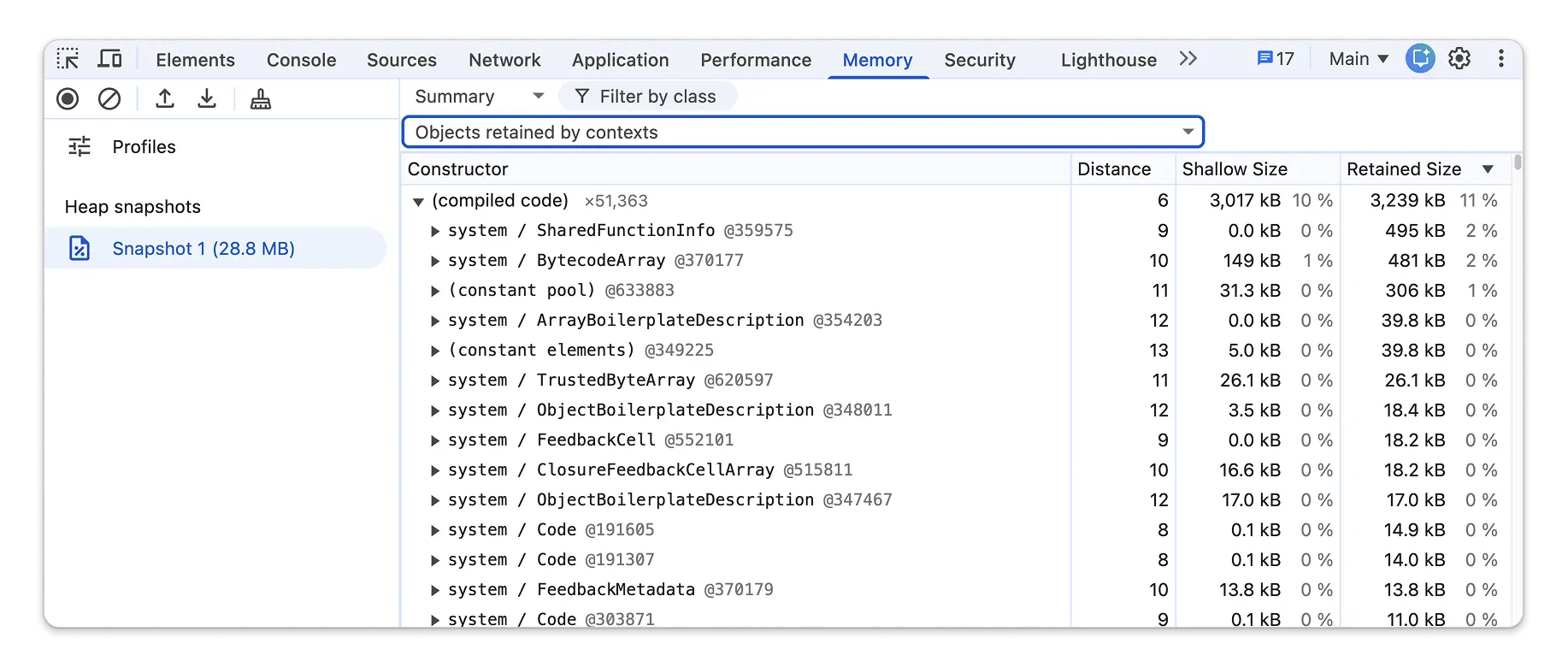
Diagnosing complex JavaScript memory leaks in multi-frame or multi-context web applications is now significantly clearer in the Memory panel:
- Native V8 context attribution: Heap snapshots now execute a two-phase
attribution algorithm. Static pointer inference resolves
native_contextmaps, while graph reachability traces remaining objects. Objects reachable from a single native context are attributed directly to that context, while objects reachable from multiple contexts are categorized into a shared context bucket. - "Retained by Context" filter: A new UI filter in the Heap Snapshot perspective lets you isolate objects retained exclusively through JavaScript closure context objects.
- Configurable property display order: A new context menu toggle, Sort properties alphabetically (enabled by default), lets you toggle between alphabetical sorting and original JS property insertion order when inspecting heap object properties.
Chromium issues: 497855658, 423838364, 40833016
Promisified Extension APIs and security hardening
DevTools extension APIs have been updated with modern asynchronous patterns and tighter security controls:
- Native Promise support: Async methods in
chrome.devtools.network(getHAR(),Request.getContent()),chrome.devtools.panels, andchrome.devtools.inspectedWindow(eval(),getResources(),Resource.getContent(),Resource.setContent()) now return standard JavaScriptPromiseobjects when called without a callback parameter. - Extension security boundaries: DevTools extensions are now restricted
from fetching HAR resources of blocked target URLs, must satisfy
extensionsOnChromeUrlspermissions for cross-extension evaluations ininspectedWindow.eval, and enforceallowFileAccesschecks onfile://resources.
Other highlights and fixes
A collection of smaller improvements and bug fixes in this release:
- Performance: Added Soft FCP (First Contentful Paint) timeline markers alongside Soft LCP and Soft Navigation markers, with updated details drawer headers.
- Performance: Added guards to skip compute pressure checks during CPU
throttling calibration on Android devices without
PressureObserversupport. - Network: Updated Copy as cURL to prefix target URLs with
--urlto prevent command-line flag misinterpretation for dash-prefixed URLs. - Sources: Enabled source map scope resolution by default, improving variable scope resolution and symbol un-minification during debugging.
- Settings: Updated emulated device presets for newer iPhone and Pixel
models with verified safe-area insets, and pre-populates custom device
User-Agent fields with
navigator.userAgent. (Chromium issues: 40718410, 518215252) - Settings: Updated the Link handling setting drop-down to display user-friendly extension titles instead of raw extension origin URLs.
- Lighthouse: Updated bundled Lighthouse module to version 13.4.0. (Chromium issue: 40543651)
Accessibility improvements
Chrome 151 brings the following accessibility enhancements:
- Elements: Restored visibility of toggled toolbar icons (such as the
script execution Resume button) under Windows High Contrast /
@media
(forced-colors: active)
mode by removing conflicting background-color overrides. (Chromium issue: 519762185) - Console: Added accessible full-text
titletooltips for truncated Live Expression string values in Console Pins.