

Published: July 15, 2026
While passkeys are straightforward to implement, capabilities and best practices continue to evolve. Learning why they are needed and how to use them takes time. To simplify this process, the Chrome team introduces the Modern Web Guidance passkey skills to help you and your agents build secure, modern sign-in experiences using passkeys.
Why use the passkey skills?
Modern Web Guidance is a set of skills designed to guide AI coding agents, such as Anti Gravity or Claude Code. With the passkey skills, you can implement registration, authentication, management, and reauthentication using the latest APIs and best practices. The coding agent autonomously generates the implementation for both frontend UI and backend logic.
An evaluation shows that an implementation using passkey skills outperforms one without them on Claude Code Opus 4.8. This evaluation uses the demo application and prompts described in this document.
| Without passkey skills | With passkey skills | |
|---|---|---|
| PASS | 47 | 80 |
| FAIL | 32 | 0 |
| N/A | 12 | 11 |
| Total | 91 | 91 |
The most visible difference is the passkey management screen, which displays a list of created passkeys based on a community-curated passkey provider list, following the passkey management best practices.
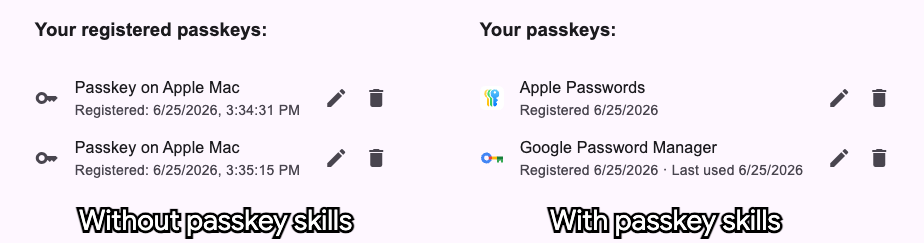
The passkey skills also empower your coding agent with powerful, less visible capabilities:
getClientCapabilities: Perform modern feature detection.- JSON Serialization: Serialize encoded payload with one JavaScript call.
- Error handling: Display a message or dismiss depending on the error type.
- Conditional mediation: Allow users to sign in directly from browser autofill suggestions.
- Signal API: Keep the list of credentials in sync between the provider and your server.
- Conditional create: Automatically create a passkey for users who have recently signed in with a password.
Step 1: Clone the demo repository
Try passkey skills with the passkey skills demo project. Clone the repository:
git clone git@github.com:GoogleChromeLabs/passkey-skills-demo.git
Step 2: Install Modern Web Guidance
Run the interactive setup wizard in your project directory to install Modern Web Guidance:
npx modern-web-guidance@latest install
This wizard adds the necessary files to your project layout, letting your AI agent understand the passkey requirements.
Step 3: Use prompts
Once installed, use these prompts to build your features. These examples cover the four use cases that the passkeys skill covers and are specifically designed for the sandbox project.
Registration
Allow users to register a passkey for their account. To implement, try the following prompt:
Implement passkey registration at /settings page under start directory
Example agent execution: The agent autonomously generates or modifies the frontend UI and backend logic to register a new passkey.
Authentication
Enable returning users to sign in quickly using discoverable credentials, through either explicit button triggers or browser autofill suggestions. To implement, try the following prompt:
Implement passkey authentication at the top page under start directory
Example agent execution: The agent handles the login and verification loop autonomously on the main landing or sign-in route.
Management
Let users view, rename, and delete their registered passkeys while keeping credentials synchronized between the server and the browser's password managers. To implement, try the following prompt:
Implement passkey management at /settings page under start directory
Example agent execution: The agent creates structural choices for users to view, add, or revoke existing passkeys.
Reauthentication
Verify a signed-in user's identity using their existing passkeys before allowing sensitive actions like security changes or financial transfers. To implement, try the following prompt:
Implement passkey reauthentication at /reauth under start directory
Example agent execution: The agent sets up step-up security for sensitive user actions.
/modern-web-guidance
Or the following command for Codex:
$modern-web-guidance
Refer to your agent's documentation, or ask your agent how to directly invoke
the modern-web-guidance skill if you are unsure.
Integrate the server side
While coding agents can generate server-side passkey code, they might not use
the latest library versions. The passkey skills demo repository includes the
simplewebauthn skill, which is a skill for the recommended server-side library
for JavaScript and TypeScript—SimpleWebAuthn.
This skill complements the coding agent's behavior.
For other server-side programming languages, Google recommends integrating passkeys with a language-specific passkey, FIDO2, or WebAuthn library, along with a skill to use its latest APIs. Library authors write their own skills so that coding agents can always use the latest APIs.
Disclaimer and feedback
Modern Web Guidance and the passkey skills are in preview. These skills were developed and tested using the passkey skills demo project with agents such as Antigravity and Claude Code. Although tested against other codebases, the skills might require adjustments beyond the provided example prompts. Review the generated code to ensure it meets your expectations, and provide additional prompts as needed.
The Chrome team updates these skills and adds other identity and authentication features to Modern Web Guidance over time. If you have feedback or feature requests, submit them to the modern-web-guidance-src repository.
Try it today to simplify passkey adoption.