



Published: November 16, 2026
Seznam is a Czech technology company and identity provider whose services reach about 90% of the Czech population. One Seznam account works across services on seznam.cz, its subdomains, and standalone domains such as mapy.com, sport.cz, and stream.cz. Browsers keep these sites apart. To make one account still feel like one product, Seznam built its sign-in around first-party redirects, Federated Credential Management (FedCM), and WebAuthn Related Origin Requests. The result is an 84.5% adjusted sign-in completion rate after domain consolidation (rising from 53% to 69% in browsers outside Chromium), and a passkey created on one Seznam domain works on the others. Developers and identity architects operating multiple domains can apply these same patterns to unify sign-in without relying on third-party cookies.
The challenge: One account, many sites
Picture someone who signs in on seznam.cz in the morning, opens mapy.com to
plan a weekend trip, and checks a match result on sport.cz at lunch. For that
person, it's all Seznam. For the browser, these are three unrelated sites, and
each one keeps its own cookies, saved passwords, and passkeys.
Seznam already handled authentication in one place. Services send users to
login.seznam.cz, where the login team maintains Google Sign-In, Bank iD,
passkeys, and other methods, so individual services don't have to. That
centralization fixed the maintenance problem. Three others remained:
- Sessions stop at the site boundary. Signing in at
login.seznam.czdoesn't sign anyone in tosport.cz. Background requests that could share the session depend on third-party cookies, and those work only when the browser and the user's privacy settings allow them. - The login page has two addresses. For historical reasons, the same login
form runs on
login.seznam.czand on the legacylogin.szn.cz. Both share a backend, but the browser sees two sites, so a password or passkey saved on one isn't offered on the other. - Each passkey belongs to a single site. A passkey is bound to its relying
party ID (RP ID). Users manage passkeys at
ucet.seznam.czand ataccount.mapy.com. By default, a passkey created onmapy.comdoesn't work on a Seznam login page.
This fragmentation was impractical at best, and Seznam discovered two concrete problems with the split-domain approach:
- Some browsers cleared cookies on the legacy
login.szn.czdomain because users visited it infrequently. - Propagating session-related secrets across origins required several complex redirects.
Seznam wanted to carry the signed-in state to every service through first-party contexts, so it would keep working under any browser privacy setting and users wouldn't have to sign in again.
The solution: Sign in once, then carry the session
Seznam kept one place to authenticate and focused on moving the result to wherever the user goes next. Each technique in this section handles one part of the problem, and each one relies on a first-party context.
Hand off the session with first-party redirects
After a user signs in, the login service creates a short-lived secret, called a ticket, backed by server-side storage. A top-level redirect carries the ticket to the target domain, where the backend exchanges it for a local session cookie. Each hop is an ordinary navigation, so the backend sets every cookie in a first-party context. Most users never notice it happening.
One DNS detail makes this handoff work across unrelated domains. For each
service domain, such as sport.cz, Seznam creates a login.sport.cz record
that points to the central login backend. A request to
login.sport.cz/ticket/TICKET reaches the login backend,
but it's served from a sport.cz host, so the backend can set a session cookie
for all of sport.cz.
You can watch the chain in the Chrome DevTools Network panel. Turn on
Preserve log, sign in, and filter for ticket.

The following abbreviated requests and responses show each hop for a user who
signs in and continues to sport.cz. The first two hops sign the user in on
both login domains. The last one signs them in to the service.
GET https://login.seznam.cz/continue

HTTP/1.1 302 FOUND
Location: https://login.szn.cz/ticket/TICKET
Set-Cookie: session=SESSION_ID; Domain=seznam.cz; Secure; HttpOnly

GET https://login.szn.cz/ticket/TICKET

HTTP/1.1 302 FOUND
Location: https://login.sport.cz/ticket/TICKET
Set-Cookie: session=SESSION_ID; Domain=szn.cz; Secure; HttpOnly

GET https://login.sport.cz/ticket/TICKET

HTTP/1.1 302 FOUND
Location: https://login.sport.cz/loginDone
Set-Cookie: session=SESSION_ID; Domain=sport.cz; Secure; HttpOnly
Replace the following:
TICKET: the short-lived secret created by the login service.SESSION_ID: the local session cookie value.
Try the quiet options before asking the user
When someone arrives at a Seznam service without a local session, the service can redirect the browser to the central login. If a valid central session exists, the login service runs the same ticket handoff and sends the user back signed in. If not, the browser comes back signed out. This redirect is a top-level navigation, so it works whatever the browser's third-party cookie settings are.
Services also embed a JavaScript library from the login team. The library provides a consistent account interface, and when no session exists yet, it works through a fallback list from least to most visible:
- The library queries the service's own login subdomain to check whether a session exists.
- If no local session exists, the library sends a credentialed cross-origin
request to
login.seznam.cz. - If that request fails, the library falls back to FedCM.
- If no automatic option succeeds, the Sign in with Seznam button opens the central login in a pop-up or redirects the page.
On sport.cz, the first check looks like this:
const badgeResponse = await fetch("https://login.sport.cz/badge", {
  credentials: "include",
});
If that request finds no session, the library tries the central login domain:
const autologinResponse = await fetch("https://login.seznam.cz/autologin", {
  method: "POST",
  credentials: "include",
  headers: { accept: "application/json" },
});
The second request works only when the browser permits third-party cookies and the endpoint is configured for credentialed Cross-Origin Resource Sharing (CORS). When that request fails, FedCM takes over. The FedCM and Seznam case study describes how Seznam uses FedCM with external partners. The same approach also covers Seznam's own services.
Share one passkey across domains with Related Origin Requests
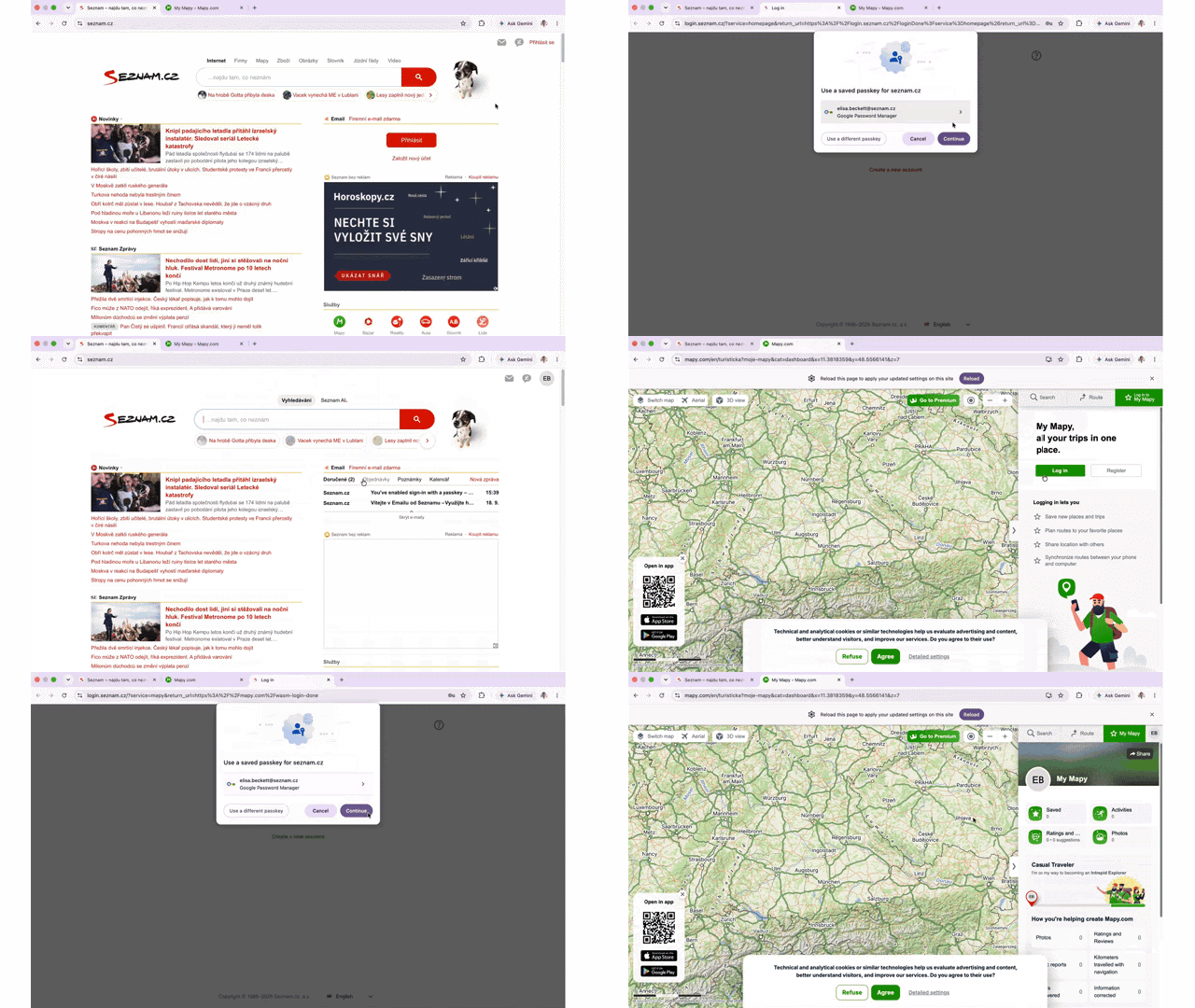
seznam.cz and reusing the session and passkey across Seznam domains.Users create and manage passkeys in their Seznam account, which runs at
ucet.seznam.cz and at account.mapy.com. Seznam set one rule: every passkey
uses seznam.cz as its RP ID, no matter which account origin creates it. A
passkey created on either origin then works on login.seznam.cz.
For ucet.seznam.cz, that setup is standard WebAuthn, because a subdomain can
use its parent domain as the RP ID. account.mapy.com is a different site, so
the browser normally rejects seznam.cz as its RP ID. Related Origin Requests
remove that block. Seznam publishes a /.well-known/webauthn file on
seznam.cz that lists the origins allowed to use its RP ID:
{
  "origins": [
    "https://account.mapy.com",
    "https://login.szn.cz"
  ]
}
When account.mapy.com calls WebAuthn with the following relying party
configuration, the browser fetches the file, finds the origin on the list, and
continues:
{
  "rp": {
    "id": "seznam.cz",
    "name": "Seznam.cz"
  }
}
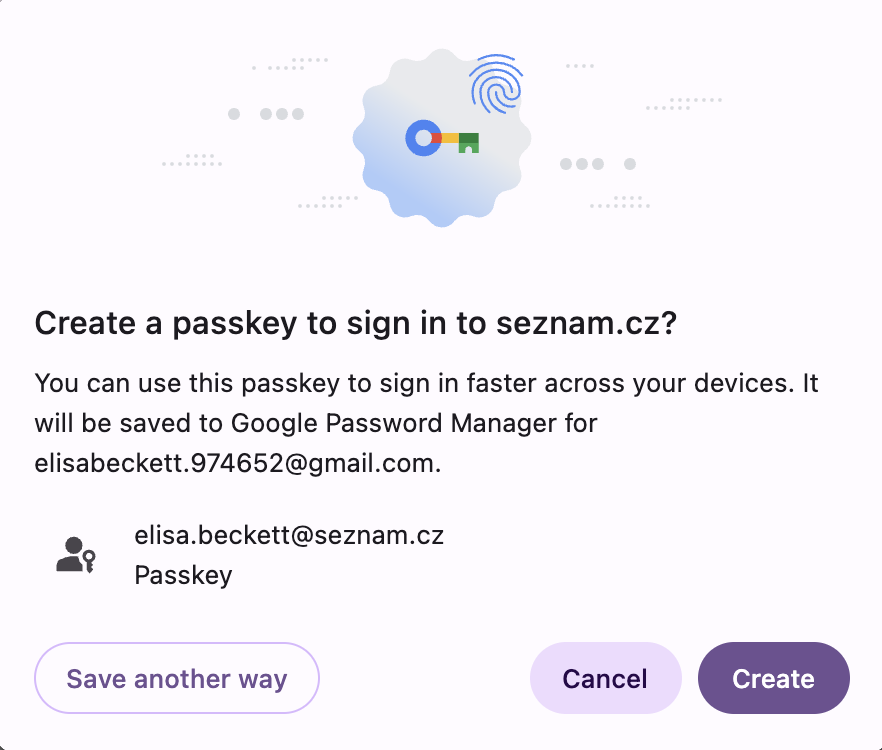
seznam.cz relying party ID.Chrome processes at most five effective top-level domain plus one (eTLD+1) labels from this file and ignores the rest. For a company with as many domains as Seznam, that five-label limit sounded like a problem, but it wasn't. Only the origins that create or manage passkeys need to be on the list. Other services sign users in through the central login.
Keep a fallback for browsers without Related Origin Requests
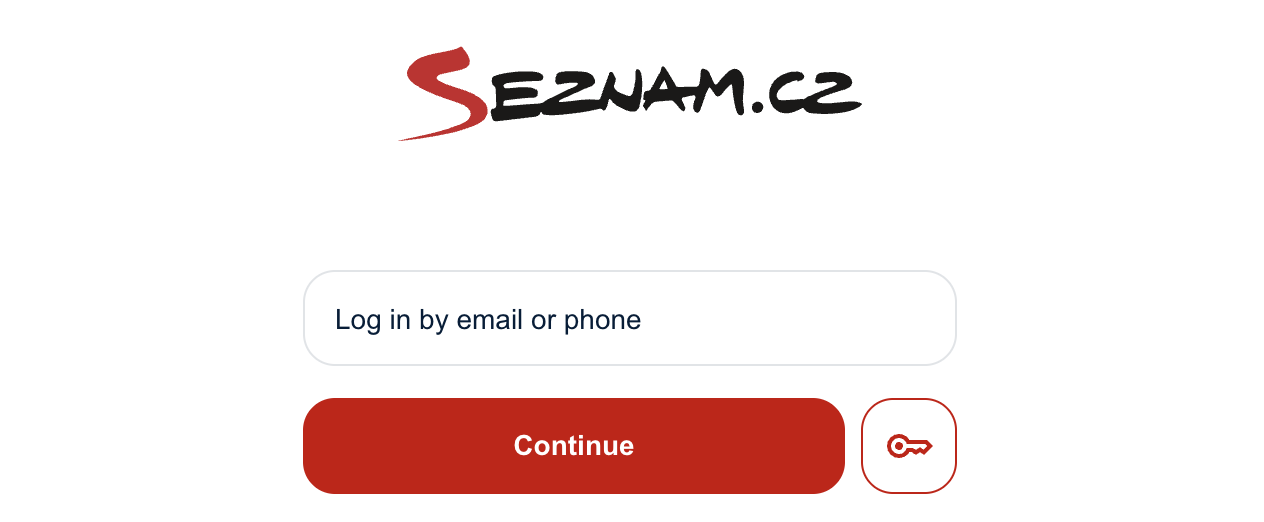
Because Related Origin Requests weren't available in every browser when Seznam built this sign-in flow, the login page also uses WebAuthn within a cross-origin iframe.
On the sign-in page, the iframe is the small key button next to Continue. Users see a button. They don't see that it's loaded from a different origin.
<iframe
  allow="publickey-credentials-get *"
  title="Verification using a security key"
  src="https://login.seznam.cz/fido.html"
></iframe>
The iframe loads a minimal document from login.seznam.cz that contains a
<button> element and a short script. Because the document runs on
login.seznam.cz, it can use seznam.cz as the RP ID without Related Origin
Requests, even when it's embedded in login.szn.cz. The flow has three steps:
- The parent page sends the request options to the iframe with
postMessage(). - The user clicks the key button, and the iframe calls
navigator.credentials.get(). - The iframe returns the credential or the error to the parent page with
postMessage().
Both sides check the sender's origin on every message. The iframe document also restricts which pages can embed it:
Content-Security-Policy: frame-ancestors https://login.seznam.cz https://login.szn.cz
Share saved passwords with Digital Asset Links
Passkeys were only half of the fragmentation problem. To make saved passwords
appear on both login domains, every participating domain publishes the same
/.well-known/assetlinks.json file with the
delegate_permission/common.get_login_creds relationship. Password managers that
support Digital Asset
Links recognize
these domains as affiliated and offer the same saved passwords on each.
Impact: Higher sign-in completion and one passkey across domains
The numbers tell part of the story. The rest shows up in how the setup works for users, service teams, and the login team:
- Users sign in once and are usually already signed in when they open the next
Seznam service. A passkey they created while managing their account on
mapy.comworks on the Seznam login page. - Service teams add the login library and get Google Sign-In, Bank iD, passkeys, and FedCM without building or maintaining any of them.
- The login team ships sign-in changes once, in one place. The main session paths don't depend on third-party cookies, so they behave the same when a browser or a user blocks third-party cookies.
Related Origin Requests didn't have to move a headline conversion number to
earn their place. In the weeks after passkeys shipped, sign-in success on
Chromium held at 87.1% and didn't recede. Across the full login population, the
completion rate sat at 82.0%, slightly above the 81.4% June baseline. After the
login domain consolidated onto login.seznam.cz, the adjusted completion rate
reached 84.5% by September. In browsers outside Chromium, the share of
identifiable users who completed sign-in rose from 53% to 69% as more of the
journey became first-party and visible.
The lasting gain, though, is architectural. Users can create a passkey on the domain where they manage their account and use it on the domain where they sign in. As a result, Seznam doesn't have to trade a working login for stronger authentication, or a stronger authenticator for a fragmented experience. One RP ID keeps the product continuous across services, without asking anyone to register a new credential every time they cross a site boundary.
Technical insights for teams
While building this system, Seznam learned lessons that apply to any company that runs more than one domain.
- Build on top-level navigation: Use first-party redirects as your
baseline session handoff, and layer credentialed
fetch()requests and FedCM on top as progressive optimizations. - Give every service domain a login subdomain: Point a
login.SERVICE_DOMAINDNS record to the central authentication backend so one server can set first-party cookies for any domain. - Choose one RP ID before users create passkeys: Bind every passkey to a
single primary RP ID and list only the origins that create or verify
passkeys in
/.well-known/webauthnto stay under Chrome's five-label limit. - Plan for browsers without Related Origin Requests: Embed a cross-origin
iframe with the
publickey-credentials-getPermissions Policy token so browsers that throw aSecurityErrorexception on mismatched RP IDs can still use the same passkeys. - Treat the iframe as a security boundary: Check
event.originon everypostMessage()call, restrict embedders with the Content Security Policy (CSP)frame-ancestorsdirective, and follow the passkeys within iframes guide to validateorigin,crossOrigin, andtopOrigininclientDataJSONon the server.
What's next
With passkeys working across its domains, Seznam is exploring capabilities such as WebAuthn immediate mediation to make sign-in simpler while keeping authentication in first-party contexts.