

Published: November 11, 2026
This week, we released version 1.0 of Modern Web Guidance, a set of skills that embed web platform expertise, best practices, and browser compatibility data directly into your coding agents. Our goal with Modern Web Guidance is to help developers using AI coding agents take full advantage of the power and capabilities of the modern web platform, and ultimately improve web experiences for users.
Since we first introduced our early preview of Modern Web Guidance back in May, coding agents have gotten better and better, and many amazing new frontier models have been released. One of the questions we hear most often is: don't these new frontier models already follow web development best practices?
Unfortunately, the answer is "no"—and we know the answer is "no" because we test it.
Each guide in Modern Web Guidance defines a set of expectations that must be true if the best practices in the guide have been properly followed. Our eval suite then tests those guides by giving the same prompt to an agent running with Modern Web Guidance installed (the guided agent) and another agent running without Modern Web Guidance installed (the unguided agent). The output of both runs is checked against the expectations defined by the guide.
When you compare the guided and the unguided pass rates, you can see that AI models—even the latest frontier models—do not reliably follow modern web development best practices on their own.
On average, unguided coding agents pass only about 50% of the checks in our eval suite, compared to around 90% when Modern Web Guidance is used.
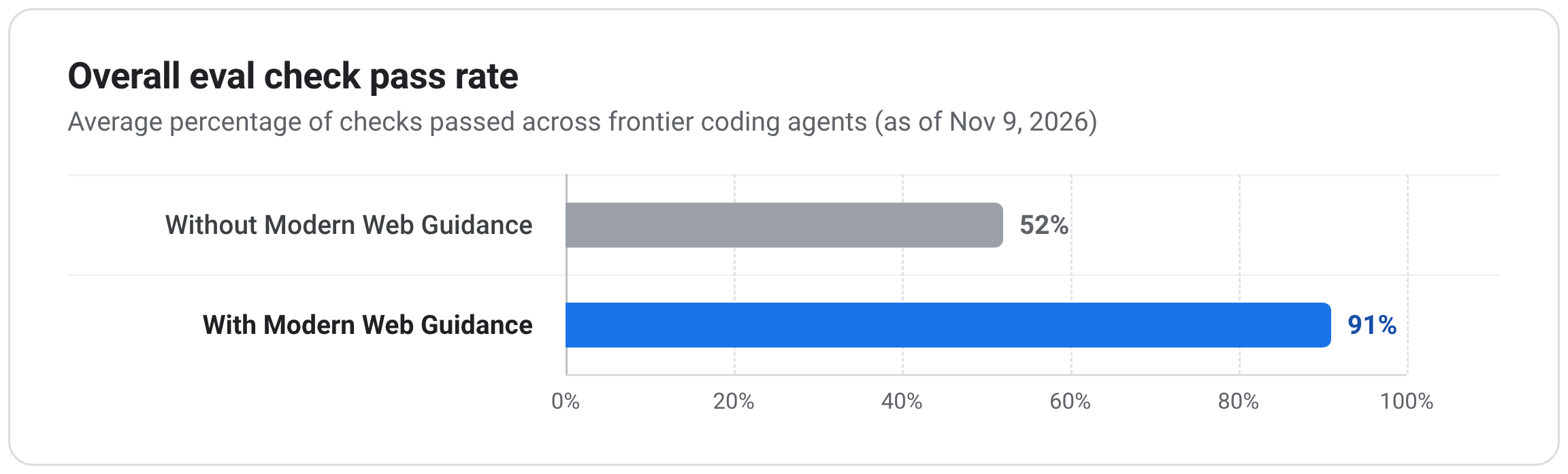
You can check out our eval dashboard to see the full list of specific checks that we run for each guide, and how each model scores on them.
But for a high-level overview, this post covers 10 of the most problematic areas that we see AI models consistently getting wrong, across key disciplines that web developers are most likely to encounter in their day-to-day work, like accessibility, user experience, performance, and security.
1. Accessibility: Keyboard focus and inert management
For people navigating with a keyboard or screen reader, predictable focus order is what makes interactive UIs usable. Without it, focus can wander into hidden background content or get stuck in dozens of extra tab stops.
Focus and inert management is one of the biggest accessibility gaps in our evals, and one of the areas that improves the most with Modern Web Guidance. The most common mistakes include:
- Failing to move focus into newly opened views and forgetting to restore focus to the triggering element when navigating back.
- Relying on manual JavaScript tab traps and
aria-modal="true"on custom modals, instead of using a modal<dialog>or marking background contentinert. - Exposing every item in a toolbar or directional grid as a separate tab stop instead of using a single tab stop with roving
tabindex. - Creating custom
:focus-visibleoutlines that lack a 3:1 contrast ratio against adjacent backgrounds.
2. Accessibility: Reduced-motion support
Unexpected page movement and large-scale animations aren't just distracting—for users with vestibular disorders or motion sensitivity, they can trigger dizziness, nausea, or headaches.
AI models usually remember to check for prefers-reduced-motion when adding standard CSS transitions or keyframe animations. However, when using newer features like smooth scrolling, view transitions, or scroll-driven animations, they often forget about reduced motion, or they make mistakes when implementing it:
- Setting
scroll-behavior:smoothglobally and unconditionally on the root element. - Using scroll-driven CSS animations with no reduced motion check.
- Removing
transitiondurations on carousel items to enable reduced motion during scroll, but then forgetting to also remove transform properties, causing items to jump in size while scrolling. - Applying a blanket
0.01msduration reset on*,*::before, and*::afterwhen reduced motion is active, wiping out all essential non-motion transitions as well (needed to communicate UI state changes). - Enabling cross-document view transitions unconditionally and overriding
::view-transition-*animations when reduced motion is active, rather than just gating the@view-transitionrule behind a reduced motion check.
3. Accessibility: Form validation, format hints, and autofill states
Forms are a cornerstone of most critical user journeys on the web. A minor snag in a checkout form can have a major impact on a business's bottom line.
When building forms, AI models get many of the basics right. However, they often fail on small but critical details, such as validation errors, proper placement of placeholders and format hints, and correctly integrating with password managers and autofill features:
- Re-implementing CSS
:user-invalidwith custom JavaScriptblurvalidation, which often flags untouchedrequiredfields as soon as users tab past them. - Letting
aria-invalidfall out of sync with visible errors, either settingaria-invalid="true"prematurely onblur, or styling:user-invalidin CSS without syncingaria-invalidin JavaScript. - Relying on disappearing
placeholdertext to show required formats (such asMM/YYon a card expiry input) instead of rendering a persistent hint linked witharia-describedby. - Placing format hints and password rules below the
<input>(instead of above it) where they can be obscured by mobile keyboards and autofill popovers right when the user needs to read them. - Highlighting
:autofillinputs by changing border color alone instead of pairing color with a non-color cue that doesn't shift layout (such as an insetbox-shadow).
4. User experience: Swipe and touch gestures
Agents are good at implementing touch gestures using imperative JavaScript and writing their own custom physics logic. These implementations work; however, the JavaScript-powered touch interactions rarely feel as smooth as users have come to expect from their native app counterparts.
Many of these interactions can be implemented with CSS and native scroll APIs, letting the browser run gesture physics off the main thread. Yet in our evals, AI models often overlook these features:
- Implementing swipe-to-dismiss or swipe-to-reveal gestures with
pointermoveortouchmovelisteners instead of using CSS Scroll Snap. - Omitting
overscroll-behavior-x:noneon tab-swipe interfaces, which can accidentally trigger a browser back or forward navigation during an over-swipe. - Driving swipe progress effects on the main thread in JavaScript callbacks instead of using scroll-driven animations.
- Not properly supporting keyboard focus on scroll-based swipe-action panels.
5. User experience: Dialogs, popovers, and top-layer transitions
In our evals, models often fall back to imperative JavaScript workarounds when animating, dismissing, or containing scroll around modal dialogs and popovers.
Instead of relying on modern HTML and CSS features built for top-layer overlays, agents frequently hand-roll entry and exit state machines, history hooks, and body scroll locks that are harder to maintain and prone to subtle UI bugs.
When you get these interactions right, it can transform a fragile-feeling experience into a polished experience that users trust. Here are the most common mistakes we see:
- Building custom
position:fixedoverlays with manual click-outside handlers for light dismiss, instead of just usingpopover. - Creating entry and exit animations by toggling CSS transition classes and coordinating with
requestAnimationFrame()andtransitionendlisteners (withsetTimeout()fallbacks), instead of doing it in pure CSS with@starting-styleandtransition-behavior. - Locking page scroll behind an open modal by setting
overflow:hiddenon<html>instead of using a<dialog>element to contain overscroll. - Adding
popstatelisteners to detect Android back gestures and close open modals, rather than using a modal<dialog>element's native back-button close functionality.
6. User experience: Dark mode and theme-adaptive controls
Users enable dark mode to reduce eye strain and glare, so a bright white flash on page load, unthemed form controls, or a toggle that gets stuck out of sync with their OS preference immediately undermines the experience.
A dark mode toggle may seem straightforward, yet unguided models in our evals consistently miss key platform details needed to get theme switching and native form controls right:
- Missing
<meta name="color-scheme" content="light dark">in the<head>, causing dark-mode users to see a white canvas flash while external stylesheets load. - Styling dark themes or dark-surfaced components with custom colors without setting
color-scheme, leaving native scrollbars and form controls stuck in light mode. - Overlooking the CSS
light-dark()function when defining theme-adaptive color tokens that automatically follow the activecolor-scheme. - Providing only a binary light or dark toggle that sets an explicit override in
localStoragewith no option to return to the OS default. - Forgetting to add a
storageevent listener, leaving other open tabs out of sync when the user changes themes.
7. Performance: Runtime responsiveness and smoothness
Users spend most of their time on a web page after it finishes loading, so sluggish interactions and janky transitions can hurt the user experience just as much as a slow initial load.
In our evals, models generally follow the classic load-time best practices that have been promoted in tools like Lighthouse for years, and they usually know to offload obvious heavy loops to a Web Worker. Where they consistently struggle is main-thread responsiveness, which is essential for optimizing INP: isolating layout work, scheduling tasks by priority, and taking advantage of new HTML and CSS features that do rendering work off the main thread.
For example, we often see agents:
- Rolling custom
setTimeout()queues for background or low-priority work instead of prioritizing user-visible tasks withscheduler.postTask()or taking advantage of task continuation withscheduler.yield()when the browser supports it. - Building complex layouts (like dense data grids) without applying
content-visibility:autoandcontain-intrinsic-size, which means updates after user interactions trigger a full-page reflow. - Hiding inactive SPA views with
display:none(or tearing them down) instead of usingcontent-visibility:hidden(paired withinert). The former destroys cached rendering state so switching back triggers full layout and paint. - Pausing offscreen
<canvas>animations and background loops with Intersection Observer callbacks rather than pairingcontent-visibility:autowith thecontentvisibilityautostatechangeevent (where available), missing the browser's pre-render margin before elements scroll into view. - Building scroll affordance UI hints using
scrollevent listeners that force continuous layout calculations, rather than using CSS scroll-state queries when available (with Intersection Observer fallbacks).
8. Performance: Layout shifts and visual flicker
Unexpected layout shifts break a reader's focus, and can cause users to click unexpected buttons—sometimes with irreversible consequences!
Models do reliably add width and height attributes to standard <img> elements to guard against layout shifts, but they consistently miss other common sources of layout shifts and pre-paint flashes from <video> elements, web font swaps, mobile browser toolbars, and client-side experiments—all of which can impact CLS.
- Omitting explicit
widthandheightattributes on<video>elements (so unloaded players default to300×150and shift layout once metadata loads), or styling media wrapper elements instead of settingaspect-ratioandobject-fitdirectly on media elements. - Pairing web fonts with system fallback fonts without
font-size-adjust, causing paragraphs and headings to reflow visibly when web fonts swap in. - Sizing hero sections and full-screen layouts with static
vhunits instead of dynamic or small viewport units (dvh,svh), causing content to jump as mobile browser toolbars expand and retract. - Hiding content with legacy
opacity:0orvisibility:hiddenanti-flicker snippets and multi-second timeouts for client-side A/B tests (delaying LCP and leaving invisible elements clickable), instead of using scripts withblocking="render"when available. - Triggering cross-document view transitions before critical above-the-fold markup has parsed instead of holding first render with
rel="expect"andblocking="render", causing half-parsed elements to pop in mid-transition.
9. Security: DOM XSS defenses and HTML sanitization
A single cross-site scripting (XSS) flaw lets an attacker run arbitrary code in your users' browsers, stealing session data or taking actions on their behalf. This is why browser-enforced defenses like safe HTML sanitization, Trusted Types, and strict CSPs are so important.
Models rarely address these security concerns proactively. For example, across all the tasks in our full eval suite, models did not add a Content Security Policy (CSP) or cross-origin isolation header without explicit prompting.
Even when prompts request security directly, unguided models continue to fail more than half of our security checks, reaching for fragile custom fallbacks or incomplete policies. That shows up clearly when defending against DOM XSS:
- Writing hand-rolled
DOMParserallowlist sanitizers—either as asetHTML()fallback or inside a Trusted Types policy—instead of using a vetted library like DOMPurify when native sanitization isn't available. - Eagerly bundling DOMPurify on every page load instead of using native
setHTML()when supported and lazy-loading DOMPurify only as a fallback. - Registering permissive
(input) => inputpassthrough Trusted Types policies that undermine sink enforcement. - Pairing Trusted Types on static pages with host-allowlist
script-src 'self'CSPs instead of locking down inline scripts with SHA-256 hashes. - Omitting
'strict-dynamic'and'report-sample'when configuring nonce-basedscript-srcContent Security Policies.
10. Security: Passkey sign-in, reauthentication, and credential lifecycle
Passkeys improve security for users and sign-in conversions for businesses, but implementing them (even with the help of agents) is challenging.
WebAuthn has specific serialization, capability-detection, and signaling APIs that unguided models almost completely miss in our evals. If you ask an AI model to add passkey sign-in, management, or step-up reauthentication, it often writes manual byte-encoding helpers, skips capability checks on management UI, or leaves credentials out of sync with password managers:
- Hand-rolling
atob()andbtoa()Base64URL conversion helpers—either as the primary path or as redundant fallback boilerplate—instead of relying on built-in serialization methods likeparseCreationOptionsFromJSON(),parseRequestOptionsFromJSON(), andcredential.toJSON(). - Omitting
PublicKeyCredential.signalUnknownCredential()during sign-in when the server reports an unknown credential ID, leaving deleted or revoked passkeys in users' password managers. - Skipping
PublicKeyCredential.getClientCapabilities()before rendering passkey creation and management UI. - Omitting an
AbortControllerandAbortSignalwhen starting step-up passkey reauthentication requests. - Passing the origin-trial
mediation:"immediate"option instead ofuiMode:"immediate"for streamlined sign-in prompts.
Close these gaps
These 10 areas are far from an exhaustive list, and we expect the specific knowledge gaps to change over time. Models will catch up and the web platform will continue to evolve.
The good news is that Modern Web Guidance addresses all of these gaps, and it will continue to evolve along with the platform.
To get started with Modern Web Guidance, run the following command, or search for it in your agent's plugin marketplace:
npx modern-web-guidance@latest install
Have you seen models get other web development tasks wrong? We want to hear about it. Open an issue in the Modern Web Guidance GitHub repository or help us close those gaps for other developers by contributing to the project.