


Mathias Bynens

Peter Kvitek
透過 Chrome 無頭模式,您可以在無人環境中執行瀏覽器,且不會顯示任何 UI。也就是說,您可以在沒有 Chrome 的情況下執行 Chrome。
使用無頭模式
如要使用無頭模式,請將 --headless 指令列旗標傳遞至 Chrome 二進位檔,例如:
Linux
google-chrome --headless
macOS
open -a "Google Chrome" --args --headless
Windows
start chrome --headless
使用舊版無頭模式
先前,無頭模式是獨立的替代瀏覽器實作,與 Chrome 二進位檔一起發布。但並未分享任何 Chrome 瀏覽器程式碼 //chrome。
Chrome 現在提供統一的無頭和有頭模式。
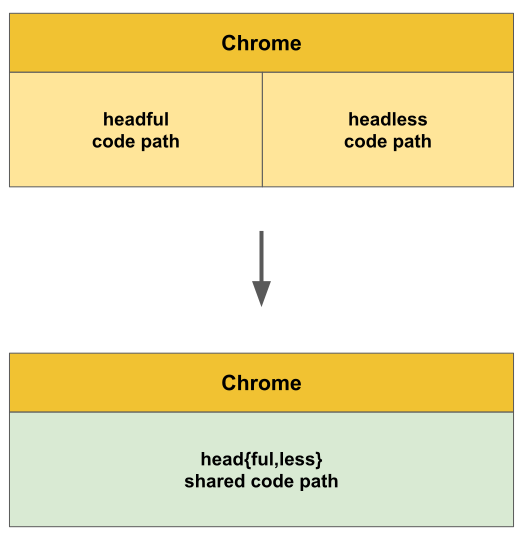
自 Chrome 132.0.6793.0 起,舊版無頭模式僅以名為 chrome-headless-shell 的獨立二進位檔提供,可從 Chrome for Testing 控制台下載。
在 Puppeteer 中
如要在 Puppeteer 中使用無頭模式,請按照下列步驟操作:
import puppeteer from 'puppeteer';

const browser = await puppeteer.launch({
  headless: true,  // (default) enables Chrome Headless mode
  // `headless: 'shell'` enables Headless Shell (old headless)
  // `headless: false` enables "headful" mode
});

const page = await browser.newPage();
await page.goto('https://developer.chrome.com/');

// …

await browser.close();
如要進一步瞭解如何在 Puppeteer 中使用無頭模式,請參閱「無頭模式」。
在 Selenium-WebDriver 中
如要在 Selenium-WebDriver 中使用無頭模式,請按照下列步驟操作:
const driver = await env
  .builder()
  .setChromeOptions(options.addArguments('--headless'))
  .build();

await driver.get('https://developer.chrome.com/');

// …

await driver.quit();
如要瞭解詳情 (包括使用其他語言繫結的範例),請參閱 Selenium 團隊的網誌文章。
意見回饋
期待收到您對無頭模式的意見回饋。如果遇到任何問題,請回報錯誤。