


Published: June 30, 2026

Amedia is Norway's largest publisher of local editorial media, managing over 100 newspaper titles and reaching over 2 million readers daily. To provide a unified and seamless experience, Amedia uses aID, their in-house digital identity solution. This standard-based federated account system not only grants users access to Amedia's entire network, but has also been adopted by other Norwegian and Danish newspapers.
The challenge: Introducing passkeys to a diverse user base
For Amedia, the sign-in process is the gateway to their content. Every second of friction directly affects readership. While regular passwords and SMS-based two-factor authentication (2FA) are notoriously clunky for users on the move, jumping straight to passkeys introduced an unexpected roadblock: sheer unfamiliarity.
Because aID is often a user's very first encounter with a passkey, forcing an abrupt change to an unfamiliar biometric prompt caused some hesitation. Amedia realized they couldn't just deploy the technology: they had to help users understand how to use passkeys.
The solution: A combined WebOTP and Passkey flow
Instead of forcing users to choose between an old habit (SMS) and a completely foreign concept (passkeys), Amedia combined them into a single, fluid onboarding experience. They used the WebOTP API to streamline the familiar SMS verification process while quietly setting up the infrastructure for passwordless sign-ins on the backend.
1. Frictionless sign-up across platforms
When a user signs up for aID, they enter their name, phone number, and email. Amedia then sends a One-Time Password (OTP) using SMS. Amedia specifically relies on SMS OTP rather than email because having more than one phone number is rare in Scandinavia, and numbers port seamlessly when switching mobile providers. This stability makes phone numbers a reliable primary identifier for sign-ins and a consistent data point for building extended user profiles. Instead of forcing the user to leave the browser, open their messages app, memorize the code, and type it in, Amedia uses the WebOTP API. On supported mobile browsers, this triggers a bottom sheet prompt that lets the user just tap Verify. The browser automatically retrieves the OTP from the SMS and submits the form.
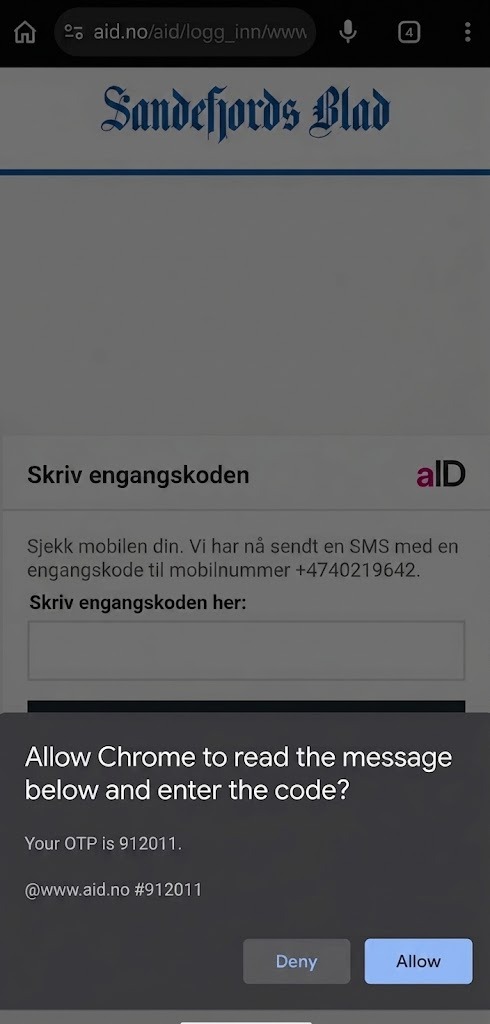
Furthermore, Amedia updated their SMS delivery to use the standardized
origin-bound message format (for example, @www.aid.no #123456) , unlocking
frictionless sign-ins across the broader ecosystem. This standard not only
powers the WebOTP API on browsers like Chrome, Opera, and Vivaldi on Android and
desktop, but it also seamlessly activates Safari's
autocomplete="one-time-code" feature. As a result, users across mobile and
desktop platforms experience a secure, automated OTP flow without requiring
platform-specific backend logic. See SMS OTP form best
practices to learn more.
// Detect feature support using OTPCredential availability
if ('OTPCredential' in window) {
  window.addEventListener('DOMContentLoaded', e => {
    const input = document.querySelector('input[autocomplete="one-time-code"]');
    if (!input) return;

    const ac = new AbortController();
    const form = input.closest('form');
    if (form) {
      form.addEventListener('submit', (e) => {
         ac.abort();
      });
    }

    navigator.credentials.get({
      otp: { transport: ['sms'] },
      signal: ac.signal
    }).then(otp => {
      // Automatically fill the input and submit the form
      input.value = otp.code;
      if (form) form.submit();
    }).catch(err => {
      console.error('WebOTP error:', err);
    });
  });
}
2. Immediate passkey registration
Previously, after a user completed the WebOTP verification, Amedia presented them with a choice: create a regular password or set up a passkey. Predictably, when faced with an unfamiliar technical term, most users took the path of least resistance: either skipping the step entirely or falling back on a standard password.
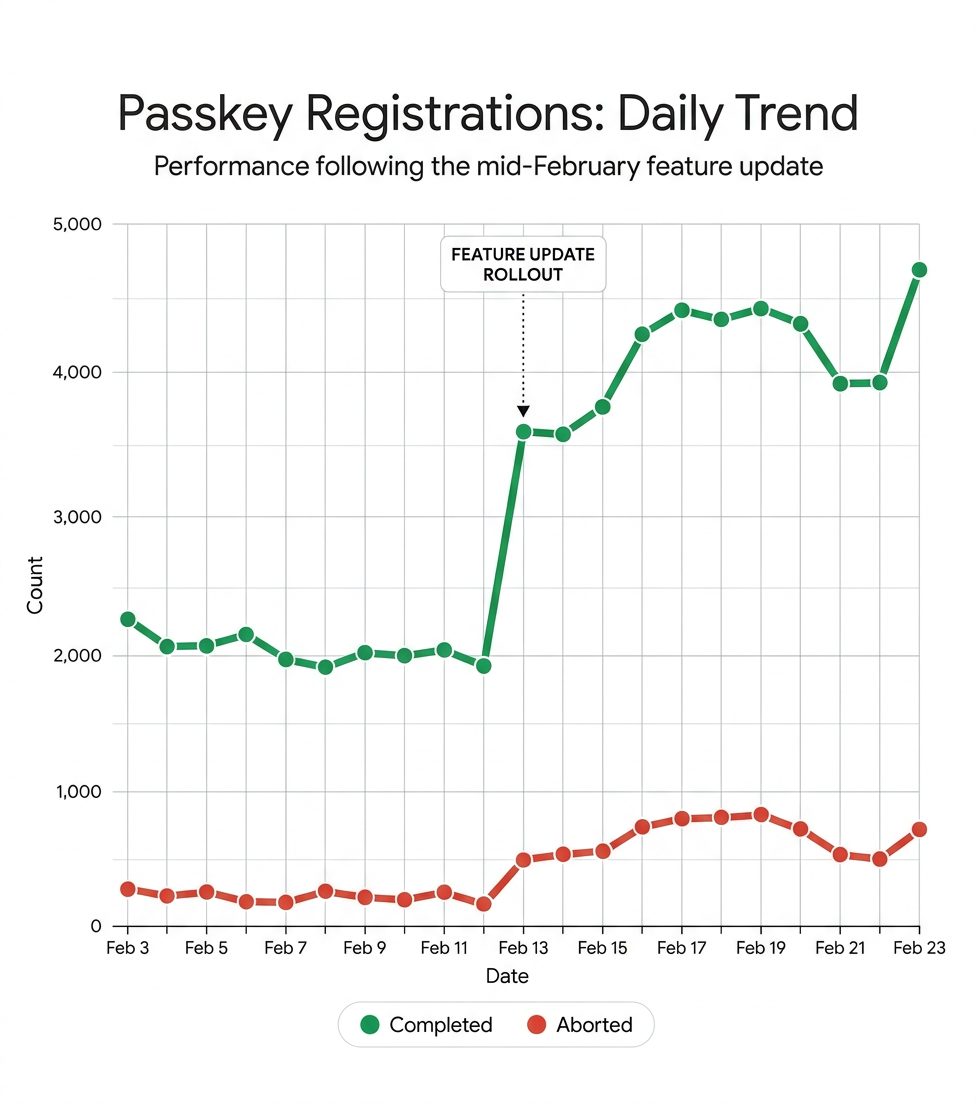
In mid-February, the Amedia team shifted their approach. They integrated the
passkey registration prompt immediately into the post-verification flow, before
even presenting them with choices. To comply with the strict user gesture
requirements on browsers like Chrome and Safari, Amedia seamlessly chained the
interaction. Because the user confirms the OTP first, this initial tap serves as
the required user gesture to directly invoke the
navigator.credentials.create() prompt. By making passkeys the default
experience rather than an optional setting, Amedia instantly doubled their
successful registration rate.
While this immediate prompt proved highly effective, the team attempted to streamline the experience even further using "conditional create", a mechanism that generates a passkey entirely in the background without requiring direct user action. However, they ran into a technical hurdle: conditional create requires a prior sign-in using a valid password saved in a password manager. Because Amedia's WebOTP flow is entirely passwordless, it does not meet this security criterion. To work around this constraint, Amedia now reserves conditional create only for regular two-factor sign-in flows (password and OTP code), while using the chained user gesture for passwordless onboarding.
To ensure a reliable experience, the system uses a standard registration flow. This triggers a browser UI dialogue where the system securely prompts the browser's passkey registration UI. The user creates a passkey using their device's screen lock (biometrics or PIN). By chaining this right after WebOTP, the user completes the setup without ever having to figure out a password.
// Triggered immediately after successful WebOTP verification
async function registerPasskey(creationOptionsFromServer) {
  try {
    const credential = await navigator.credentials.create({
      publicKey: {
        ...creationOptionsFromServer,
        authenticatorSelection: {
          residentKey: "required",
          userVerification: "required"
        }
      }
    });

    // Send the new credential to the server for registration
    await sendCredentialToServer(credential);
  } catch (error) {
    console.error("Passkey registration failed", error);
  }
}
3. Rapid subsequent sign-ins
On the user's next visit to an Amedia publication on the same device, aID automatically triggers a passkey sign-in. If the user interacts with the page before the automatic prompt appears, or if the automatic prompt is dismissed, the system gracefully uses passkey form autofill.
This makes the sign-in process fast, as the user only needs to interact with the browser/OS prompt or their keyboard's autofill suggestions to select their passkey, entirely bypassing manual form entry.
// Triggering conditional UI for autofill suggestions
async function authenticateWithPasskey(requestOptionsFromServer) {
  try {
    const credential = await navigator.credentials.get({
      publicKey: requestOptionsFromServer,
      mediation: "conditional" // Enables autofill integration
    });

    // Authenticate the user on the server
    await verifyAssertionWithServer(credential);
  } catch (error) {
    console.error("Passkey authentication failed", error);
  }
}
The Impact: Chaining for frictionless adoption
By innovating the onboarding flow, Amedia significantly reduced friction for new and returning readers. The combination of WebOTP and passkeys yielded clear operational and experience improvements:
- Substantially faster sign-ups: The overall time required to create a new aID account decreased significantly due to automated WebOTP entry and the complete removal of manual password creation.
- 48% of new users create passkeys: By prompting for passkey creation immediately after WebOTP verification, Amedia achieved an exceptionally high conversion rate for passkey registration, representing a 100% increase over their previous choice-based onboarding flow.
- 82% faster sign-in: Returning users authenticate more than five times faster using passkeys compared to alternative methods like passwords or manual OTP entry.
| Metric | Value |
|---|---|
| Passkey creation rate for new users | 48% |
| Faster sign-in for returning users | 82% |
| Increase in passkey adoption | 100% |
Ultimately, while the broader digital ecosystem continues to navigate challenges around passkey terminology and user education, Amedia's proactive approach provides a successful blueprint. Integrating passkeys into a high-frequency service used by millions daily establishes a new standard for seamless access in the media industry, delivering a permanent security upgrade without sacrificing user retention.