

Published: January 30, 2026
When building AI assistance for Performance, the primary engineering challenge was making Gemini gracefully work with performance traces recorded in DevTools.
Large Language Models (LLMs) operate within a 'context window' which refers to a strict limit on the amount of information they can process at once. This capacity is measured in tokens. For Gemini models, one token is approximately a group of four characters.
Performance traces are huge JSON files, often consisting of several megabytes. Sending a raw trace would instantly exhaust a model's context window and not leave room for your questions.
To make AI assistance for Performance possible, we had to architect a system that maximized the amount of useful data for an LLM with minimum token usage. In this blog, you can learn about the techniques we used to do so and adopt them for your own projects.
Tailor the initial context
Debugging the performance of a website is a complex task. A developer can either look at the full trace for context, or focus on Core Web Vitals and related time spans of the trace, or even go down to the details and focus on individual events such as clicks or scrolls and their related call stacks.
To aid the debugging process, DevTools' AI assistance needs to match those developer journeys and only work with the relevant data to give advice specific to the developer focus. So instead of always sending the full trace, we built AI assistance to slice the data based on your debugging task:
| Debugging task | Data initially sent to AI assistance |
|---|---|
| Chat about a performance trace | Trace summary: A text-based report that includes high-level information from the trace and debugging session. Includes the page URL, throttling conditions, key performance metrics (LCP, INP, CLS), a list of available insights, and, if available, a CrUX summary. |
| Chat about a Performance insight | Trace summary, and the name of the selected Performance insight. |
| Chat about a task from a trace | Trace summary, and the serialised call-tree where the selected task is located. |
| Chat about a network request | Trace summary, and the selected request key and timestamp |
| Generate trace annotations | The serialised call-tree where the selected task is located. The serialized tree identifies which task is the selected one. |
The trace summary is almost always sent to provide initial context to Gemini, the underlying model of AI assistance. For AI-generated annotations, it's omitted.
Giving tools to AI
AI assistance in DevTools functions as an agent. This means it can autonomously query for more data, based on the developer's initial prompt and the initial context shared with it. To query more data, we gave AI assistance a set of predefined functions it can call. A pattern known as Function Calling, or Tool use.
Based on the debugging journeys outlined previously, we defined a set of granular functions for the agent. These functions drill down into specifics considered important based on the initial context, similar to how a human developer would approach performance debugging. The set of functions are as follows:
| Function | Description |
|---|---|
getInsightDetails(name) |
Returns detailed information about a specific Performance insight (for example,details on why LCP was flagged). |
getEventByKey(key) |
Returns detailed properties for a single, specific event. |
getMainThreadTrackSummary(start, end) |
Returns a summary of the main thread activity for the given bounds, including top-down, bottom-up, and third-party summaries. |
getNetworkTrackSummary(start, end) |
Returns a summary of network activity for the given time bounds. |
getDetailedCallTree(event_key) |
Returns the full call tree for a specific main thread event on the performance trace |
getFunctionCode(url, line, col) |
Returns the source code for a function defined at a specific location in a resource, annotated with runtime performance data from the performance trace |
getResourceContent(url) |
Returns the content of a text resource used by the page (for example, HTML or CSS). |
By strictly limiting data retrieval to these function calls, we ensure that only relevant information enters the context window in a well-defined format, optimizing token usage.
Example of an agent operation
Let's look at a practical example of how AI assistance uses function calling to retrieve more information. After an initial prompt of "Why is this request slow?", AI assistance can call the following functions incrementally:
getEventByKey: Fetch the detailed timing breakdown (TTFB, download time) of the specific request selected by the user.getMainThreadTrackSummary: Check if the main thread was busy (blocked) when the request should have started.getNetworkTrackSummary: Analyze if other resources were competing for bandwidth at the same time.getInsightDetails: Check if the Trace Summary already mentions an insight, related to this request as a bottleneck.
By combining the results of these calls, AI assistance can then provide a
diagnosis and propose actionable steps, such as suggesting code improvements
using getFunctionCode or optimizing resource loading based on
getResourceContent.
However, retrieval of relevant data is only half the challenge. Even with
functions providing granular data, the data returned by those functions can be
of a large size. To take another example, getDetailedCallTree can return a
tree with hundreds of nodes. In standard JSON, this would be many { and }
just for nesting!
There is, therefore, a need for a format that is dense enough to be token-efficient, but still structured enough for an LLM to understand and reference.
Serialize the data
Let's dive deeper into how we approached this challenge, continuing with the call tree example, as call trees make up the majority of data in a performance trace. For reference, the following examples shows a single task in a call stack in JSON:
{
  "id": 2,
  "name": "animate",
  "selected": true,
  "duration": 150,
  "selfTime": 20,
  "children": [3, 5, 6, 7, 10, 11, 12]
}
One performance trace can contain thousands of those, as shown in the following screenshot. Every little colored box is represented using this object structure.
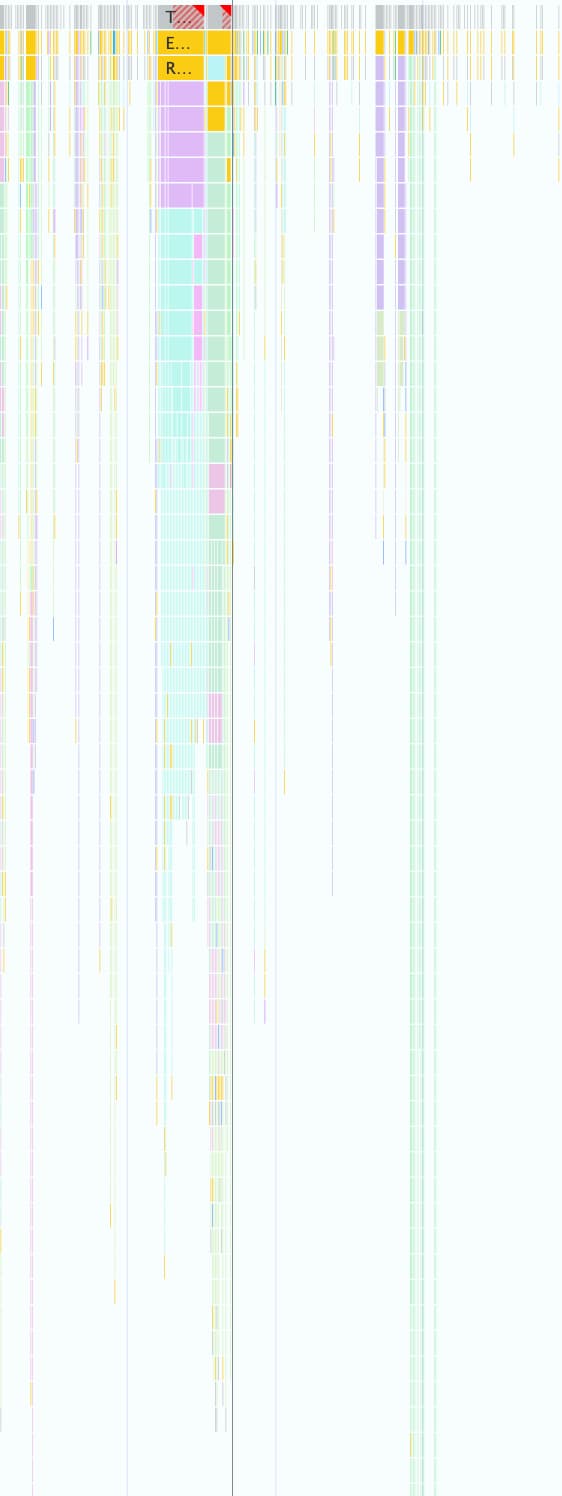
This format is good to programmatically work with in DevTools, but it's wasteful for LLMs because of the following reasons:
- Redundant keys: Strings like
"duration","selfTime", and"children"are repeated for every single node in the call tree. So, a tree with 500 nodes sent to a model would consume tokens for each of those keys 500 times. - Verbose lists: Listing every child ID individually through
childrenconsumes a massive number of tokens, especially for tasks that trigger many downstream events.
The implementation of a token-efficient format for all the data used with AI assistance for Performance was a step-by-step process.
First Iteration
When we started working on AI assistance for Performance, we optimised for shipping speed. Our approach on token optimization was basic, and we stripped the original JSON from braces and commas, which resulted in a format like the following:
allUrls = [...]

Node: 1 - update
Selected: false
Duration: 200
Self Time: 50
Children:
   2 - animate

Node: 2 - animate
Selected: true
Duration: 150
Self Time: 20
URL: 0
Children:
   3 - calculatePosition
   5 - applyStyles
   6 - applyStyles
   7 - calculateLayout
   10 - applyStyles
   11 - applyStyles
   12 - applyStyles

Node: 3 - calculatePosition
Selected: false
Duration: 15
Self Time: 2
URL: 0
Children:
   4 - getBoundingClientRect

...
But this first version was only a slight improvement over raw JSON. It still
explicitly listed out node children with IDs and names, and prepended
descriptive, repeated keys (Node:, Selected:, Duration:, …) in front of
each line.
Optimise child node lists
As a next step to further optimize, we removed the names for node children
(calculatePosition, applyStyles, … in the previous example). As AI
assistance has access to all nodes through function calling and this information
is already in the node head (Node: 3 - calculatePosition) there is no need to
repeat this information., This allowed us to collapse the Children to a simple
list of integers:
Node: 2 - animate
Selected: true
Duration: 150
Self Time: 20
URL: 0
Children: 3, 5, 6, 7, 10, 11, 12

..
While this was a marked improvement from before, there was still further room to
optimize. When looking at the previous example, you might notice Children is
almost sequential, with only 4, 8, and 9 missing.
The reason is that in our first attempt we used a Depth-First Search (DFS) algorithm to serialize tree data from the Performance trace. This resulted in non-sequential IDs for sibling nodes, which required us to list every ID individually.
We realized that if we re-indexed the tree using Breadth-First Search (BFS) we
would get sequential IDs instead, making another optimization possible. Instead
of listing individual IDs, we could now represent even hundreds of children with
a single compact range, like 3-9 for the original example.
The final node notation, with the optimized Children list looks like this:
allUrls = [...]

Node: 2 - animate
Selected: true
Duration: 150
Self Time: 20
URL: 0
Children: 3-9
Reduce the number of keys
With the node lists optimized, we moved on to the redundant keys. We started by stripping all keys from the previous format, which resulted in this:
allUrls = [...]

2;animate;150;20;0;3-10
Admittedly token-efficient, we still needed to give Gemini instructions on how to understand this data. As a result, the first time we sent a call tree to Gemini, we included the following prompt:
...
Each call frame is presented in the following format:

'id;name;duration;selfTime;urlIndex;childRange;[S]'

Key definitions:

*   id: A unique numerical identifier for the call frame.
*   name: A concise string describing the call frame (e.g., 'Evaluate Script', 'render', 'fetchData').
*   duration: The total execution time of the call frame, including its children.
*   selfTime: The time spent directly within the call frame, excluding its children's execution.
*   urlIndex: Index referencing the "All URLs" list. Empty if no specific script URL is associated.
*   childRange: Specifies the direct children of this node using their IDs. If empty ('' or 'S' at the end), the node has no children. If a single number (e.g., '4'), the node has one child with that ID. If in the format 'firstId-lastId' (e.g., '4-5'), it indicates a consecutive range of child IDs from 'firstId' to 'lastId', inclusive.
*   S: **Optional marker.** The letter 'S' appears at the end of the line **only** for the single call frame selected by the user.

....
While this format description incurs a token cost, it's a static cost paid once for the entire conversation. The cost is outweighed by the savings gained through the previous optimizations.
Conclusion
Optimizing token usage is a critical consideration when building with AI. By shifting from raw JSON to a specialized custom format, re-indexing trees with Breadth-First Search, and using tool calls to fetch data on demand, we significantly reduced the amount of tokens AI assistance in Chrome DevTools consumes.
These optimizations were a prerequisite for enabling AI assistance for performance traces. Due to its limited context window it could otherwise not handle the sheer volume of data. But the optimized format enables a performance agent that can maintain a longer conversation history and provide more accurate, context-aware answers without getting overwhelmed by noise.
We hope these techniques inspire you to take a second look at your own data structures when designing for AI. To get started with AI in web applications, explore Learn AI on web.dev.