

Published: June 30, 2026
Chrome 150 brings improved memory debugging to DevTools for agents, enhances AI
assistance with more widgets, and introduces full editing capabilities for CSS
@container and @function rules.
DevTools for agents
Across recent releases up to v1.4.0, Chrome DevTools for agents has significantly expanded its agentic browser automation and debugging capabilities.
Key features and improvements since the last release include:
- Memory debugging suite (
--experimentalMemory): Agents can now capture and analyze V8 heap snapshots directly to diagnose JavaScript memory leaks and analyze object retention hierarchies. - Chrome extensions management (
--categoryExtensions): Agents can manage extension lifecycles (install, uninstall, reload, list) and capture background service worker console logs for diagnostics. - Bundled agent skills: The
skills/directory is now published directly in the npm package distribution, enabling MCP client agents to automatically discover and execute specialized browsing and debugging workflows. - Token and output optimizations: Capping screenshot dimensions at the source reduces token consumption, and experimental TOON (Token-Oriented Object Notation) support optimizes structured data formatting.
- Enhanced navigation and context:
list_pagesnow includes page titles alongside URLs and target IDs for improved multi-tab context selection, whileallowedUrlPatternandblockedUrlPatternconfiguration options enforce strict browsing scope security.
For the most recent updates around DevTools for agents, and to contribute, visit the GitHub repository.
Deeper insights in AI assistance
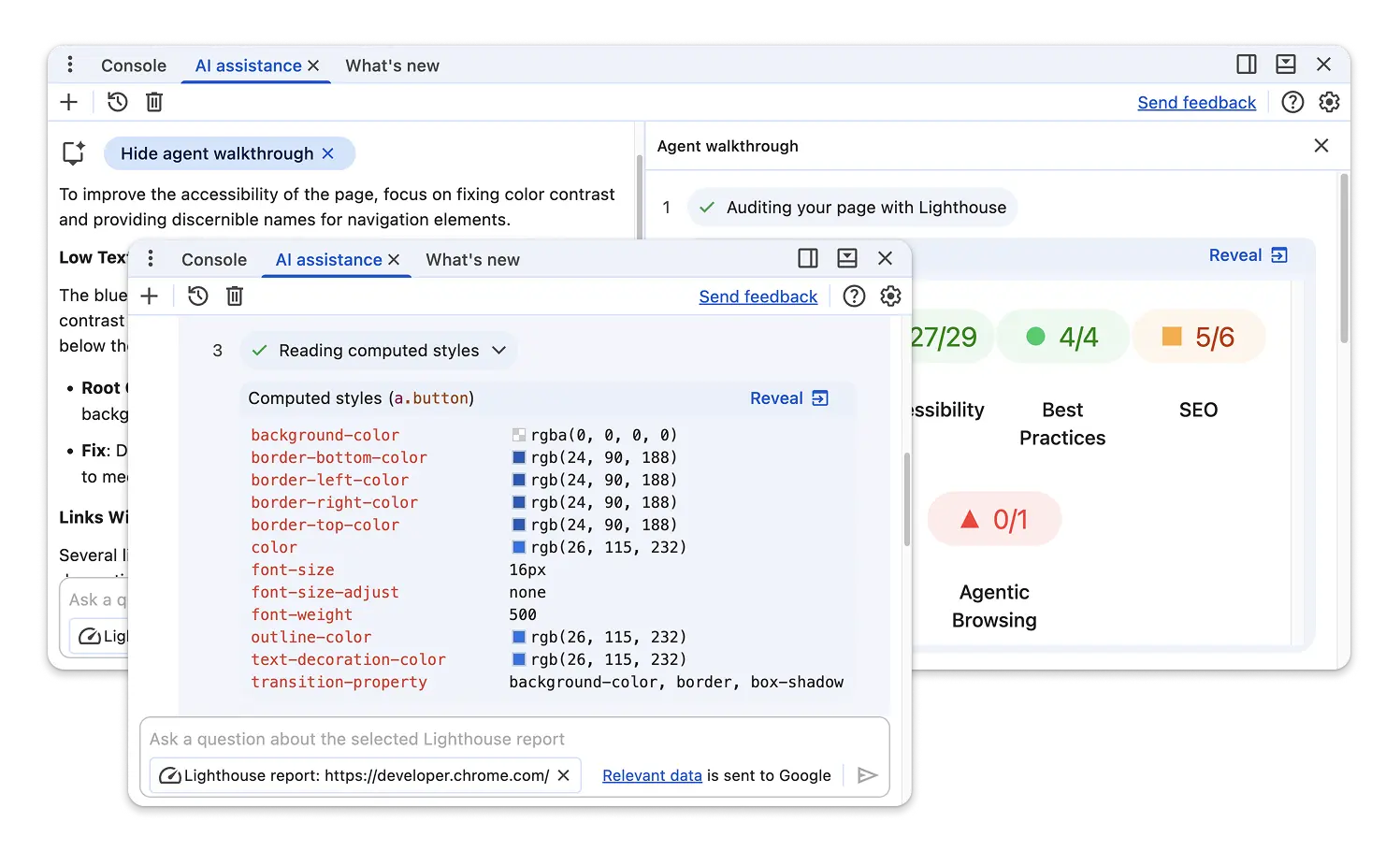
The AI assistance panel continues to evolve, providing more detail in Agent walkthroughs. Nine additional widgets now feature data from the Lighthouse, Network, Sources and Performance panels. The widgets help you better understand the data used by Gemini when calling the agent tools to retrieve performance events, resource content, network requests and more.
Chromium issues: 460763995
Full editing support for more CSS at-rules
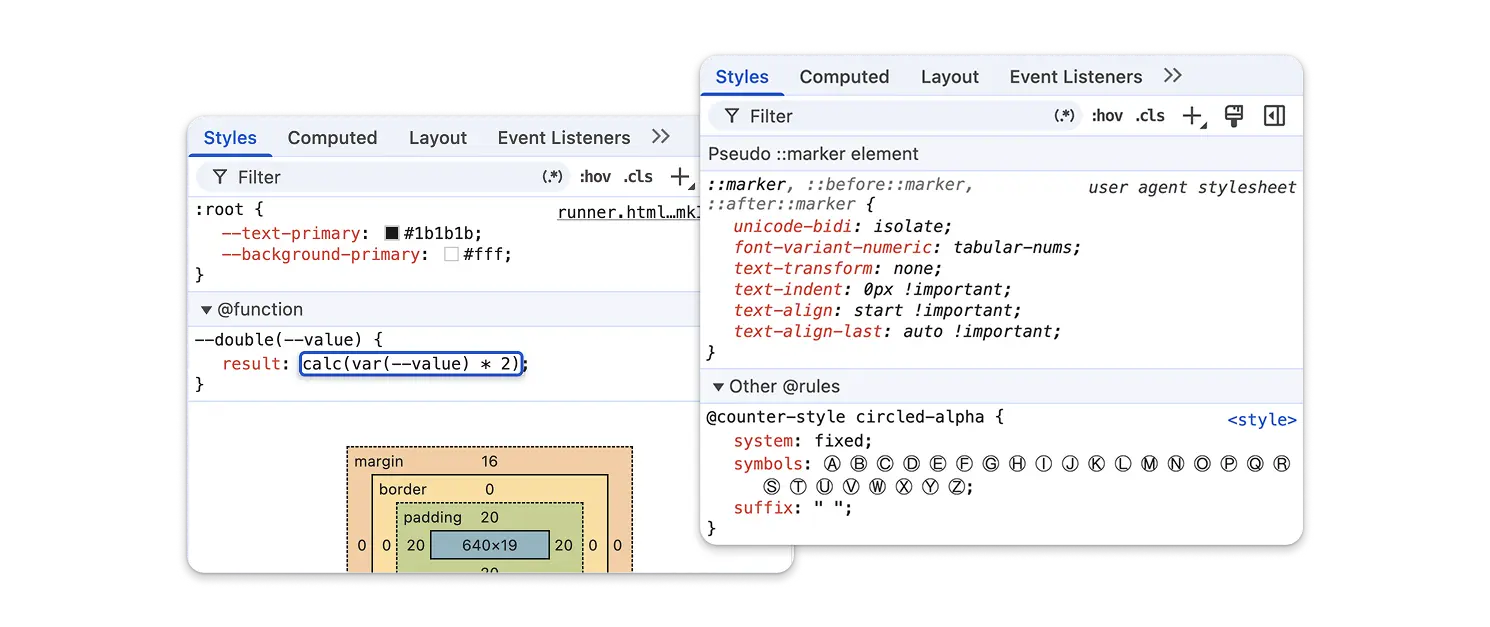
The Styles tab in the Elements panel brings new authoring capabilities for modern CSS features:
- In-place
@containerrule editing: You can now directly edit container names and query conditions in CSS@containerrules, allowing seamless experimentation with responsive container query designs. - CSS
@functionrule editing: Added full editing support for custom CSS@functionrules. @counter-stylerule editing: Added code completion forlist-style-typeproperties, linking them directly to their corresponding@counter-styledefinitions.- Collapse non-contributing rules: A new preference setting lets you collapse non-contributing CSS style rules, keeping the Styles pane focused strictly on active styles.
Chromium issues: 507611251, 41491726, 480080406, 351662727, 514846131
De-duplicated breakpoints and recursive source map support in Sources
The Sources panel features improved debugging accuracy across complex modern build pipelines:
- Logical breakpoint de-duplication: Breakpoint markers in the gutter are now de-duplicated across code-split bundles and SSR/client compiled templates using closest resolved location mapping. This prevents duplicate breakpoint indicators when debugging code shared across multiple chunks or environments.
- Recursive
EvalOriginand nested source maps: The debugger now supports recursiveEvalOriginstructures and nested translation chains across source maps, ensuring accurate stack traces and stepping behavior in multi-stage compilation workflows. - Go to line keyboard shortcut: Added ALT + G as an additional keyboard shortcut for "Go to line" navigation in the editor, to avoid conflicts with the new Gemini in Chrome shortcut.
- Import attributes formatting: Updated the underlying Acorn parser to support pretty-print formatting for standard JavaScript import attributes syntax.
Chromium issues: 493674242, 485142682, 480172712, 491167992
Security and cross-origin hardening across DevTools
Like many other software products, we recently saw a jump in security reports, many of which were found with the help of AI. The team is constantly reviewing and fixing these issues to keep DevTools safe:
- Self-XSS protections for Live Expressions: Added self-XSS warning dialogs and protection mechanisms when creating Live Expressions in the Console.
- Recorder navigation allowlists and replay verification: The Recorder panel now enforces strict navigation allowlists to prevent navigating to high-privilege pages, alongside strict extension origin verification within replay sections.
- Extension network override restrictions: Network overrides managed by
extensions now strictly enforce
runtime_blocked_hostshost policies. - Safe
@font-faceconstruction: Refactored@font-facerule generation using theCSSStyleSheetAPI and safe URL stringification to prevent CSS injection through data URLs.
Other highlights
A collection of smaller improvements and bug fixes in this release:
- Performance: Fixed
TraceTreetransfer size inflation for cached network requests by forcing transfer size to 0 bytes on identified cache hits. - Performance: Updated performance formatters to support optional Chrome
UX Report (CrUX)
deviceScopefield data. - Performance: Enabled horizontal scrolling in Call Tree tables to prevent ellipsis truncation on long file URLs.
- Performance: Fixed broken re-rendering and DOM state corruption in the Insights sidebar across multiple trace files.
- Performance: Migrated timeline invalidation tracking and debug mode settings from experimental flags to standard DevTools settings.
- Network: Reverted incorrect column renaming to restore the Has overrides column and fixed sorting logic for header and content overrides.
- Network: Fixed CSS
attr()styling in Server-Timing waterfall bars so per-row generated colors render properly. - Network: Fixed Copy as cURL command generation for nameless cookies.
- Application: Connected local and session storage items in the
Application panel using the new
StorageAgentinfrastructure. - Application: Fixed Speculative loads status precedence so URLs that succeed both prefetch and prerender display accurately as "prerendered".
- Application: Surfaced byte-exact value tooltips across columns in Heap Snapshot views.
- Issues: Surfaced the
BackUINavigationWouldSkipAdissue type whenever back navigation would skip ad entries. - Issues: Added support for surfacing email verification request
issues (
EmailVerificationRequestIssue). - Lighthouse: Added an Agentic Browsing category checkbox (disabled by default) in the Lighthouse configuration panel and updated the bundled Lighthouse engine to v13.3.0.
Chromium issues: 518021339, 40908621, 517519019, 487755345, 505284391, 465915378, 512908993, 40543651
Accessibility improvements
Chrome 150 brings several enhancements to screen reader announcements, widget structures, and ARIA semantics across DevTools:
- Improved screen reader announcements when selecting tabs and navigating sections within the Styles tab.
- Added descriptive tooltips on dialog close icons and allowed ARIA details and description attributes on tooltips.
- Enforced strict ARIA
menuitemroles on context menu items to improve navigation for assistive technologies.
Chromium issues: 510013788