


নতুন CSS গ্রিড ডিবাগিং টুল
CSS গ্রিড ডিবাগিংয়ের জন্য DevTools এখন আরও ভালো সমর্থন প্রদান করে!
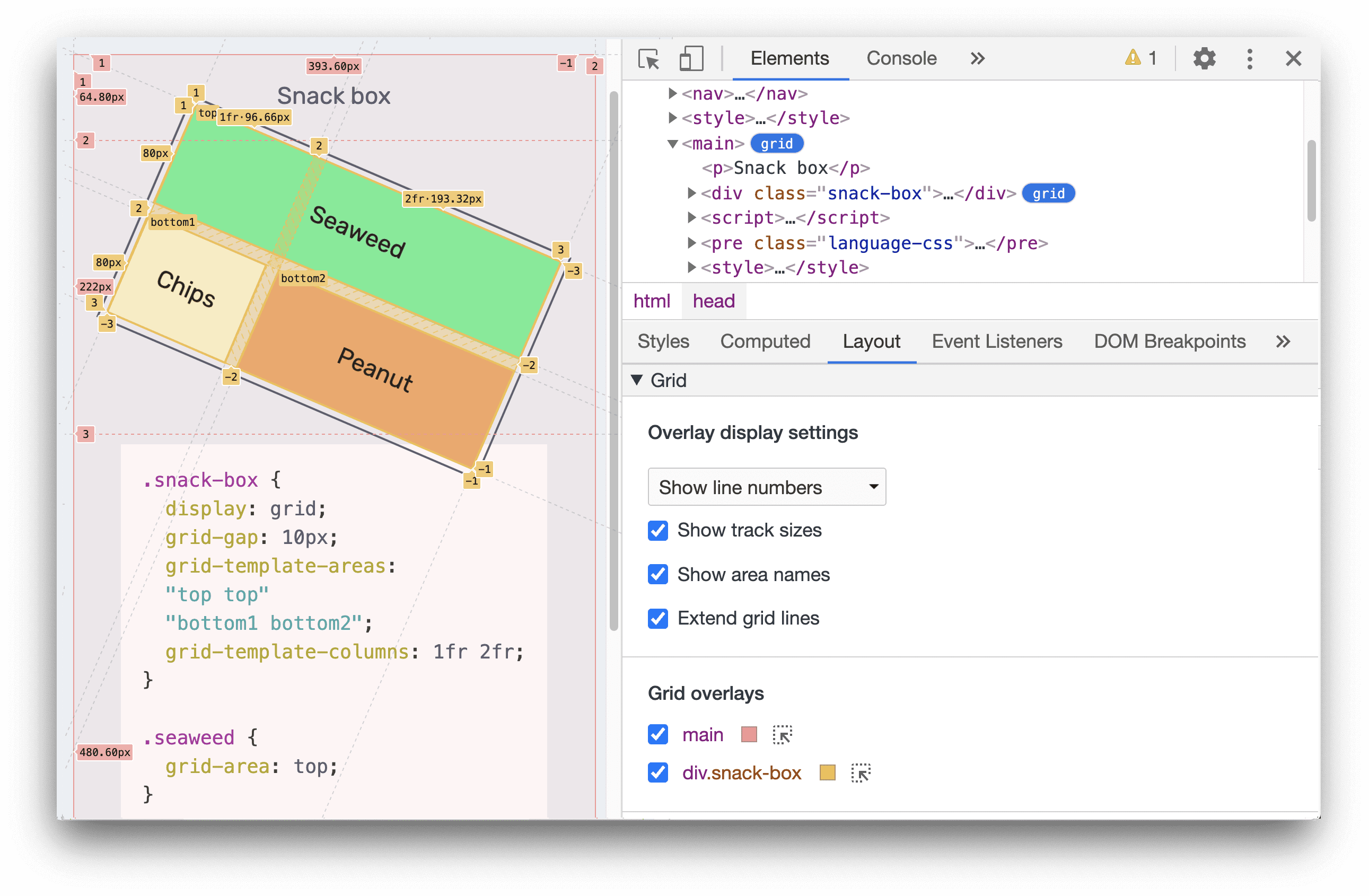
যখন আপনার পৃষ্ঠার কোনও HTML উপাদানে display: grid অথবা display: inline-grid প্রয়োগ করা হয়, তখন আপনি Elements প্যানেলে তার পাশে একটি grid ব্যাজ দেখতে পাবেন। পৃষ্ঠায় একটি গ্রিড ওভারলে প্রদর্শন টগল করতে ব্যাজটিতে ক্লিক করুন।
নতুন লেআউট প্যানে একটি গ্রিড বিভাগ রয়েছে যা আপনাকে গ্রিডগুলি দেখার জন্য বেশ কয়েকটি বিকল্প প্রদান করে।
আরও জানতে ডকুমেন্টেশনটি দেখুন।
ক্রোমিয়াম সমস্যা: ১০৪৭৩৫৬
নতুন WebAuthn ট্যাব
আপনি এখন নতুন WebAuthn ট্যাব ব্যবহার করে প্রমাণীকরণকারী অনুকরণ করতে এবং ওয়েব প্রমাণীকরণ API ডিবাগ করতে পারেন।
WebAuthn ট্যাব খুলতে আরও বিকল্প > আরও সরঞ্জাম > WebAuthn নির্বাচন করুন।
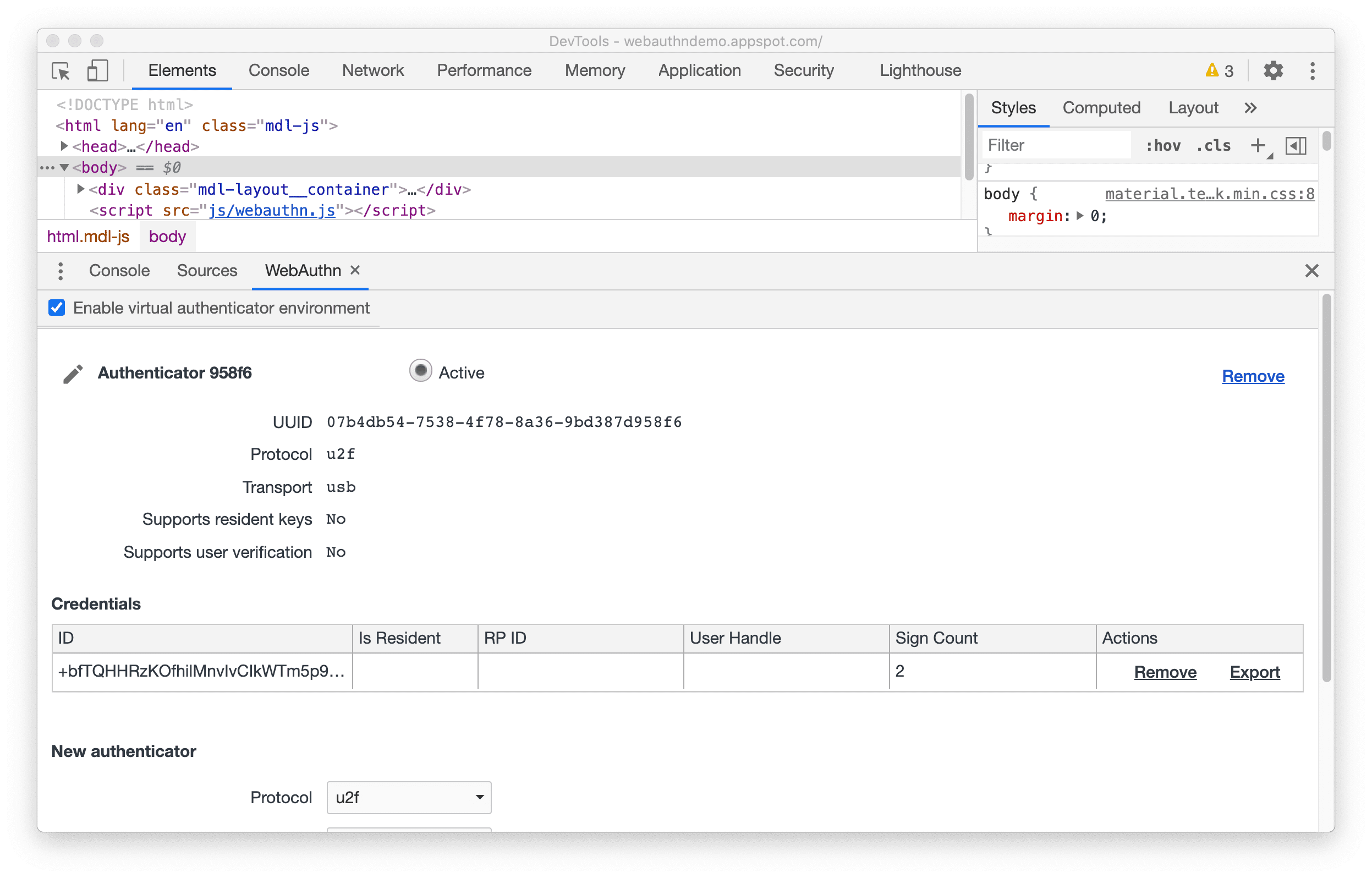
নতুন WebAuthn ট্যাবের আগে, Chrome-এ কোনও নেটিভ WebAuthn ডিবাগিং সাপোর্ট ছিল না। ডেভেলপারদের ওয়েব অথেনটিকেশন API দিয়ে তাদের ওয়েব অ্যাপ্লিকেশন পরীক্ষা করার জন্য ফিজিক্যাল অথেনটিকেশনেটরের প্রয়োজন হত।
নতুন WebAuthn ট্যাবের সাহায্যে, ওয়েব ডেভেলপাররা এখন এই প্রমাণীকরণকারীদের অনুকরণ করতে, তাদের ক্ষমতা কাস্টমাইজ করতে এবং তাদের অবস্থা পরিদর্শন করতে পারবেন, কোনও শারীরিক প্রমাণীকরণকারীদের প্রয়োজন ছাড়াই। এটি ডিবাগিং অভিজ্ঞতাকে অনেক সহজ করে তোলে।
WebAuthn বৈশিষ্ট্য সম্পর্কে আরও জানতে আমাদের ডকুমেন্টেশন দেখুন।
ক্রোমিয়াম সমস্যা: ১০৩৪৬৬৩
উপরের এবং নীচের প্যানেলের মধ্যে সরঞ্জামগুলি সরান
DevTools এখন DevTools-এ উপরের এবং নীচের প্যানেলের মধ্যে টুলগুলি সরানোর সুবিধা প্রদান করে। এইভাবে, আপনি একবারে যেকোনো দুটি টুল দেখতে পারবেন।
উদাহরণস্বরূপ, যদি আপনি একবারে Elements and Sources প্যানেল দেখতে চান, তাহলে আপনি Sources প্যানেলে ডান ক্লিক করতে পারেন এবং এটিকে নীচে সরাতে Move to bottom নির্বাচন করতে পারেন।
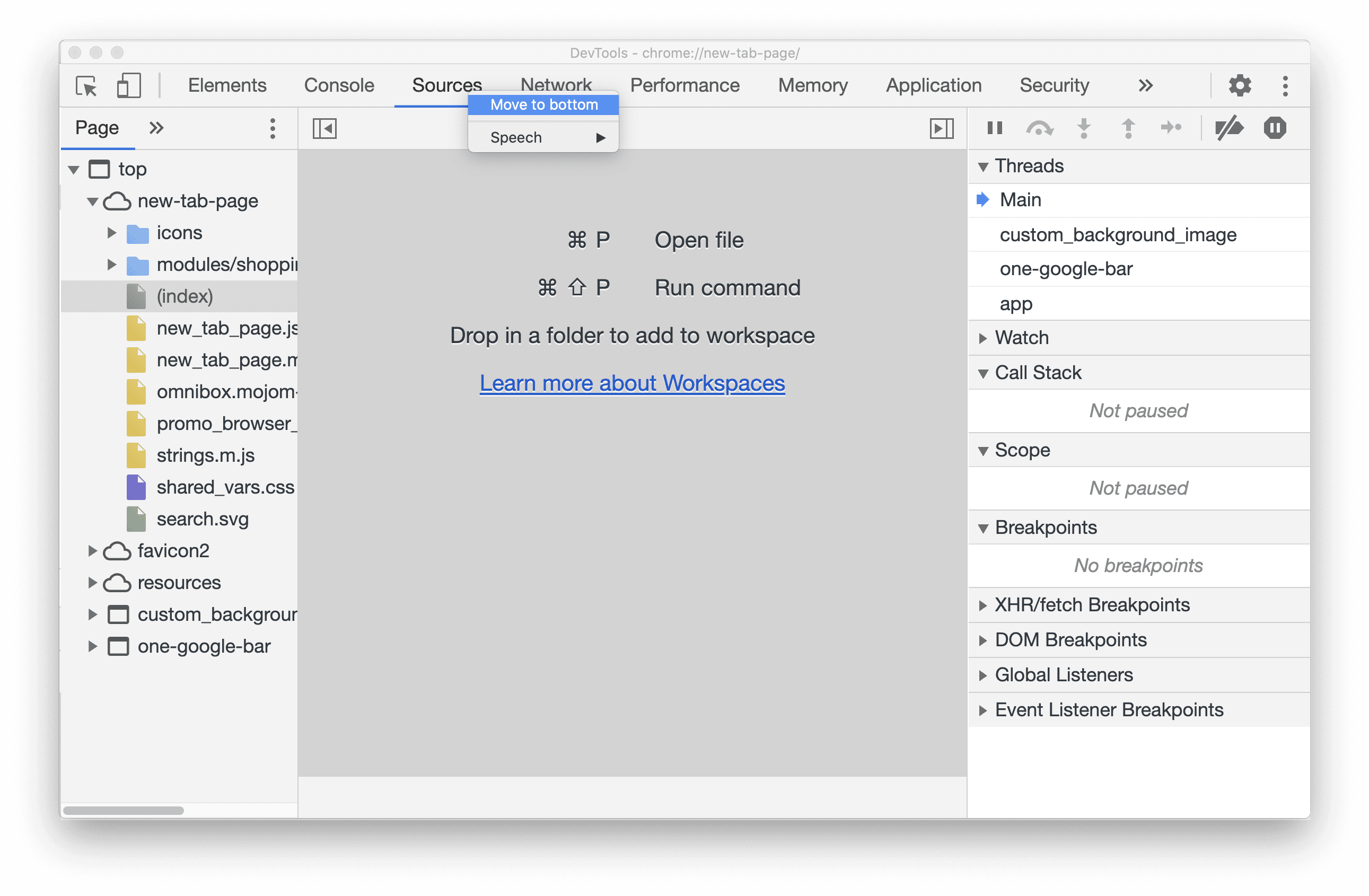
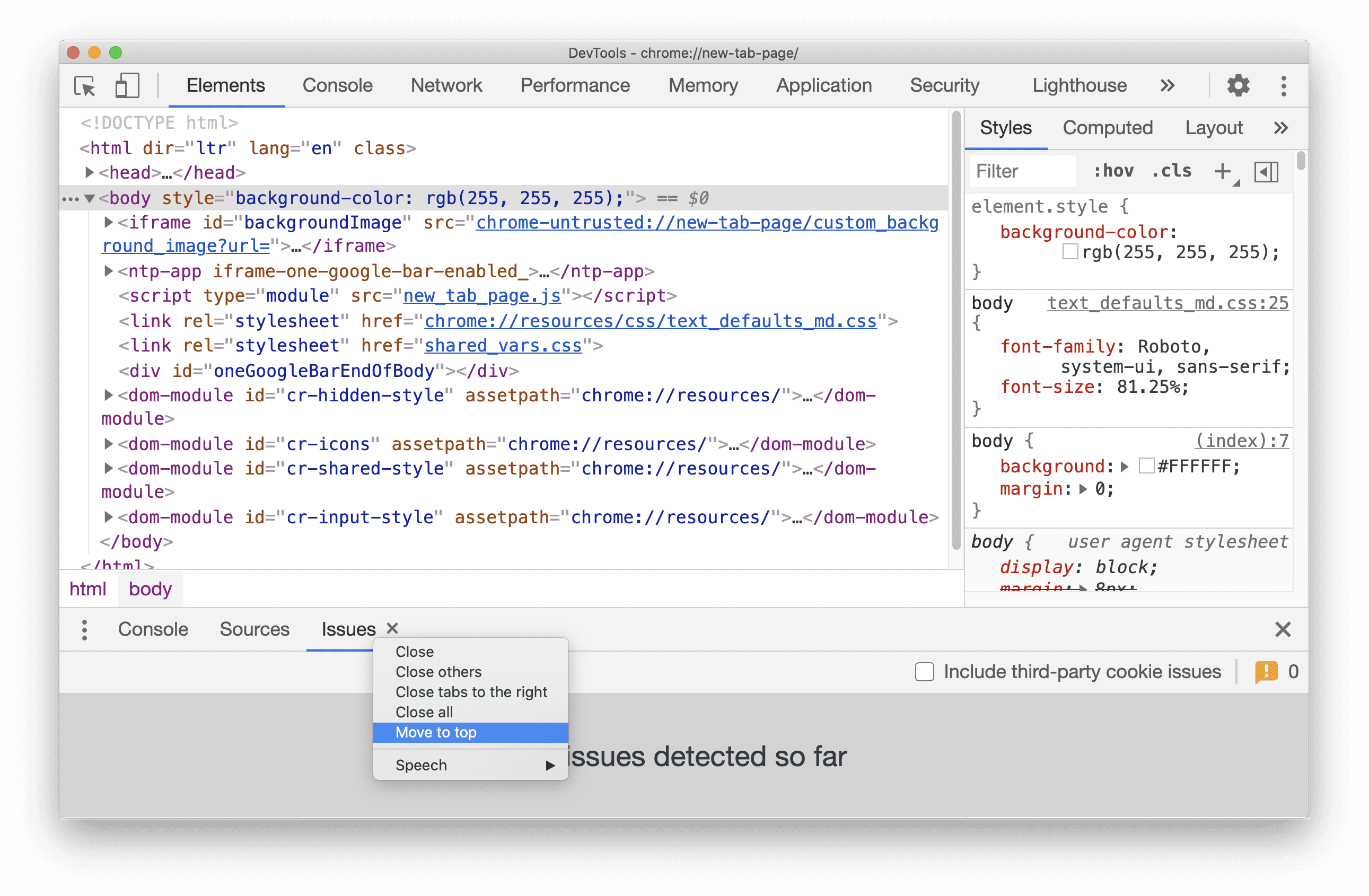
একইভাবে, আপনি যেকোনো নীচের ট্যাবকে উপরে সরাতে পারেন একটি ট্যাবে ডান ক্লিক করে এবং Move to top নির্বাচন করে।
ক্রোমিয়াম সমস্যা: ১০৭৫৭৩২
এলিমেন্ট প্যানেল আপডেট
স্টাইলস প্যানে কম্পিউটেড সাইডবার প্যানটি দেখুন
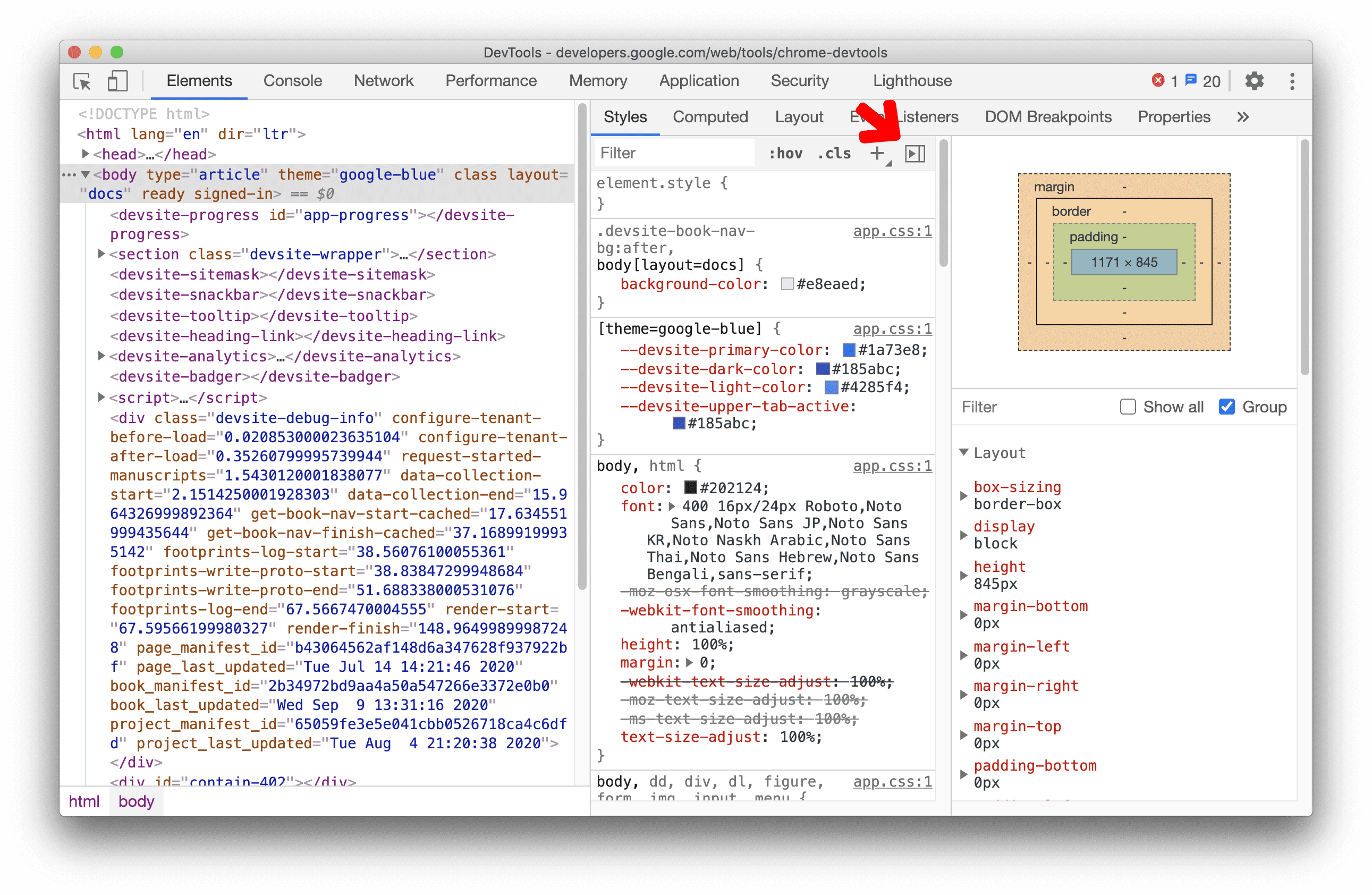
আপনি এখন স্টাইলস প্যানে কম্পিউটেড সাইডবার প্যানটি টগল করতে পারেন।
স্টাইলস পেনের কম্পিউটেড সাইডবার পেইনটি ডিফল্টভাবে আড়াল করা থাকে। এটি টগল করতে বোতামে ক্লিক করুন।
ক্রোমিয়াম সমস্যা: ১০৭৩৮৯৯
কম্পিউটেড প্যানে CSS প্রোপার্টি গ্রুপ করা
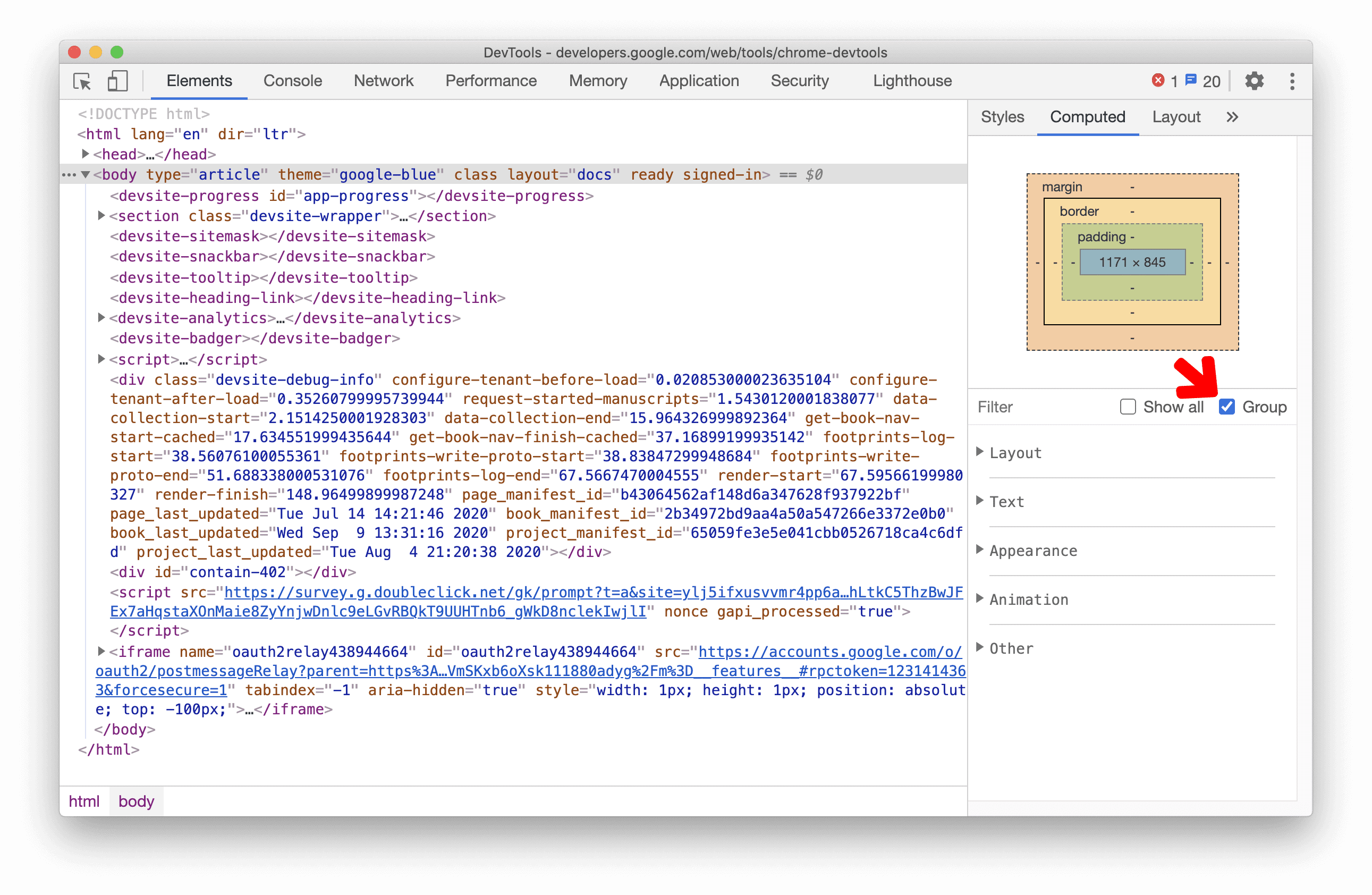
আপনি এখন কম্পিউটেড প্যানে বিভাগ অনুসারে CSS বৈশিষ্ট্যগুলিকে গোষ্ঠীভুক্ত করতে পারেন।
এই নতুন গ্রুপিং বৈশিষ্ট্যের সাহায্যে, কম্পিউটেড প্যানে নেভিগেট করা (কম স্ক্রলিং) সহজ হবে এবং CSS পরিদর্শনের জন্য সম্পর্কিত বৈশিষ্ট্যের একটি সেটে বেছে বেছে ফোকাস করা যাবে।
এলিমেন্টস প্যানেলে, একটি এলিমেন্ট নির্বাচন করুন। CSS প্রোপার্টিগুলিকে গ্রুপ/আনগ্রুপ করতে গ্রুপ চেকবক্সটি টগল করুন।
ক্রোমিয়াম সমস্যা: 1096230 , 1084673 , 1106251
লাইটহাউস প্যানেলে লাইটহাউস 6.4
লাইটহাউস প্যানেলটি এখন লাইটহাউস 6.4 চালাচ্ছে। পরিবর্তনগুলির সম্পূর্ণ তালিকার জন্য রিলিজ নোটগুলি দেখুন।
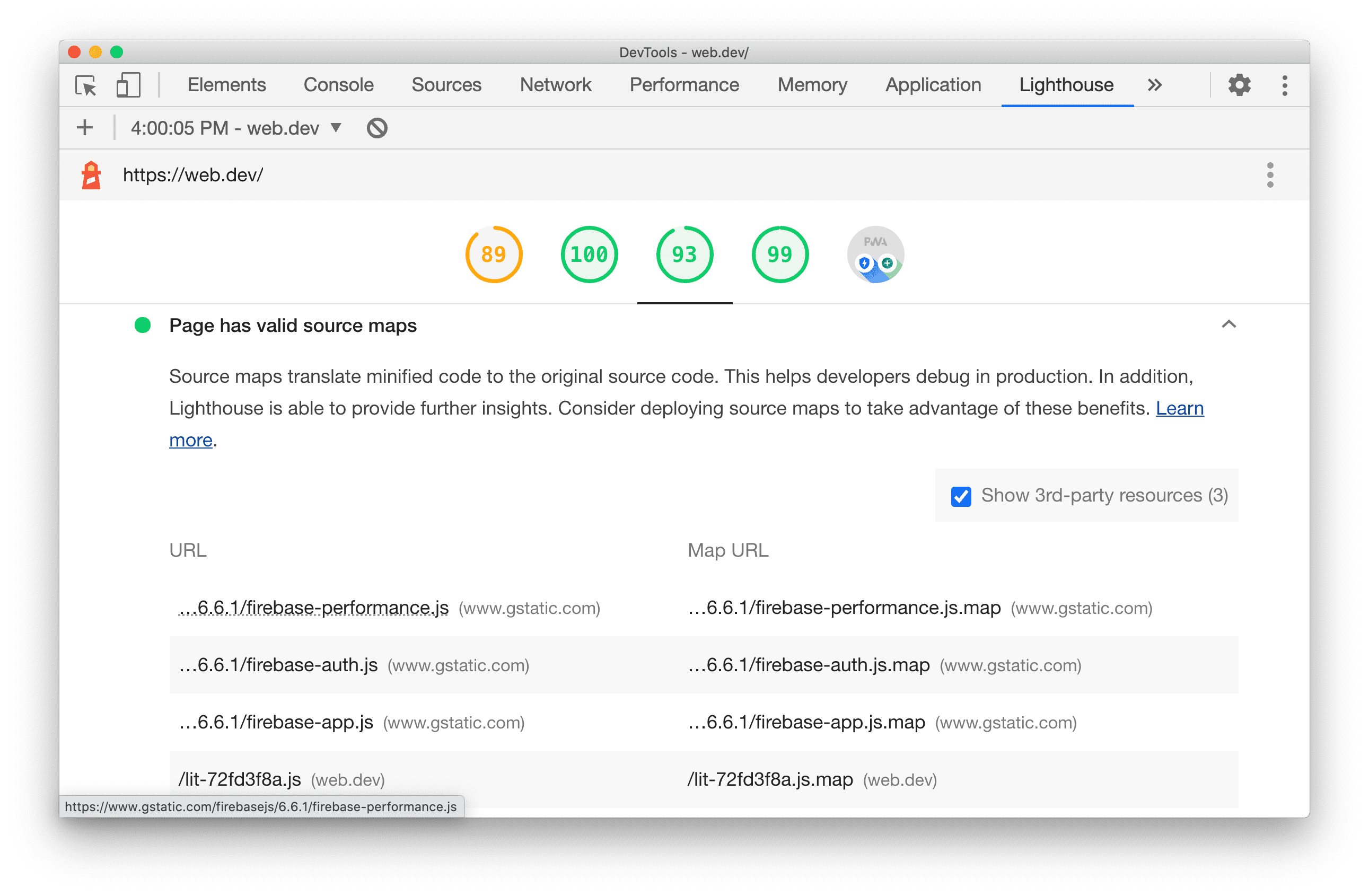
লাইটহাউস ৬.৪-এ নতুন অডিট:
- প্রিলোড ফন্ট ।
font-display: optionalব্যবহার করে এমন সমস্ত ফন্ট প্রিলোড করা হয়েছে কিনা তা যাচাই করে। - বৈধ উৎস মানচিত্র । বৃহৎ, প্রথম-পক্ষের জাভাস্ক্রিপ্টের জন্য কোনও পৃষ্ঠায় বৈধ উৎস মানচিত্র আছে কিনা তা অডিট করে।
- [পরীক্ষামূলক] বৃহৎ জাভাস্ক্রিপ্ট লাইব্রেরি । বৃহৎ জাভাস্ক্রিপ্ট লাইব্রেরি খারাপ কর্মক্ষমতা সৃষ্টি করতে পারে। এই অডিটটি
moment.jsএর মতো সাধারণ, বৃহৎ জাভাস্ক্রিপ্ট লাইব্রেরির সস্তা বিকল্পগুলির পরামর্শ দেয়।
ক্রোমিয়াম সমস্যা: ৭৭২৫৫৮
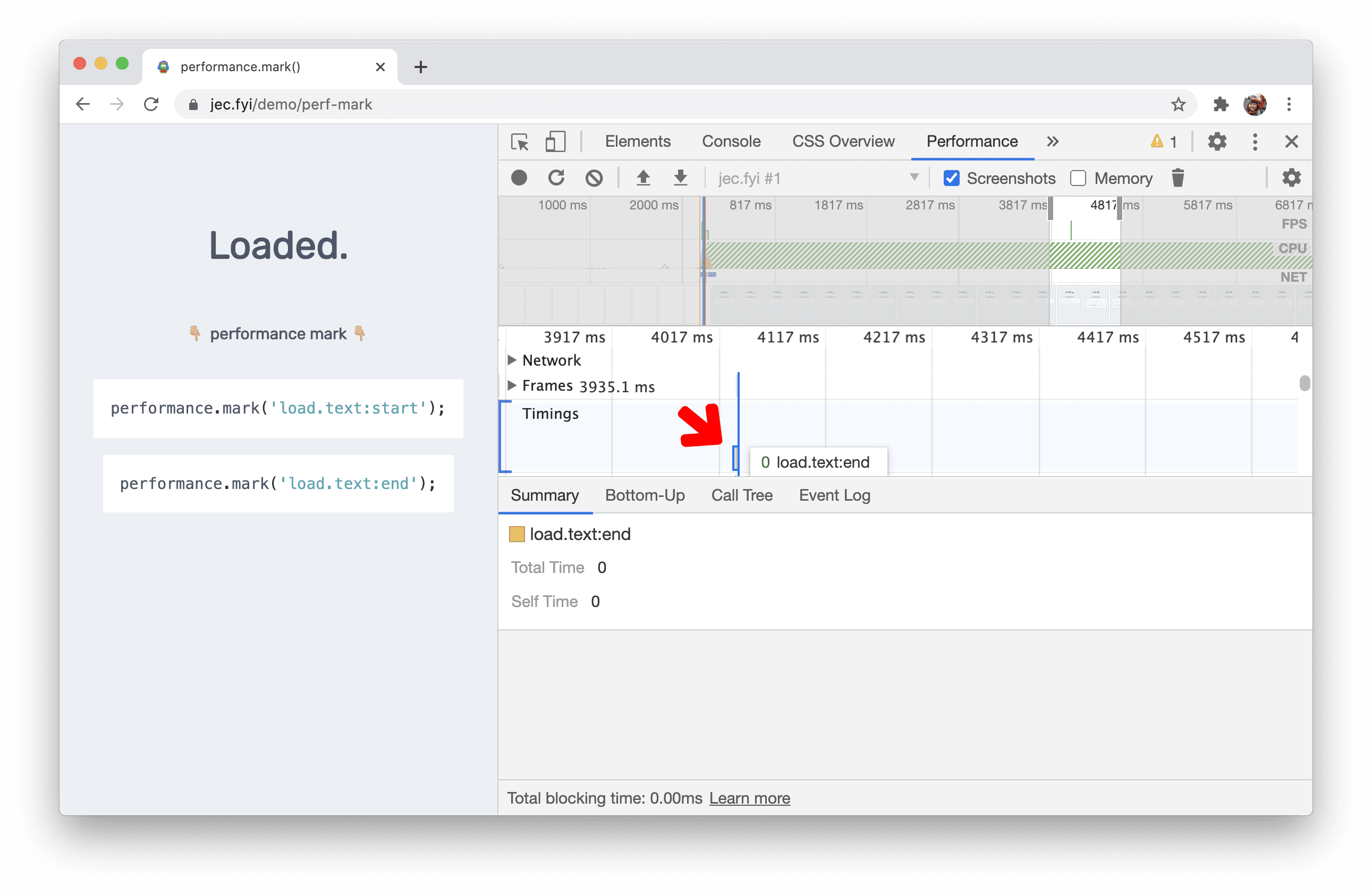
সময় বিভাগে performance.mark() ইভেন্টগুলি
একটি পারফরম্যান্স রেকর্ডিংয়ের সময় বিভাগটি এখন performance.mark() ইভেন্টগুলিকে চিহ্নিত করে।
নেটওয়ার্ক প্যানেলে নতুন resource-type এবং url ফিল্টার
নেটওয়ার্ক অনুরোধ ফিল্টার করতে নেটওয়ার্ক প্যানেলে নতুন resource-type এবং url কীওয়ার্ড ব্যবহার করুন।
উদাহরণস্বরূপ, নেটওয়ার্ক অনুরোধগুলিতে ফোকাস করতে resource-type:image ব্যবহার করুন, যা চিত্র।

resource-type এবং url মতো আরও বিশেষ কীওয়ার্ড আবিষ্কার করতে বৈশিষ্ট্য অনুসারে ফিল্টার অনুরোধগুলি দেখুন।
ক্রোমিয়াম সমস্যা: 1121141 , 1104188
ফ্রেমের বিবরণ দেখুন আপডেট
এন্ডপয়েন্টে COEP এবং COOP reporting to প্রদর্শন করুন
আপনি এখন নিরাপত্তা ও বিচ্ছিন্নতা বিভাগের অধীনে ক্রস-অরিজিন এম্বেডার পলিসি (COEP) এবং ক্রস-অরিজিন ওপেনার পলিসি (COOP) এন্ডপয়েন্টে reporting to দেখতে পারবেন।
রিপোর্টিং এপিআই একটি নতুন HTTP হেডার, Report-To , সংজ্ঞায়িত করে, যা ওয়েব ডেভেলপারদের ব্রাউজারকে সতর্কতা এবং ত্রুটি পাঠানোর জন্য সার্ভার এন্ডপয়েন্ট নির্দিষ্ট করার একটি উপায় দেয়।
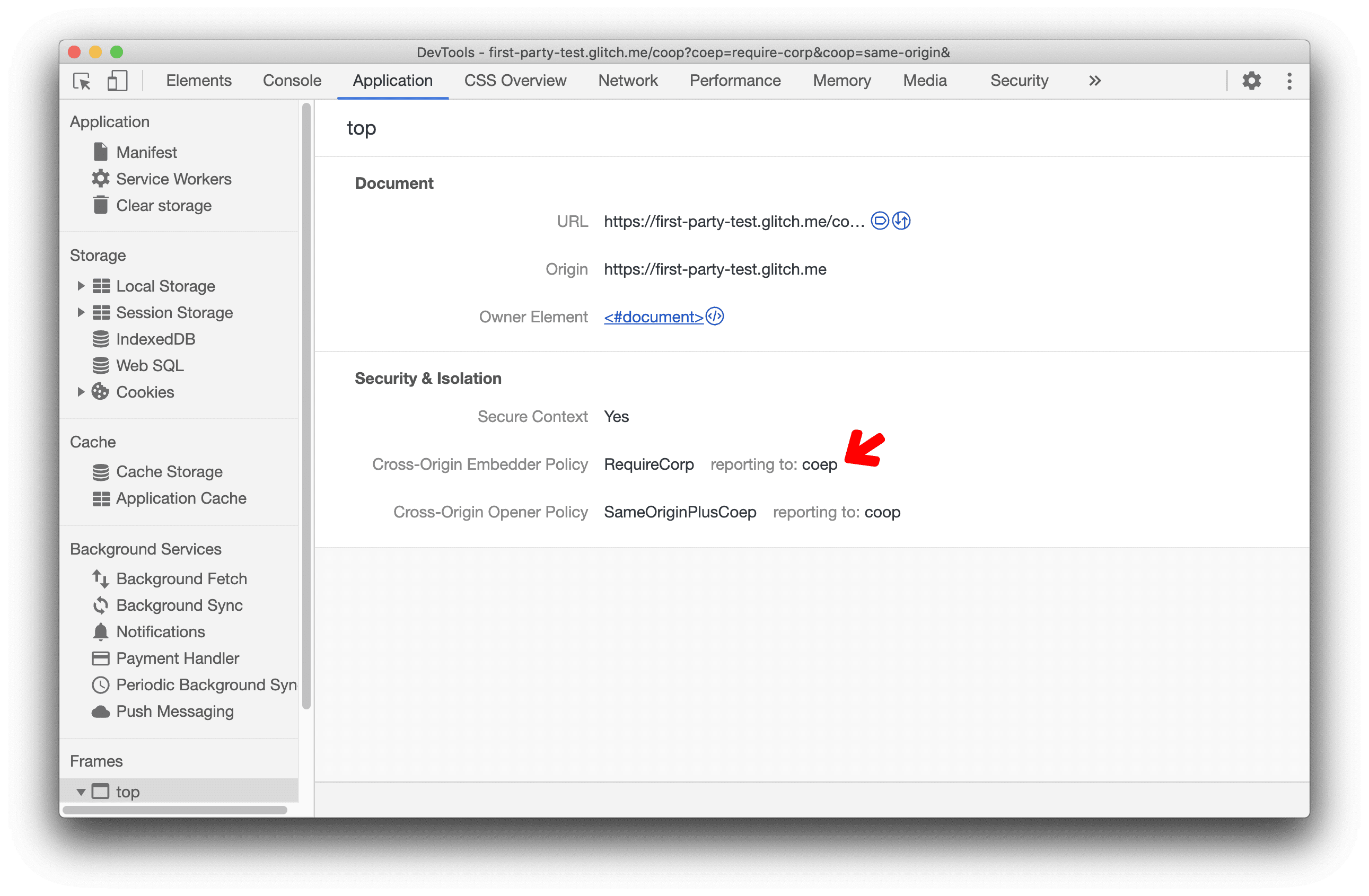
COEP এবং COOP কীভাবে সক্ষম করবেন এবং আপনার ওয়েবসাইটকে "ক্রস-অরিজিন আইসোলেটেড" করবেন সে সম্পর্কে আরও জানতে এই নিবন্ধটি পড়ুন।
ক্রোমিয়াম সমস্যা: ১০৫১৪৬৬
COEP এবং COOP report-only মোড প্রদর্শন করুন
DevTools এখন COEP এবং COOP-এর জন্য report-only লেবেল প্রদর্শন করে, যেগুলি report-only মোডে সেট করা আছে।
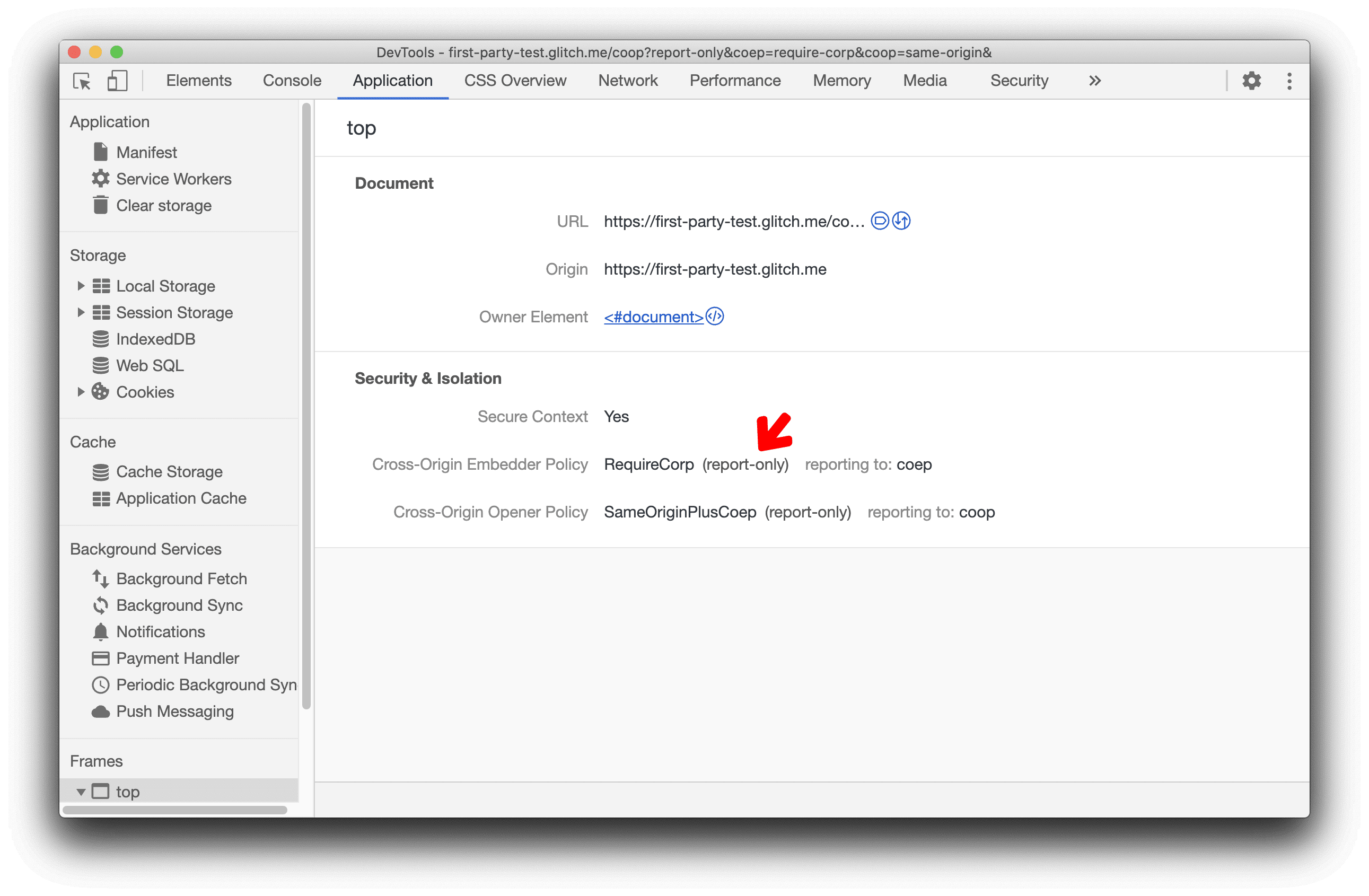
তথ্য ফাঁস রোধ এবং আপনার ওয়েবসাইটে COOP এবং COEP কীভাবে সক্ষম করবেন তা জানতে এই ভিডিওটি দেখুন।
ক্রোমিয়াম সমস্যা: ১০৫১৪৬৬
আরও সরঞ্জাম মেনুতে Settings বন্ধ করা
"আরও সরঞ্জাম" মেনুতে থাকা Settings বন্ধ করে দেওয়া হয়েছে। এর পরিবর্তে মূল প্যানেল থেকে সেটিংসটি খুলুন।
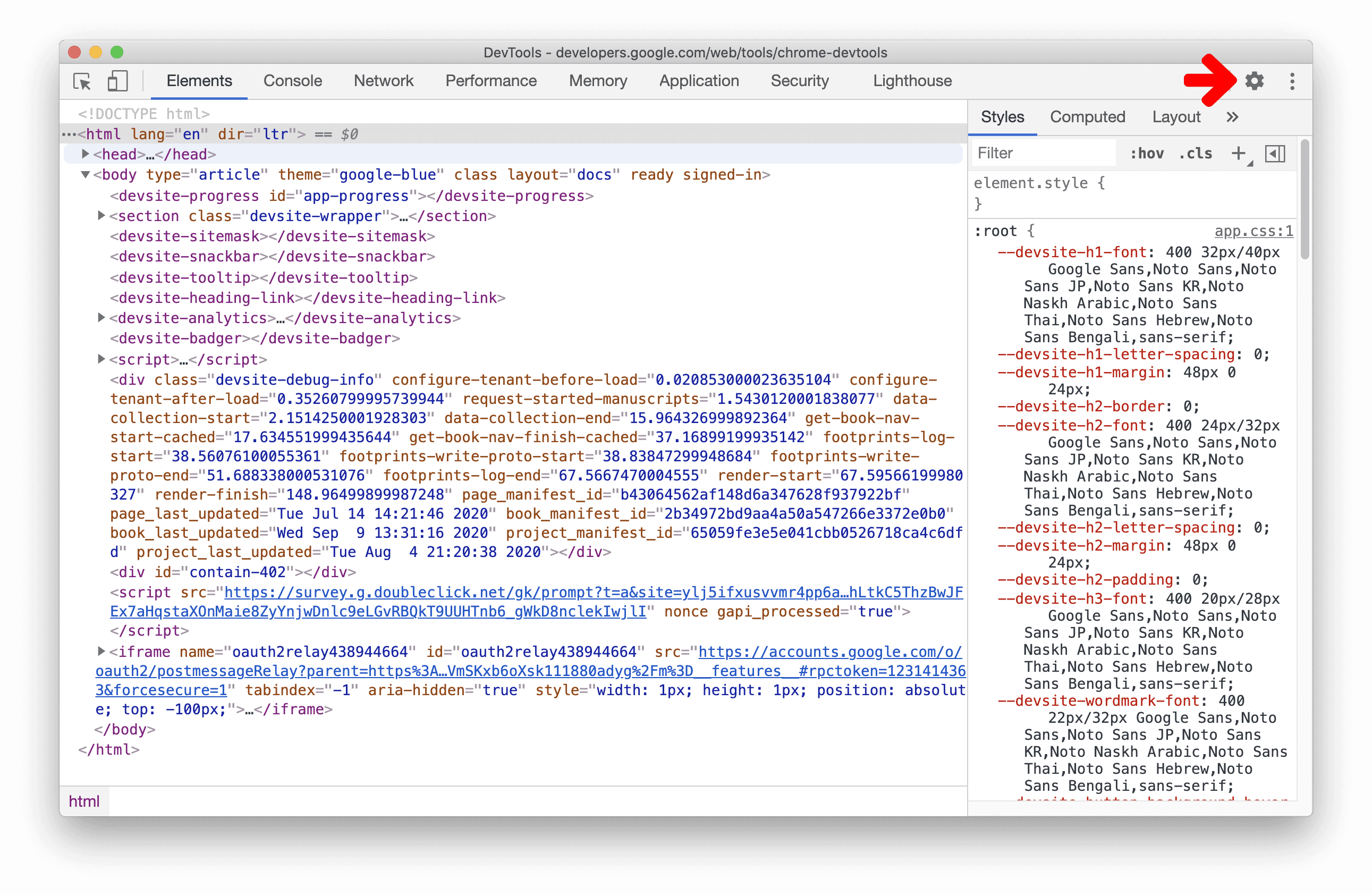
ক্রোমিয়াম সমস্যা: ১১২১৩১২
পরীক্ষামূলক বৈশিষ্ট্য
CSS ওভারভিউ প্যানেলে রঙের বৈপরীত্যের সমস্যাগুলি দেখুন এবং সমাধান করুন
CSS ওভারভিউ প্যানেল এখন আপনার পৃষ্ঠার কম রঙের বৈপরীত্যযুক্ত লেখার একটি তালিকা প্রদর্শন করে।
এই উদাহরণে, ডেমো পৃষ্ঠায় রঙের বৈপরীত্য কম। সমস্যাটির উপর ক্লিক করলে, আপনি সমস্যাযুক্ত উপাদানগুলির একটি তালিকা দেখতে পাবেন।
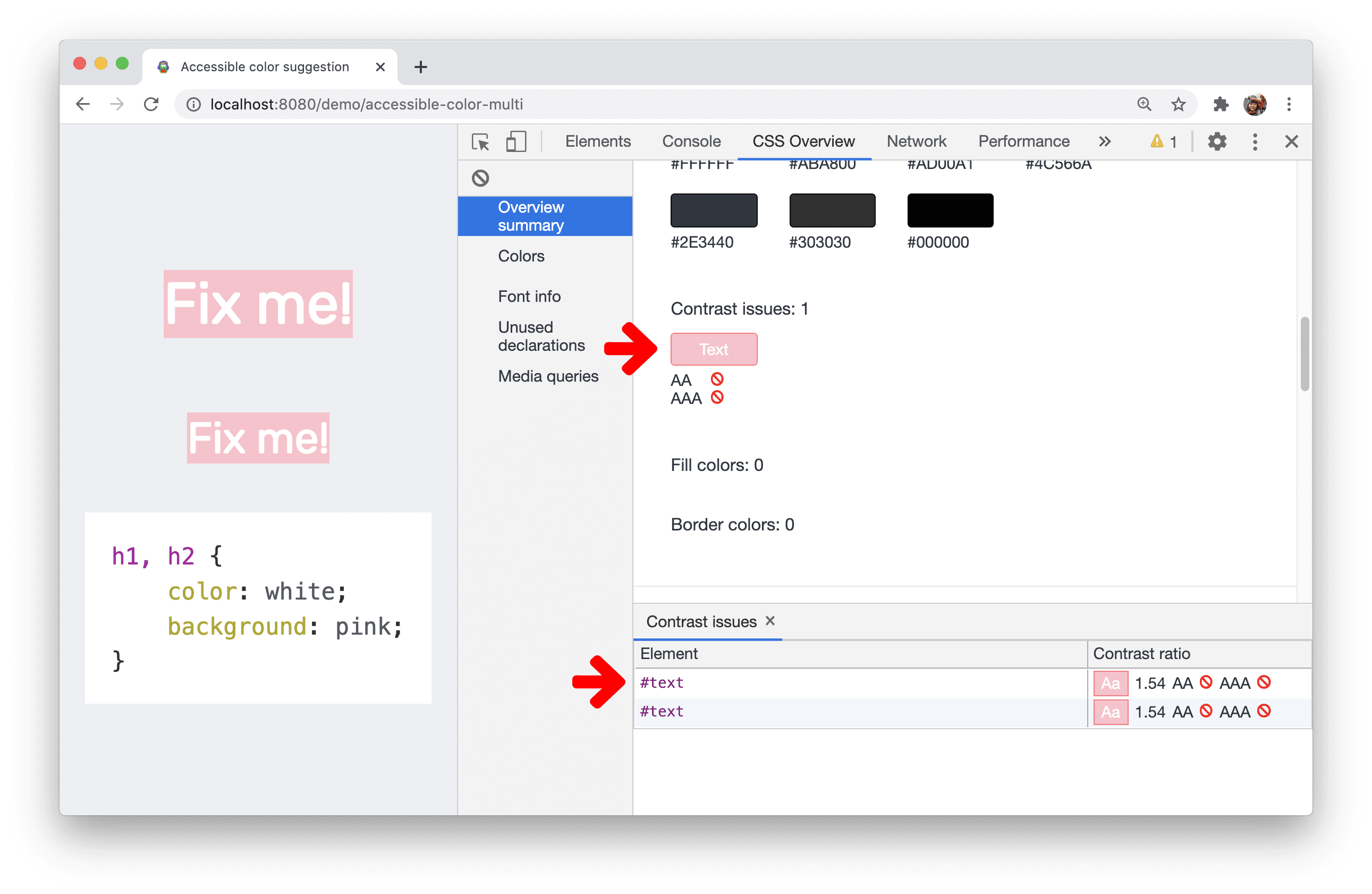
তালিকার একটি উপাদানের উপর ক্লিক করে এলিমেন্ট প্যানেলে এলিমেন্টটি খুলুন। DevTools আপনাকে কম কনট্রাস্ট টেক্সট ঠিক করতে সাহায্য করার জন্য স্বয়ংক্রিয় রঙের পরামর্শ প্রদান করে ।
ক্রোমিয়াম সমস্যা: ১১২০৩১৬
DevTools-এ কীবোর্ড শর্টকাট কাস্টমাইজ করুন
আপনি এখন DevTools-এ আপনার পছন্দের কমান্ডের জন্য কীবোর্ড শর্টকাটগুলি কাস্টমাইজ করতে পারেন।
সেটিংস > শর্টকাট এ যান, একটি কমান্ডের উপর হোভার করে এবং কীবোর্ড শর্টকাটটি কাস্টমাইজ করতে সম্পাদনা বোতামে (পেন আইকন) ক্লিক করুন।
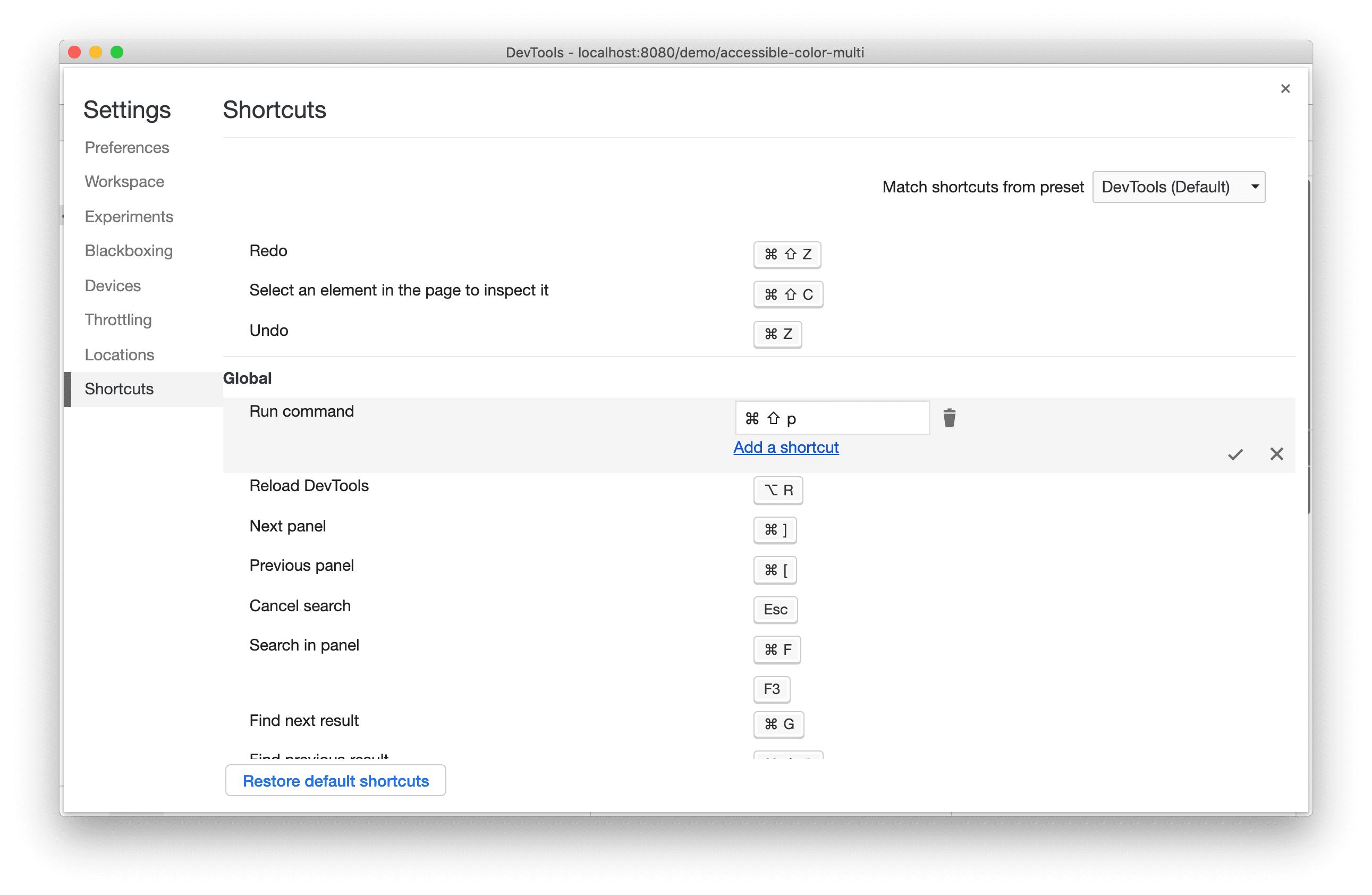
সমস্ত শর্টকাট রিসেট করতে, ডিফল্ট শর্টকাট পুনরুদ্ধার করুন এ ক্লিক করুন।
ক্রোমিয়াম সমস্যা: ১৭৪৩০৯
প্রিভিউ চ্যানেলগুলি ডাউনলোড করুন
আপনার ডিফল্ট ডেভেলপমেন্ট ব্রাউজার হিসেবে Chrome Canary , Dev , অথবা Beta ব্যবহার করার কথা বিবেচনা করুন। এই প্রিভিউ চ্যানেলগুলি আপনাকে সর্বশেষ DevTools বৈশিষ্ট্যগুলিতে অ্যাক্সেস দেয়, আপনাকে অত্যাধুনিক ওয়েব প্ল্যাটফর্ম API পরীক্ষা করতে দেয় এবং আপনার ব্যবহারকারীদের আগে আপনার সাইটে সমস্যাগুলি খুঁজে পেতে সহায়তা করে!
Chrome DevTools টিমের সাথে যোগাযোগ করুন
DevTools সম্পর্কিত নতুন বৈশিষ্ট্য, আপডেট বা অন্য কিছু নিয়ে আলোচনা করতে নিম্নলিখিত বিকল্পগুলি ব্যবহার করুন।
- crbug.com এ আমাদের কাছে প্রতিক্রিয়া এবং বৈশিষ্ট্য অনুরোধ জমা দিন।
- ব্যবহার করে DevTools সমস্যা রিপোর্ট করুন। আরও বিকল্প > সাহায্য > DevTools-এ DevTools সমস্যা রিপোর্ট করুন ।
- @ChromeDevTools- এ টুইট করুন।
- DevTools YouTube ভিডিওতে নতুন কী আছে বা DevTools Tips YouTube ভিডিওগুলিতে মন্তব্য করুন।
DevTools-এ নতুন কী আছে
DevTools সিরিজে নতুন কী কী বিষয় অন্তর্ভুক্ত করা হয়েছে তার একটি তালিকা।
- DevTools MCP সার্ভার আপডেট
- উন্নত ট্রেস শেয়ারিং
- @starting-style এর জন্য সমর্থন
- প্রদর্শনের জন্য সম্পাদক উইজেট: রাজমিস্ত্রি
- বাতিঘর ১৩
- জেমিনি থেকে কোড পরামর্শ
- DevTools MCP সার্ভারের জন্য উন্নত বৈশিষ্ট্য
- এআই সহায়তার দ্রুত অ্যাক্সেস
- জেমিনি দিয়ে সম্পূর্ণ পারফরম্যান্স ট্রেস ডিবাগ করুন
- ড্রয়ারের ওরিয়েন্টেশন টগল করুন
- গুগল ডেভেলপার প্রোগ্রাম
- বিবিধ হাইলাইটস
- আপনার এআই এজেন্টের জন্য Chrome DevTools (MCP)
- জেমিনি দিয়ে নেটওয়ার্ক নির্ভরতা ট্রি ডিবাগ করুন
- জেমিনির সাথে আপনার চ্যাটগুলি রপ্তানি করুন
- পারফরম্যান্স প্যানেলে স্থায়ী ট্র্যাক কনফিগারেশন
- IP সুরক্ষিত নেটওয়ার্ক অনুরোধগুলি ফিল্টার করুন
- এলিমেন্টস > লেআউট ট্যাব রাজমিস্ত্রির লেআউট সাপোর্ট যোগ করে
- বাতিঘর ১২.৮.২
- বিবিধ হাইলাইটস
- জেমিনি দিয়ে আরও অন্তর্দৃষ্টি ডিবাগ করুন
- 'নেটওয়ার্ক কন্ডিশন'-এ 'সেভ-ডেটা' হেডারটি অনুকরণ করুন।
- CSS প্রপার্টি টুলটিপে বেসলাইন স্ট্যাটাস দেখুন
- ব্যবহারকারী এজেন্ট ক্লায়েন্ট ইঙ্গিতগুলিতে ফর্ম ফ্যাক্টরগুলিকে ওভাররাইড করুন
- বাতিঘর ১২.৮.০
- বিবিধ হাইলাইটস
- আরও নির্ভরযোগ্য এবং উৎপাদনশীল Chrome DevTools
- স্টাইলিংয়ের জন্য AI সহায়তায় ছবি আপলোড করুন
- নেটওয়ার্কের টেবিলে অনুরোধ শিরোনাম যোগ করুন
- গুগল আই/ও ২০২৫ এর হাইলাইটগুলি দেখুন
- বিবিধ হাইলাইটস
- পারফর্মেন্স প্যানেলের উন্নতি
- 'নেটওয়ার্ক নির্ভরতা ট্রি' অন্তর্দৃষ্টিতে পূর্ব-সংযুক্ত উৎপত্তি
- 'ডকুমেন্ট রিকোয়েস্ট ল্যাটেন্সি' ইনসাইট-এ সার্ভারের প্রতিক্রিয়া এবং পুনঃনির্দেশের সময়
- নেটওয়ার্ক অনুরোধের সারাংশে পুনঃনির্দেশনা
- পারফর্ম্যান্স ট্রেসে কম শব্দ
- 'জাভাস্ক্রিপ্ট নমুনা অক্ষম করুন' বন্ধ করা হয়েছে
- সেন্সরে ভূ-অবস্থান নির্ভুলতা পরামিতি
- এলিমেন্ট প্যানেলের উন্নতি
- জটিল CSS মানগুলি সহজে ডিবাগ করুন
- এলিমেন্টস > স্টাইলে @function সাপোর্ট
- নেটওয়ার্ক প্যানেলের উন্নতি
- অনুরোধ-শিরোনাম ফিল্টার
- বিচ্ছিন্ন ওয়েব অ্যাপে সরাসরি সকেট
- বিবিধ হাইলাইটস
- অ্যাক্সেসযোগ্যতা
- গুগল আই/ও ২০২৫ সংস্করণ
- জেমিনি দিয়ে আপনার কর্মক্ষেত্রে CSS পরিবর্তনগুলি সংশোধন করুন এবং সংরক্ষণ করুন
- একটি ওয়ার্কস্পেস ফোল্ডার সংযুক্ত করুন এবং পরিবর্তনগুলি আপনার সোর্স ফাইলগুলিতে সংরক্ষণ করুন।
- পারফরম্যান্সের অন্তর্দৃষ্টি সম্পর্কে জেমিনিকে জিজ্ঞাসা করুন
- জেমিনি দিয়ে পারফরম্যান্সের ফলাফল টীকা করুন
- জেমিনির সাথে আপনার চ্যাটে স্ক্রিনশট যোগ করুন
- পারফর্ম্যান্স প্যানেলে নতুন অন্তর্দৃষ্টি
- ডুপ্লিকেট জাভাস্ক্রিপ্ট
- লিগ্যাসি জাভাস্ক্রিপ্ট
- জল্পনা এখন নিয়ম ট্যাগ সমর্থন করে
- বাতিঘর ১২.৬.০
- বিবিধ হাইলাইটস
- অ্যাক্সেসযোগ্যতা
- পারফর্মেন্স প্যানেলের উন্নতি
- নতুন পারফর্ম্যান্স অন্তর্দৃষ্টি
- হাইলাইট করতে ক্লিক করুন
- নেটওয়ার্ক অনুরোধের সারসংক্ষেপে সার্ভারের সময়
- 'গোপনীয়তা এবং নিরাপত্তা' বিভাগে কুকিজ ফিল্টার করুন
- প্যানেল জুড়ে টেবিলে kB ইউনিটে আকার
- এলিমেন্টস > স্টাইলে অটোকমপ্লিট কর্নার-শেপ এবং কর্নার-*-শেপ সাপোর্ট করে।
- পরীক্ষামূলক: DOM-এ উপাদান এবং বৈশিষ্ট্যের সমস্যাগুলি হাইলাইট করা
- বাতিঘর ১২.৫.০
- বিবিধ হাইলাইটস
- পারফর্মেন্স প্যানেলের উন্নতি
- পারফরম্যান্সে প্রোফাইল এবং ফাংশন কলের জন্য অরিজিন এবং স্ক্রিপ্ট লিঙ্ক
- পর্যায়ক্রমে LCP ফিল্ড ডেটা সাপোর্ট
- নেটওয়ার্ক নির্ভরতা ট্রি অন্তর্দৃষ্টি
- সারাংশে মোট এবং স্ব-সময়ের পরিবর্তে সময়কাল
- সবচেয়ে ভারী স্ট্যাক হাইলাইটিং
- বিভিন্ন প্যানেলের জন্য উন্নত খালি অবস্থা
- এলিমেন্টসে অ্যাক্সেসিবিলিটি ট্রি ভিউ
- বাতিঘর ১২.৪.০
- বিবিধ হাইলাইটস
- গোপনীয়তা এবং নিরাপত্তা প্যানেল
- পারফর্মেন্স প্যানেলের উন্নতি
- ক্যালিব্রেটেড CPU থ্রটলিং প্রিসেট
- একই AI চ্যাটে বিভিন্ন পারফর্ম্যান্স ইভেন্ট নির্বাচন করুন
- পারফরম্যান্সে প্রথম এবং তৃতীয় পক্ষের হাইলাইটিং
- মার্কার টুলটিপস এবং অন্তর্দৃষ্টিতে ফিল্ড ডেটা
- জোরপূর্বক রিফ্লো অন্তর্দৃষ্টি
- 'DOM সাইজ অপ্টিমাইজ করুন' অন্তর্দৃষ্টি
- console.timeStamp ব্যবহার করে পারফর্ম্যান্স ট্রেস প্রসারিত করুন।
- এলিমেন্ট প্যানেলের উন্নতি
- অ্যানিমেটেড স্টাইলের রিয়েল-টাইম মান
- :open pseudo-class এবং বিভিন্ন pseudo-elements এর জন্য সমর্থন
- সমস্ত কনসোল বার্তা কপি করুন
- মেমোরি প্যানেলে বাইট ইউনিট
- বিবিধ হাইলাইটস
- স্থায়ী এআই চ্যাট ইতিহাস
- পারফর্মেন্স প্যানেলের উন্নতি
- ছবি বিতরণের অন্তর্দৃষ্টি
- ক্লাসিক এবং আধুনিক কীবোর্ড নেভিগেশন
- ফ্লেম চার্টে অপ্রাসঙ্গিক স্ক্রিপ্টগুলি উপেক্ষা করুন
- হোভারে টাইমলাইন মার্কার এবং রেঞ্জ হাইলাইট করা হচ্ছে
- প্রস্তাবিত থ্রটলিং সেটিংস
- একটি ওভারলেতে সময় চিহ্নিতকারী
- সারাংশে JS কলের স্ট্যাক ট্রেস
- ব্যাজ সেটিংস এলিমেন্টস-এর মেনুতে সরানো হয়েছে
- নতুন 'নতুন কী' প্যানেল
- বাতিঘর ১২.৩.০
- বিবিধ হাইলাইটস
- জেমিনি ব্যবহার করে নেটওয়ার্ক অনুরোধ, উৎস ফাইল এবং কর্মক্ষমতা ট্রেস ডিবাগ করুন
- AI চ্যাট ইতিহাস দেখুন
- অ্যাপ্লিকেশন > স্টোরেজে এক্সটেনশন স্টোরেজ পরিচালনা করুন
- কর্মক্ষমতা উন্নতি
- লাইভ মেট্রিক্সে ইন্টারঅ্যাকশনের পর্যায়গুলি
- সারাংশ ট্যাবে রেন্ডার-ব্লকিং তথ্য
- scheduler.postTask ইভেন্ট এবং তাদের ইনিশিয়েটার তীরগুলির জন্য সমর্থন
- অ্যানিমেশন প্যানেল এবং এলিমেন্টস > স্টাইলস ট্যাবের উন্নতি
- এলিমেন্টস > স্টাইল থেকে অ্যানিমেশনে যান
- কম্পিউটেড ট্যাবে রিয়েল-টাইম আপডেট
- সেন্সরে কম্পিউট প্রেসার ইমুলেশন
- মেমোরি প্যানেলে উৎস অনুসারে গ্রুপ করা একই নামের JS অবজেক্ট
- সেটিংসের জন্য একটি নতুন চেহারা
- পারফর্ম্যান্স ইনসাইট প্যানেলটি বন্ধ করে DevTools থেকে সরানো হয়েছে
- বিবিধ হাইলাইটস
- জেমিনি দিয়ে CSS ডিবাগ করুন
- একটি ডেডিকেটেড সেটিংস ট্যাবে AI বৈশিষ্ট্যগুলি নিয়ন্ত্রণ করুন
- পারফর্মেন্স প্যানেলের উন্নতি
- পারফরম্যান্সের ফলাফল টীকা করুন এবং শেয়ার করুন
- পারফরম্যান্স প্যানেলে পারফরম্যান্সের অন্তর্দৃষ্টি পান
- অতিরিক্ত লেআউট পরিবর্তনগুলি সহজেই সনাক্ত করা যায়
- অ-সংযোজিত অ্যানিমেশনগুলি চিহ্নিত করুন
- হার্ডওয়্যার কনকারেন্সি সেন্সরে চলে যায়
- বেনামী স্ক্রিপ্টগুলি উপেক্ষা করুন এবং স্ট্যাক ট্রেসে আপনার কোডের উপর ফোকাস করুন
- এলিমেন্টস > স্টাইল: গ্রিড ওভারলে এবং CSS-ওয়াইড কীওয়ার্ডের জন্য সাইডওয়ে-* লেখার মোডের জন্য সমর্থন।
- টাইমস্প্যান এবং স্ন্যাপশট মোডে নন-HTTP পৃষ্ঠাগুলির জন্য লাইটহাউস অডিট
- অ্যাক্সেসিবিলিটি উন্নতি
- বিবিধ হাইলাইটস
- নেটওয়ার্ক প্যানেলের উন্নতি
- নেটওয়ার্ক ফিল্টারগুলি নতুন করে কল্পনা করা হয়েছে
- HAR রপ্তানি এখন ডিফল্টরূপে সংবেদনশীল ডেটা বাদ দেয়
- এলিমেন্ট প্যানেলের উন্নতি
- text-emphasis-* বৈশিষ্ট্যের জন্য স্বয়ংসম্পূর্ণ মান
- স্ক্রোল ওভারফ্লোগুলি একটি ব্যাজ দিয়ে চিহ্নিত
- পারফর্মেন্স প্যানেলের উন্নতি
- লাইভ মেট্রিক্সে সুপারিশ
- ব্রেডক্রাম্বস নেভিগেট করুন
- মেমোরি প্যানেলের উন্নতি
- নতুন 'বিচ্ছিন্ন উপাদান' প্রোফাইল
- প্লেইন JS অবজেক্টের উন্নত নামকরণ
- ডায়নামিক থিমিং বন্ধ করুন
- Chrome পরীক্ষা: প্রক্রিয়া ভাগাভাগি
- বাতিঘর ১২.২.১
- বিবিধ হাইলাইটস
- রেকর্ডার ফায়ারফক্সের জন্য পাপেটিয়ারে রপ্তানি সমর্থন করে
- পারফর্মেন্স প্যানেলের উন্নতি
- লাইভ মেট্রিক্স পর্যবেক্ষণ
- নেটওয়ার্ক ট্র্যাকে অনুসন্ধানের অনুরোধগুলি
- performance.mark এবং performance.measure কলের স্ট্যাক ট্রেস দেখুন
- অটোফিল প্যানেলে পরীক্ষার ঠিকানা ডেটা ব্যবহার করুন
- এলিমেন্ট প্যানেলের উন্নতি
- নির্দিষ্ট উপাদানের জন্য আরও রাজ্য জোর করুন
- এলিমেন্টস > স্টাইলস এখন আরও গ্রিড বৈশিষ্ট্য স্বয়ংক্রিয়ভাবে সম্পন্ন করে
- বাতিঘর ১২.২.০
- বিবিধ হাইলাইটস
- জেমিনির কনসোল ইনসাইটগুলি বেশিরভাগ ইউরোপীয় দেশে লাইভ হচ্ছে
- পারফর্ম্যান্স প্যানেল আপডেট
- উন্নত নেটওয়ার্ক ট্র্যাক
- এক্সটেনসিবিলিটি API ব্যবহার করে পারফর্ম্যান্স ডেটা কাস্টমাইজ করুন
- টাইমিংস ট্র্যাকে বিস্তারিত তথ্য
- নেটওয়ার্ক প্যানেলে তালিকাভুক্ত সমস্ত অনুরোধ কপি করুন
- নামযুক্ত HTML ট্যাগ এবং কম বিশৃঙ্খলা সহ দ্রুত হিপ স্ন্যাপশট
- অ্যানিমেশন ক্যাপচার করতে এবং @keyframes লাইভ সম্পাদনা করতে অ্যানিমেশন প্যানেল খুলুন।
- বাতিঘর ১২.১.০
- অ্যাক্সেসিবিলিটি উন্নতি
- বিবিধ হাইলাইটস
- এলিমেন্টস প্যানেলে CSS অ্যাঙ্কর পজিশনিং পরীক্ষা করুন
- সোর্স প্যানেলের উন্নতি
- উন্নত 'এখানে কখনও বিরতি দেবেন না'
- নতুন স্ক্রোল স্ন্যাপ ইভেন্ট লিসেনার্স
- নেটওয়ার্ক প্যানেলের উন্নতি
- নেটওয়ার্ক থ্রটলিং প্রিসেট আপডেট করা হয়েছে
- HAR ফর্ম্যাটের কাস্টম ক্ষেত্রে পরিষেবা কর্মীর তথ্য
- পারফর্মেন্স প্যানেলে WebSocket ইভেন্টগুলি পাঠান এবং গ্রহণ করুন
- বিবিধ হাইলাইটস
- পারফর্মেন্স প্যানেলের উন্নতি
- আপডেট করা ট্র্যাক কনফিগারেশন মোড ব্যবহার করে ট্র্যাকগুলি সরান এবং লুকান
- ফ্লেম চার্টে স্ক্রিপ্টগুলি উপেক্ষা করুন
- সিপিইউ ২০ বার কমিয়ে দিন
- পারফর্ম্যান্স ইনসাইট প্যানেল বন্ধ করে দেওয়া হবে
- হিপ স্ন্যাপশটে নতুন ফিল্টার ব্যবহার করে অতিরিক্ত মেমরি ব্যবহার খুঁজুন
- অ্যাপ্লিকেশন > স্টোরেজ বিভাগে স্টোরেজ বালতিগুলি পরীক্ষা করুন।
- কমান্ড-লাইন ফ্ল্যাগ ব্যবহার করে স্ব-XSS সতর্কতা অক্ষম করুন
- বাতিঘর ১২.০.০
- বিবিধ হাইলাইটস
- জেমিনির সাহায্যে কনসোলে ত্রুটি এবং সতর্কতাগুলি আরও ভালভাবে বুঝুন
- এলিমেন্টস > স্টাইলে @position-try নিয়ম সমর্থন করে
- সোর্স প্যানেলের উন্নতি
- স্বয়ংক্রিয় প্রিটি-প্রিন্টিং এবং ব্র্যাকেট ক্লোজিং কনফিগার করুন
- প্রত্যাখ্যাত প্রতিশ্রুতিগুলি ধরা পড়েছে বলে স্বীকৃত হয়।
- কনসোলে ত্রুটির কারণ
- নেটওয়ার্ক প্যানেলের উন্নতি
- প্রারম্ভিক ইঙ্গিত শিরোনামগুলি পরীক্ষা করুন
- জলপ্রপাতের কলামটি লুকান
- পারফর্মেন্স প্যানেলের উন্নতি
- CSS নির্বাচক পরিসংখ্যান ক্যাপচার করুন
- ক্রম পরিবর্তন করুন এবং ট্র্যাক লুকান
- মেমোরি প্যানেলে রিটেইনারগুলি উপেক্ষা করুন
- বাতিঘর ১১.৭.১
- বিবিধ হাইলাইটস
- নতুন অটোফিল প্যানেল
- WebRTC-এর জন্য উন্নত নেটওয়ার্ক থ্রটলিং
- অ্যানিমেশন প্যানেলে স্ক্রোল-চালিত অ্যানিমেশন সমর্থন
- এলিমেন্টস > স্টাইলে উন্নত CSS নেস্টিং সাপোর্ট
- উন্নত কর্মক্ষমতা প্যানেল
- ফ্লেম চার্টে ফাংশন এবং তাদের সন্তানদের লুকান
- নির্বাচিত সূচনাকারীদের থেকে তাদের শুরু করা ইভেন্টগুলিতে তীরচিহ্ন
- বাতিঘর ১১.৬.০
- মেমোরি > হিপ স্ন্যাপশট-এ বিশেষ বিভাগের জন্য টুলটিপস
- অ্যাপ্লিকেশন > স্টোরেজ আপডেট
- শেয়ার্ড স্টোরেজের জন্য ব্যবহৃত বাইট
- ওয়েব SQL সম্পূর্ণরূপে অবচিত
- কভারেজ প্যানেলের উন্নতি
- লেয়ার প্যানেলটি হয়তো বন্ধ হয়ে যেতে পারে
- জাভাস্ক্রিপ্ট প্রোফাইলার অবচয়: চতুর্থ ধাপ, চূড়ান্ত
- বিবিধ হাইলাইটস
- ইস্টার এগ খুঁজুন
- এলিমেন্ট প্যানেল আপডেট
- এলিমেন্টস > স্টাইলসে একটি ফোকাসড পৃষ্ঠা অনুকরণ করুন
-
var()ফলব্যাকে কালার পিকার, অ্যাঙ্গেল ক্লক এবং ইজিং এডিটর - CSS দৈর্ঘ্যের টুলটি বন্ধ করা হয়েছে
- পারফরম্যান্স > প্রধান ট্র্যাকে নির্বাচিত অনুসন্ধান ফলাফলের জন্য পপওভার
- নেটওয়ার্ক প্যানেল আপডেট
- নেটওয়ার্ক > ইভেন্টস্ট্রিম ট্যাবে বোতাম এবং অনুসন্ধান ফিল্টার সাফ করুন
- নেটওয়ার্ক > কুকিজ-এ থার্ড-পার্টি কুকিজের জন্য অব্যাহতির কারণ সহ টুলটিপস
- সোর্সে সকল ব্রেকপয়েন্ট সক্রিয় এবং নিষ্ক্রিয় করুন
- Node.js এর জন্য DevTools-এ লোড করা স্ক্রিপ্টগুলি দেখুন
- বাতিঘর ১১.৫.০
- অ্যাক্সেসিবিলিটি উন্নতি
- বিবিধ হাইলাইটস
- রেকর্ডার এক্সটেনশনের অফিসিয়াল সংগ্রহ লাইভ।
- নেটওয়ার্ক উন্নতি
- স্থিতি কলামে ব্যর্থতার কারণ
- উন্নত কপি সাবমেনু
- কর্মক্ষমতা উন্নতি
- টাইমলাইনে ব্রেডক্রাম্বস
- মূল ট্র্যাকে ইভেন্টের সূচনাকারীরা
- Node.js DevTools-এর জন্য JavaScript VM ইনস্ট্যান্স নির্বাচক মেনু
- সোর্সে নতুন শর্টকাট এবং কমান্ড
- উপাদানগুলির উন্নতি
- ::view-transition ছদ্ম-উপাদানটি এখন Styles-এ সম্পাদনাযোগ্য।
- ব্লক কন্টেইনারের জন্য align-content প্রোপার্টি সাপোর্ট
- অনুকরণকৃত ভাঁজযোগ্য ডিভাইসের জন্য ভঙ্গি সমর্থন
- গতিশীল থিমিং
- নেটওয়ার্ক এবং অ্যাপ্লিকেশন প্যানেলে তৃতীয় পক্ষের কুকিজ ফেজআউট সতর্কতা প্রদান করে
- বাতিঘর ১১.৪.০
- অ্যাক্সেসিবিলিটি উন্নতি
- বিবিধ হাইলাইটস
- উপাদানগুলির উন্নতি
- নেটওয়ার্ক প্যানেলে স্ট্রিমলাইন করা ফিল্টার বার
-
@font-palette-valuesসাপোর্ট - সমর্থিত কেস: অন্য একটি কাস্টম প্রপার্টির ফলব্যাক হিসেবে কাস্টম প্রপার্টি
- উন্নত সোর্স ম্যাপ সাপোর্ট
- পারফর্মেন্স প্যানেলের উন্নতি
- উন্নত ইন্টারঅ্যাকশন ট্র্যাক
- বটম-আপ, কল ট্রি এবং ইভেন্ট লগ ট্যাবে উন্নত ফিল্টারিং
- সোর্স প্যানেলে ইন্ডেন্টেশন মার্কার
- নেটওয়ার্ক প্যানেলে ওভাররাইড করা হেডার এবং কন্টেন্টের জন্য সহায়ক টুলটিপস
- অনুরোধ ব্লকিং প্যাটার্ন যোগ এবং অপসারণের জন্য নতুন কমান্ড মেনু বিকল্প
- CSP লঙ্ঘনের পরীক্ষাটি সরানো হয়েছে
- বাতিঘর ১১.৩.০
- অ্যাক্সেসিবিলিটি উন্নতি
- বিবিধ হাইলাইটস
- থার্ড-পার্টি কুকি ফেজআউট
- প্রাইভেসি স্যান্ডবক্স বিশ্লেষণ টুল দিয়ে আপনার ওয়েবসাইটের কুকিজ বিশ্লেষণ করুন
- উন্নত উপেক্ষা তালিকা
- node_modules এর জন্য ডিফল্ট বর্জন প্যাটার্ন
- ধরা পড়া ব্যতিক্রমগুলি এখন ধরা পড়লে অথবা উপেক্ষা না করা কোডের মধ্য দিয়ে গেলে কার্যকর করা বন্ধ করে দেয়।
- সোর্স ম্যাপে
x_google_ignoreListনাম পরিবর্তন করেignoreListরাখা হয়েছে - রিমোট ডিবাগিংয়ের সময় নতুন ইনপুট মোড টগল
- এলিমেন্টস প্যানেল এখন #ডকুমেন্ট নোডের URL গুলি দেখায়।
- অ্যাপ্লিকেশন প্যানেলে কার্যকর কন্টেন্ট নিরাপত্তা নীতি
- উন্নত অ্যানিমেশন ডিবাগিং
- সোর্সে 'আপনি কি এই কোডটি বিশ্বাস করেন?' ডায়ালগ এবং কনসোলে স্ব-XSS সতর্কতা
- ওয়েব ওয়ার্কার এবং ওয়ার্কলেটে ইভেন্ট লিসেনার ব্রেকপয়েন্ট
-
<audio>এবং<video>এর জন্য নতুন মিডিয়া ব্যাজ - প্রিলোডিং এর নাম পরিবর্তন করে স্পেকুলেটিভ লোডিং করা হয়েছে
- বাতিঘর ১১.২.০
- অ্যাক্সেসিবিলিটি উন্নতি
- বিবিধ হাইলাইটস
- এলিমেন্টস > স্টাইলে উন্নত @property বিভাগ
- সম্পাদনাযোগ্য @property নিয়ম
- অবৈধ @property নিয়মের সমস্যাগুলি রিপোর্ট করা হয়েছে
- অনুকরণ করার জন্য ডিভাইসের আপডেট করা তালিকা
- সোর্সে স্ক্রিপ্ট ট্যাগগুলিতে প্রিটি-প্রিন্ট ইনলাইন JSON
- কনসোলে ব্যক্তিগত ক্ষেত্রগুলি স্বয়ংসম্পূর্ণ করুন
- বাতিঘর ১১.১.০
- অ্যাক্সেসিবিলিটি উন্নতি
- ওয়েব SQL অবচয়
- অ্যাপ্লিকেশন > ম্যানিফেস্টে স্ক্রিনশট অ্যাসপেক্ট রেশিও ভ্যালিডেশন
- বিবিধ হাইলাইটস
- এলিমেন্টস > স্টাইলসে কাস্টম প্রপার্টিজের জন্য নতুন বিভাগ
- আরও স্থানীয় ওভাররাইড উন্নতি
- উন্নত অনুসন্ধান
- উন্নত উৎস প্যানেল
- সোর্স প্যানেলে স্ট্রিমলাইন করা কর্মক্ষেত্র
- সোর্সে প্যানগুলি পুনঃক্রম করুন
- আরও স্ক্রিপ্ট ধরণের জন্য সিনট্যাক্স হাইলাইটিং এবং প্রিটি-প্রিন্টিং
- পছন্দ-হ্রাস-স্বচ্ছতা মিডিয়া বৈশিষ্ট্যটি অনুকরণ করুন
- বাতিঘর ১১
- অ্যাক্সেসিবিলিটি উন্নতি
- বিবিধ হাইলাইটস
- নেটওয়ার্ক প্যানেলের উন্নতি
- স্থানীয়ভাবে আরও দ্রুত ওয়েব কন্টেন্ট ওভাররাইড করুন
- XHR এর কন্টেন্ট ওভাররাইড করুন এবং অনুরোধগুলি আনুন
- Chrome এক্সটেনশনের অনুরোধ লুকান
- মানুষের পঠনযোগ্য HTTP স্ট্যাটাস কোড
পারফরম্যান্স: নেটওয়ার্ক ইভেন্টের জন্য ফেচ অগ্রাধিকারের পরিবর্তনগুলি দেখুন
- ডিফল্টরূপে সোর্স সেটিংস সক্রিয়: কোড ভাঁজ এবং স্বয়ংক্রিয় ফাইল প্রকাশ
- তৃতীয় পক্ষের কুকি সমস্যাগুলির উন্নত ডিবাগিং
- নতুন রঙ
- বাতিঘর ১০.৪.০
- অ্যাপ্লিকেশন প্যানেলে প্রিলোডিং ডিবাগ করুন
- DevTools-এর জন্য C/C++ WebAssembly ডিবাগিং এক্সটেনশন এখন ওপেন সোর্স।
- বিবিধ হাইলাইটস
- (পরীক্ষামূলক) নতুন রেন্ডারিং ইমুলেশন: পছন্দ-হ্রাস-স্বচ্ছতা
- (পরীক্ষামূলক) উন্নত প্রোটোকল মনিটর
- অনুপস্থিত স্টাইলশিটগুলির উন্নত ডিবাগিং
- এলিমেন্টস > স্টাইলস > ইজিং এডিটরে লিনিয়ার টাইমিং সাপোর্ট
- স্টোরেজ বাকেট সাপোর্ট এবং মেটাডেটা ভিউ
- বাতিঘর ১০.৩.০
- অ্যাক্সেসিবিলিটি: কীবোর্ড কমান্ড এবং উন্নত স্ক্রিন রিডিং
- বিবিধ হাইলাইটস
- উপাদানগুলির উন্নতি
- নতুন CSS সাবগ্রিড ব্যাজ
- টুলটিপসে নির্বাচকের নির্দিষ্টতা
- টুলটিপসে কাস্টম CSS প্রোপার্টিজের মান
- উৎসের উন্নতি
- CSS সিনট্যাক্স হাইলাইটিং
- শর্তসাপেক্ষ ব্রেকপয়েন্ট সেট করার শর্টকাট
- অ্যাপ্লিকেশন > বাউন্স ট্র্যাকিং প্রশমন
- বাতিঘর ১০.২.০
- ডিফল্টভাবে কন্টেন্ট স্ক্রিপ্ট উপেক্ষা করুন
- নেটওয়ার্ক > প্রতিক্রিয়ার উন্নতি
- বিবিধ হাইলাইটস
- ওয়েবঅ্যাসেম্বলি ডিবাগিং সাপোর্ট
- Wasm অ্যাপে উন্নত স্টেপিং আচরণ
- এলিমেন্টস প্যানেল এবং সমস্যা ট্যাব ব্যবহার করে অটোফিল ডিবাগ করুন
- রেকর্ডারে দৃষ্টান্ত
- বাতিঘর ১০.১.১
- কর্মক্ষমতা বৃদ্ধি
- performance.mark() পারফরম্যান্স > টাইমিং-এ হোভারের সময় দেখায়
- profile() কমান্ডটি Performance > Main পূরণ করে
- ধীর ব্যবহারকারীর মিথস্ক্রিয়ার জন্য সতর্কতা
- ওয়েব ভাইটালস আপডেট
- জাভাস্ক্রিপ্ট প্রোফাইলার অবচয়: তৃতীয় ধাপ
- বিবিধ হাইলাইটস
- নেটওয়ার্ক প্রতিক্রিয়া শিরোনামগুলিকে ওভাররাইড করুন
- Nuxt, Vite, এবং Rollup ডিবাগিং উন্নতি
- এলিমেন্টস > স্টাইলে CSS উন্নতি
- অবৈধ CSS বৈশিষ্ট্য এবং মান
- অ্যানিমেশন শর্টহ্যান্ড প্রোপার্টিতে কী ফ্রেমের লিঙ্ক
- নতুন কনসোল সেটিং: এন্টারে অটোকম্পলিট
- কমান্ড মেনু লেখা ফাইলের উপর জোর দেয়
- জাভাস্ক্রিপ্ট প্রোফাইলার অবচয়: দ্বিতীয় পর্যায়
- বিবিধ হাইলাইটস
- রেকর্ডার আপডেট
- রেকর্ডার রিপ্লে এক্সটেনশন
- পিয়ার্স সিলেক্টর দিয়ে রেকর্ড করুন
- লাইটহাউস বিশ্লেষণের মাধ্যমে রেকর্ডিংগুলিকে পাপেটিয়ার স্ক্রিপ্ট হিসেবে রপ্তানি করুন
- রেকর্ডারের জন্য এক্সটেনশন পান
- এলিমেন্ট > স্টাইল আপডেট
- স্টাইলস প্যানে CSS ডকুমেন্টেশন
- সিএসএস নেস্টিং সাপোর্ট
- কনসোলে লগপয়েন্ট এবং শর্তসাপেক্ষ ব্রেকপয়েন্ট চিহ্নিত করা
- ডিবাগিংয়ের সময় অপ্রাসঙ্গিক স্ক্রিপ্টগুলি উপেক্ষা করুন
- জাভাস্ক্রিপ্ট প্রোফাইলার বন্ধ করা শুরু হয়েছে
- হ্রাসকৃত কন্ট্রাস্ট অনুকরণ করুন
- বাতিঘর ১০
- বিবিধ হাইলাইটস
- স্টাইলস প্যান ব্যবহার করে HD রঙ ডিবাগ করা হচ্ছে
- উন্নত ব্রেকপয়েন্ট UX
- কাস্টমাইজযোগ্য রেকর্ডার শর্টকাট
- অ্যাঙ্গুলারের জন্য আরও ভালো সিনট্যাক্স হাইলাইট
- অ্যাপ্লিকেশন প্যানেলে ক্যাশে পুনর্গঠন করুন
- বিবিধ হাইলাইটস
- রিলোড করার সময় পারফরম্যান্স প্যানেল সাফ করা হচ্ছে
- রেকর্ডার আপডেট
- রেকর্ডারে আপনার ব্যবহারকারী প্রবাহের কোডটি দেখুন এবং হাইলাইট করুন।
- রেকর্ডিংয়ের নির্বাচক প্রকারগুলি কাস্টমাইজ করুন
- রেকর্ডিংয়ের সময় ব্যবহারকারীর প্রবাহ সম্পাদনা করুন
- স্বয়ংক্রিয়ভাবে ইন-প্লেস প্রিটি প্রিন্ট
- Vue, SCSS এবং আরও অনেক কিছুর জন্য উন্নত সিনট্যাক্স হাইলাইট এবং ইনলাইন প্রিভিউ
- কনসোলে আর্গোনমিক এবং সামঞ্জস্যপূর্ণ স্বয়ংসম্পূর্ণতা
- বিবিধ হাইলাইটস
- রেকর্ডার: ধাপ, ইন-পেজ রিপ্লে, ধাপের প্রসঙ্গ মেনু বিকল্প হিসেবে কপি করুন।
- পারফরম্যান্সের রেকর্ডিংয়ে প্রকৃত ফাংশনের নাম দেখান
- কনসোল এবং সোর্স প্যানেলে নতুন কীবোর্ড শর্টকাট
- উন্নত জাভাস্ক্রিপ্ট ডিবাগিং
- বিবিধ হাইলাইটস
- [পরীক্ষামূলক] ব্রেকপয়েন্ট পরিচালনায় উন্নত UX
- [পরীক্ষামূলক] স্বয়ংক্রিয়ভাবে ইন-প্লেস প্রিটি প্রিন্ট
- নিষ্ক্রিয় CSS বৈশিষ্ট্যের জন্য ইঙ্গিত
- রেকর্ডার প্যানেলে XPath এবং টেক্সট নির্বাচকদের স্বয়ংক্রিয়ভাবে সনাক্ত করুন
- কমা দিয়ে পৃথক করা এক্সপ্রেশনগুলো ধাপে ধাপে দেখুন
- উন্নত উপেক্ষা তালিকা সেটিং
- বিবিধ হাইলাইটস
- DevTools-এ কীবোর্ড শর্টকাট কাস্টমাইজ করুন
- কীবোর্ড শর্টকাট ব্যবহার করে হালকা এবং অন্ধকার থিম টগল করুন
- মেমোরি ইন্সপেক্টরে C/C++ অবজেক্ট হাইলাইট করুন
- HAR আমদানির জন্য সম্পূর্ণ ইনিশিয়েটর তথ্য সমর্থন করুন
-
Enterটিপে DOM অনুসন্ধান শুরু করুন -
align-contentCSS flexbox প্রোপার্টিগুলির জন্যstartএবংendআইকনগুলি প্রদর্শন করুন - বিবিধ হাইলাইটস
- সোর্স প্যানেলে লেখক/প্রয়োগকৃত অনুসারে ফাইলগুলিকে গ্রুপ করুন
- অ্যাসিঙ্ক্রোনাস অপারেশনের জন্য লিঙ্ক করা স্ট্যাক ট্রেস
- পরিচিত তৃতীয় পক্ষের স্ক্রিপ্টগুলি স্বয়ংক্রিয়ভাবে উপেক্ষা করুন
- ডিবাগিংয়ের সময় উন্নত কল স্ট্যাক
- সোর্স প্যানেলে উপেক্ষা-তালিকাভুক্ত সোর্স লুকানো হচ্ছে
- কমান্ড মেনুতে উপেক্ষা-তালিকাভুক্ত ফাইলগুলি লুকানো
- পারফর্মেন্স প্যানেলে নতুন ইন্টারঅ্যাকশন ট্র্যাক
- পারফর্ম্যান্স ইনসাইট প্যানেলে LCP টাইমিং ব্রেকডাউন
- রেকর্ডার প্যানেলে রেকর্ডিংয়ের জন্য ডিফল্ট নাম স্বয়ংক্রিয়ভাবে তৈরি করুন
- বিবিধ হাইলাইটস
- রেকর্ডারে ধাপে ধাপে রিপ্লে
- রেকর্ডার প্যানেলে ইভেন্টের উপর মাউস সাপোর্ট করুন
- পারফরম্যান্স ইনসাইট প্যানেলে সবচেয়ে বড় কন্টেন্টফুল পেইন্ট (LCP)
- লেআউট পরিবর্তনের সম্ভাব্য মূল কারণ হিসেবে টেক্সটের ঝলকানি (FOIT, FOUT) শনাক্ত করুন।
- ম্যানিফেস্ট প্যানে প্রোটোকল হ্যান্ডলার
- এলিমেন্টস প্যানেলে উপরের স্তরের ব্যাজ
- রানটাইমে Wasm ডিবাগিং তথ্য সংযুক্ত করুন
- ডিবাগিংয়ের সময় লাইভ সম্পাদনা সমর্থন করুন
- স্টাইলস প্যানে @scope at নিয়মগুলি দেখুন এবং সম্পাদনা করুন
- উৎস মানচিত্রের উন্নতি
- বিবিধ হাইলাইটস
- ডিবাগিংয়ের সময় ফ্রেম পুনরায় চালু করুন
- রেকর্ডার প্যানেলে ধীর গতিতে রিপ্লে করার বিকল্পগুলি
- রেকর্ডার প্যানেলের জন্য একটি এক্সটেনশন তৈরি করুন
- সোর্স প্যানেলে লেখক/প্রয়োগকৃত অনুসারে ফাইলগুলিকে গ্রুপ করুন
- পারফরম্যান্স ইনসাইট প্যানেলে নতুন ব্যবহারকারীর সময় ট্র্যাক
- একটি এলিমেন্টের নির্ধারিত স্লট প্রকাশ করুন
- পারফরম্যান্স রেকর্ডিংয়ের জন্য হার্ডওয়্যার কনকারেন্সি সিমুলেট করুন
- CSS ভেরিয়েবলগুলি স্বয়ংক্রিয়ভাবে পূরণ করার সময় রঙহীন মানের পূর্বরূপ দেখুন
- ব্যাক/ফরোয়ার্ড ক্যাশে প্যানে ব্লকিং ফ্রেমগুলি সনাক্ত করুন
- জাভাস্ক্রিপ্ট অবজেক্টের জন্য উন্নত স্বয়ংসম্পূর্ণ পরামর্শ।
- সোর্স ম্যাপের উন্নতি
- বিবিধ হাইলাইটস
- রেকর্ডার প্যানেলে ডাবল-ক্লিক এবং রাইট-ক্লিক ইভেন্ট ক্যাপচার করুন
- লাইটহাউস প্যানেলে নতুন টাইমস্প্যান এবং স্ন্যাপশট মোড
- পারফরম্যান্স ইনসাইট প্যানেলে উন্নত জুম নিয়ন্ত্রণ
- একটি পারফর্ম্যান্স রেকর্ডিং মুছে ফেলার বিষয়টি নিশ্চিত করুন
- এলিমেন্টস প্যানেলে প্যানগুলি পুনঃক্রম করুন
- ব্রাউজারের বাইরে একটি রঙ নির্বাচন করা
- ডিবাগিংয়ের সময় উন্নত ইনলাইন মান প্রিভিউ
- ভার্চুয়াল প্রমাণীকরণকারীদের জন্য বড় ব্লব সমর্থন করুন
- সোর্স প্যানেলে নতুন কীবোর্ড শর্টকাট
- সোর্স ম্যাপের উন্নতি
- প্রিভিউ বৈশিষ্ট্য: নতুন পারফরম্যান্স ইনসাইট প্যানেল
- হালকা এবং অন্ধকার থিম অনুকরণ করার জন্য নতুন শর্টকাট
- নেটওয়ার্ক প্রিভিউ ট্যাবে উন্নত নিরাপত্তা
- ব্রেকপয়েন্টে উন্নত রিলোডিং
- কনসোল আপডেট
- শুরুতেই ব্যবহারকারীর প্রবাহ রেকর্ডিং বাতিল করুন
- স্টাইলস প্যানে উত্তরাধিকারসূত্রে প্রাপ্ত হাইলাইট সিউডো-এলিমেন্টগুলি প্রদর্শন করুন
- বিবিধ হাইলাইটস
- [পরীক্ষামূলক] CSS পরিবর্তনগুলি অনুলিপি করুন
- [পরীক্ষামূলক] ব্রাউজারের বাইরে রঙ নির্বাচন করা
- JSON ফাইল হিসেবে রেকর্ড করা ব্যবহারকারীর প্রবাহ আমদানি এবং রপ্তানি করুন
- স্টাইলস প্যানে ক্যাসকেড স্তরগুলি দেখুন
-
hwb()রঙ ফাংশনের জন্য সমর্থন - ব্যক্তিগত সম্পত্তির প্রদর্শন উন্নত করা হয়েছে
- বিবিধ হাইলাইটস
- [পরীক্ষামূলক] লাইটহাউস প্যানেলে নতুন টাইমস্প্যান এবং স্ন্যাপশট মোড
- স্টাইলস প্যানে @supports at নিয়মগুলি দেখুন এবং সম্পাদনা করুন
- ডিফল্টরূপে সাধারণ নির্বাচকদের সমর্থন করুন
- রেকর্ডিংয়ের নির্বাচক কাস্টমাইজ করুন
- রেকর্ডিংটির নাম পরিবর্তন করুন
- হোভারে ক্লাস/ফাংশন বৈশিষ্ট্যের পূর্বরূপ দেখুন
- পারফরম্যান্স প্যানেলে আংশিকভাবে উপস্থাপিত ফ্রেমগুলি
- বিবিধ হাইলাইটস
- ওয়েবসকেট অনুরোধ থ্রটলিং করা হচ্ছে
- অ্যাপ্লিকেশন প্যানেলে নতুন রিপোর্টিং API ফলক
- রেকর্ডার প্যানেলে উপাদানটি দৃশ্যমান/ক্লিকযোগ্য না হওয়া পর্যন্ত অপেক্ষা করতে সহায়তা করুন
- উন্নত কনসোল স্টাইলিং, ফর্ম্যাটিং এবং ফিল্টারিং
- সোর্স ম্যাপ ফাইল দিয়ে Chrome এক্সটেনশন ডিবাগ করুন
- সোর্স প্যানেলে উন্নত সোর্স ফোল্ডার ট্রি
- সোর্স প্যানেলে কর্মী সোর্স ফাইলগুলি প্রদর্শন করুন
- ক্রোমের অটো ডার্ক থিম আপডেট
- স্পর্শ-বান্ধব রঙ-পিকার এবং বিভক্ত ফলক
- বিবিধ হাইলাইটস
- প্রিভিউ বৈশিষ্ট্য: পূর্ণ-পৃষ্ঠা অ্যাক্সেসিবিলিটি ট্রি
- পরিবর্তন ট্যাবে আরও সুনির্দিষ্ট পরিবর্তনগুলি
- ব্যবহারকারীর প্রবাহ রেকর্ডিংয়ের জন্য দীর্ঘ সময়সীমা সেট করুন
- ব্যাক/ফরোয়ার্ড ক্যাশে ট্যাব ব্যবহার করে নিশ্চিত করুন যে আপনার পৃষ্ঠাগুলি ক্যাশেযোগ্য।
- নতুন প্রোপার্টিজ প্যান ফিল্টার
- CSS forced-colors মিডিয়া বৈশিষ্ট্যটি অনুকরণ করুন
- হোভার কমান্ডে রুলার দেখান
- ফ্লেক্সবক্স এডিটরে
row-reverseএবংcolumn-reverseসমর্থন করুন - XHR রিপ্লে করার জন্য এবং সমস্ত অনুসন্ধান ফলাফল প্রসারিত করার জন্য নতুন কীবোর্ড শর্টকাট
- লাইটহাউস প্যানেলে লাইটহাউস ৯
- উন্নত উৎস প্যানেল
- বিবিধ হাইলাইটস
- [পরীক্ষামূলক] রিপোর্টিং API ফলকে শেষ বিন্দু
- প্রিভিউ বৈশিষ্ট্য: নতুন রেকর্ডার প্যানেল
- ডিভাইস মোডে ডিভাইস তালিকা রিফ্রেশ করুন
- HTML হিসেবে সম্পাদনা করে স্বয়ংক্রিয়ভাবে সম্পন্ন করুন
- উন্নত কোড ডিবাগিং অভিজ্ঞতা
- ডিভাইস জুড়ে DevTools সেটিংস সিঙ্ক করা হচ্ছে
- প্রিভিউ বৈশিষ্ট্য: নতুন CSS ওভারভিউ প্যানেল
- পুনরুদ্ধার এবং উন্নত CSS দৈর্ঘ্য সম্পাদনা এবং অনুলিপি অভিজ্ঞতা
- CSS প্রিফারস-কনট্রাস্ট মিডিয়া ফিচারটি অনুকরণ করুন
- Chrome এর অটো ডার্ক থিম বৈশিষ্ট্যটি অনুকরণ করুন
- স্টাইলস প্যানে জাভাস্ক্রিপ্ট হিসেবে ঘোষণা কপি করুন
- নেটওয়ার্ক প্যানেলে নতুন পেলোড ট্যাব
- প্রোপার্টিজ প্যানে প্রোপার্টিজের প্রদর্শন উন্নত করা হয়েছে।
- কনসোলে CORS ত্রুটি লুকানোর বিকল্প
- কনসোলে সঠিক
Intlবস্তুর পূর্বরূপ এবং মূল্যায়ন - ধারাবাহিক অ্যাসিঙ্ক স্ট্যাক ট্রেস
- কনসোল সাইডবারটি ধরে রাখুন
- অ্যাপ্লিকেশন প্যানেলে অ্যাপ্লিকেশন ক্যাশে ফলকটি বন্ধ করা হয়েছে
- [পরীক্ষামূলক] অ্যাপ্লিকেশন প্যানেলে নতুন রিপোর্টিং API ফলক
- নতুন CSS দৈর্ঘ্যের অথরিং টুল
- "সমস্যা" ট্যাবে সমস্যাগুলি লুকান
- বৈশিষ্ট্যের প্রদর্শন উন্নত করা হয়েছে
- লাইটহাউস প্যানেলে লাইটহাউস 8.4
- সোর্স প্যানেলে স্নিপেটগুলি সাজান
- অনুবাদিত রিলিজ নোটের নতুন লিঙ্ক এবং একটি অনুবাদ বাগ রিপোর্ট করুন
- DevTools কমান্ড মেনুর জন্য উন্নত UI
- আপনার পছন্দের ভাষায় DevTools ব্যবহার করুন
- ডিভাইসের তালিকায় নতুন Nest Hub ডিভাইস
- ফ্রেমের বিবরণ ভিউতে অরিজিন ট্রায়াল
- নতুন CSS কন্টেইনার কোয়েরি ব্যাজ
- নেটওয়ার্ক ফিল্টারগুলি উল্টানোর জন্য নতুন চেকবক্স
- কনসোল সাইডবারের আসন্ন অবচয়
- সমস্যা ট্যাব এবং নেটওয়ার্ক প্যানেলে কাঁচা
Set-Cookiesহেডারগুলি প্রদর্শন করুন - কনসোলে নিজস্ব বৈশিষ্ট্য হিসেবে নেটিভ অ্যাক্সেসরগুলিকে ধারাবাহিকভাবে প্রদর্শন করে
- #sourceURL সহ ইনলাইন স্ক্রিপ্টের জন্য সঠিক ত্রুটি স্ট্যাক ট্রেস
- কম্পিউটেড প্যানে রঙের বিন্যাস পরিবর্তন করুন
- কাস্টম টুলটিপগুলিকে নেটিভ HTML টুলটিপ দিয়ে প্রতিস্থাপন করুন
- [পরীক্ষামূলক] সমস্যা ট্যাবে সমস্যাগুলি লুকান
- স্টাইলস প্যানে সম্পাদনাযোগ্য CSS কন্টেইনার কোয়েরি
- নেটওয়ার্ক প্যানেলে ওয়েব বান্ডেল প্রিভিউ
- অ্যাট্রিবিউশন রিপোর্টিং API ডিবাগিং
- কনসোলে আরও ভালো স্ট্রিং হ্যান্ডলিং
- উন্নত CORS ডিবাগিং
- বাতিঘর 8.1
- ম্যানিফেস্ট প্যানে নতুন নোট URL
- স্থির CSS ম্যাচিং নির্বাচক
- নেটওয়ার্ক প্যানেলে প্রিটি-প্রিন্টিং JSON প্রতিক্রিয়া
- সিএসএস গ্রিড এডিটর
- কনসোলে
constপুনঃঘোষণার জন্য সমর্থন - সোর্স অর্ডার ভিউয়ার
- ফ্রেমের বিবরণ দেখার জন্য নতুন শর্টকাট
- উন্নত CORS ডিবাগিং সমর্থন
- XHR লেবেলের নাম পরিবর্তন করে Fetch/XHR করুন
- নেটওয়ার্ক প্যানেলে Wasm রিসোর্সের ধরণ ফিল্টার করুন
- নেটওয়ার্ক কন্ডিশন ট্যাবে ডিভাইসের জন্য ব্যবহারকারী-এজেন্ট ক্লায়েন্টের ইঙ্গিত
- সমস্যা ট্যাবে Quirks মোডের সমস্যাগুলি রিপোর্ট করুন
- পারফরম্যান্স প্যানেলে কম্পিউট ইন্টারসেকশন অন্তর্ভুক্ত করুন
- লাইটহাউস প্যানেলে লাইটহাউস ৭.৫
- কল স্ট্যাকে "ফ্রেম পুনঃসূচনা করুন" প্রসঙ্গ মেনুটি বন্ধ করা হয়েছে
- [পরীক্ষামূলক] প্রোটোকল মনিটর
- [পরীক্ষামূলক] পাপেটিয়ার রেকর্ডার
- ওয়েব ভাইটালস তথ্য পপ আপ হবে
- নতুন মেমোরি ইন্সপেক্টর
- CSS স্ক্রোল-স্ন্যাপ ভিজ্যুয়ালাইজ করুন
- নতুন ব্যাজ সেটিংস ফলক
- আকৃতির অনুপাতের তথ্য সহ উন্নত চিত্র পূর্বরূপ
-
Content-Encodingকনফিগার করার বিকল্প সহ নতুন নেটওয়ার্ক কন্ডিশন বোতাম - গণনা করা মান দেখার শর্টকাট
-
accent-colorকীওয়ার্ড - রঙ এবং আইকন দিয়ে সমস্যার ধরণ শ্রেণীবদ্ধ করুন
- ট্রাস্ট টোকেন মুছুন
- ফ্রেমের বিবরণ ভিউতে ব্লক করা বৈশিষ্ট্যগুলি
- পরীক্ষা-নিরীক্ষার সেটিংয়ে পরীক্ষা-নিরীক্ষা ফিল্টার করুন
- ক্যাশে স্টোরেজ প্যানে নতুন
Vary Headerকলাম - জাভাস্ক্রিপ্ট প্রাইভেট ব্র্যান্ড চেক সমর্থন করুন
- ব্রেকপয়েন্ট ডিবাগিংয়ের জন্য উন্নত সমর্থন
-
[]নোটেশন সহ হোভার প্রিভিউ সমর্থন করুন - HTML ফাইলের উন্নত রূপরেখা
- Wasm ডিবাগিংয়ের জন্য সঠিক ত্রুটি স্ট্যাক ট্রেস
- নতুন CSS ফ্লেক্সবক্স ডিবাগিং টুল
- নতুন কোর ওয়েব ভাইটালস ওভারলে
- সমস্যা গণনা কনসোল স্ট্যাটাস বারে সরানো হয়েছে
- বিশ্বস্ত ওয়েব কার্যকলাপের সমস্যাগুলি রিপোর্ট করুন
- কনসোলে স্ট্রিংগুলিকে (বৈধ) জাভাস্ক্রিপ্ট স্ট্রিং লিটারেল হিসেবে ফর্ম্যাট করুন
- অ্যাপ্লিকেশন প্যানেলে নতুন ট্রাস্ট টোকেন ফলক
- CSS color-gamut মিডিয়া বৈশিষ্ট্যটি অনুকরণ করুন
- উন্নত প্রগতিশীল ওয়েব অ্যাপস টুলিং
- নেটওয়ার্ক প্যানেলে নতুন
Remote Address Spaceকলাম - কর্মক্ষমতা উন্নতি
- ফ্রেমের বিবরণ ভিউতে অনুমোদিত/অনুমোদিত বৈশিষ্ট্যগুলি প্রদর্শন করুন
- কুকিজ প্যানে নতুন
SamePartyকলাম - অপ্রচলিত অ-মানক
fn.displayNameসমর্থন - সেটিংস মেনুতে
Don't show Chrome Data Saver warningবন্ধ করা হচ্ছে - [পরীক্ষামূলক] সমস্যা ট্যাবে স্বয়ংক্রিয়ভাবে কম-বৈপরীত্য সমস্যা প্রতিবেদন করা
- [পরীক্ষামূলক] এলিমেন্টস প্যানেলে সম্পূর্ণ অ্যাক্সেসিবিলিটি ট্রি ভিউ
- বিশ্বস্ত প্রকার লঙ্ঘনের জন্য ডিবাগিং সমর্থন
- ভিউপোর্টের বাইরে নোডের স্ক্রিনশট ক্যাপচার করুন
- নেটওয়ার্ক অনুরোধের জন্য নতুন ট্রাস্ট টোকেন ট্যাব
- লাইটহাউস প্যানেলে লাইটহাউস ৭
- CSS
:targetঅবস্থা জোর করে সমর্থন করে - উপাদানের ডুপ্লিকেট করার জন্য নতুন শর্টকাট
- কাস্টম CSS বৈশিষ্ট্যের জন্য রঙ পিকার
- CSS বৈশিষ্ট্য কপি করার জন্য নতুন শর্টকাট
- URL-ডিকোড করা কুকি দেখানোর জন্য নতুন বিকল্প
- শুধুমাত্র দৃশ্যমান কুকিজ সাফ করুন
- স্টোরেজ প্যানে তৃতীয় পক্ষের কুকিজ সাফ করার জন্য নতুন বিকল্প
- কাস্টম ডিভাইসের জন্য ব্যবহারকারী-এজেন্ট ক্লায়েন্ট ইঙ্গিত সম্পাদনা করুন
- "নেটওয়ার্ক লগ রেকর্ড করুন" সেটিংটি বজায় রাখুন
- নেটওয়ার্ক প্যানেলে ওয়েবট্রান্সপোর্ট সংযোগগুলি দেখুন
- "অনলাইন" এর নাম পরিবর্তন করে "নো থ্রটলিং" করা হয়েছে
- কনসোল, সোর্স প্যানেল এবং স্টাইলস প্যানে নতুন কপি বিকল্প
- ফ্রেমের বিবরণ ভিউতে নতুন পরিষেবা কর্মীদের তথ্য
- ফ্রেমের বিবরণ ভিউতে মেমরির তথ্য পরিমাপ করুন
- সমস্যা ট্যাব থেকে মতামত প্রদান করুন
- পারফরম্যান্স প্যানেলে বাদ দেওয়া ফ্রেমগুলি
- ডিভাইস মোডে ফোল্ডেবল এবং ডুয়াল-স্ক্রিন অনুকরণ করুন
- [পরীক্ষামূলক] পাপেটিয়ার রেকর্ডার দিয়ে স্বয়ংক্রিয় ব্রাউজার পরীক্ষা
- [পরীক্ষামূলক] স্টাইলস ফলকে ফন্ট সম্পাদক
- [পরীক্ষামূলক] CSS ফ্লেক্সবক্স ডিবাগিং টুল
- [পরীক্ষামূলক] নতুন CSP লঙ্ঘন ট্যাব
- [পরীক্ষামূলক] নতুন রঙের বৈসাদৃশ্য গণনা - অ্যাডভান্সড পারসেপচুয়াল কনট্রাস্ট অ্যালগরিদম (APCA)
- দ্রুত DevTools স্টার্টআপ
- নতুন সিএসএস অ্যাঙ্গেল ভিজ্যুয়ালাইজেশন টুল
- অসমর্থিত ছবির ধরণগুলি অনুকরণ করুন
- স্টোরেজ প্যানে স্টোরেজ কোটার আকার সিমুলেট করুন
- পারফরম্যান্স প্যানেলে নতুন ওয়েব ভাইটালস লেন
- নেটওয়ার্ক প্যানেলে CORS ত্রুটিগুলি রিপোর্ট করুন
- ফ্রেমের বিবরণ ভিউতে ক্রস-অরিজিন আইসোলেশন তথ্য
- ফ্রেমের বিবরণ ভিউতে নতুন ওয়েব কর্মীদের তথ্য
- খোলা জানালার জন্য ওপেনারের ফ্রেমের বিবরণ প্রদর্শন করুন
- সার্ভিস ওয়ার্কার্স প্যান থেকে নেটওয়ার্ক প্যানেল খুলুন।
- প্রপার্টির মান কপি করুন
- নেটওয়ার্ক ইনিশিয়েটারের জন্য স্ট্যাকট্রেস কপি করুন
- মাউসওভারে Wasm ভেরিয়েবলের মান প্রিভিউ করুন
- কনসোলে Wasm ভেরিয়েবল মূল্যায়ন করুন
- ফাইল/মেমরির আকারের জন্য পরিমাপের ধারাবাহিক একক
- এলিমেন্টস প্যানেলে ছদ্ম উপাদানগুলি হাইলাইট করুন
- [পরীক্ষামূলক] CSS ফ্লেক্সবক্স ডিবাগিং টুল
- [পরীক্ষামূলক] কর্ড কীবোর্ড শর্টকাট কাস্টমাইজ করুন
- নতুন CSS গ্রিড ডিবাগিং টুল
- নতুন WebAuthn ট্যাব
- উপরের এবং নীচের প্যানেলের মধ্যে সরঞ্জামগুলি সরান
- স্টাইলস প্যানে নতুন কম্পিউটেড সাইডবার প্যান
- কম্পিউটেড প্যানে CSS প্রোপার্টি গ্রুপ করা
- লাইটহাউস প্যানেলে লাইটহাউস 6.3
- সময় বিভাগে
performance.mark()ইভেন্টগুলি - নেটওয়ার্ক প্যানেলে নতুন
resource-typeএবংurlফিল্টার - ফ্রেমের বিবরণ দেখুন আপডেট
- আরও সরঞ্জাম মেনুতে
Settingsবন্ধ করা - [পরীক্ষামূলক] CSS ওভারভিউ প্যানেলে রঙের বৈপরীত্যের সমস্যাগুলি দেখুন এবং সমাধান করুন
- [পরীক্ষামূলক] DevTools-এ কীবোর্ড শর্টকাট কাস্টমাইজ করুন
- নতুন মিডিয়া প্যানেল
- এলিমেন্টস প্যানেলের প্রসঙ্গ মেনু ব্যবহার করে নোডের স্ক্রিনশট ক্যাপচার করুন
- ট্যাব আপডেটের সমস্যা
- অনুপস্থিত স্থানীয় ফন্টগুলি অনুকরণ করুন
- নিষ্ক্রিয় ব্যবহারকারীদের অনুকরণ করুন
-
prefers-reduced-dataঅনুকরণ করুন - নতুন জাভাস্ক্রিপ্ট বৈশিষ্ট্যগুলির জন্য সমর্থন
- লাইটহাউস প্যানেলে লাইটহাউস 6.2
- সার্ভিস ওয়ার্কার্স প্যানে "অন্যান্য উৎস" তালিকার অবচয়
- ফিল্টার করা আইটেমের কভারেজের সারাংশ দেখান
- অ্যাপ্লিকেশন প্যানেলে নতুন ফ্রেমের বিবরণ দৃশ্য
- স্টাইলস প্যানে অ্যাক্সেসযোগ্য রঙের পরামর্শ
- এলিমেন্টস প্যানেলে প্রোপার্টিজ প্যানটি পুনঃস্থাপন করুন
- নেটওয়ার্ক প্যানেলে মানব-পঠনযোগ্য
X-Client-Dataহেডার মান - স্টাইলস প্যানে কাস্টম ফন্টগুলি স্বয়ংক্রিয়ভাবে সম্পূর্ণ করুন
- নেটওয়ার্ক প্যানেলে ধারাবাহিকভাবে রিসোর্সের ধরণ প্রদর্শন করুন
- এলিমেন্টস এবং নেটওয়ার্ক প্যানেলে বোতামগুলি সাফ করুন
- CSS-ইন-JS ফ্রেমওয়ার্কের জন্য স্টাইল এডিটিং
- লাইটহাউস প্যানেলে লাইটহাউস ৬
- ফার্স্ট মিনিংফুল পেইন্ট (FMP) অবচয়
- নতুন জাভাস্ক্রিপ্ট বৈশিষ্ট্যগুলির জন্য সমর্থন
- ম্যানিফেস্ট প্যানে নতুন অ্যাপ শর্টকাট সতর্কতা
- টাইমিং ট্যাবে পরিষেবা কর্মীর
respondWithইভেন্টগুলি - কম্পিউটেড ফলকের ধারাবাহিক প্রদর্শন
- WebAssembly ফাইলের জন্য বাইটকোড অফসেট
- সোর্স প্যানেলে লাইন-ভিত্তিক কপি এবং কাট
- কনসোল সেটিংস আপডেট
- পারফর্ম্যান্স প্যানেল আপডেট
- ব্রেকপয়েন্ট, কন্ডিশনাল ব্রেকপয়েন্ট এবং লগপয়েন্টের জন্য নতুন আইকন
- নতুন সমস্যা ট্যাব ব্যবহার করে সাইটের সমস্যাগুলি সমাধান করুন
- ইন্সপেক্ট মোড টুলটিপে অ্যাক্সেসিবিলিটি তথ্য দেখুন
- পারফর্ম্যান্স প্যানেল আপডেট
- কনসোলে আরও সঠিক প্রতিশ্রুতি পরিভাষা
- স্টাইলস প্যান আপডেট
- এলিমেন্টস প্যানেলে প্রোপার্টিজ প্যানের অবচয়
- ম্যানিফেস্ট প্যানে অ্যাপ শর্টকাট সমর্থন
- দৃষ্টিশক্তির ঘাটতি অনুকরণ করুন
- লোকেল অনুকরণ করুন
- ক্রস-অরিজিন এম্বেডার নীতি (COEP) ডিবাগিং
- ব্রেকপয়েন্ট, কন্ডিশনাল ব্রেকপয়েন্ট এবং লগপয়েন্টের জন্য নতুন আইকন
- নির্দিষ্ট কুকি সেট করে এমন নেটওয়ার্ক অনুরোধগুলি দেখুন
- কমান্ড মেনু থেকে বাম দিকে ডক করুন
- প্রধান মেনুতে সেটিংস বিকল্পটি সরানো হয়েছে
- অডিট প্যানেল এখন লাইটহাউস প্যানেল।
- একটি ফোল্ডারে সমস্ত স্থানীয় ওভাররাইড মুছে ফেলুন
- লং টাস্ক UI আপডেট করা হয়েছে
- ম্যানিফেস্ট প্যানে মাস্কেবল আইকন সাপোর্ট
- ডিভাইস মোডে Moto G4 সাপোর্ট
- কুকি-সম্পর্কিত আপডেট
- আরও সঠিক ওয়েব অ্যাপ ম্যানিফেস্ট আইকন
- আনস্কেপড মান দেখতে CSS
contentপ্রপার্টিগুলির উপর কার্সার রাখুন - কনসোলে সোর্স ম্যাপের ত্রুটি
- ফাইলের শেষের দিকে স্ক্রোলিং অক্ষম করার জন্য সেটিং
- কনসোলে
letএবংclassপুনঃঘোষণার জন্য সমর্থন - উন্নত ওয়েবঅ্যাসেম্বলি ডিবাগিং
- ইনিশিয়েটার ট্যাবে ইনিশিয়েটার চেইনের অনুরোধ করুন
- ওভারভিউতে নির্বাচিত নেটওয়ার্ক অনুরোধটি হাইলাইট করুন।
- নেটওয়ার্ক প্যানেলে URL এবং পাথ কলাম
- আপডেট করা ইউজার-এজেন্ট স্ট্রিং
- নতুন অডিট প্যানেল কনফিগারেশন UI
- প্রতি-ফাংশন বা প্রতি-ব্লক কোড কভারেজ মোড
- কোড কভারেজ এখন একটি পৃষ্ঠা পুনরায় লোডের মাধ্যমে শুরু করতে হবে
- কুকি কেন ব্লক করা হয়েছে তা ডিবাগ করুন
- কুকির মান দেখুন
- বিভিন্ন পছন্দ-রঙ-স্কিম এবং পছন্দ-হ্রাস-গতির পছন্দগুলি অনুকরণ করুন
- কোড কভারেজ আপডেট
- কেন একটি নেটওয়ার্ক রিসোর্স অনুরোধ করা হয়েছিল তা ডিবাগ করুন
- কনসোল এবং সোর্স প্যানেলগুলি আবার ইন্ডেন্টেশন পছন্দগুলিকে সম্মান করে
- কার্সার নেভিগেশনের জন্য নতুন শর্টকাট
- অডিট প্যানেলে মাল্টি-ক্লায়েন্ট সাপোর্ট
- পেমেন্ট হ্যান্ডলার ডিবাগিং
- অডিট প্যানেলে লাইটহাউস ৫.২
- পারফরম্যান্স প্যানেলে সবচেয়ে বড় কন্টেন্টফুল পেইন্ট
- প্রধান মেনু থেকে DevTools সমস্যা ফাইল করুন
- এলিমেন্ট স্টাইল কপি করুন
- লেআউট পরিবর্তনগুলি কল্পনা করুন
- অডিট প্যানেলে লাইটহাউস ৫.১
- OS থিম সিঙ্ক হচ্ছে
- ব্রেকপয়েন্ট এডিটর খোলার জন্য কীবোর্ড শর্টকাট
- নেটওয়ার্ক প্যানেলে প্রিফেচ ক্যাশে
- বস্তু দেখার সময় ব্যক্তিগত বৈশিষ্ট্য
- অ্যাপ্লিকেশন প্যানেলে বিজ্ঞপ্তি এবং পুশ বার্তা
- CSS মান সহ স্বয়ংক্রিয়ভাবে সম্পন্ন করুন
- নেটওয়ার্ক সেটিংসের জন্য একটি নতুন UI
- HAR এক্সপোর্টে ওয়েবসকেট বার্তা
- HAR আমদানি এবং রপ্তানি বোতাম
- রিয়েল-টাইম মেমরি ব্যবহার
- পরিষেবা কর্মী নিবন্ধন পোর্ট নম্বর
- ব্যাকগ্রাউন্ড ফেচ এবং ব্যাকগ্রাউন্ড সিঙ্ক ইভেন্টগুলি পরিদর্শন করুন
- ফায়ারফক্সের জন্য পাপেটিয়ার
- CSS ফাংশনগুলি স্বয়ংক্রিয়ভাবে সম্পন্ন করার সময় অর্থপূর্ণ প্রিসেটগুলি
- কমান্ড মেনু থেকে সাইটের ডেটা সাফ করুন
- সকল IndexedDB ডাটাবেস দেখুন
- হোভারে একটি রিসোর্সের আনকম্প্রেসড সাইজ দেখুন
- ব্রেকপয়েন্টস প্যানে ইনলাইন ব্রেকপয়েন্ট
- IndexedDB এবং ক্যাশে রিসোর্স গণনা
- বিস্তারিত পরিদর্শন টুলটিপ নিষ্ক্রিয় করার জন্য সেটিং
- এডিটরে ট্যাব ইন্ডেন্টেশন টগল করার জন্য সেটিং
- CSS প্রপার্টি দ্বারা প্রভাবিত সকল নোড হাইলাইট করুন
- অডিট প্যানেলে লাইটহাউস v4
- ওয়েবসকেট বাইনারি মেসেজ ভিউয়ার
- কমান্ড মেনুতে এলাকার স্ক্রিনশট ক্যাপচার করুন
- নেটওয়ার্ক প্যানেলে পরিষেবা কর্মী ফিল্টার
- পারফর্ম্যান্স প্যানেল আপডেট
- পারফরম্যান্স প্যানেল রেকর্ডিংয়ে দীর্ঘ কাজ
- টাইমিং বিভাগের প্রথম রঙ
- বোনাস টিপ: RGB এবং HSL কালার কোড দেখার জন্য শর্টকাট (ভিডিও)
- লগপয়েন্ট
- পরিদর্শন মোডে বিস্তারিত টুলটিপস
- এক্সপোর্ট কোড কভারেজ ডেটা
- কীবোর্ড দিয়ে কনসোল নেভিগেট করুন
- কালার পিকারে AAA কনট্রাস্ট রেশিও লাইন
- কাস্টম জিওলোকেশন ওভাররাইড সংরক্ষণ করুন
- কোড ভাঁজ করা
- ফ্রেম ট্যাবের নাম পরিবর্তন করে মেসেজ ট্যাব করা হয়েছে
- বোনাস টিপ: সম্পত্তি অনুসারে নেটওয়ার্ক প্যানেল ফিল্টারিং (ভিডিও)
- পারফর্ম্যান্স প্যানেলে পারফর্ম্যান্স মেট্রিক্স ভিজ্যুয়ালাইজ করুন
- DOM ট্রিতে টেক্সট নোড হাইলাইট করুন
- JS পাথটি একটি DOM নোডে কপি করুন
- অডিট প্যানেল আপডেট , যার মধ্যে রয়েছে একটি নতুন অডিট যা JS লাইব্রেরি সনাক্ত করে এবং কমান্ড মেনু থেকে অডিট প্যানেল অ্যাক্সেস করার জন্য নতুন কীওয়ার্ড।
- বোনাস টিপ: মিডিয়া কোয়েরি (ভিডিও) পরিদর্শন করতে ডিভাইস মোড ব্যবহার করুন
- একটি DOM নোড হাইলাইট করতে একটি লাইভ এক্সপ্রেশন ফলাফলের উপর কার্সার রাখুন।
- DOM নোডগুলিকে গ্লোবাল ভেরিয়েবল হিসেবে সংরক্ষণ করুন
- HAR আমদানি ও রপ্তানিতে এখন ইনিশিয়েটর এবং অগ্রাধিকার তথ্য
- প্রধান মেনু থেকে কমান্ড মেনু অ্যাক্সেস করুন
- পিকচার-ইন-পিকচার ব্রেকপয়েন্ট
- বোনাস টিপ: কনসোলে নোডের ফায়ারড ইভেন্ট লগ করতে
monitorEvents()ব্যবহার করুন (ভিডিও) - কনসোলে লাইভ এক্সপ্রেশন
- ইগার ইভালুয়েশনের সময় DOM নোডগুলি হাইলাইট করুন
- পারফর্ম্যান্স প্যানেল অপ্টিমাইজেশন
- আরও নির্ভরযোগ্য ডিবাগিং
- কমান্ড মেনু থেকে নেটওয়ার্ক থ্রটলিং সক্ষম করুন
- স্বয়ংক্রিয়ভাবে শর্তসাপেক্ষ ব্রেকপয়েন্ট পূরণ করুন
- অডিওকনটেক্সট ইভেন্টে বিরতি
- ndb দিয়ে Node.js অ্যাপ ডিবাগ করুন
- বোনাস টিপ: ইউজার টাইমিং এপিআই ব্যবহার করে বাস্তব বিশ্বের ব্যবহারকারীদের মিথস্ক্রিয়া পরিমাপ করুন
- আগ্রহী মূল্যায়ন
- যুক্তির ইঙ্গিত
- ফাংশন স্বয়ংক্রিয়ভাবে সম্পন্ন হওয়া
- ES2017 কীওয়ার্ড
- অডিট প্যানেলে লাইটহাউস 3.0
- BigInt সাপোর্ট
- ওয়াচ প্যানে প্রোপার্টি পাথ যোগ করা হচ্ছে
- "টাইমস্ট্যাম্প দেখান" সেটিংসে সরানো হয়েছে
- বোনাস টিপ: কম পরিচিত কনসোল পদ্ধতি (ভিডিও)
- সমস্ত নেটওয়ার্ক হেডার জুড়ে অনুসন্ধান করুন
- CSS ভেরিয়েবলের মান প্রিভিউ
- ফেচ হিসেবে কপি করুন
- নতুন অডিট, ডেস্কটপ কনফিগারেশন বিকল্প এবং দেখার ট্রেস
- অসীম লুপ বন্ধ করুন
- পারফরম্যান্স ট্যাবে ব্যবহারকারীর সময় নির্ধারণ
- মেমোরি প্যানেলে স্পষ্টভাবে তালিকাভুক্ত জাভাস্ক্রিপ্ট ভিএম উদাহরণ
- নেটওয়ার্ক ট্যাবের নাম পরিবর্তন করে পৃষ্ঠা ট্যাব করা হয়েছে
- ডার্ক থিমের আপডেট
- নিরাপত্তা প্যানেলে সার্টিফিকেটের স্বচ্ছতার তথ্য
- পারফরম্যান্স প্যানেলে সাইট আইসোলেশন বৈশিষ্ট্যগুলি
- বোনাস টিপ: লেয়ার প্যানেল + অ্যানিমেশন ইন্সপেক্টর (ভিডিও)
- নেটওয়ার্ক প্যানেলে ব্ল্যাকবক্সিং
- ডিভাইস মোডে জুমিং অটো-অ্যাডজাস্ট করুন
- প্রিভিউ এবং রেসপন্স ট্যাবে প্রিটি-প্রিন্টিং
- প্রিভিউ ট্যাবে HTML কন্টেন্টের প্রিভিউ দেখা
- HTML এর ভিতরের স্টাইলের জন্য লোকাল ওভাররাইড সাপোর্ট
- বোনাস টিপ: ইভেন্ট লিসেনার ব্রেকপয়েন্টগুলিকে আরও কার্যকর করার জন্য ব্ল্যাকবক্স ফ্রেমওয়ার্ক স্ক্রিপ্টগুলি
- স্থানীয় ওভাররাইড
- নতুন অ্যাক্সেসিবিলিটি টুল
- পরিবর্তন ট্যাব
- নতুন SEO এবং কর্মক্ষমতা নিরীক্ষা
- পারফরম্যান্স প্যানেলে একাধিক রেকর্ডিং
- অ্যাসিঙ্ক কোডে কর্মীদের সাথে নির্ভরযোগ্য কোড স্টেপিং
- বোনাস টিপ: পাপেটিয়ারের সাহায্যে DevTools অ্যাকশনগুলি স্বয়ংক্রিয় করুন (ভিডিও)
- পারফরম্যান্স মনিটর
- কনসোল সাইডবার
- একই রকম কনসোল বার্তাগুলিকে গ্রুপ করুন
- বোনাস টিপ: হোভার সিউডো-ক্লাস (ভিডিও) টগল করুন
- মাল্টি-ক্লায়েন্ট রিমোট ডিবাগিং সমর্থন
- কর্মক্ষেত্র 2.0
- ৪টি নতুন অডিট
- কাস্টম ডেটা দিয়ে পুশ বিজ্ঞপ্তিগুলি অনুকরণ করুন
- কাস্টম ট্যাগ দিয়ে ব্যাকগ্রাউন্ড সিঙ্ক ইভেন্টগুলি ট্রিগার করুন
- বোনাস টিপ: ইভেন্ট লিসেনার ব্রেকপয়েন্ট (ভিডিও)
- কনসোলে শীর্ষ-স্তরের অপেক্ষা
- নতুন স্ক্রিনশট ওয়ার্কফ্লো
- সিএসএস গ্রিড হাইলাইটিং
- অবজেক্ট অনুসন্ধানের জন্য একটি নতুন কনসোল API
- নতুন কনসোল ফিল্টার
- নেটওয়ার্ক প্যানেলে HAR আমদানি
- প্রিভিউযোগ্য ক্যাশে রিসোর্স
- আরও অনুমানযোগ্য ক্যাশে ডিবাগিং
- ব্লক-স্তরের কোড কভারেজ
- মোবাইল ডিভাইস থ্রটলিং সিমুলেশন
- স্টোরেজ ব্যবহার দেখুন
- কোনও পরিষেবা কর্মী কখন প্রতিক্রিয়া ক্যাশে করেছেন তা দেখুন
- কমান্ড মেনু থেকে FPS মিটার সক্রিয় করুন
- মাউসহুইলের আচরণ জুম বা স্ক্রোল করার জন্য সেট করুন
- ES6 মডিউলের জন্য ডিবাগিং সমর্থন
- নতুন অডিট প্যানেল
- তৃতীয় পক্ষের ব্যাজ
- Continue To Here-এর জন্য একটি নতুন অঙ্গভঙ্গি
- অ্যাসিঙ্কে প্রবেশ করুন
- কনসোলে আরও তথ্যবহুল অবজেক্ট প্রিভিউ
- কনসোলে আরও তথ্যবহুল প্রসঙ্গ নির্বাচন
- কভারেজ ট্যাবে রিয়েল-টাইম আপডেট
- সহজ নেটওয়ার্ক থ্রটলিং বিকল্পগুলি
- ডিফল্টরূপে অ্যাসিঙ্ক স্ট্যাক চালু থাকে
- CSS এবং JS কোড কভারেজ
- পূর্ণ-পৃষ্ঠার স্ক্রিনশট
- অনুরোধ ব্লক করুন
- অ্যাসিঙ্ক অপেক্ষার উপর ধাপ
- ইউনিফাইড কমান্ড মেনু