



Published: July 10, 2026
The National Health Service (NHS) is the UK's publicly funded healthcare system. As the secure digital identity provider for NHS England and NHS Wales, NHS login provides a single, trusted way for tens of millions of citizens to access health and social care services. With a user base of this scale, and with such sensitive data, authentication friction and security are paramount.
Working with digital services partner Hippo, the NHS team implemented passkeys. Hippo drove the UX research and the technical integration of passkeys, which resulted in faster, easier, and more secure access for users, alongside a dramatic reduction in support and operational costs.
Key results
- Reduced sign-in time: Users authenticate 8x faster using passkeys. Median sign-in times dropped from 43 seconds (password + SMS OTP) to just 5 seconds using Conditional UI.
- High adoption and scale: 6.7 million passkeys created by users since the feature launched two years ago, driving 6 million passkey sign-ins every month.
- Lower transaction costs: Up to £1.2M saved on OTP costs since launch.
| Key Metric | Impact |
|---|---|
| 8x | Faster sign-in time using passkeys (5s versus 43s) |
| 6.7 million | Passkeys created by users since launch |
| 6 million | Passkey sign-ins every month |
| £1.2 million | Saved on SMS OTP costs since launch |
Friction, cost, and password fatigue
NHS login serves as the centralized digital gateway for users accessing various health services. To ensure that no user is left behind, the platform maintains support for password and SMS-based multi-factor authentication (MFA) methods. However, these methods present systemic challenges:
- Forgotten passwords: Users frequently get locked out of health services because they forget their passwords.
- Security risks: Passwords and SMS codes remain vulnerable to phishing attacks.
- Rising costs: Sending millions of SMS text messages for two-factor authentication is financially demanding.
- Inclusivity hurdles: Relying on SMS requires users to have a mobile phone with a reliable signal, which can be a barrier for some.
How the NHS and Hippo implemented passkeys
The team's approach was user-centric and iterative, focusing on integrating passkeys as a new, optional authentication method rather than a forced replacement. This allowed for gradual adoption and real-world user feedback.
The team focused on two primary developer flows within the existing platform: passkey registration and authentication.
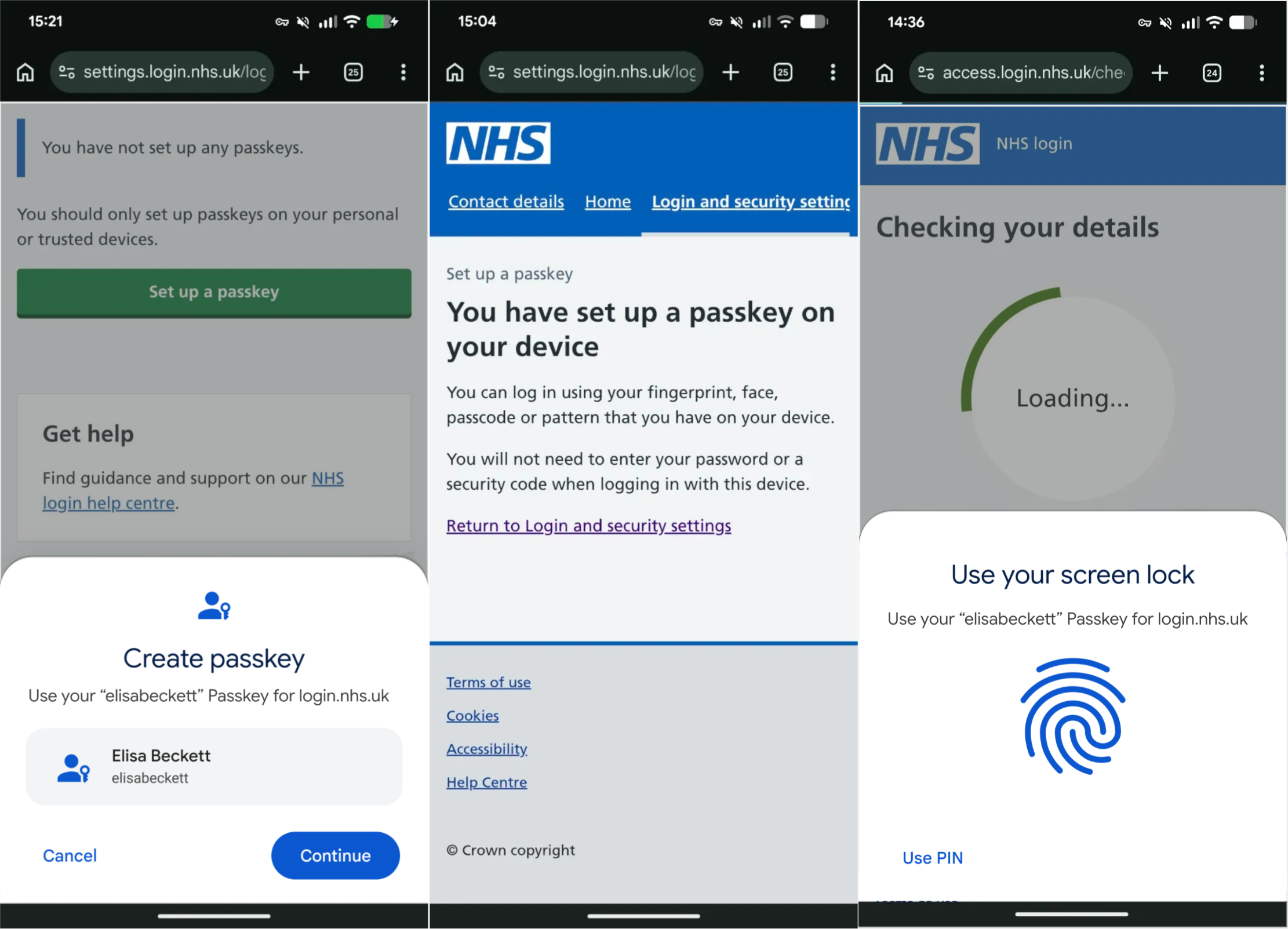
Upgrade users through seamless passkey registration
Instead of forcing all users to register a passkey immediately, the team targets active, authenticated users. After a user successfully signs in using their standard method (password + SMS), they see a clear prompt inviting them to create a passkey for faster, more secure logins in the future.
Our biggest challenge was finding the right balance between educating and enabling users. The more we tried to explain passkeys, the more hesitant users felt. We shifted to a device-led experience using familiar terms like 'Fingerprint' and 'Face ID'. Users understood the concept much faster by using it.
Pelin Demir, UX Designer at Hippo
The registration flow relies on the standard browser-native WebAuthn API. The following is a conceptual example of the registration sequence:
// Simplified example of the registration call
async function createPasskey() {
  try {
    // 1. Fetch challenge and options from the NHS Login server
    const createOptions = await fetch('/api/passkey/register-options', {
      method: 'POST'
    }).then(r => r.json());

    // 2. Trigger the browser/OS to create the passkey
    const credential = await navigator.credentials.create({
      publicKey: createOptions
    });

    // 3. Send the public key credential back to the server for verification and storage
    await fetch('/api/passkey/register-verify', {
      method: 'POST',
      body: JSON.stringify(credential)
    });

    // 4. Show success message to the user
    showSuccess('Passkey saved');

  } catch (err) {
    console.error('Error creating passkey:', err);
    showError('Could not create passkey. Please try again.');
  }
}
Streamline the login flow using Conditional UI
The most significant user experience improvement comes from Conditional UI
(WebAuthn autofill). By adding autocomplete="username webauthn" to the login
field, the browser proactively prompts the user to authenticate using
biometrics.
<form action="/login" method="post">
  <label for="username">Email or NHS number</label>
  <input type="text"
         id="username"
         name="username"
         autocomplete="username webauthn"
         required>
  <button type="submit">Continue</button>
</form>
Implementing Conditional UI grew passkey usage by nearly 1.7x, demonstrating that removing input friction directly accelerates adoption.
Handle stale keys with the Signal API
A known operational challenge with passkeys is stale credentials, instances where a user removes a credential from their account settings, but the passkey remains stored in their device's password manager. Attempting to use a stale key results in a confusing authentication failure.
To address this, the team incorporated the WebAuthn Signal API. When a credential is revoked or updated on the backend, the server signals the passkey provider to synchronize, removing invalid keys from the user's autofill suggestions seamlessly.
Deliver frictionless access and enhanced security
Users are increasingly adopting passkeys as an authentication mechanism.
- Frictionless user experience: Removing authentication friction means users can access NHS services and manage their health proactively, without the frustration or drop-offs caused by forgotten credentials.
- Uncompromised security: Passkeys deliver built-in phishing resistance, securing highly sensitive health data while paving the way for a password- and SMS-free future.
- Operational efficiency: Beyond the direct financial savings on SMS OTPs, reducing password reliance fundamentally improves efficiency for the NHS. The drop in password-related support calls frees up staff to handle more complex queries.
Key lessons
While integrating passkeys across NHS services, the team identified the following key lessons:
- UX over technical complexity: The technical implementation of WebAuthn was straightforward. The primary challenge resided in optimizing the UX for wide demographic adoption.
- Enablement over education: Users expect the platform to manage security silently. Over-explaining passkey mechanics created cognitive load; trusting familiar device prompts (biometrics) proved far more effective.
- Cross-device journeys: A user might create a passkey on their phone but later try to sign in on a library computer. Handling the cross-device flow (where the desktop shows a QR code scanned by the phone) was a critical journey to design and test. They also added a new section in the user's account management showing passkeys and identity to help management of passkeys (see Determine the passkey provider with AAGUID).
- Account recovery: Passkeys don't eliminate the need for robust account recovery. The team had to ensure that a user who lost their device could still securely regain access to their account, a high-stakes flow for health-related services.
- Balancing innovation with inclusivity: While passkeys offer a superior experience, they cannot completely replace legacy systems overnight without leaving some vulnerable users behind. The team deliberately maintained password + SMS OTP as a parallel path, accepting the ongoing cost to ensure no users were excluded by device requirements or poor network coverage.
What's next?
With over 6.7 million passkeys created, Hippo is now working on improving the prompts that invite users to create a passkey. Instead of forcing a switch, they use testing to find the best moments to offer passkeys, helping more users upgrade smoothly.