


Published: April 20, 2026
Chrome plans to ship the Soft Navigations API we have previously been experimenting with later this year. In preparation for that, we are offering one more origin trial starting in Chrome 147 until Chrome 149. This trial incorporates feedback from previous trials into the API's expected final shape. We are encouraging website owners interested in this feature to conduct a final test of the API's expected final shape before its release.
What are soft navigations?
A "soft navigation" is when JavaScript intercepts a navigation (for example, clicking on a link) and updates the content on the existing page, rather than loading a new page, while the URL is still updated in the address bar. To users, these appear the same as conventional navigations, but from the browser's perspective the page is still the original page.
Need for the Soft Navigation API
The Soft Navigations API is a proposed API for detection of soft navigations that Single Page Application (SPA) sites use. Because no actual page navigation happens for a soft navigation, JavaScript must manually manage certain actions that would normally happen for a navigation. Some actions, like navigation history management, are possible with current APIs. However, other actions, such as measuring Core Web Vitals, are not possible for these navigations.
The Soft Navigation API allows observation of soft navigations. While the JavaScript that initiates the soft navigation (typically a JavaScript framework) is aware of when a navigation occurs, other JavaScript used by the site (for example, analytics scripts), and the browser itself won't be aware.
Core Web Vitals and SPAs
One of the main drivers for the Soft Navigation API is to allow measurement of Core Web Vitals for SPAs. Core Web Vitals are measured by both the browser (to appear in tooling such as the Chrome User Experience Report), and by site owners using Real User Monitoring (RUM) solutions.
JavaScript frameworks can measure some aspects of the Core Web Vitals for SPAs. In particular Interaction to Next Paint (INP), and Cumulative Layout Shift (CLS) are based on primitives (the Event Timing API and the Layout Instability API respectively) that can be measured across any timespan to calculate those metrics. However, other metrics such as Largest Contentful Paint (LCP) are only emitted by the browser—based on page navigations and is finalized upon interaction.
How the API enables measurement of Core Web Vitals for SPAs
The Soft Navigation API introduces two new performance entries:
- A
SoftNavigationEntryentry that is emitted when all soft navigation requirements are fulfilled. This includes aninteractionIdfor the interaction that caused the soft navigation, a uniquenavigationId, and anameset to the new URL and various paint timings that can be used to measure the first contentful paint of the soft navigation. - An
InteractionContentfulPaintentry that allows measuring multiple, increasingly-sized, contentful paints after interactions to measure LCP for soft navigations.
These new entries can be observed using a PerformanceObserver using the soft-navigation and interaction-contentful-paint types respectively.
The API also expands each of the largest-contentful-paint, interaction-contentful-paint, event-timing, and layout-shift performance entries (and others) to include an identifier, navigationId, that represents the navigation the entry is for. Because PerformanceObservers don't observe performance entries until the page is idle, some time can elapse between the event that created the performance entry, and your observation of it. This is especially true when the page is very busy, for example, during soft navigations. This navigationId value helps attribute entries to the correct navigation.
Some interaction-contentful-paint entries can happen before the navigation, and some after. Instead of having to track all paints that might result in a soft navigation, the soft-navigation entry includes a largestInteractionContentfulPaint entry that is the largest paint seen until this time.
Together, these enable Core Web Vitals to be measured for:
- LCP: Using
largest-contentful-paintfor the initial page load and the newinteraction-contentful-paintandsoft-navigationentries for soft navigations. - CLS: Using
layout-shiftentries and slicing them based on thesoft-navigationentries for soft navigations. - INP: Using
evententries and slicing them based on thesoft-navigationentries for soft navigations. - FCP: Using
first-contentful-paintfor the initial page load and the paint timing details on the newsoft-navigationentries for soft navigations.
For more details, see the Soft Navigations documentation.
How are soft navigations triggered?
The Soft Navigation API triggers a soft navigation when the following occurs:
- A user interaction occurs,
- … which results in a visible paint of content to the user,
- … and a URL update occurs.
The API takes this approach rather than letting a JavaScript framework "emit" a soft navigation, or building upon the Navigation API for two reasons:
- First, this includes all existing SPA sites without any changes required to those sites.
- Second, it enables a consistent understanding of what constitutes a soft navigation regardless of how a framework or developer handles navigations.
Frameworks or developers can update the URL for a soft navigation even without a user interaction or a DOM update that users would consider a navigation. They can also update the URL at different times: at the start of the interaction, only at the end when it's complete, or at any state in between.
Rather than relying on framework and developer choices, building soft navigation detection into the browser establishes a canonical definition that enables measurement Core Web Vitals for soft navigations at scale and makes these measurements comparable at scale.
Frameworks and developers can also ignore the Soft Navigations API and use the underlying Event Timing, Layout Instability APIs, and the new InteractionContentfulPaint performance entry to measure additional performance metrics as they choose. However, we recommend using the API for measuring Core Web Vitals to enable consistent measurement across sites and across tooling.
Help needed to test the Soft Navigation API
We need your help to test the Soft Navigations API and determine if it correctly matches your expectations for when a soft navigation occurs. Does the API fail to report soft navigations when you consider them to have occurred? Conversely, does the API over-report navigations that you don't consider navigations?
What has changed since the last origin trial
The primary change in this latest iteration is decoupling InteractionContentfulPaint from the soft navigations to enable other use cases for that performance entry, and the additional largestInteractionContentfulPaint attribute to the SoftNavigationEntry.
From a website perspective, the API now also includes replaceState as soft navigations because we heard your feedback that this is important to consider as a navigation in many circumstances. We are eager to hear about any other cases where the API does not recognize a soft navigation.
We have also made countless other improvements to the implementation. For those looking exactly what has changed in the latest iteration, a detailed history of all the changes can be found in the Soft Navigations Changelog.
We want the API to be as useful as possible and are open to further changes to make that happen. Changes are much easier to implement to the API before it launches and sites start depending on an implementation. Therefore, we ask SPA developers and those interested in measuring web performance for these sites to test this API and provide feedback on it.
How to test
The API can be tested locally with Chrome flags or command line options. Additionally, you can test it in the field with the origin trial (learn more about origin trials).
See our documentation or the GitHub repository for more technical details about the API, especially how to measure the Core Web Vitals.
Additionally, an experimental soft navigation version of the web-vitals library is available on GitHub and npm.
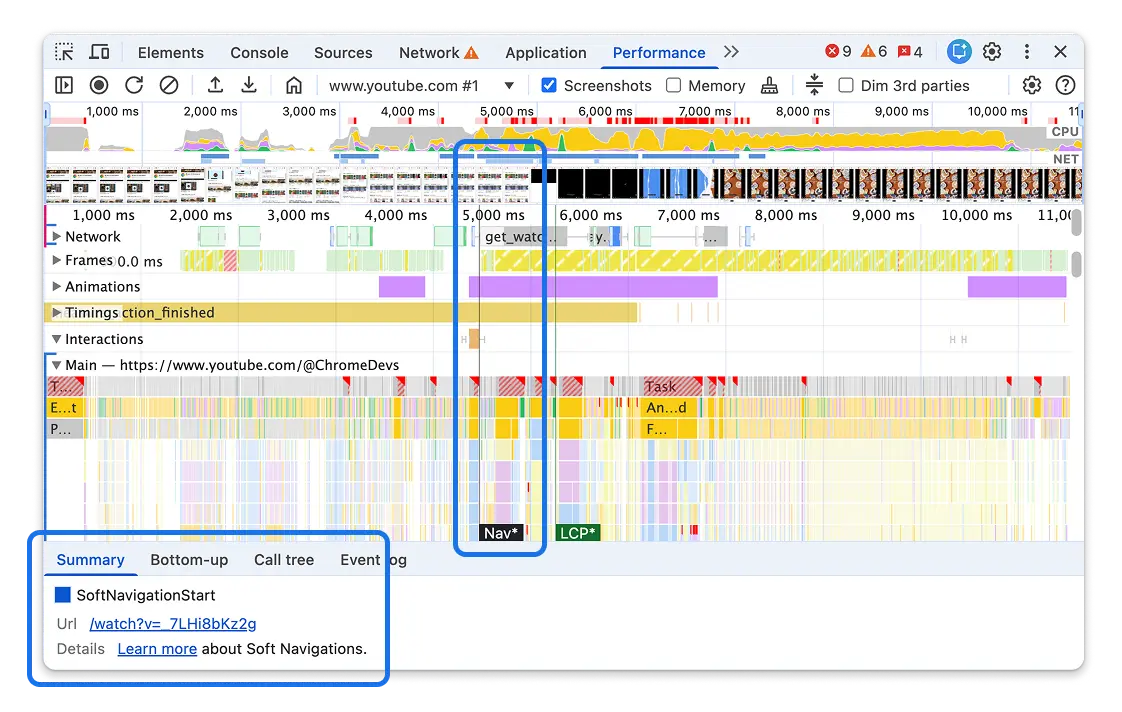
For a simpler test, the Performance panel of Chrome DevTools shows soft navigation in Performance traces as of Chrome 145, even without enabling the feature:
Feedback
Feedback on the API should be raised as issues on GitHub, and report bugs on the Chromium implementation on Chrome's issue tracker. If you are unsure which category feedback falls into, don't worry too much. We prefer to receive feedback in either place, and we will triage the issues in both places and redirect them to the correct location.