Chrome for Developers
Get inspired Blog Docs
  • Build with Chrome
  • Learn how Chrome works, participate in origin trials, and build with Chrome everywhere.
  • Web Platform
  • Capabilities
  • Extensions
  • Chrome Web Store
  • Chromium
  • Aurora
  • Web on Android
  • Origin trials
  • Productivity
  • Create the best experience for your users with the web's best tools.
  • DevTools
  • Lighthouse
  • Chrome UX Report
  • Accessibility
  • Get things done quicker and neater, with our ready-made libraries.
  • Workbox
  • Puppeteer
  • Experience
  • Design a beautiful and performant web with Chrome.
  • Performance
  • CSS and UI
  • Identity
  • Payments
  • Privacy and security
  • Resources
  • More from the Chrome team.
  • All documentation
  • Baseline
  • web.dev
  • English
  • Deutsch
  • Español – América Latina
  • Français
  • Indonesia
  • Italiano
  • Polski
  • Português – Brasil
  • Tiếng Việt
  • Türkçe
  • Русский
  • עברית
  • العربيّة
  • فارسی
  • हिंदी
  • বাংলা
  • ภาษาไทย
  • 中文 – 简体
  • 中文 – 繁體
  • 日本語
  • 한국어
Sign in
  • Lighthouse
Lighthouse Performance audit Accessibility audit Best Practices audit SEO audit Progressive Web App
Chrome for Developers
  • Get inspired
  • Blog
  • Docs
    • More
    • Lighthouse
    • Performance audit
    • Accessibility audit
    • Best Practices audit
    • SEO audit
    • Progressive Web App
  • General best practices
  • Page lacks the HTML doctype, thus triggering quirks mode
  • Browser errors were logged to the console
  • Displays images with incorrect aspect ratio
  • Charset declaration is missing or occurs too late in the HTML
  • Make your page fast
  • Does not use HTTP/2 for all of its resources
  • Uses document.write()
  • Use passive listeners to improve scrolling performance
  • Make your page secure
  • Links to cross-origin destinations are unsafe
  • Includes front-end JavaScript libraries with known security vulnerabilities
  • Ensure CSP is effective against XSS attacks
  • Create a good user experience
  • Requests the notification permission on page load
  • Requests the geolocation permission on page load
  • Prevents users from pasting into input fields
  • Avoid deprecated technologies
  • Uses Application Cache
  • Uses deprecated APIs
  • Diagnostic audits
  • Detected JavaScript libraries
  • Build with Chrome
  • Web Platform
  • Capabilities
  • Extensions
  • Chrome Web Store
  • Chromium
  • Aurora
  • Web on Android
  • Origin trials
  • Productivity
  • DevTools
  • Lighthouse
  • Chrome UX Report
  • Accessibility
  • Workbox
  • Puppeteer
  • Experience
  • Performance
  • CSS and UI
  • Identity
  • Payments
  • Privacy and security
  • Resources
  • All documentation
  • Baseline
  • web.dev
  • Home
  • Docs
  • Lighthouse
  • Best Practices audit

Detected JavaScript libraries

Stay organized with collections Save and categorize content based on your preferences.

Lighthouse lists all front-end JavaScript libraries detected on the page:
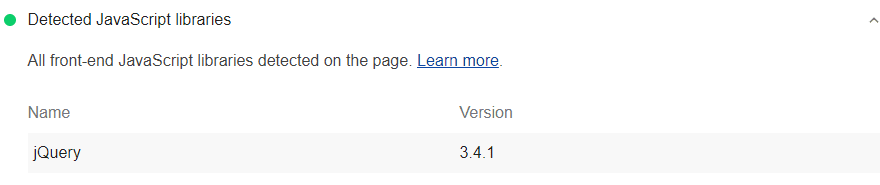
Lighthouse audit showing all front-end JavaScript libraries detected on page

This is a diagnostic audit

This audit simply lists all the front-end JavaScript libraries your page uses.

Resources

Source code for Detected JavaScript libraries audit

Except as otherwise noted, the content of this page is licensed under the Creative Commons Attribution 4.0 License, and code samples are licensed under the Apache 2.0 License. For details, see the Google Developers Site Policies. Java is a registered trademark of Oracle and/or its affiliates.

Last updated 2019-05-02 UTC.

  • Contribute

    • File a bug
    • See open issues
  • Related content

    • Chromium updates
    • Case studies
    • Archive
    • Podcasts & shows
  • Connect

    • @ChromiumDev on X
    • YouTube
  • Terms
  • Privacy
  • English
  • Deutsch
  • Español – América Latina
  • Français
  • Indonesia
  • Italiano
  • Polski
  • Português – Brasil
  • Tiếng Việt
  • Türkçe
  • Русский
  • עברית
  • العربيّة
  • فارسی
  • हिंदी
  • বাংলা
  • ภาษาไทย
  • 中文 – 简体
  • 中文 – 繁體
  • 日本語
  • 한국어