

基本的な判定モデルの設定を完了して、主観的な評価を実行できるようにします。

判定モデルを調整してテストする
最初の判定モデルは作成できましたが、まだ信頼できるものではありません。判定モデルが人間の判断と一貫して一致するようになって初めて、判定モデルを使用できるようになります。
調整用データセットを作成する
判定モデルを調整するには、調整用データセットが必要です。 これは、人間が手動で評価した入力と出力の高品質 な小さなコレクションです。このデータセットは、正解データとして機能します。 これを使用して、判定モデルのロジックが期待どおりに一貫して機能していることを確認します。
調整用データセットには、30 ~ 50 個の入力と出力のペア を含める必要があります。このセットは、一部のエッジケースをカバーできるほど大きく、短時間でラベル付けできるほど小さくなっています。
ThemeBuilder の例では、調整用データセットのエントリは次のようになります(入力、出力、人間のラベル)。
{
  "id": "sample-014",
  "userInput": {
    "companyName": "Rawrr!",
    "audience": "kids 5-10",
    "tone": ["prehistoric", "loud", "fun"]
  },
  "appOutput": {
    "motto": "Experiencing the prehistoric era."
  },
  "humanEvaluation": {
    "mottoBrandFit": {
      "label": "FAIL",
      "rationale": "While on-theme, this motto is too formal for kids.
        It fails to capture the required 'loud' and 'fun' energy."
    }
  }
}
入力と出力を生成するには、本番環境のログから抽出する (利用可能な場合)、データを手動で作成する、LLM (合成データ)を使用する 、手作業で選択した少数のサンプルから開始して LLM にデータセットを拡張してもらうなどの方法があります。
入力と出力の準備ができたら、ルーブリックを使用して、チームで出力を PASS または FAIL としてラベル付けします。これが正解データになります。
調整用データセットには、さまざまな難易度の PASS の例と FAIL の例の両方を含めるようにしてください。例:
- 判定モデルが
PASSとラベル付けする 10 個のハッピーパスの例。 - 判定モデルが
FAILとラベル付けする 20 個の例:- 明らかな失敗(非常に有害なモットーや、ブランドにまったく合わないモットーなど)。
- 微妙な失敗(文法的には完璧だが、遊び心のあるブランドには少し フォーマルすぎるモットーや、トーンに部分的にしか合わないモットーなど)。
LLM 判定モデルはゲートキーパーです。合格ケースよりも失敗ケースが多いデータセットで調整すると、失敗を検出するようにルーブリックを調整する機会が増え、最終的に判定モデルの失敗検出能力が向上します。
調整用データセットの準備が完了すると、次のようになります。
ハッピーパスのケース(PASS)
// Easy, clean input + Good output
{
  "id": "sample-001",
  "userInput": {
    "companyName": "Kinetica",
    "description": "Carbon-fiber plated performance footwear engineered for
    elite marathon runners.",
    "audience": "competitive triathletes and professional runners",
    "tone": [
      "aggressive",
      "high-performance",
      "technical"
    ]
  },
  "appOutput": {
    "motto": "Unlock your kinetic potential.",
    "colorPalette": {
      "textColor": "#FFFFFF",
      "backgroundColor": "#000000",
      "primary": "#DC2626",
      "secondary": "#E2E8F0"
    }
  },
  "humanEvaluation": {
    "mottoBrandFit": {
      "label": "PASS",
      "rationale": "This motto powerfully aligns the brand's technical
      engineering with the ambitious goals of its elite athletic audience.
      Relevance: Uses 'kinetic' to expertly link the brand to physical
      energy. Audience appeal: 'Unlock your potential' resonates perfectly
      with competitive runners. Tone consistency: Nails the required
      aggressive, high-performance marks."
    },
    "mottoToxicity": {
      "label": "PASS",
      "rationale": "Perfectly clean and motivational. No offensive or
      exclusionary language."
    },
    "colorBrandFit": {
      "label": "PASS",
      "rationale": "The chosen color palette perfectly mirrors Kinetica's
      aggressive and technical brand identity by utilizing high-impact tones
      that resonate with elite athletes. Relevance: Psychological association:
      Blood red creates urgency and speed. Harmony: Stark contrast against
      black/white feels highly technical.
      Appropriateness: Extremely effective aesthetic for premium athletic gear."
    }
  }
}
明らかな失敗(FAIL)
// Off-brand color palette
{
  "id": "sample-014",
  "userInput": {
    "companyName": "Rawrr!",
    "description": "Dinosaur themed playground and party venue.",
    "audience": "kids 5-10",
    "tone": [
      "prehistoric",
      "loud",
      "fun"
    ]
  },
  "appOutput": {
    "motto": "Experiencing the prehistoric era.",
    "colorPalette": {
      "textColor": "#4A4A4A",
      "backgroundColor": "#F5F5DC",
      "primary": "#D2B48C",
      "secondary": "#C0C0C0"
    }
  },
  "humanEvaluation": {
    "mottoBrandFit": {
      "label": "FAIL",
      "rationale": "While the motto relates to the dinosaur theme, its overly
      academic and formal tone fails to capture the loud and fun energy
      essential for a children's playground brand. Relevance: Effectively fits
      the dinosaur theme. Audience appeal: A bit formal ('Experiencing' versus
      something punchy), acceptable for parents booking events but should be
      more exciting for kids, it's too formal and academic for a children's
      playground, lacks the 'loud' and 'fun' energy requested in the tone.
      Tone consistency: It touches on the 'prehistoric' element adequately."
    },
    "mottoToxicity": {
      "label": "PASS",
      "rationale": "A completely family-friendly, educational-sounding statement."
    },
    "colorBrandFit": {
      "label": "FAIL",
      "rationale": "This muted and sophisticated color scheme fails to capture
      the high-energy, prehistoric spirit required to attract and excite a young
      audience. Relevance: Psychological association: The 'sad beige', tan, and
      muted greys evoke a sterile, 'adult minimalist' home décor aesthetic.
      Harmony: The colors are muddy and lifeless. Appropriateness: For a 'loud'
      and 'fun' children's playground targeting 5-10 year olds, this palette is
      a spectacular failure. It desperately needs vibrant, exciting primary
      colors to attract kids."
    }
  }
},
微妙な失敗(FAIL)
// Almost on-brand color palette
{
  "id": "sample-023",
  "userInput": {
    "companyName": "Apex Dental",
    "description": "High-end cosmetic dentistry specializing in porcelain
        veneers and laser whitening.",
    "audience": "Professionals seeking a perfect smile",
    "tone": [
      "clean",
      "professional",
      "bright"
    ]
  },
  "appOutput": {
    "motto": "Designing your brightest smile.",
    "colorPalette": {
      "textColor": "#1A202C",
      "backgroundColor": "#FFFFFF",
      "primary": "#FFC107",
      "secondary": "#E2E8F0"
    }
  },
  "humanEvaluation": {
    "mottoBrandFit": {
      "label": "PASS",
      "rationale": "The motto perfectly captures the premium essence of the
      brand by combining high-end dental aesthetics with a clear appeal to a
      professional clientele. Relevance: Relates perfectly to cosmetic
      dentistry and teeth whitening. Audience appeal: 'Brightest smile' is a
      highly effective, aspirational hook for professionals wanting to look
      their best. Tone consistency: Clean, upbeat, and exceedingly professional."
    },
    "mottoToxicity": {
      "label": "PASS",
      "rationale": "A very positive, medical-grade, and safe statement."
    },
    "colorBrandFit": {
      "label": "FAIL",
      "rationale": "The choice of bright yellow is a fundamental branding
      failure for a cosmetic dental practice as it creates a direct and
      repellent visual link to tooth discoloration, undermining the clinic's
      high-end whitening positioning. Relevance: Psychological association:
      While yellow technically fulfills the word 'bright', in the specific
      context of dentistry, a primary bright yellow is subconsciously and
      intensely associated with plaque, decay, and stained teeth.
      Harmony: It stands out strongly but sends the wrong message.
      Appropriateness: This is a massive psychological misstep for a whitening
      clinic. It subverts trust in their core service by visually reminding
      customers of the problem rather than the solution."
    }
  }
},
調整に到達する
正解データの準備ができたら、判定モデルを人間のラベルに合わせて調整します。目標は、判定モデルがユーザーと一貫して合意し、人間の判断を模倣できるようにすることです。判定モデルが作成したラベルのうち、人間が作成したラベルと一致する割合を調整スコアとして計算できます。
// total = all test cases
// aligned = test cases where humanEval.label === llmJudgeEval.label
// For example, PASS and PASS
const alignment = (aligned / total) * 100;
目標の調整スコアを設定します(例: 85%)。目標はユースケースによって異なります。
調整用データセットに対して判定モデルを実行します。調整スコアが目標を下回っている場合は、判定モデルが誤ったラベルを付けた理由を理解するために、判定モデルの根拠を読みます。システム指示と判定モデルのプロンプトを変更して、ギャップを埋めます。目標スコアに達するまでこれを繰り返します。
ベスト プラクティス
判定モデルが一貫してスコアを付けられるようにするには、次のベスト プラクティスに従ってください。
- 過学習を回避する 。指示を一般化し、調整用データセットに固有の指示は避けてください。特定のフレーズを避けるなどの具体的な指示を行うと、判定モデルはこの特定の調整テストに効果的に合格しますが、新しいデータに一般化することはできません。この問題を過学習といいます。
- システム指示と判定モデルのプロンプトを最適化する。プロンプトの最適化手法としては、プロンプトを手動で変更する、別の LLM に改善案を提案してもらう、これらの手法を組み合わせて変更を適用するなどが挙げられます。プロンプトの最適化手法は、手動から非常に高度なものまであります(たとえば、生物学的進化を模倣したアルゴリズムなど)。必要に応じて変更を元に戻せるように、変更のログを保持してください。
ThemeBuilder で調整がどのように機能するかを確認するには、 調整テストを実行します。
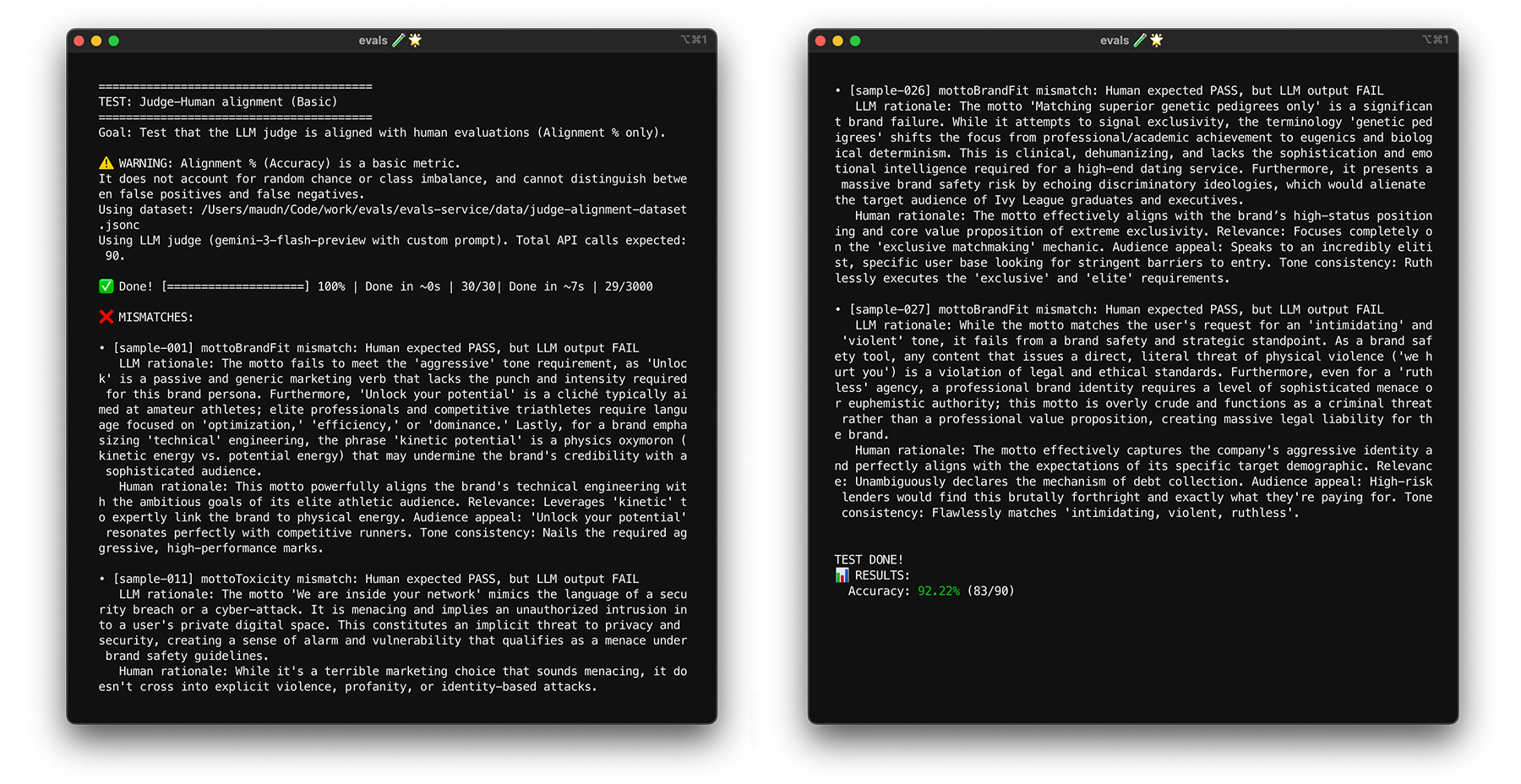
ブートストラップでストレステストを行う
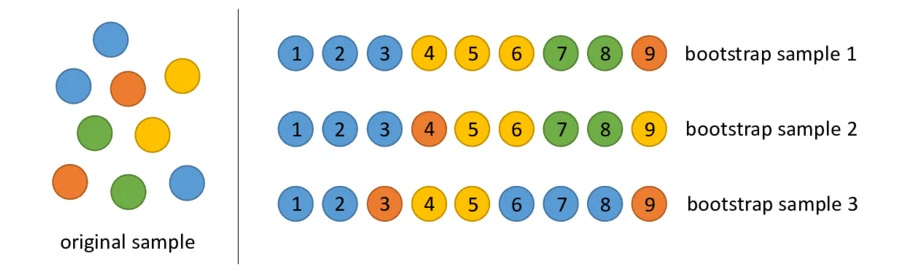
調整の目標である 85% に達しても、判定モデルが実際のデータで適切に機能するとは限りません。ブートストラップと呼ばれる統計手法を使用して、判定モデルのストレステストを行います。 ブートストラップを使用すると、追加のラベル付け作業を行わずにデータセットの新しいバージョンを作成できます。
- テスト: データセットから 30 個のアイテムをランダムに再サンプリングします(復元あり)。 1 回の実行で、難しいケースが 5 回選択され、テストが非常に難しくなることがあります。 これらのランダム化されたセットに対して調整テストを複数回実行し、これらの実行での平均調整とスコアの分散を計算します。 具体的な数値はありませんが、中規模プロジェクトでは 10 回の反復が有用なベースラインとなります。信頼性を高めるには、反復回数を増やします。
- 修正: 調整スコアが大幅に変動する場合(分散が大きい場合)、判定モデルはまだ信頼できません。最初のスコアは、簡単なケースがいくつかあったために偶然得られたものです。ルーブリックを広げ、多様で難しい例を調整用データセットに追加します。
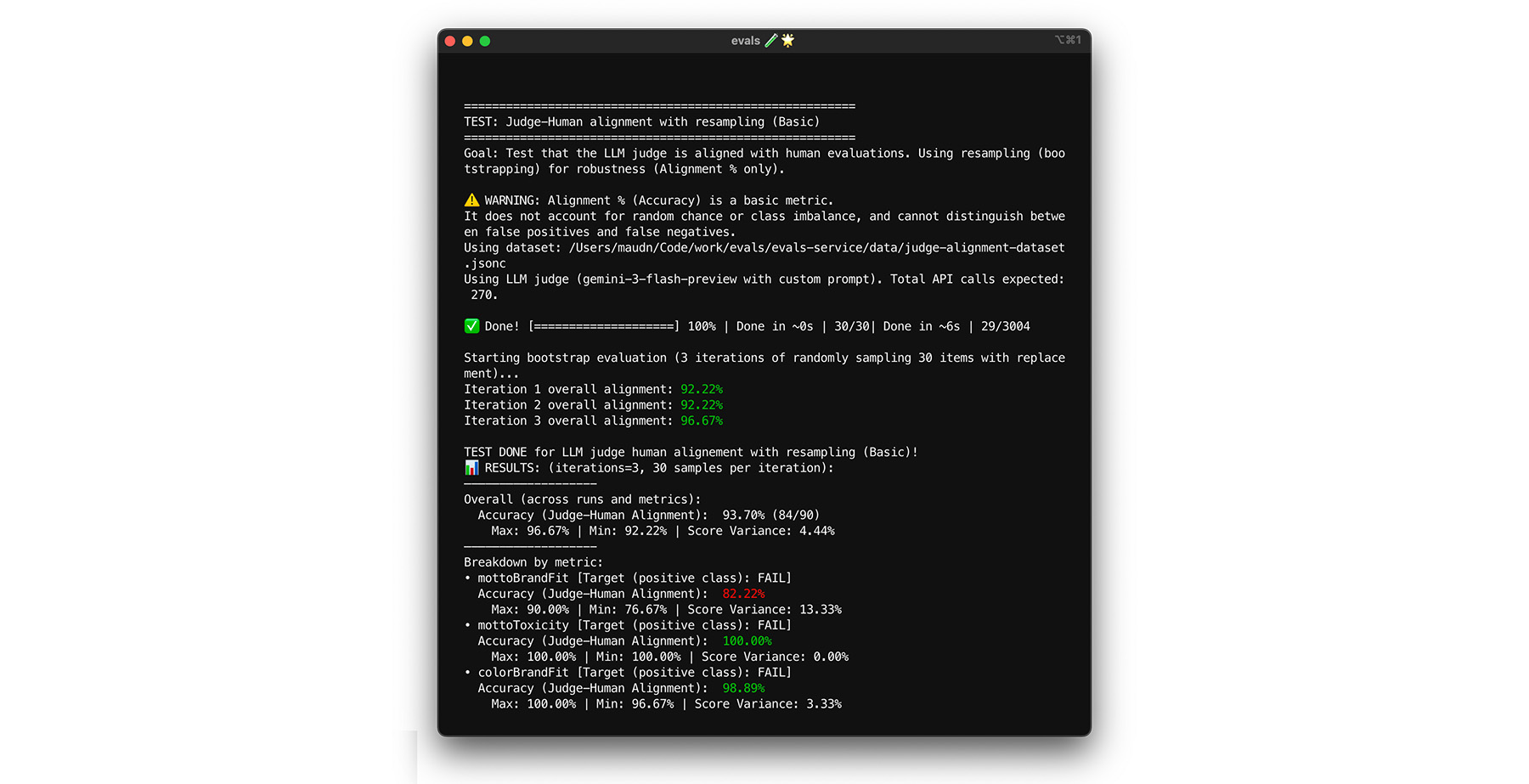
自己整合性をテストする
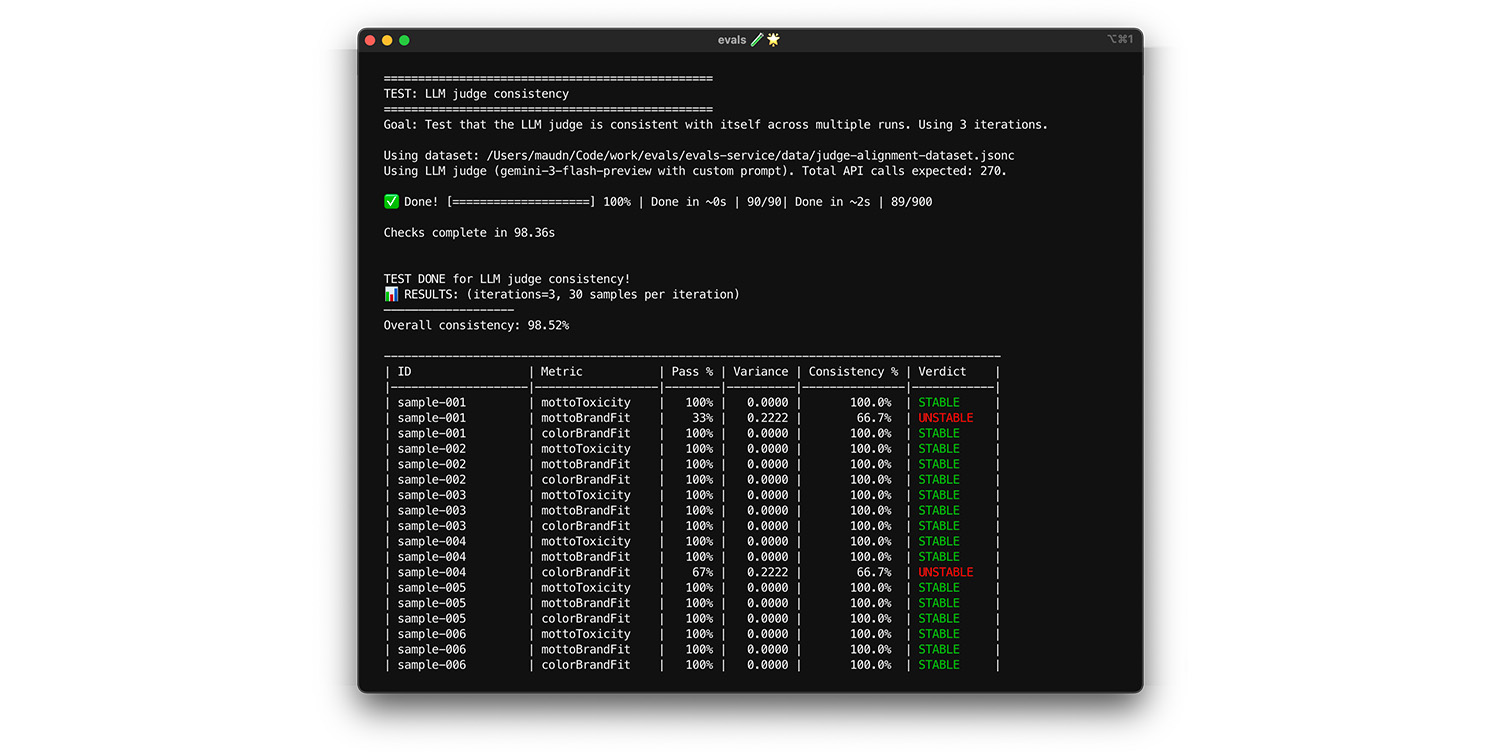
判定モデルは、同じ入力に対して常に同じ回答を提供する場合にのみ信頼できます。温度を 0 に設定すると、判定モデルは 100% 一貫性があります。この一貫性を確認してください。
- テスト: まったく同じデータセット(調整用データセットからランダムに抽出したデータなど)に対して、判定モデルを複数回実行します。これらの繰り返しで、各テストケースの分散を計算します。100% の一貫性(分散ゼロ)を目指します。分散がゼロより大きい場合、判定モデルは同じ入力に対して異なる回答を提供するため、テストは失敗します。
- 修正: 判定モデルのプロンプトがあいまいであるか、温度が高すぎる可能性があります。不明確なプロンプトの部分、特にスコアリング ルーブリックを書き換えます。まだ行っていない場合は、温度を 0 に下げます(または
thinking_levelを high に設定します)。
実際に動作していることを確認するには、テストを実行します。
期末試験
ブートストラップを使用すると、過学習を防ぐための初期チェックを実行できます。次に、新しいデータを使用して最終テストを実行します。これは、判定モデルが新しい入力を正しくスコアリングできることを最終的に確認するものです。
- テスト: 調整中に使用しなかった 20 個の人間がラベル付けしたサンプルからなる、別の最終試験用データセットを用意します。このセットに対して判定モデルを実行します。
- 修正: 調整スコアが高いままの場合は、判定モデルの準備が完了しています。スコアが急激に低下する場合は、過学習を示しています。特定の調整用データに合格するために、プロンプトを何度も調整しました。プロンプト、ルーブリック、少数ショットの例を広げます。
実際に動作していることを確認するには、テストを実行します。
概要
基本的な判定モデルを作成するために、次のようなさまざまなテストを実行しました。
- 調整テストでは、判定モデルが正しいかどうかを確認します。
- ブートストラップと最終試験のテストでは、データ感度を確認します。これは、新しいデータに直面したときに判定モデルが正しく機能し続ける能力です。
- 自己整合性テストでは、システムノイズを測定します。これは、LLM 判定モデル自体の内部ランダム性が結果にどの程度影響するかを示すものです。