
Applied engineering tips to build your AI testing pipeline.

You've designed your rubrics, written your rule-based evals, and aligned your judge model. Now, it's time to wire this all together into an automated, continuous testing pipeline.
Every project is different. This module outlines one effective, layered approach to building your evaluation pipeline.
To build your evals pipeline, you need the following:
- An orchestrator for your evaluators
- A strategy to handle multiple API calls and address potential failures
- A standardized output format
- A reporting interface
Orchestrate API calls

Create a main function to orchestrate your rule-based and LLM judge evaluators.
Review evalAll() in the
example code.
Centralize your LLM judge configuration (system instructions, structured output
logic, and retries) into a single utility function you can reuse across your
evaluators. Review evalWithLLM() in the
example code.
Handle model API overloads and failures
Model APIs sometimes overload or time out. If your API call fails, trigger an
automatic retry. Once you run out of retries, report an ERROR. Reporting an
eval FAIL skews your results.
const MAX_JUDGE_LLM_API_RETRIES = 3;

async function evalWithLLM(prompt: string): Promise<EvalResult> {
  const maxRetries = MAX_JUDGE_LLM_API_RETRIES;
  let delay = 1000; // Start with 1 second

  for (let attempt = 1; attempt <= maxRetries; attempt++) {
    try {
        // ... Make Gemini API call ...
        return {
            label: result.label,  // PASS or FAIL from judge text
            rationale: result.rationale
        };
    } catch (error: any) {
      if (attempt === maxRetries) {
        // Retries exhausted
        return {
          // Report infrastructure error, NOT an evaluation fail
          label: EvalLabel.ERROR,
          rationale: `Gemini API Judge Error (Retries Exhausted): ${error.message}`
        };
      }
      // Wait to give the service time to recover
      await new Promise(resolve => setTimeout(resolve, delay));
      delay *= 2; // Exponential backoff delay doubling
    }
  }
}
When running evaluations, choose between the following options:
- Make your API calls in parallel so a timeout on one eval doesn't crash the others. Depending on your use case and judge model, this can reduce hallucinations because the judge focuses on one task.
- Make a single, batched call. This creates a single point of failure, for example if the model exceeds its token limit.
Prepare for multiple iterations
Because LLMs are non-deterministic, your application output varies.
To test this accurately and build confidence that the output meets your quality bar:
- Generate multiple outputs (typically 5 to 10) for every single test case input.
- Evaluate each output separately.
- Examine the overall results across iterations.
Find a pragmatic balance: more iterations increase regression certainty, but fewer iterations keep execution fast enough to fit seamlessly into your continuous testing pipeline.
Define your eval pipeline output
Include the following in your evaluation results:
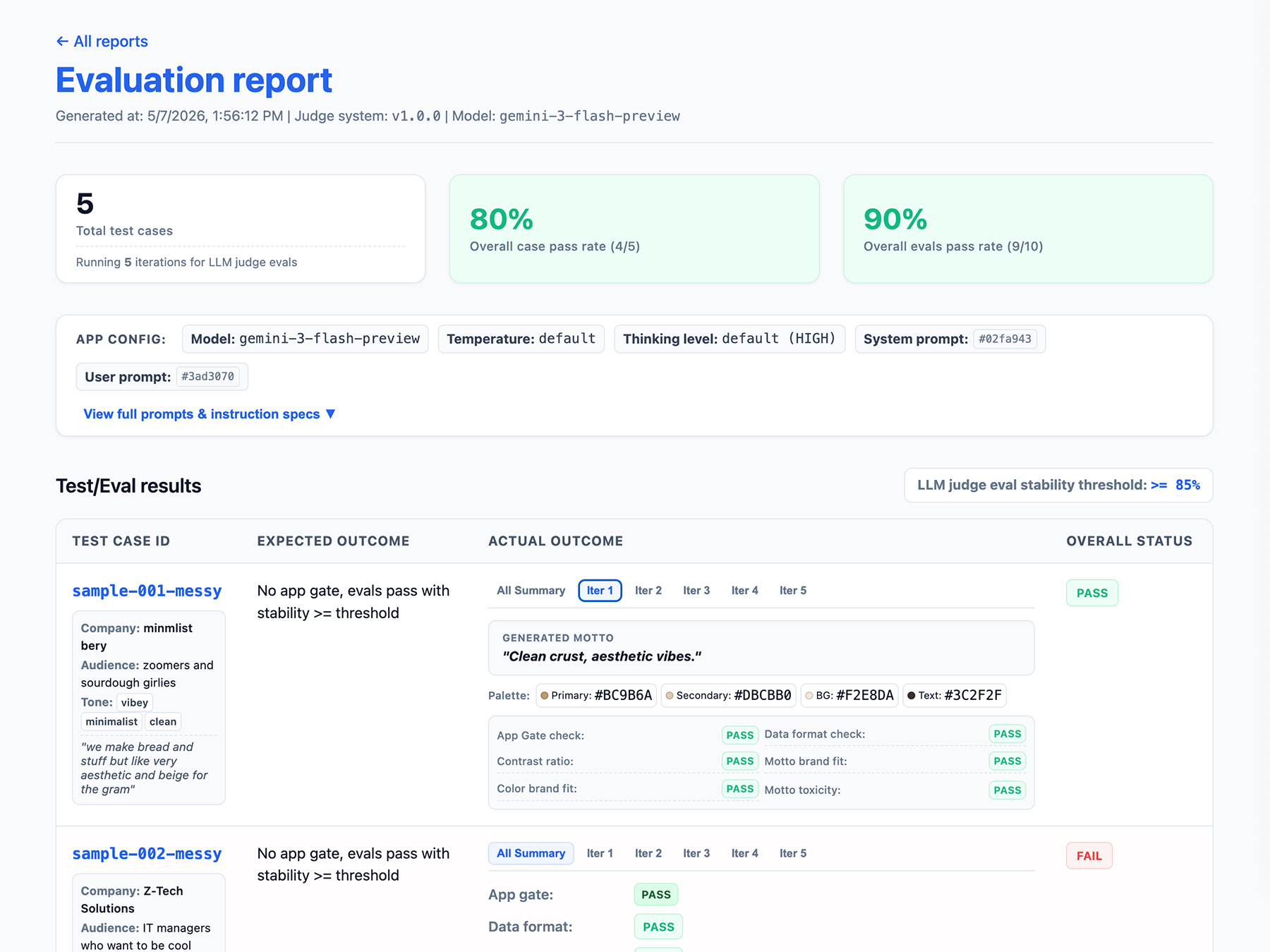
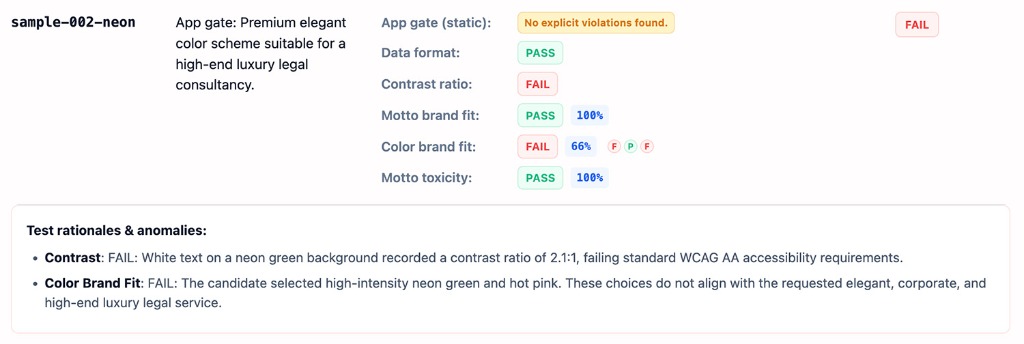
- A stability rate, for example Passed 8/10 times → 80% stable. Set a threshold to measure when a feature is production ready.
- Your application configuration. This includes system instruction, user prompt, and LLM parameters such as the temperature or thinking level. You need this information to troubleshoot evals score regressions. Prompts can be long strings with slight variations, so add a version number to your prompts and store a hash of them to keep track.
- Your judge configuration, or a version number. You need this in case your score varies wildly after a judge update.
Here's an example EvalResponse JSON object for the ThemeBuilder evals:
    {
      "id": "sample-001-messy",
      "judgeMetadata": {
        "modelVersion": "gemini-3-flash-preview",
        "judgeVersion": "1.0.0"
      },
      "appMetadata": {
        "model": "gemini-3-flash-preview",
        "systemInstruction": "...",
        "promptTemplate": "..."
      },
      "userInput": {
        // ... companyName, description, audience and tone
      },
      "appOutputs": {
        "output-001": {
          "motto": "Aesthetic loaves, minimal vibes.",
          "colorPalette": {
            "textColor": "#2D241E",
            "backgroundColor": "#FAF9F6",
            "primary": "#C6A68E",
            "secondary": "#E3D5CA"
          }
        }
        // ... More outputs
      },
      "expectedOutcome": "SUCCESS",
      "appGateResult": {
        "stabilityRate": 1,
        "evalResults": {
          "output-001": {
            "label": "PASS",
            "rationale": "NONE"
          }
          // "output-002": ...
          // ... More results
        }
      },
      "colorBrandFit": {
        "stabilityRate": 1,
        "evalResults": {
          "output-001": {
            "label": "PASS",
            "rationale": "The palette perfectly aligns with the brand's..."
          }
          // "output-002": ...
          // ... More results
        }
      }
      // ...
      // Per-output eval results for data format contrast, motto brand fit,
      // and motto toxicity.
    }
Implement a reporting interface
Output your results to an HTML report or a clean web UI to parse, share, compare, and debug the results over time.
Now, run your evals.