
Agent-friendly websites
WebMCP APIs
Overview
What is WebMCP and why should you care?
Imperative API
Define WebMCP tools with standard JavaScript to execute site-specific functions, such as form input and site navigation.
Declarative API
Transform your standard HTML forms into WebMCP tools by adding annotations.
WebMCP and MCP
Together, WebMCP and MCP help agents accomplish personalized tasks on behalf of human users.
How WebMCP works
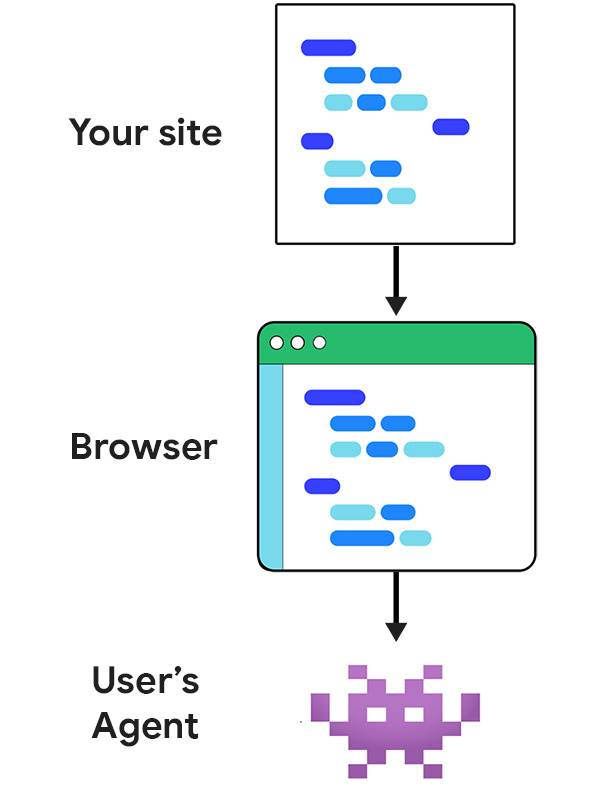
Your site registers tools
Your site declares the actions an agent can take, as WebMCP tools. Each tool has a name, description, and JSON schema.
// Imperative API
document.modelContext.registerTool({
  name: "bookSlot",
  title: "Book a consultation slot",
  description: "Reserve a 30-minute consultation.",
  inputSchema: {
    type: "object",
    properties: {
      date:  { type: "string", format: "date" },
      time:  { type: "string" },
      name:  { type: "string" },
      email: { type: "string", format: "email" }
    },
    required: ["date", "time", "name", "email"]
  },
  annotations: { readOnlyHint: false },
  execute: async (input, client) => {
    return await api.book(input);
  }
});
The browser exposes them
The browser collects and presents these tools to the user's WebMCP-aware agent, alongside the page's URL, title, and origin permission scope.
The agent takes fast, reliable action
The agent sees a contract, supplies structured arguments, and your code does the rest. The user stays in the loop for permission and confirmation. It's faster, more reliable than actuation.
// the agent's view
{
  "tool": "bookSlot",
  "arguments": {
    "date": "2026-07-31",
    "time": "14:00",
    "name": "Jerry Jones",
    "email": "jerry.jones@example.com"
  }
}
Optimize your site for agents
When to use WebMCP
Read examples from a user and agent's perspective to understand what WebMCP tools to support a critical user journey (CUJ).
Plan your WebMCP strategy
Just as you'd do for any software application, your first step should be to plan your tool strategy.
Build effective tools
Learn how you can define and build WebMCP tools that are useful for your website or web application.
WebMCP tool security
Read our early guidance on security for those building tools with WebMCP.
WebMCP evals
Build with AI agents
Modern web guidance
npx modern-web-guidance@latest install
Build extensions with coding agents
Safety considerations for agent developers
Meet Gemini in Chrome
AI assistance, right in your browser. Get key takeaways, clarify concepts, and find answers based on the context of your open tabs.
Gemini works across your Google apps to help you power through your day.