


發布日期:2026 年 4 月 30 日
有了內建 AI,您的網站或網頁應用程式就能執行 AI 輔助工作,不必部署、管理或自行代管模型。您可能會發現,從示範到可供正式使用的功能,這段過程充滿挑戰。本文涵蓋技術和使用者體驗考量,協助您避免常見錯誤。
在合理時間內準備模型
適用於所有 API,例如 Summarizer、Translator 和 Writer。
建議:明確判斷使用者有意使用 AI 功能後,請立即初始化工作階段。舉例來說,當使用者前往相關 AI 工具介面、將游標懸停在 AI 工作區上,或與功能周圍的 UI 互動時,請初始化工作階段。預先暖機工作階段可讓模型在背景中悄悄載入記憶體,使用者設定工作時不會受到影響,進而避免冷啟動延遲。如果功能設計為可重複使用,請在開始算繪目前結果時,一併啟動下一個最有可能的 AI 工作,搶先一步。
請勿:除非必要,否則請勿等待使用者點選「生成」來初始化工作階段。這會導致冷啟動延遲,因為模型必須首次載入記憶體,並準備執行管道。
在建立期間設定初始提示
適用於:提示 API。
建議:在工作階段初始化期間提供系統指令,加快第一個提示詞的處理速度。
請勿:從空白工作階段開始,並在第一次 prompt() 呼叫時傳送系統指令。這會增加延遲時間,因為模型必須在最後一刻處理這些指令。
// ✅ DO: Create the session as early as possible (tip on warming up the model early) and use initialPrompts for system instructions in the create call
const session = await LanguageModel.create({
  initialPrompts: [
    { role: 'system', content: 'You are a helpful assistant specialized in code reviews.' }
  ]
});

// A few moments later, when the user triggers the AI feature
const review = await session.prompt(`Review the following code:\n\n${code}`);

// ❌ DON'T: Send instructions using prompt() after creation
// const slowerSession = await LanguageModel.create();
// await slowerSession.prompt(`You are a helpful assistant specialized in code reviews.\n\nReview the following code:\n\n${code}`); // Higher latency
複製工作階段,處理重複性工作
適用於:提示 API。
對於 Prompt API,每個工作階段都會追蹤對話內容,並將所有先前的互動納入考量。由於複製的對話會承襲父項工作階段的所有內容,包括初始提示和複製時間點之前的所有互動記錄,因此請妥善安排使用方式,只承襲所需內容。
建議做法:
- 建立基礎工作階段:如要有效處理不相關的工作,請建立基礎工作階段,其中只包含系統指令,不含先前的對話背景資訊。
- 複製基準:在新工作中使用該基準工作階段的
clone(),即可節省重新剖析系統指令的額外負擔。您可以藉此建立平行對話,或將工作重設為基準。
錯誤做法:
- 請勿將同一工作階段用於不相關的工作,並避免複製已包含不必要互動記錄的工作階段。這兩種模式都可能導致不相關的先前脈絡干擾目前的工作。
- 請勿使用相同的系統指令重複呼叫
create()。 請改用複製模式,以提升成效。
// ✅ DO: Create a baseline session and clone it for each new task
const baseSession = await LanguageModel.create({
  initialPrompts: [{
    role: 'system',
    content: 'You are a technical editor...',
  }],
});

// Clone the base session once for the first task
const task1 = await baseSession.clone();
const response1 = await task1.prompt("Review this first draft...");
// ... Repeat the cloning pattern for subsequent independent tasks
// Each task starts fresh from the baseline system instructions

// ❌ DON'T:
// Bad performance pattern: repeated create() calls for identical tasks.
// This forces the model to re-parse instructions every time, increasing latency.
// const sessionA = await LanguageModel.create({ initialPrompts: [...] });
// await sessionA.prompt("Task 1...");
// const sessionB = await LanguageModel.create({ initialPrompts: [...] });
// await sessionB.prompt("Task 2...");
// Bad quality pattern: reusing the same session for unrelated tasks.
// const session = await LanguageModel.create();
// await session.prompt("Analyze this financial report...");
// Unrelated task in the same session:
// await session.prompt("Now write a children's story...");
銷毀未使用的工作階段
適用於所有 API。
建議做法:明確呼叫不再需要的會話 destroy(),在不再使用某項功能時釋放記憶體。如果使用複製模式,請保留基本工作階段,並銷毀不再需要的副本。
請勿:讓多個大型工作階段保持啟用狀態。每個工作階段都會耗用記憶體,造成不必要的資源用量,這可能會成為問題。垃圾收集器會自然清除工作階段,但呼叫 destroy() 可更快釋放記憶體。
// ✅ DO: Use the clone and destroy it immediately after
const clone = await baseSession.clone();
const response = await clone.prompt("Quick task...");
// Free memory right away: destry the clone, keep the baseSession
clone.destroy();
安全且有效率地算繪串流回應
適用對象:所有支援串流的 API (Prompt、Summarizer、Writer、Rewriter 和 Translator)。
建議:將所有 LLM 輸出內容視為不可信的內容。請對完整的合併輸出內容進行清理,而不只是區塊,因為惡意程式碼可能會分散在各個更新中。在支援的環境中,請先使用 Sanitizer API,再進行算繪。為避免效能下降,請使用串流 Markdown 剖析器,例如 streaming-markdown。
請勿:在每次更新區塊時直接設定 innerHTML。這項做法速度緩慢,特別是使用語法螢光標示等複雜格式時,而且容易受到注入攻擊。
import * as smd from "streaming-markdown";
// Set up virtual buffer and Sanitizer API
const sanitizer = new Sanitizer({
  allowElements: ['figure', 'figcaption', 'p', 'br', 'strong', 'em', 'img', 'a'],
  allowAttributes: {
    'loading': ['img'], 'decoding': ['img'], 'src': ['img'], 'href': ['a']
  }
});

// Create an off-screen fragment so the parser doesn't cause flicker
// or trigger XSS in the live DOM during the building process.
const buffer = new DocumentFragment();
const parser = smd.parser_new(buffer);

// Use sanitizer as a gatekeeper / cleaner function so we can combine it with the streaming Markdown parser
function syncSanitized(target, sourceFragment) {
  // .sanitize() returns a fresh, clean DocumentFragment
  const cleanFragment = sanitizer.sanitize(sourceFragment);
  // replaceChildren is the modern high-performance way to swap DOM content
  target.replaceChildren(cleanFragment);
}

// Streaming Logic
// `chunks` keeps track of the raw string (useful for logs/debug)
chunks += chunk;
// Let the parser build the DOM incrementally in the buffer.
// This is high-performance because the buffer is not live
smd.parser_write(parser, chunk);
// Use the Sanitizer API to port the content safely to the container.
syncSanitized(container, buffer);
加快輸入速度
適用於所有 API。
建議:只將確實需要的內容傳遞給模型。刪除與當下工作無關的所有內容。如果是大型資料集,請提供簡短的總覽和一小部分相關項目。
請勿:將未經處理的原始文字、不必要的中繼資料、HTML 標記或大型未經過濾的清單傳送至 API。延遲時間會隨著輸入大小顯著增加,這可能會導致許多裝置上的 AI 功能無法正常運作。
// ✅ DO: Send only relevant text
const cleanText = document.querySelector('#article').innerText;
const summary = await Summarizer.summarize(cleanText);

// ❌ DON'T: Send the entire DOM structure
// const dirtyText = document.querySelector('#article').innerHTML;
使用結構化輸出內容取得可預測的結果
適用於:提示 API。
建議:如要模型以特定格式傳回資料,請提供 responseConstraint 欄位,藉此提供 JSON 結構定義,並使用結構化輸出。確保輸出內容可預測,避免需要複雜的後續處理或手動剖析。
不要:只依賴自然語言指令 (例如「只輸出 JSON」)。模型可能包含會中斷剖析器的對話填充內容。
// ✅ DO: Use a JSON Schema for predictable results
const schema = {
  type: "object",
  properties: {
    isTopicCats: { type: "boolean" }
  }
};

const result = await session.prompt(`Is this post about cats?\n\n${post}`, {
  responseConstraint: schema,
});
console.log(JSON.parse(result).isTopicCats);
解除生成長度限制
適用於:Prompt API,因為這是唯一支援結構化輸出內容結構定義的 API。
建議:讓模型自然生成回覆,然後使用用戶端邏輯截斷文字,以符合 UI。
錯誤做法:使用結構化輸出結構定義,強制執行嚴格的字元限制,例如 maxLength: 125。如果模型的回覆超過您設定的限制,模型可能會改用高密度詞元 (例如外文或表情符號) 壓縮意義,導致輸出內容毫無意義。
/*  DO: Handle overflow using CSS */
.result {
  overflow: hidden;
  white-space: nowrap;
  text-overflow: ellipsis; /* Displays '…' */
}
// ❌ DON'T: Force length in the prompt
const result = await session.prompt("Write a bio in exactly 50 characters.");
確保使用者知情
適用於所有 API。
建議:視工作複雜度和預期時間長度而定,使用動畫、視覺提示和進度指標,讓使用者掌握最新資訊。最佳做法取決於您的用途和預期的 API 輸出長度。這裡提供一些想法:
- 串流播放長篇內容:如果是摘要或對話,串流播放功能預設會逐一顯示每個權杖,就像打字機一樣。這項功能可提供即時意見回饋,感覺就像在自然對話。
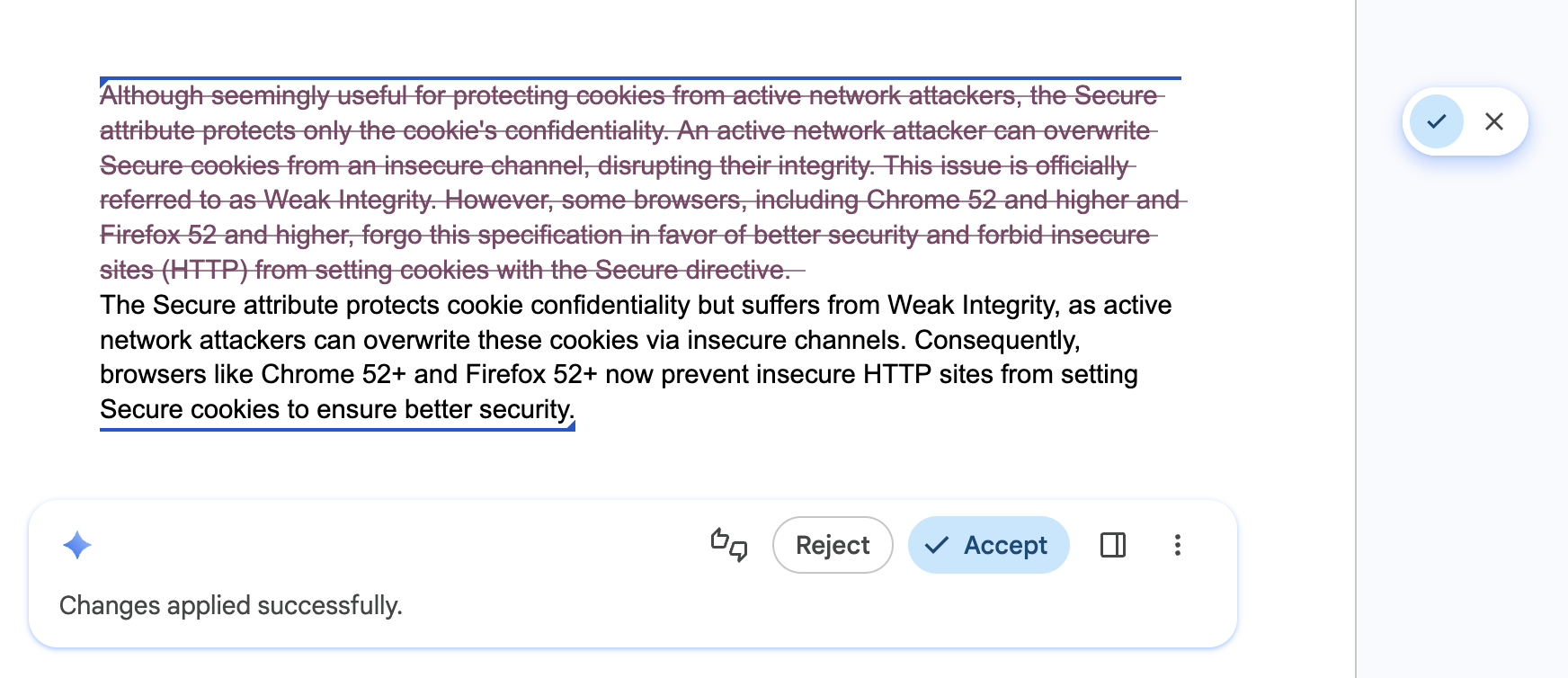
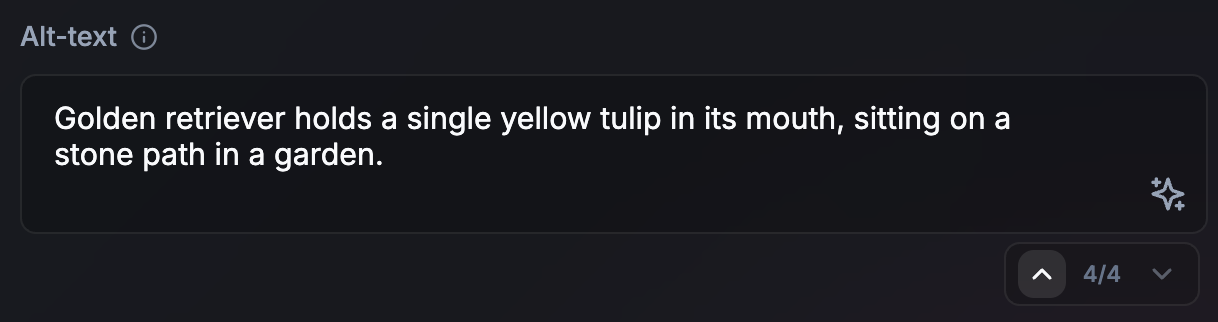
- 非串流適用於短工作 (或長時間非同步工作):如果是簡短輸出內容 (例如替代文字),非串流可建立更精緻的 UI。此外,在目前的工作算繪時,這項功能還能提供時間,讓您預先準備下一個 AI 工作。這個方法也適用於較長的非同步或背景工作。如果使用者未在輸出內容中遭到封鎖而無法繼續流程,則不必急著產生輸出內容。在 UI 中顯示程序正在進行。
- 更新的視覺轉換效果:翻譯或重寫文字時,使用動畫 (例如文字變形)。
錯誤:更新使用者介面時未提供視覺提示。
符合使用者對時間和工作的心理模型
適用於所有 API。
建議:如果回應幾乎是即時傳送,請考慮人為延遲一到兩秒。矛盾的是,如果使用者認為生成過程符合任務難度,可能會覺得結果更值得信賴。使用動畫表示已執行 AI 程序。
請勿:突然替換使用者介面。
讓使用者快速瀏覽及復原 AI 編輯內容
適用於所有 API。
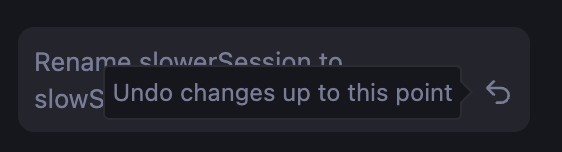
建議:在 UI 中加入步進器或瀏覽記錄,讓使用者放心探索不同結果,並快速復原 AI 編輯內容。確保不同版本仍可隨時存取。
請勿:覆寫使用者先前的草稿,或他們可能喜歡的 AI 結果,且無法返回、還原或比較版本。
讓使用者控管及覆寫設定
適用於所有 API。
做法:將使用者設為所有生成內容的最終編輯者。提供直覺式覆寫功能,讓使用者完全掌控最終輸出內容。API 可能會產生不正確的結果。
請勿:強制只顯示 AI 生成的結果。
快取重複性工作的結果
適用於所有 API。
建議做法:針對重複的輸入內容或查詢,導入本機結果快取 (例如使用 sessionStorage 或 IndexedDB)。修剪空白字元並轉換為小寫,將輸入內容正規化,以提高快取命中率。如果是大量輸入內容 (例如圖片),請產生雜湊做為快取金鑰。為快取設定保守的存留時間 (TTL),或在更新快取結果時提供這些結果。如果結果不盡理想,請讓使用者觸發新的推論。
請勿:針對重複的搜尋查詢或相同的資料輸入重新執行相同的推論,因為這類情況不適合變異性,例如使用者在搜尋結果之間來回瀏覽時。這能盡量提升回應速度,並有效運用本機運算資源。
// ✅ DO: Check a local cache before running inference
async function getAiResponse(userInput, forceRefresh = false) {
  // Normalize the query to increase cache hits
  const query = userInput.trim().toLowerCase();
  const cacheKey = `ai_results_${query}`;
  const TTL_MS = 3600000; // 1 hour conservative TTL

  if (!forceRefresh) {
    const itemStr = localStorage.getItem(cacheKey);
    if (itemStr) {
      const item = JSON.parse(itemStr);
      const now = Date.now();

      // Check if the item has expired
      if (now < item.expiry) {
        // Lightweight safety check before rendering
        if (isValid(item.value)) return item.value;
      } else {
        // Delete the stale entry if the TTL has passed
        localStorage.removeItem(cacheKey);
      }
    }
  }

  // Fallback: Run inference if no valid cache exists
  const session = await LanguageModel.create();
  const response = await session.prompt(userInput);

  // Store the result for future use (with an expiration)
  const cacheData = {
    value: response,
    expiry: Date.now() + TTL_MS
  };
  localStorage.setItem(cacheKey, JSON.stringify(cacheData));

  return response;
}