




发布时间:2024 年 5 月 16 日
正面和负面评价都会影响买家的购买决定。
根据外部研究,82% 的在线购物者会在购买前主动寻找负面评价。这些负面评价对客户和商家都有用,因为负面评价有助于降低退货率,并帮助制造商改进产品。
以下是一些可以提高评价质量的方法:
- 在提交每条评价之前,检查其中是否包含有害内容。我们可以鼓励用户移除冒犯性语言和其他无益的评论,以便他们的评价能更好地帮助其他用户做出更明智的购买决定。
- 负面:这个包很糟糕,我很讨厌它。
- 包含实用反馈的负面评价 拉链非常僵硬,材质感觉很廉价。我已退回此包。
- 根据评价中使用的语言自动生成评分。
- 确定评价是负面评价还是正面评价。
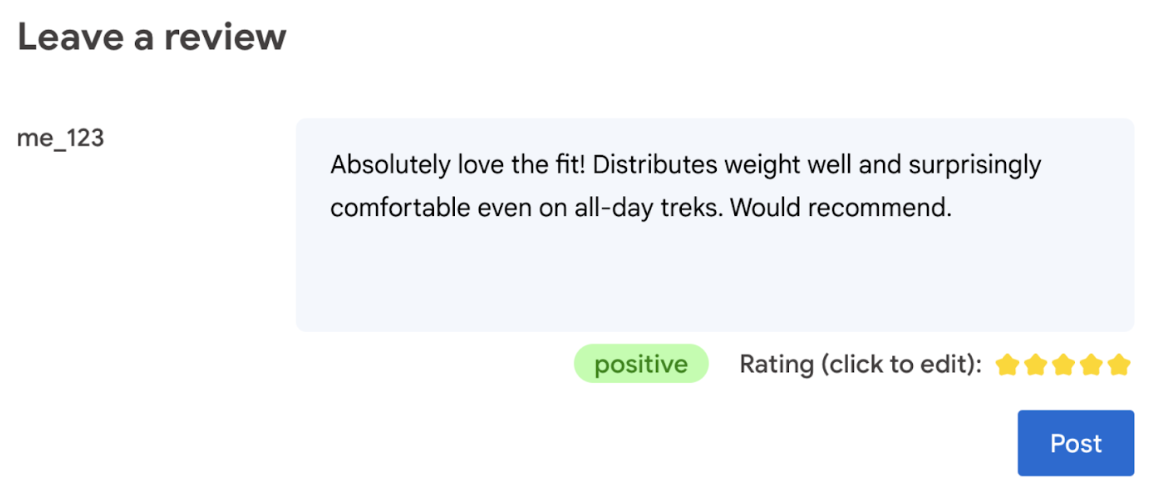
最终,用户应有权决定商品评分。
以下 Codelab 提供了客户端解决方案,包括设备端解决方案和浏览器端解决方案。无需具备 AI 开发知识、服务器或 API 密钥。
前提条件
虽然使用 Gemini API 或 OpenAI API 等解决方案的服务器端 AI 可为许多应用提供强大的解决方案,但本指南侧重于客户端 Web AI。客户端 AI 推理在浏览器中进行,通过消除服务器往返来改善 Web 用户体验。
在此 Codelab 中,我们将综合运用多种技术,向您展示客户端 AI 工具箱中的工具。
我们使用以下库和模型:
- TensforFlow.js 进行毒性分析。 TensorFlow.js 是一个开源机器学习库,可用于在 Web 上进行推理和训练。
- 用于情感分析的 transformers.js。Transformers.js 是 Hugging Face 推出的 Web AI 库。
- Gemma 2B 用于星级评分。Gemma 是一系列轻量级开放模型,基于 Google 用于创建 Gemini 模型的研究和技术构建而成。为了在浏览器中运行 Gemma,我们将其与 MediaPipe 的实验性 LLM Inference API 搭配使用。
用户体验和安全注意事项
以下是一些注意事项,有助于确保最佳的用户体验和安全性:
- 允许用户修改评分。最终,用户应有权决定商品评分。
- 明确向用户说明评分和评价是自动生成的。
- 允许用户发布归类为有害的评价,但在服务器上运行第二次检查。这样可以避免出现令人沮丧的情况,即无害评价被错误地归类为有害评价(假正例)。这还涵盖了恶意用户设法绕过客户端检查的情况。
- 客户端毒性检查很有用,但可以绕过。确保您也在服务器端运行检查。
使用 TensorFlow.js 分析恶意内容
使用 TensorFlow.js 快速开始分析用户评价的毒性。
- 安装并导入 TensorFlow.js 库和毒性模型。
- 设置最低预测置信度。默认值为 0.85,在我们的示例中,我们将其设置为 0.9。
- 异步加载模型。
- 异步对评价进行分类。我们的代码会识别任何类别中超过 0.9 阈值的预测。
此模型可按身份攻击、侮辱、淫秽等类别对恶意内容进行分类。
例如:
import * as toxicity from '@tensorflow-models/toxicity';

// Minimum prediction confidence allowed
const TOXICITY_COMMENT_THRESHOLD = 0.9;

const toxicityModel = await toxicity.load(TOXICITY_COMMENT_THRESHOLD);
const toxicityPredictions = await toxicityModel.classify([review]);
// `predictions` is an array with the raw toxicity probabilities
const isToxic = toxicityPredictions.some(
    (prediction) => prediction.results[0].match
);
使用 Transformers.js 确定情感
安装并导入 Transformers.js 库。
异步对评价进行分类。使用自定义阈值来设置您认为可用于应用的置信度水平。
例如:
import { pipeline } from '@xenova/transformers';

const SENTIMENT_THRESHOLD = 0.9;
// Create a pipeline (don't block rendering on this function)
const transformersjsClassifierSentiment = await pipeline(
  'sentiment-analysis'
);

// When the user finishes typing
const sentimentResult = await transformersjsClassifierSentiment(review);
const { label, score } = sentimentResult[0];
if (score > SENTIMENT_THRESHOLD) {
  // The sentiment is `label`
} else {
  // Classification is not conclusive
}
使用 Gemma 和 MediaPipe 建议星级评分
借助 LLM Inference API,您可以在浏览器中完全运行大语言模型 (LLM)。
考虑到 LLM 的内存和计算需求比客户端模型大一百多倍,这项新功能尤其具有变革性意义。通过对整个 Web 堆栈进行优化,包括新的操作、量化、缓存和权重共享,可以实现这一点。资料来源:“Large Language Models On-Device with MediaPipe and TensorFlow Lite”(使用 MediaPipe 和 TensorFlow Lite 的设备端大语言模型)。
- 安装并导入 MediaPipe LLM Inference API。
- 下载模型。 在此示例中,我们使用从 Kaggle 下载的 Gemma 2B。 Gemma 2B 是 Google 最小的开放权重模型。
- 将代码指向正确的模型文件,并使用
FilesetResolver。这一点非常重要,因为生成式 AI 模型可能具有特定的资源目录结构。 - 使用 MediaPipe 的 LLM 接口加载和配置模型。准备使用模型:指定模型位置、首选回答长度以及通过温度指定首选创意水平。
- 向模型提供提示(查看示例)。
- 等待模型的回答。
- 解析评分:从模型的回答中提取星级评分。
import { FilesetResolver, LlmInference } from '@mediapipe/tasks-genai';

const mediaPipeGenAi = await FilesetResolver.forGenAiTasks();
const llmInference = await LlmInference.createFromOptions(mediaPipeGenAi, {
    baseOptions: {
        modelAssetPath: '/gemma-2b-it-gpu-int4.bin',
    },
    maxTokens: 1000,
    topK: 40,
    temperature: 0.5,
    randomSeed: 101,
});

const prompt = …
const output = await llmInference.generateResponse(prompt);

const int = /\d/;
const ratingAsString = output.match(int)[0];
rating = parseInt(ratingAsString);
提示示例
const prompt = `Analyze a product review, and then based on your analysis give me the
corresponding rating (integer). The rating should be an integer between 1 and 5.
1 is the worst rating, and 5 is the best rating. A strongly dissatisfied review
that only mentions issues should have a rating of 1 (worst). A strongly
satisfied review that only mentions positives and upsides should have a rating
of 5 (best). Be opinionated. Use the full range of possible ratings (1 to 5). \n\n
  \n\n
  Here are some examples of reviews and their corresponding analyses and ratings:
  \n\n
  Review: 'Stylish and functional. Not sure how it'll handle rugged outdoor use,
  but it's perfect for urban exploring.'
  Analysis: The reviewer appreciates the product's style and basic
  functionality. They express some uncertainty about its ruggedness but overall
  find it suitable for their intended use, resulting in a positive, but not
  top-tier rating.
  Rating (integer): 4
  \n\n
  Review: 'It's a solid backpack at a decent price. Does the job, but nothing
  particularly amazing about it.'
  Analysis: This reflects an average opinion. The backpack is functional and
  fulfills its essential purpose. However, the reviewer finds it unremarkable
  and lacking any standout features deserving of higher praise.
  Rating (integer): 3
  \n\n
  Review: 'The waist belt broke on my first trip! Customer service was
  unresponsive too. Would not recommend.'
  Analysis: A serious product defect and poor customer service experience
  naturally warrants the lowest possible rating. The reviewer is extremely
  unsatisfied with both the product and the company.
  Rating (integer): 1
  \n\n
  Review: 'Love how many pockets and compartments it has. Keeps everything
  organized on long trips. Durable too!'
  Analysis: The enthusiastic review highlights specific features the user loves
  (organization and durability), indicating great satisfaction with the product.
  This justifies the highest rating.
  Rating (integer): 5
  \n\n
  Review: 'The straps are a bit flimsy, and they started digging into my
  shoulders under heavy loads.'
  Analysis: While not a totally negative review, a significant comfort issue
  leads the reviewer to rate the product poorly. The straps are a key component
  of a backpack, and their failure to perform well under load is a major flaw.
  Rating (integer): 1
  \n\n
  Now, here is the review you need to assess:
  \n
  Review: "${review}" \n`;
要点总结
无需具备 AI/机器学习专业知识。设计提示需要迭代,但其余代码都是标准的 Web 开发代码。
客户端模型相当准确。如果您运行本文档中的代码段,会发现毒性和情感分析均给出了准确的结果。在测试的几个参考评价中,Gemma 的评分与 Gemini 模型的评分基本一致。为了验证该准确性,需要进行更多测试。
不过,为 Gemma 2B 设计提示需要花费一番功夫。由于 Gemma 2B 是一个小型 LLM,因此需要详细的提示才能生成令人满意的结果,这比 Gemini API 所需的提示要详细得多。
推理速度非常快。如果您运行本文档中的代码段,应该会发现,在许多设备上,推理速度可以很快,甚至可能比服务器往返速度更快。不过,推理速度可能会有很大差异。需要在目标设备上进行全面的基准比较。我们预计,随着 WebGPU、WebAssembly 和库的更新,浏览器推理速度会越来越快。例如,Transformers.js 在 v3 中添加了 Web GPU 支持,这可以大幅加快设备端推理速度。
下载大小可能非常大。在浏览器中进行推理的速度很快,但加载 AI 模型可能是一项挑战。若要在浏览器中执行 AI,您通常需要库和模型,这会增加 Web 应用的下载大小。
虽然 Tensorflow 毒性模型(一种经典的自然语言处理模型)只有几 KB,但生成式 AI 模型(例如 Transformers.js 的默认情感分析模型)的大小达到了 60 MB。Gemma 等大语言模型的大小可达 1.3GB。这远远超过了中位 网页大小 2.2 MB,而该大小已经远大于建议的最佳性能大小。在特定场景中,客户端生成式 AI 是可行的。
网络上的生成式 AI 领域正在快速发展!未来有望出现更小、经过网络优化的模型。
后续步骤
Chrome 正在尝试在浏览器中运行生成式 AI 的另一种方式。 您可以报名参加抢先预览计划来测试该功能。