


প্রকাশিত: ৩০ এপ্রিল, ২০২৬
অন্তর্নির্মিত এআই-এর সাহায্যে, আপনার ওয়েবসাইট বা ওয়েব অ্যাপ্লিকেশন কোনো মডেল স্থাপন, পরিচালনা বা সেলফ-হোস্ট করার প্রয়োজন ছাড়াই এআই-চালিত কাজ সম্পাদন করতে পারে। একটি ডেমো থেকে প্রোডাকশন-রেডি ফিচারে রূপান্তর করা আপনার জন্য চ্যালেঞ্জিং হতে পারে। এই ডকুমেন্টটিতে প্রযুক্তিগত এবং ইউএক্স (UX) সংক্রান্ত বিষয়গুলো আলোচনা করা হয়েছে, যা আপনাকে সাধারণ ভুলগুলো এড়াতে সাহায্য করবে।
যুক্তিসঙ্গত সময়ে মডেলটি প্রস্তুত করুন
প্রযোজ্য: সমস্ত এপিআই, যেমন—Summarizer, Translator, এবং Writer।
করণীয়: ব্যবহারকারীর এআই ফিচারটি ব্যবহার করার উদ্দেশ্য পরিষ্কারভাবে বুঝতে পারার সাথে সাথেই সেশনটি শুরু করুন। উদাহরণস্বরূপ, যখন একজন ব্যবহারকারী কোনো প্রাসঙ্গিক এআই টুলস সারফেসে প্রবেশ করেন, কোনো এআই ওয়ার্কস্পেসের উপর হোভার করেন, অথবা ফিচারটির চারপাশের UI-এর সাথে ইন্টারঅ্যাক্ট করেন। সেশনটি আগে থেকে প্রস্তুত করে রাখলে, ব্যবহারকারী যখন তার কাজটি সেট আপ করছেন, সেই সময়ে মডেলটি ব্যাকগ্রাউন্ডে নীরবে মেমোরিতে লোড হতে পারে, যা এড়ানো সম্ভব এমন কোল্ড-স্টার্ট ল্যাটেন্সি দূর করে। এক ধাপ এগিয়ে থাকার চেষ্টা করুন এবং বর্তমান ফলাফল রেন্ডার করা শুরু করার সাথে সাথেই পরবর্তী সম্ভাব্য এআই কাজটি শুরু করে দিন, উদাহরণস্বরূপ, যদি ফিচারটি পুনরাবৃত্তিমূলক ব্যবহারের জন্য ডিজাইন করা হয়ে থাকে।
অপ্রয়োজনীয় হলে, সেশন শুরু করার জন্য ব্যবহারকারীর 'Generate' বোতামে ক্লিক করার অপেক্ষা করবেন না । এর ফলে কোল্ড স্টার্টে বিলম্ব হয়, কারণ মডেলটিকে প্রথমে মেমরিতে লোড হতে এবং এর এক্সিকিউশন পাইপলাইন প্রস্তুত করতে হয়।
তৈরির সময় প্রাথমিক নির্দেশাবলী সেট করুন
প্রযোজ্য: প্রম্পট এপিআই।
করণীয়: প্রথম প্রম্পটের গতি উন্নত করার জন্য সেশন শুরুর সময় সিস্টেম নির্দেশাবলী প্রদান করুন।
যা করবেন না: একটি খালি সেশন দিয়ে শুরু করবেন না এবং প্রথম prompt() কলের অংশ হিসেবে সিস্টেম নির্দেশাবলী পাঠাবেন না। এটি ল্যাটেন্সি বাড়িয়ে দেয়, কারণ এটি মডেলকে শেষ মুহূর্তে সেই নির্দেশাবলী প্রক্রিয়া করতে বাধ্য করে।
// ✅ DO: Create the session as early as possible (tip on warming up the model early) and use initialPrompts for system instructions in the create call
const session = await LanguageModel.create({
  initialPrompts: [
    { role: 'system', content: 'You are a helpful assistant specialized in code reviews.' }
  ]
});

// A few moments later, when the user triggers the AI feature
const review = await session.prompt(`Review the following code:\n\n${code}`);

// ❌ DON'T: Send instructions using prompt() after creation
// const slowerSession = await LanguageModel.create();
// await slowerSession.prompt(`You are a helpful assistant specialized in code reviews.\n\nReview the following code:\n\n${code}`); // Higher latency
পুনরাবৃত্তিমূলক কাজের জন্য ক্লোন সেশন
প্রযোজ্য: প্রম্পট এপিআই।
প্রম্পট এপিআই-এর ক্ষেত্রে, প্রতিটি সেশন পূর্ববর্তী সমস্ত ইন্টারঅ্যাকশন বিবেচনায় নিয়ে কথোপকথনের প্রেক্ষাপট ট্র্যাক করে । যেহেতু একটি ক্লোন তার প্যারেন্ট সেশন থেকে প্রাথমিক প্রম্পট এবং ক্লোন করার মুহূর্ত পর্যন্ত সমস্ত ইন্টারঅ্যাকশনের ইতিহাস সহ সবকিছু উত্তরাধিকার সূত্রে পায়, তাই আপনার ব্যবহার এমনভাবে সাজান যাতে কেবল আপনার প্রয়োজনীয় জিনিসগুলোই উত্তরাধিকার সূত্রে গৃহীত হয়।
করুন:
- একটি বেস সেশন তৈরি করুন: সম্পর্কহীন কাজগুলো দক্ষতার সাথে পরিচালনা করার জন্য, একটি বেস সেশন তৈরি করুন যাতে শুধুমাত্র আপনার সিস্টেমের নির্দেশাবলী থাকবে এবং পূর্ববর্তী কোনো কথোপকথনের প্রসঙ্গ থাকবে না।
- বেসলাইন ক্লোন করুন: সিস্টেম নির্দেশাবলী পুনরায় পার্স করার অতিরিক্ত কাজ এড়াতে নতুন টাস্কের জন্য সেই বেস সেশনে
clone()ব্যবহার করুন। এটি আপনাকে সমান্তরাল কথোপকথন তৈরি করতে বা একটি টাস্ককে তার বেসলাইনে রিসেট করতে দেয়।
করবেন না:
- সম্পর্কহীন কাজের জন্য একই সেশন পুনরায় ব্যবহার করবেন না এবং এমন কোনো সেশন ক্লোন করা থেকে বিরত থাকুন যাতে আগে থেকেই অপ্রয়োজনীয় ইন্টারঅ্যাকশনের ইতিহাস রয়েছে। এই উভয় অভ্যাসই আপনার বর্তমান কাজে সম্পর্কহীন পূর্ববর্তী প্রসঙ্গের হস্তক্ষেপ ঘটাতে পারে।
- একই সিস্টেম নির্দেশাবলী দিয়ে বারবার
create()কল করবেন না। পারফরম্যান্স অপ্টিমাইজ করতে এর পরিবর্তে ক্লোনিং প্যাটার্ন ব্যবহার করুন।
// ✅ DO: Create a baseline session and clone it for each new task
const baseSession = await LanguageModel.create({
  initialPrompts: [{
    role: 'system',
    content: 'You are a technical editor...',
  }],
});

// Clone the base session once for the first task
const task1 = await baseSession.clone();
const response1 = await task1.prompt("Review this first draft...");
// ... Repeat the cloning pattern for subsequent independent tasks
// Each task starts fresh from the baseline system instructions

// ❌ DON'T:
// Bad performance pattern: repeated create() calls for identical tasks.
// This forces the model to re-parse instructions every time, increasing latency.
// const sessionA = await LanguageModel.create({ initialPrompts: [...] });
// await sessionA.prompt("Task 1...");
// const sessionB = await LanguageModel.create({ initialPrompts: [...] });
// await sessionB.prompt("Task 2...");
// Bad quality pattern: reusing the same session for unrelated tasks.
// const session = await LanguageModel.create();
// await session.prompt("Analyze this financial report...");
// Unrelated task in the same session:
// await session.prompt("Now write a children's story...");
অব্যবহৃত সেশনগুলি ধ্বংস করুন
সকল এপিআই-এর ক্ষেত্রে প্রযোজ্য।
করণীয়: যখন কোনো ফিচার আর ব্যবহার করা হয় না, তখন মেমরি খালি করার জন্য আপনার অপ্রয়োজনীয় সেশনগুলিতে স্পষ্টভাবে destroy() কল করুন। আপনি যদি ক্লোনিং প্যাটার্ন ব্যবহার করেন, তবে মূল সেশনটি রাখুন এবং অপ্রয়োজনীয় ক্লোনগুলি ধ্বংস করে দিন।
যা করবেন না: একাধিক বড় সেশন সক্রিয় রাখবেন না। প্রতিটি সেশন মেমরি ব্যবহার করে, যা অপ্রয়োজনীয় রিসোর্স খরচ তৈরি করে এবং একটি সমস্যা হয়ে দাঁড়াতে পারে। গার্বেজ কালেক্টর স্বাভাবিকভাবেই সেশনগুলো পরিষ্কার করে দেয়, কিন্তু destroy() কল করলে আরও দ্রুত মেমরি খালি হয়।
// ✅ DO: Use the clone and destroy it immediately after
const clone = await baseSession.clone();
const response = await clone.prompt("Quick task...");
// Free memory right away: destry the clone, keep the baseSession
clone.destroy();
স্ট্রিমিং প্রতিক্রিয়াগুলি নিরাপদে এবং দক্ষতার সাথে রেন্ডার করুন
প্রযোজ্য: স্ট্রিমিং সমর্থন সহ সকল এপিআই (Prompt, Summarizer, Writer, Rewriter, এবং Translator)।
করণীয়: সমস্ত LLM আউটপুটকে অবিশ্বস্ত কন্টেন্ট হিসেবে বিবেচনা করুন। শুধু খণ্ডাংশ নয়, সম্পূর্ণ সম্মিলিত আউটপুটকে স্যানিটাইজ করুন, কারণ ক্ষতিকারক কোড বিভিন্ন আপডেটে বিভক্ত থাকতে পারে। রেন্ডার করার আগে, যেখানে সমর্থিত, সেখানে স্যানিটাইজার এপিআই (Sanitizer API) ব্যবহার করুন। পারফরম্যান্সের অবনতি এড়াতে, স্ট্রিমিং-মার্কডাউন (streaming-markdown) -এর মতো একটি স্ট্রিমিং মার্কডাউন পার্সার ব্যবহার করুন।
যা করবেন না: প্রতিটি চাঙ্ক আপডেটে সরাসরি innerHTML সেট করবেন না। এটি ধীরগতির, বিশেষ করে সিনট্যাক্স হাইলাইটিং-এর মতো জটিল ফরম্যাটিংয়ের ক্ষেত্রে, এবং ইনজেকশনের ঝুঁকিপূর্ণ।
import * as smd from "streaming-markdown";
// Set up virtual buffer and Sanitizer API
const sanitizer = new Sanitizer({
  allowElements: ['figure', 'figcaption', 'p', 'br', 'strong', 'em', 'img', 'a'],
  allowAttributes: {
    'loading': ['img'], 'decoding': ['img'], 'src': ['img'], 'href': ['a']
  }
});

// Create an off-screen fragment so the parser doesn't cause flicker
// or trigger XSS in the live DOM during the building process.
const buffer = new DocumentFragment();
const parser = smd.parser_new(buffer);

// Use sanitizer as a gatekeeper / cleaner function so we can combine it with the streaming Markdown parser
function syncSanitized(target, sourceFragment) {
  // .sanitize() returns a fresh, clean DocumentFragment
  const cleanFragment = sanitizer.sanitize(sourceFragment);
  // replaceChildren is the modern high-performance way to swap DOM content
  target.replaceChildren(cleanFragment);
}

// Streaming Logic
// `chunks` keeps track of the raw string (useful for logs/debug)
chunks += chunk;
// Let the parser build the DOM incrementally in the buffer.
// This is high-performance because the buffer is not live
smd.parser_write(parser, chunk);
// Use the Sanitizer API to port the content safely to the container.
syncSanitized(container, buffer);
গতির জন্য ইনপুট অপ্টিমাইজ করুন
সকল এপিআই-এর ক্ষেত্রে প্রযোজ্য।
করণীয়: মডেলে শুধু একান্ত প্রয়োজনীয় তথ্যই পাঠান। বর্তমান কাজের জন্য অপ্রাসঙ্গিক সবকিছু বাদ দিন। বড় ডেটাসেটের ক্ষেত্রে, একটি সংক্ষিপ্ত বিবরণ এবং প্রাসঙ্গিক আইটেমগুলোর একটি ছোট অংশ প্রদান করুন।
যা করবেন না: এপিআই-তে সরাসরি অপরিশোধিত টেক্সট, অপ্রয়োজনীয় মেটাডেটা, এইচটিএমএল ট্যাগ বা বড় আকারের অপরিশোধিত তালিকা পাঠাবেন না। ইনপুটের আকার বাড়ার সাথে সাথে ল্যাটেন্সি উল্লেখযোগ্যভাবে বৃদ্ধি পায়, যার ফলে অনেক ডিভাইসে এআই ফিচারটি ত্রুটিপূর্ণ বলে মনে হতে পারে।
// ✅ DO: Send only relevant text
const cleanText = document.querySelector('#article').innerText;
const summary = await Summarizer.summarize(cleanText);

// ❌ DON'T: Send the entire DOM structure
// const dirtyText = document.querySelector('#article').innerHTML;
পূর্বাভাসযোগ্য ফলাফলের জন্য কাঠামোগত আউটপুট ব্যবহার করুন।
প্রযোজ্য: প্রম্পট এপিআই।
করণীয়: যখন মডেল থেকে একটি নির্দিষ্ট ফরম্যাটে ডেটা ফেরত পাওয়ার প্রয়োজন হয়, তখন একটি JSON Schema প্রদানের জন্য responseConstraint ফিল্ড ব্যবহার করে স্ট্রাকচার্ড আউটপুট ব্যবহার করুন। এটি আউটপুটকে অনুমানযোগ্য করে তোলে এবং আপনাকে জটিল পোস্ট-প্রসেসিং বা ম্যানুয়াল পার্সিং থেকে বিরত রাখে।
যা করবেন না: শুধুমাত্র স্বাভাবিক ভাষার নির্দেশাবলীর (যেমন "শুধু JSON আউটপুট দাও") উপর নির্ভর করবেন না। মডেলগুলিতে কথোপকথনমূলক অপ্রয়োজনীয় অংশ থাকতে পারে যা আপনার পার্সারকে অকার্যকর করে দেয়।
// ✅ DO: Use a JSON Schema for predictable results
const schema = {
  type: "object",
  properties: {
    isTopicCats: { type: "boolean" }
  }
};

const result = await session.prompt(`Is this post about cats?\n\n${post}`, {
  responseConstraint: schema,
});
console.log(JSON.parse(result).isTopicCats);
দৈর্ঘ্যের সীমাবদ্ধতা থেকে প্রজন্মকে বিচ্ছিন্ন করুন
প্রযোজ্য: প্রম্পট এপিআই, কারণ এটিই একমাত্র এপিআই যা স্ট্রাকচার্ড আউটপুট স্কিমা সমর্থন করে।
করণীয়: মডেলটিকে স্বাভাবিকভাবে তার প্রতিক্রিয়া তৈরি করতে দিন, এবং তারপর আপনার UI-এর সাথে মানানসই করার জন্য ক্লায়েন্ট-সাইড লজিক ব্যবহার করে টেক্সটটি সংক্ষিপ্ত করুন।
যা করবেন না: স্ট্রাকচার্ড আউটপুট স্কিমা ব্যবহার করে maxLength: 125 মতো কঠোর অক্ষর সীমা প্রয়োগ করবেন না। যখন একটি মডেলের প্রতিক্রিয়া আপনার সেট করা সীমার চেয়ে দীর্ঘ হয়, তখন মডেলটি অর্থ সংকুচিত করার জন্য বিদেশী ভাষা বা ইমোজির মতো উচ্চ-ঘনত্বের টোকেন ব্যবহার করতে পারে, যার ফলে অর্থহীন আউটপুট তৈরি হয়।
/*  DO: Handle overflow using CSS */
.result {
  overflow: hidden;
  white-space: nowrap;
  text-overflow: ellipsis; /* Displays '…' */
}
// ❌ DON'T: Force length in the prompt
const result = await session.prompt("Write a bio in exactly 50 characters.");
ব্যবহারকারীকে অবহিত রাখুন
সকল এপিআই-এর ক্ষেত্রে প্রযোজ্য।
করণীয়: কাজের জটিলতা এবং প্রত্যাশিত সময়কালের উপর নির্ভর করে, ব্যবহারকারীকে অবহিত রাখতে অ্যানিমেশন, ভিজ্যুয়াল সংকেত এবং অগ্রগতি সূচক ব্যবহার করুন। সর্বোত্তম পন্থাটি আপনার ব্যবহারের ক্ষেত্র এবং এপিআই আউটপুটের প্রত্যাশিত দৈর্ঘ্যের উপর নির্ভর করে। কিছু ধারণা নিচে দেওয়া হলো:
- দীর্ঘ কন্টেন্টের জন্য স্ট্রিমিং: সারাংশ বা চ্যাটের ক্ষেত্রে, স্ট্রিমিং ডিফল্টরূপে প্রতিটি টোকেনের জন্য একটি টাইপরাইটার এফেক্ট তৈরি করে। এটি স্বাভাবিক মনে হতে পারে এবং তাৎক্ষণিক প্রতিক্রিয়া প্রদান করতে পারে।
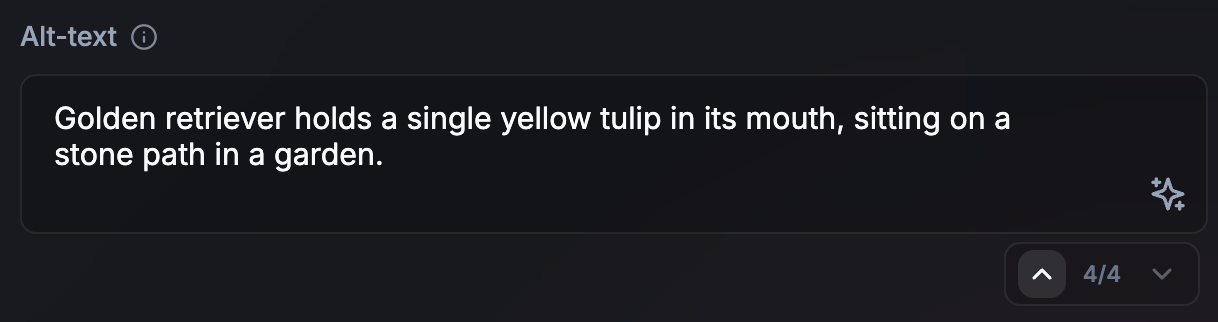
- ছোট কাজ (বা দীর্ঘ অ্যাসিঙ্ক্রোনাস কাজ)-এর জন্য নন-স্ট্রিমিং: ছোট আউটপুটের জন্য, যেমন অল্ট-টেক্সট, নন-স্ট্রিমিং একটি আরও পরিশীলিত UI তৈরি করতে পারে। এটি বর্তমান কাজটি রেন্ডার হওয়ার সময়ে পরবর্তী AI কাজটি প্রস্তুত করার জন্য সময়ও দেয়। এই পদ্ধতিটি দীর্ঘ অ্যাসিঙ্ক্রোনাস বা ব্যাকগ্রাউন্ড কাজের জন্যও কার্যকর। যদি ব্যবহারকারী তার কাজ চালিয়ে যাওয়ার জন্য আউটপুটের কারণে আটকে না থাকেন, তবে আউটপুটটি ঘটার সাথে সাথেই তৈরি করার কোনো জরুরি প্রয়োজন নেই। UI-তে প্রক্রিয়াটি যে চলমান, তার সংকেত দিন।
- আপডেটের জন্য ভিজ্যুয়াল ট্রানজিশন: টেক্সট অনুবাদ বা পুনর্লিখন করার সময় অ্যানিমেশন ব্যবহার করুন, যেমন, শব্দের রূপান্তর।
যা করবেন না: ভিজ্যুয়াল সংকেত ছাড়া UI আপডেট করবেন না।
ব্যবহারকারীর সময় ও কাজ সম্পর্কিত মানসিক মডেলের সাথে সামঞ্জস্য বিধান করুন।
সকল এপিআই-এর ক্ষেত্রে প্রযোজ্য।
করণীয়: যদি কোনো প্রতিক্রিয়া প্রায় তাৎক্ষণিক হয়, তবে এক বা দুই সেকেন্ডের একটি কৃত্রিম বিলম্বের কথা বিবেচনা করুন। আপাতদৃষ্টিতে অদ্ভুত মনে হলেও, ব্যবহারকারীরা হয়তো ফলাফলকে আরও বেশি বিশ্বাসযোগ্য মনে করতে পারেন, যখন তারা এমন একটি উৎপাদন প্রক্রিয়া উপলব্ধি করেন যা তাদের কাছে কাজটি সম্পর্কে অনুভূত জটিলতার সাথে সামঞ্জস্যপূর্ণ। কোনো এআই প্রক্রিয়া সম্পন্ন হয়েছে তা বোঝাতে অ্যানিমেশন ব্যবহার করুন।
যা করবেন না: তাৎক্ষণিক UI পরিবর্তন করে ব্যবহারকারীদের চমকে দেবেন না।
ব্যবহারকারীদের দ্রুত নেভিগেট করতে এবং এআই সম্পাদনা পূর্বাবস্থায় ফেরাতে অনুমতি দিন।
সকল এপিআই-এর ক্ষেত্রে প্রযোজ্য।
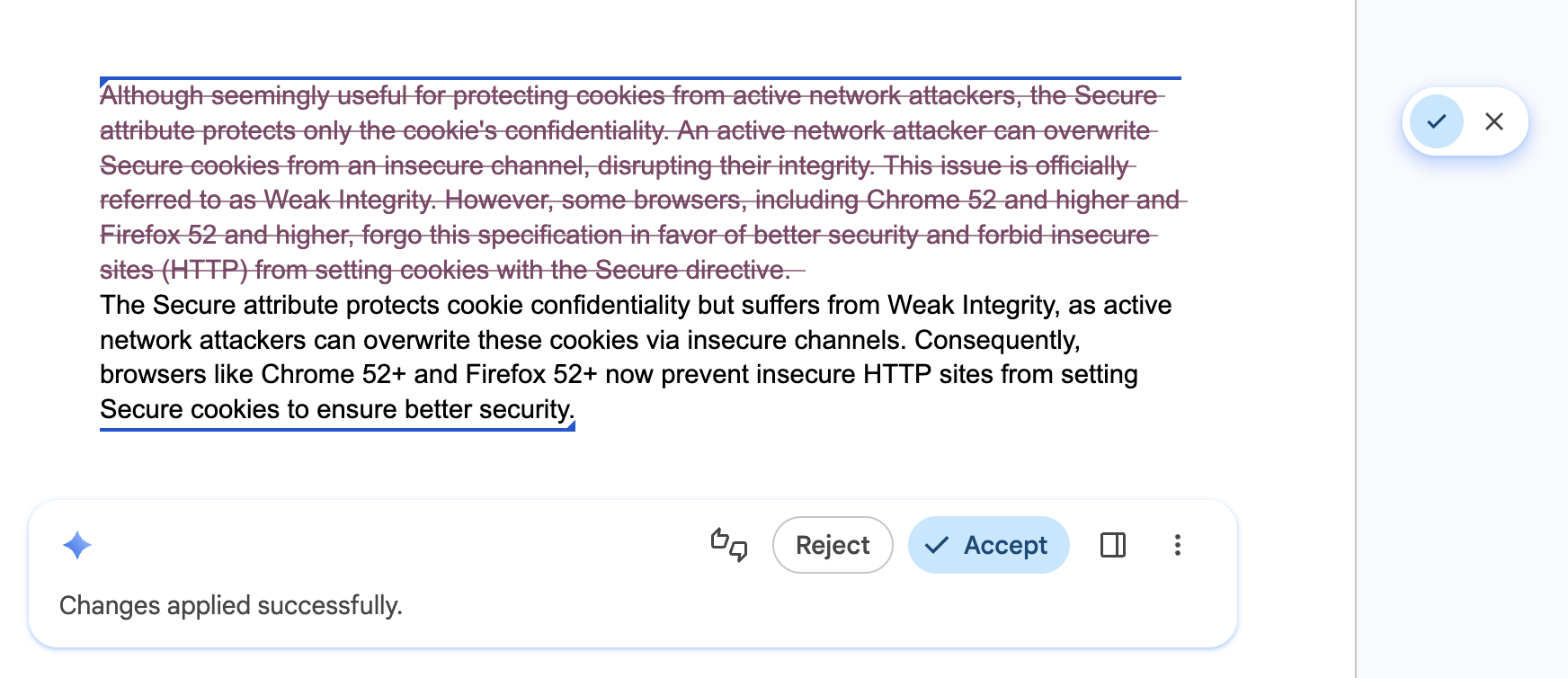
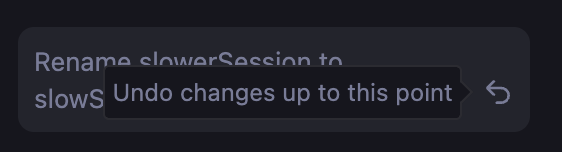
করণীয়: আপনার UI-তে একটি স্টেপার বা নেভিগেশন হিস্ট্রি যুক্ত করুন, যা ব্যবহারকারীদের আত্মবিশ্বাসের সাথে বিভিন্ন ফলাফল অন্বেষণ করতে এবং AI দ্বারা করা সম্পাদনাগুলো দ্রুত পূর্বাবস্থায় ফিরিয়ে আনতে সাহায্য করবে। এটি নিশ্চিত করে যে বিভিন্ন সংস্করণ তখনও সহজেই উপলব্ধ থাকবে।
যা করবেন না: ব্যবহারকারীর পূর্ববর্তী খসড়া বা তার পছন্দের কোনো এআই ফলাফল এমনভাবে মুছে ফেলবেন না, যাতে আগের অবস্থায় ফিরে যাওয়া, পূর্বাবস্থায় ফেরা বা সংস্করণ তুলনা করার কোনো উপায় না থাকে।
ব্যবহারকারীর নিয়ন্ত্রণ এবং অগ্রাহ্য করার ক্ষমতা প্রদান করুন
সকল এপিআই-এর ক্ষেত্রে প্রযোজ্য।
করণীয়: ব্যবহারকারীকে তৈরি করা সমস্ত কন্টেন্টের চূড়ান্ত সম্পাদক করুন। সহজবোধ্য ওভাররাইডের ব্যবস্থা রাখুন, যাতে ব্যবহারকারী চূড়ান্ত আউটপুটের সম্পূর্ণ মালিকানা বজায় রাখতে পারেন। এপিআইগুলো ভুল ফলাফল দিতে পারে।
করবেন না: একমাত্র বিকল্প হিসেবে এআই-দ্বারা তৈরি কোনো ফলাফলকে জোর করে চাপিয়ে দেবেন না।
পুনরাবৃত্ত কাজগুলির ফলাফল ক্যাশে করুন
সকল এপিআই-এর ক্ষেত্রে প্রযোজ্য।
করণীয়: বারবার দেওয়া ইনপুট বা কোয়েরির জন্য একটি স্থানীয় রেজাল্ট ক্যাশে (উদাহরণস্বরূপ, sessionStorage বা IndexedDB ব্যবহার করে) প্রয়োগ করুন। ক্যাশে হিট বাড়ানোর জন্য হোয়াইটস্পেস ছেঁটে ফেলে এবং লোয়ারকেস করে ইনপুটকে নর্মালাইজ করুন। ভারী ইনপুটের জন্য, যেমন ছবি, ক্যাশে কী হিসাবে ব্যবহার করার জন্য একটি হ্যাশ তৈরি করুন। আপনার ক্যাশের জন্য একটি রক্ষণশীল টাইম টু লিভ (TTL) সেট করুন (অথবা ব্যাকগ্রাউন্ডে আপডেট করার সময় ক্যাশ করা ফলাফল পরিবেশন করুন)। ফলাফল অসন্তোষজনক হলে ব্যবহারকারীকে নতুন করে ইনফারেন্স শুরু করার সুযোগ দিন।
যা করবেন না: একই সার্চ কোয়েরি বা অভিন্ন ডেটা ইনপুটের পুনরাবৃত্তির জন্য একই ইনফারেন্স পুনরায় চালাবেন না, যেখানে পরিবর্তনশীলতা কাম্য নয়, উদাহরণস্বরূপ যখন একজন ব্যবহারকারী সার্চ রেজাল্টগুলোর মধ্যে বারবার আসা-যাওয়া করেন। এটি রেসপন্সিভনেস এবং লোকাল কম্পিউটের দক্ষ ব্যবহারকে অপ্টিমাইজ করে।
// ✅ DO: Check a local cache before running inference
async function getAiResponse(userInput, forceRefresh = false) {
  // Normalize the query to increase cache hits
  const query = userInput.trim().toLowerCase();
  const cacheKey = `ai_results_${query}`;
  const TTL_MS = 3600000; // 1 hour conservative TTL

  if (!forceRefresh) {
    const itemStr = localStorage.getItem(cacheKey);
    if (itemStr) {
      const item = JSON.parse(itemStr);
      const now = Date.now();

      // Check if the item has expired
      if (now < item.expiry) {
        // Lightweight safety check before rendering
        if (isValid(item.value)) return item.value;
      } else {
        // Delete the stale entry if the TTL has passed
        localStorage.removeItem(cacheKey);
      }
    }
  }

  // Fallback: Run inference if no valid cache exists
  const session = await LanguageModel.create();
  const response = await session.prompt(userInput);

  // Store the result for future use (with an expiration)
  const cacheData = {
    value: response,
    expiry: Date.now() + TTL_MS
  };
  localStorage.setItem(cacheKey, JSON.stringify(cacheData));

  return response;
}