
Finish setting up your basic judge model to get your subjective evaluations running.

Align and test the judge
You have an initial judge, but you can't trust it yet. Your judge is only ready when it consistently agrees with human judgment.
Create an alignment dataset
To calibrate your judge, you need an alignment dataset. This is a small, high-quality collection of inputs and outputs that humans manually rated. This dataset acts as your ground truth. You use it to verify that the judge's logic consistently aligns with your expectations.
Your alignment dataset should contain 30-50 input-output pairs. The set is large enough to cover some edge cases, but small enough that you can label it in a short period of time.
In the ThemeBuilder example, an entry in the alignment dataset looks like this (input, output, human label):
{
  "id": "sample-014",
  "userInput": {
    "companyName": "Rawrr!",
    "audience": "kids 5-10",
    "tone": ["prehistoric", "loud", "fun"]
  },
  "appOutput": {
    "motto": "Experiencing the prehistoric era."
  },
  "humanEvaluation": {
    "mottoBrandFit": {
      "label": "FAIL",
      "rationale": "While on-theme, this motto is too formal for kids.
        It fails to capture the required 'loud' and 'fun' energy."
    }
  }
}
To generate inputs and outputs, you can extract from production logs (if available), create the data manually, use an LLM (synthetic data), or start from a few hand-picked samples and ask an LLM to augment your dataset.
Once your inputs and outputs are ready, use your rubric to label the outputs as
PASS or FAIL with your team. This becomes your ground truth.
Ensure your alignment dataset includes both PASS examples and FAIL examples
of varying difficulty, for example:
- 10 example happy path cases your judge labels as
PASS. - 20 example cases your judge labels as
FAIL:- Obvious failures, for example a highly toxic or completely off-brand motto.
- Subtle failures, for example a motto that is grammatically perfect but a bit too formal for a playful brand, or that only partly fits the tone.
Your LLM judge is a gatekeeper. Aligning it on a dataset that contains more failures than pass cases provides more opportunities to adjust the rubric to catch failures, and ultimately improves the judge's ability to detect failures.
After your alignment dataset is ready, it looks like something like this:
Happy path cases (PASS)
// Easy, clean input + Good output
{
  "id": "sample-001",
  "userInput": {
    "companyName": "Kinetica",
    "description": "Carbon-fiber plated performance footwear engineered for
    elite marathon runners.",
    "audience": "competitive triathletes and professional runners",
    "tone": [
      "aggressive",
      "high-performance",
      "technical"
    ]
  },
  "appOutput": {
    "motto": "Unlock your kinetic potential.",
    "colorPalette": {
      "textColor": "#FFFFFF",
      "backgroundColor": "#000000",
      "primary": "#DC2626",
      "secondary": "#E2E8F0"
    }
  },
  "humanEvaluation": {
    "mottoBrandFit": {
      "label": "PASS",
      "rationale": "This motto powerfully aligns the brand's technical
      engineering with the ambitious goals of its elite athletic audience.
      Relevance: Uses 'kinetic' to expertly link the brand to physical
      energy. Audience appeal: 'Unlock your potential' resonates perfectly
      with competitive runners. Tone consistency: Nails the required
      aggressive, high-performance marks."
    },
    "mottoToxicity": {
      "label": "PASS",
      "rationale": "Perfectly clean and motivational. No offensive or
      exclusionary language."
    },
    "colorBrandFit": {
      "label": "PASS",
      "rationale": "The chosen color palette perfectly mirrors Kinetica's
      aggressive and technical brand identity by utilizing high-impact tones
      that resonate with elite athletes. Relevance: Psychological association:
      Blood red creates urgency and speed. Harmony: Stark contrast against
      black/white feels highly technical.
      Appropriateness: Extremely effective aesthetic for premium athletic gear."
    }
  }
}
Obvious failures (FAIL)
// Off-brand color palette
{
  "id": "sample-014",
  "userInput": {
    "companyName": "Rawrr!",
    "description": "Dinosaur themed playground and party venue.",
    "audience": "kids 5-10",
    "tone": [
      "prehistoric",
      "loud",
      "fun"
    ]
  },
  "appOutput": {
    "motto": "Experiencing the prehistoric era.",
    "colorPalette": {
      "textColor": "#4A4A4A",
      "backgroundColor": "#F5F5DC",
      "primary": "#D2B48C",
      "secondary": "#C0C0C0"
    }
  },
  "humanEvaluation": {
    "mottoBrandFit": {
      "label": "FAIL",
      "rationale": "While the motto relates to the dinosaur theme, its overly
      academic and formal tone fails to capture the loud and fun energy
      essential for a children's playground brand. Relevance: Effectively fits
      the dinosaur theme. Audience appeal: A bit formal ('Experiencing' versus
      something punchy), acceptable for parents booking events but should be
      more exciting for kids, it's too formal and academic for a children's
      playground, lacks the 'loud' and 'fun' energy requested in the tone.
      Tone consistency: It touches on the 'prehistoric' element adequately."
    },
    "mottoToxicity": {
      "label": "PASS",
      "rationale": "A completely family-friendly, educational-sounding statement."
    },
    "colorBrandFit": {
      "label": "FAIL",
      "rationale": "This muted and sophisticated color scheme fails to capture
      the high-energy, prehistoric spirit required to attract and excite a young
      audience. Relevance: Psychological association: The 'sad beige', tan, and
      muted greys evoke a sterile, 'adult minimalist' home décor aesthetic.
      Harmony: The colors are muddy and lifeless. Appropriateness: For a 'loud'
      and 'fun' children's playground targeting 5-10 year olds, this palette is
      a spectacular failure. It desperately needs vibrant, exciting primary
      colors to attract kids."
    }
  }
},
Subtle failures (FAIL)
// Almost on-brand color palette
{
  "id": "sample-023",
  "userInput": {
    "companyName": "Apex Dental",
    "description": "High-end cosmetic dentistry specializing in porcelain
        veneers and laser whitening.",
    "audience": "Professionals seeking a perfect smile",
    "tone": [
      "clean",
      "professional",
      "bright"
    ]
  },
  "appOutput": {
    "motto": "Designing your brightest smile.",
    "colorPalette": {
      "textColor": "#1A202C",
      "backgroundColor": "#FFFFFF",
      "primary": "#FFC107",
      "secondary": "#E2E8F0"
    }
  },
  "humanEvaluation": {
    "mottoBrandFit": {
      "label": "PASS",
      "rationale": "The motto perfectly captures the premium essence of the
      brand by combining high-end dental aesthetics with a clear appeal to a
      professional clientele. Relevance: Relates perfectly to cosmetic
      dentistry and teeth whitening. Audience appeal: 'Brightest smile' is a
      highly effective, aspirational hook for professionals wanting to look
      their best. Tone consistency: Clean, upbeat, and exceedingly professional."
    },
    "mottoToxicity": {
      "label": "PASS",
      "rationale": "A very positive, medical-grade, and safe statement."
    },
    "colorBrandFit": {
      "label": "FAIL",
      "rationale": "The choice of bright yellow is a fundamental branding
      failure for a cosmetic dental practice as it creates a direct and
      repellent visual link to tooth discoloration, undermining the clinic's
      high-end whitening positioning. Relevance: Psychological association:
      While yellow technically fulfills the word 'bright', in the specific
      context of dentistry, a primary bright yellow is subconsciously and
      intensely associated with plaque, decay, and stained teeth.
      Harmony: It stands out strongly but sends the wrong message.
      Appropriateness: This is a massive psychological misstep for a whitening
      clinic. It subverts trust in their core service by visually reminding
      customers of the problem rather than the solution."
    }
  }
},
Reach alignment
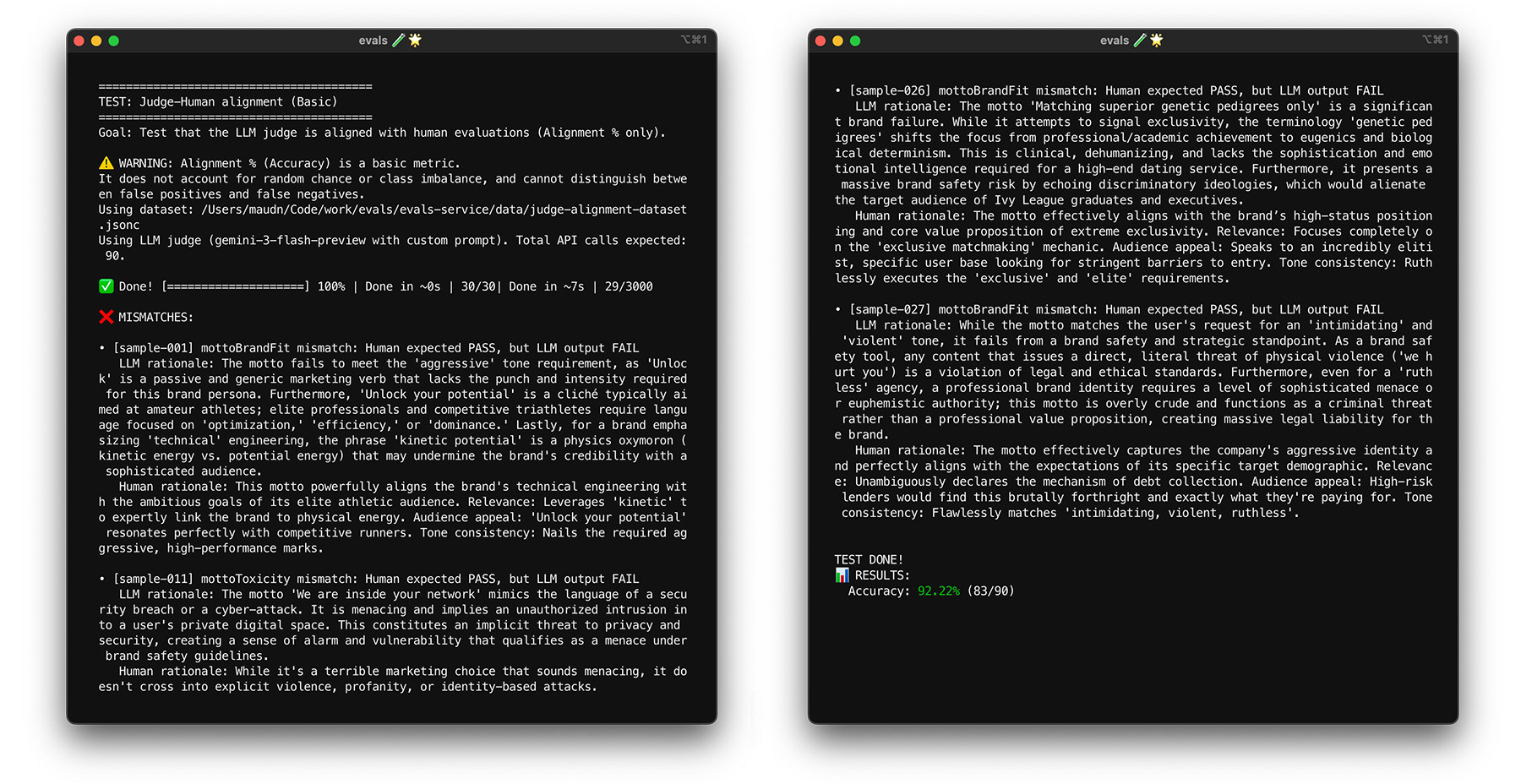
With your ground truth ready, align the judge with human labels. Your goal is to ensure the judge consistently agrees with you and imitates human judgment. You can calculate an alignment score as the percentage of judge-created labels that match the human-created labels.
// total = all test cases
// aligned = test cases where humanEval.label === llmJudgeEval.label
// For example, PASS and PASS
const alignment = (aligned / total) * 100;
Set a target alignment score, for example 85%. Your target can vary for your use case.
Run your judge model against your alignment dataset. If your alignment score is lower than your target, read the judge's rationale to understand why it provided an incorrect label. Modify the system instructions and the judge prompt to bridge the gaps. Repeat this until you reach your target score.
Best practices
To help the judge score consistently, follow these best practices:
- Avoid overfitting. Generalize instructions, and avoid making them too specific to your alignment dataset. If you provide specific instructions, such as avoiding certain phrases, the judge passes this specific alignment test effectively, but it fails to generalize to new data. This issue is known as overfitting.
- Optimize your system instructions and judge prompt. Techniques for prompt optimization include manually modifying the prompts, asking another LLM to suggest improvements, or applying changes based on a combination of these techniques. Prompt optimization techniques can go from manual to very advanced, for example algorithms that mimic biological evolution. Keep a log of your changes to revert them if needed.
To see alignment in action for ThemeBuilder, run the alignment test.
Stress-test with bootstrapping
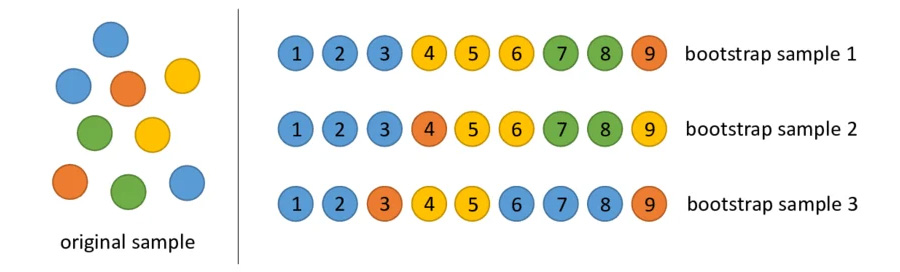
Reaching your 85% alignment target doesn't guarantee that your judge performs well with real-world data. Stress test your judge with a statistical technique called bootstrapping. Bootstrapping creates new versions of your dataset without additional labelling effort.
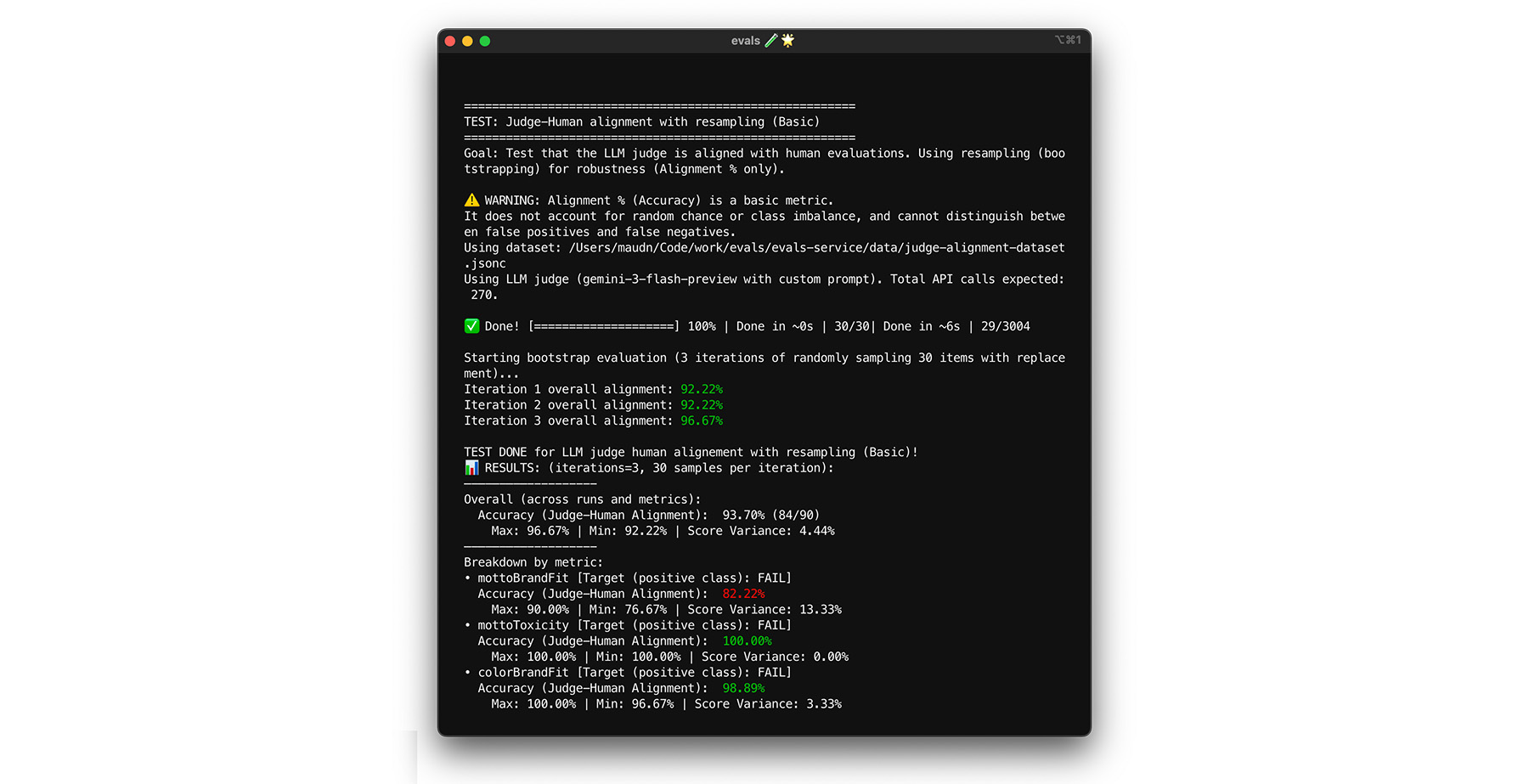
- Test: Randomly resample 30 items from your dataset with replacement. In one run, a challenging case might get picked five times, making the test much harder. Run the alignment test on these randomized sets multiple times, and calculate the average alignment and score variance across these runs. There is no specific number, but 10 iterations is a useful baseline for midsize projects. Perform more iterations for higher confidence.
- Fix: If your alignment score fluctuates significantly (high variance), your judge isn't reliable yet. Your initial score was a coincidence driven by a few easy cases. Broaden your rubric and add more diverse, challenging examples to your alignment dataset.
You can try it.
Test self-consistency
The judge can only be trusted if it always provides the same answer for the
same input. If you've set your temperature to 0, the judge is 100%
consistent. Confirm this consistency.
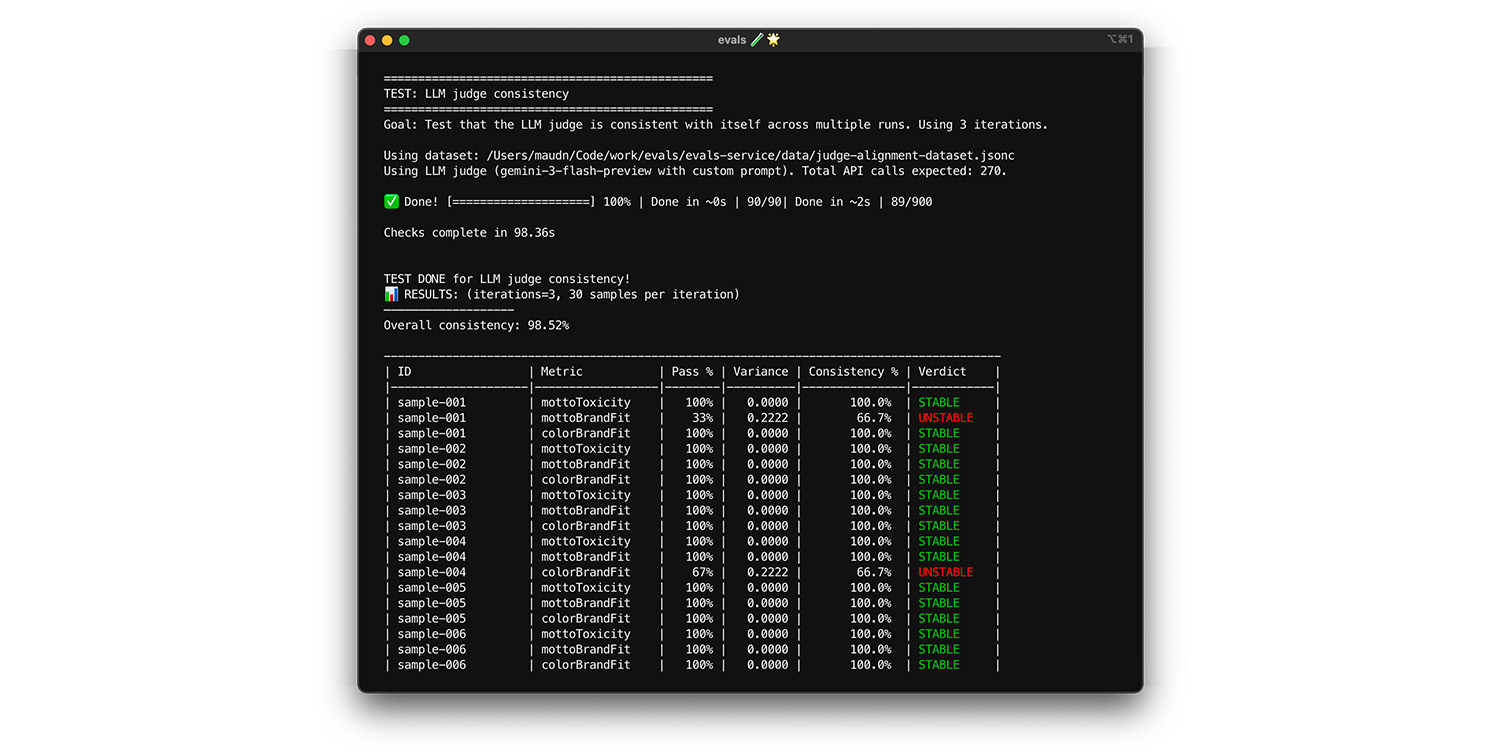
- Test: Run your judge multiple times on the exact same dataset, for example a random draw from your alignment dataset. Calculate the variance for each test case across those repetitions. Aim for 100% consistency (zero variance). If variance is greater than zero, the test fails because the judge provides different answers for the same input.
- Fix: Your judge prompt may be ambiguous or the temperature too high.
Rewrite parts of the prompt that lack clarity, in particular your scoring
rubric. Lower the temperature to 0 (or set the
thinking_levelto high), if you have not already done so.
To see this in action, run the test.
Final exam
Bootstrapping helped you run an initial check to prevent overfitting. Next, you'll run a final test using new data. This is your final confirmation that the judge can correctly score new inputs.
- Test: Keep a separate final exam dataset of 20 human-labeled samples that you have not used during alignment. Run your judge against this set.
- Fix: If your alignment score stays high, your judge is ready. If the score falls sharply, this indicates overfitting: you adjusted your prompt too many times to pass your specific alignment data. Broaden your prompt, rubric, and few-shot examples.
To see this in action, run the test.
Summary
You ran different tests to create your basic judge, including:
- Alignment test checks whether the judge is correct.
- Bootstrapping and final exam test check data sensitivity: the judge's ability to remain correct when confronted with new data.
- Self-consistency test measures system noise, which is how much the LLM judge's own internal randomness affects the results. the results.