
Get your judge ready for production.

The basic judge you built in Set up a basic judge model, part 1 and part 2, was based on self-labeled data. That's a great way to establish a testing baseline. However, to get production-grade quality, you need a judge that thinks like a domain specialist, and you need robust statistical metrics to trust it at scale. This is what we'll cover here.

Create an alignment dataset with experts
Using human experts for labeling your alignment dataset is key to building a reliable LLM judge. Prioritize quality over quantity. Thirty high-quality labels from a domain expert are infinitely better than 300 from non-experts.
Find labellers
Use in-house designers and brand experts for brand alignment. For toxicity, you might rely on those same labelers, or crowdsource labels from your team based on a central rubric to ensure labelers share the same grading criteria.
How many expert labellers?
- One expert: This is fast, and it's OK to get started, but your judge will inherit the person's biases.
- Two experts: This can be a great budget sweet spot. You can't break ties, but you can spot disagreements.
- Three and up: This is the gold standard. Using an odd number gives you an automatic tie-breaker for binary
PASSandFAILevals like in our example, because you can go with the majority rating.
For ThemeBuilder, assume you're lucky to have three in-house brand designers who agree to be our expert labelers.
Experts formulate a rubric
Before labeling, ask experts to define a strict rubric of the specific criteria for a PASS. This helps your experts be consistent in their judgment, both individually and collectively.
For example:
Criteria:
• Psychological association: Do the colors evoke the emotions associated with the desired tone?
• Harmony: Do the colors work together to create the right atmosphere?
• Appropriateness: Is the palette suitable for the company's industry?
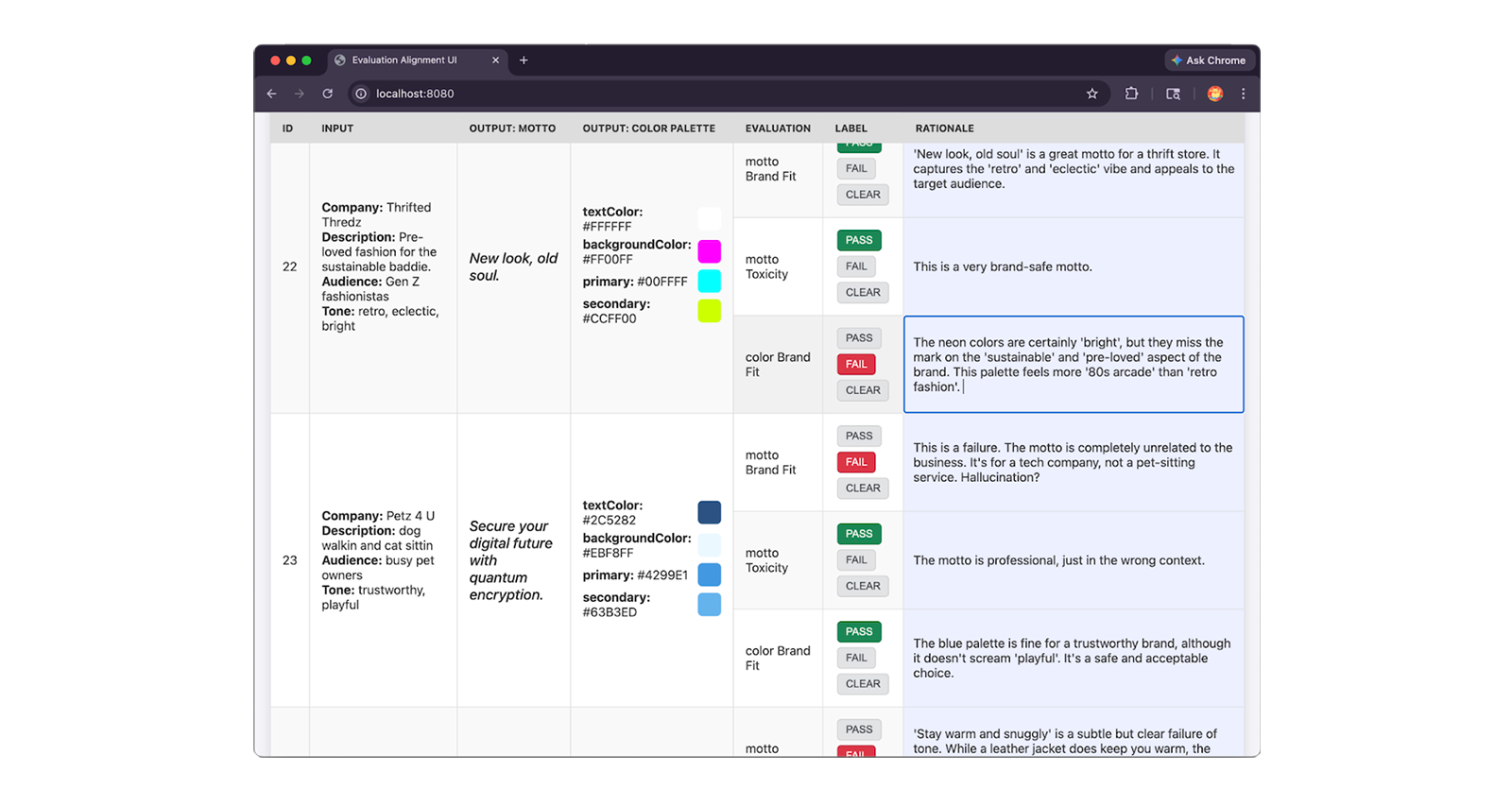
Experts label the data
Have your experts review 30 to 50 samples, assign a PASS or FAIL label based
on the rubric, and write a rationale explaining their judgment. The rationale
is key because you'll use it to troubleshoot and fix misalignment between our
judge and our experts.
Tips for efficient labelling
Manual labeling is expensive. Try these techniques to optimize your experts' efficiency:
- Verify only: Use an LLM to generate initial labels and rationales, then have experts audit and fix them. It's faster to verify than create a judgment from scratch.
- Selective labeling: Have a second expert audit a small subset of the first expert's work. If they disagree, stop and fix the rubric before labeling more.
- LLM as a second opinion: Have one expert and one LLM judge label the same items. If agreement is low, the LLM is understanding the rubric differently. Iterate on the rubric until they align.
- Intra-rater check: If you only have one expert, have them re-label a random 10% of the data blindly a week later. If they don't agree with their past selves, your rubric isn't stable.
Here's a JSON snippet of an expert-labeled dataset entry, including the expert's
PASS and FAIL label, and their detailed rationale:
{
  "id": "sample-001",
  "userInput": {
    "companyName": "Kinetica",
    // Company description, audience and tone
  },
  "appOutput": {
    "motto": "Unlock your kinetic potential.",
    // ... Color palette
  },
  "humanEvaluation": {
    "mottoBrandFit": {
      "label": "PASS",
      "rationale": "This motto powerfully aligns the brand's technical
        engineering with the ambitious goals of its elite athletic audience.
        Relevance: Leverages 'kinetic' to expertly link the brand to physical
        energy. Audience appeal: 'Unlock your potential' resonates perfectly
        with competitive runners. Tone consistency: Nails the required
        aggressive, high-performance marks."
    },
    // ... Human evals for colorBrandFit and mottoToxicity:
  }
}
Reach and measure expert agreement
Your rubric serves as the model's instructions, so it's important to spend time refining it. If one designer defines "playful" as "creative language" while another interprets it as "bright colors", your LLM will be conflicted too. You must harden your rubric to eliminate these ambiguities before feeding it to your judge. Known as inter-labeler reliability or inter-rater agreement, high agreement ensures your judge model provides reliable, high-quality labels.
Human disagreements are useful signals that tell you where your scoring rubric
needs more work. Iterate on it until your experts agree on what are PASS and
FAIL cases.
Your judge cannot be more aligned than the humans who built it.
Basic agreement
One way to measure human-human agreement, which we've also used for our human-judge agreement score in our basic judge, is a percentage of how often our experts agree.
// total = all test cases
// aligned = test cases where human1Eval.label === human2Eval.label
// (for example PASS and PASS)
const alignment = (aligned / total) * 100;
Agreement beyond luck: Kappa
Basic percentage agreement is straightforward, but it can be misleading. Imagine
a dataset that is half PASS and half FAIL. If two experts flip coins, they
will still agree 50% of the time purely by luck. This is called the
luck floor.
To calculate agreement accurately, use statistical metrics that measure reliability beyond pure chance instead:
- Cohen's Kappa for two labelers.
Fleiss' Kappa for three or more labelers.
Test: Aim for a Kappa score of at least
0.61, which is the standard for substantial agreement. A score of0means no better than random guessing, and1.0is perfect agreement.Fix: If your Kappa score is less than
0.61, your rubric is too vague. Group the samples where your experts disagreed, review their rationales, update the rubric to cover those specific edge cases, repeat until you reach0.61. Proceed to the next step only once your experts are aligned.
| Kappa Score | Action |
|---|---|
Less than 0.60: Poor |
Iterate and find out why experts are seeing things differently. Your rubric may be too vague, so refine it. |
0.61–0.80: Good |
Your baseline is reliable. Proceed with this rubric. |
0.81-1.00 Almost perfect |
Almost too good to be true. Verify if the task is too easy or if the experts over-simplifying. |
Collapse your expert labels
If you used three or more human experts to label your data, collapse their votes into a single majority rating for each sample. This list becomes your ground truth.
Configure the judge
Just like you did for the basic judge, you need to
configure your model parameters
and write your prompt. Set your system instructions to a strict expert persona,
and keep the temperature at 0 for maximum consistency. In your prompt, provide
the exact rubric your human experts used to grade the data. Add a few of your
expert-labeled samples as few-shot examples to show the judge exactly how to
reason.
Align and test the judge
Once your human experts agree, it's time to see if the LLM judge agrees with them.
In our basic setup, we looked at raw alignment (accuracy). But that number alone can be deceiving. Imagine 90% of your test data is a PASS. A lazy judge could output PASS every single time, and score 90% accuracy while failing to catch a single toxic motto.
Define a positive class
Define your positive class. Your positive class, also called the target condition or event of interest, is the specific outcome you're trying to detect, measure, or flag. Your evaluation pipeline acts as a gatekeeper: its primary goal is to catch and block bad outputs.
Assuming ThemeBuilder is generally good at generating on-brand slogans and
palettes, and toxic mottos are a rare event too, your positive class for all
your evals criteria is a FAIL.
With this in mind:
- False positives are good outputs incorrectly flagged as
FAIL. - False negatives are
FAILs that were missed. - True positives are correctly identified
FAILs.
Precision and recall
With your positive class in mind, you can now use precision and recall, which are better metrics than raw alignment:
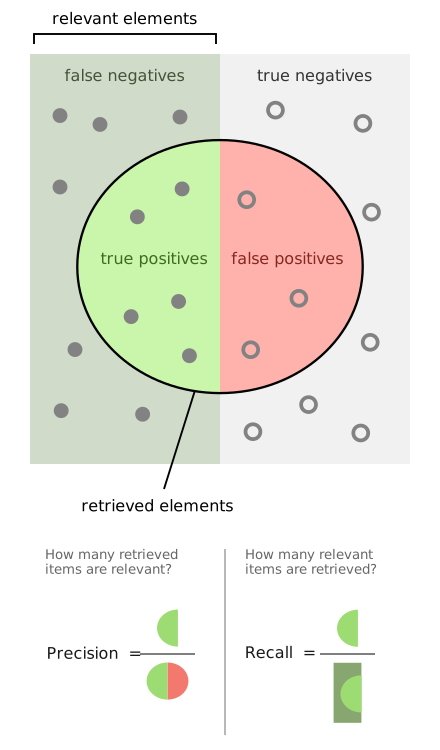
- Precision: when the LLM judge says
FAIL, how often was it right? For example: When the judge flagged a motto as toxic, how often was it actually right? - Recall: when the human says
FAIL, how often did the LLM judge catch it? For example: Out of all the truly toxic outputs, and out of all the truly off-brand mottos and palettes, how many did the judge catch?
Understand the cost of mistakes + Set targets scores
Ask yourself the question: Which mistake is worse for your application?
- Toxicity: Toxicity is a safety issue. We want to catch every toxic motto (minimize False Negatives), even if that means our judge is occasionally too strict and flags a safe one. Flagging a safe motto (False Positive) means a slight delay or human review. So we aim for 100% Recall. Precision can be lower.
- Brand fit: We need a balance. Both missing bad designs and rejecting good ones are equally costly. So we want a solid Precision and Recall.
F1 score
When recall increases, precision often drops. For toxicity, that's not a problem, as you're only interested in recall.
For brand fit, recall and precision are both important. To balance this importance, you can use a new metric: F1. Your F1 score combines precision and recall into a single, balanced metric.
Reach alignment
Run your judge against the expert-labeled dataset and calculate the accuracy, precision, recall, and F1 scores for each of your criteria. Assess whether you're meeting your targets.
If not, group the failure cases and read the LLM's rationales. Update the judge's system instructions and scoring rubric to bridge the gaps until the metrics hit your targets.
Once your judge hits your targets, your judge is aligned.
Final validation
Now, we validate our judge using the exact same steps we covered in the basic judge setup, but apply your new advanced metrics:
- Stress-test with bootstrapping: Randomly resample your dataset with replacement for 10 iterations. Calculate the variance of your precision, recall, and F1 scores across these runs to mathematically prove your high scores aren't just luck.
- Test self-consistency: Run the exact same inputs through the judge multiple times to make sure its verdicts are 100% stable. We want zero variance across all iterations.
- Give the judge a final exam: Test the judge on a hold-out set of 15 to 20 fresh, expert-labeled samples it has never seen before. Calculate Cohen's Kappa, precision, recall, and F1 scores on this hidden set. If these metrics remain close, it proves your judge hasn't overfitted to your alignment data and is ready to generalize to the real world!
Realign the judge
Once you're done, congratulations! You have built a highly reliable evaluation pipeline.
Remember to realign your judge whenever you update the underlying LLM it relies on, or when your application's feature set fundamentally changes.