


Published: February 1, 2023, Last updated: March 30, 2026
Since its launch, the Core Web Vitals initiative has sought to measure the actual user experience of a website, rather than technical details behind how a website is created or loaded. The three Core Web Vitals metrics were created as user-centric metrics—an evolution over existing technical metrics such asDOMContentLoaded or load that measured timings that were often unrelated to how users perceived the performance of the page. Because of this, the technology used to build the site shouldn't impact the scoring providing the site performs well.
The reality is always a little trickier than the ideal, and the popular Single Page Application architecture has never been fully supported by the Core Web Vitals metrics. Rather than loading distinct, individual web pages as the user navigates about the site, these web applications use so-called "soft navigations", where the page content is instead changed by JavaScript. In these applications, the illusion of a conventional web page architecture is maintained by altering the URL and pushing previous URLs in the browser's history to allow the back and forward buttons to work as the user would expect.
Many JavaScript frameworks use this model, but each in a different way. Since this is outside of what the browser traditionally understands as a "page", measuring this has always been difficult: where is the line to be drawn between an interaction on the current page, versus considering this as a new page?
The Chrome team has been been considering this challenge for some time now, and is looking to standardize a definition of what is a "soft-navigation", and how the Core Web Vitals can be measured for this—in a similar way that websites implemented in the conventional multi-page architecture (MPA) are measured.
We've made several improvements to the API based on developer feedback for the last origin trial and are now asking for developers to try the latest iteration and provide feedback on the approach before this launches. We're pretty confident where the API has landed over these iterations and are aiming to launch the API later this year, subject to feedback on this latest origin trial.
What is a soft navigation?
We have come up with the following definition of a soft navigation:
- The navigation is initiated by a user action.
- The navigation results in a visible URL change to the user.
- The interaction results in a visible paint.
For some sites, these heuristics may lead to false positives (that users wouldn't really consider a "navigation" to have happened) or false negatives (where the user does consider a "navigation" to have happened despite not meeting these criteria). We welcome feedback at the soft navigation specification repository on the heuristics.
DevTools support for soft Navigations
We have added support for soft navigations to the DevTools Performance panel in trace view:
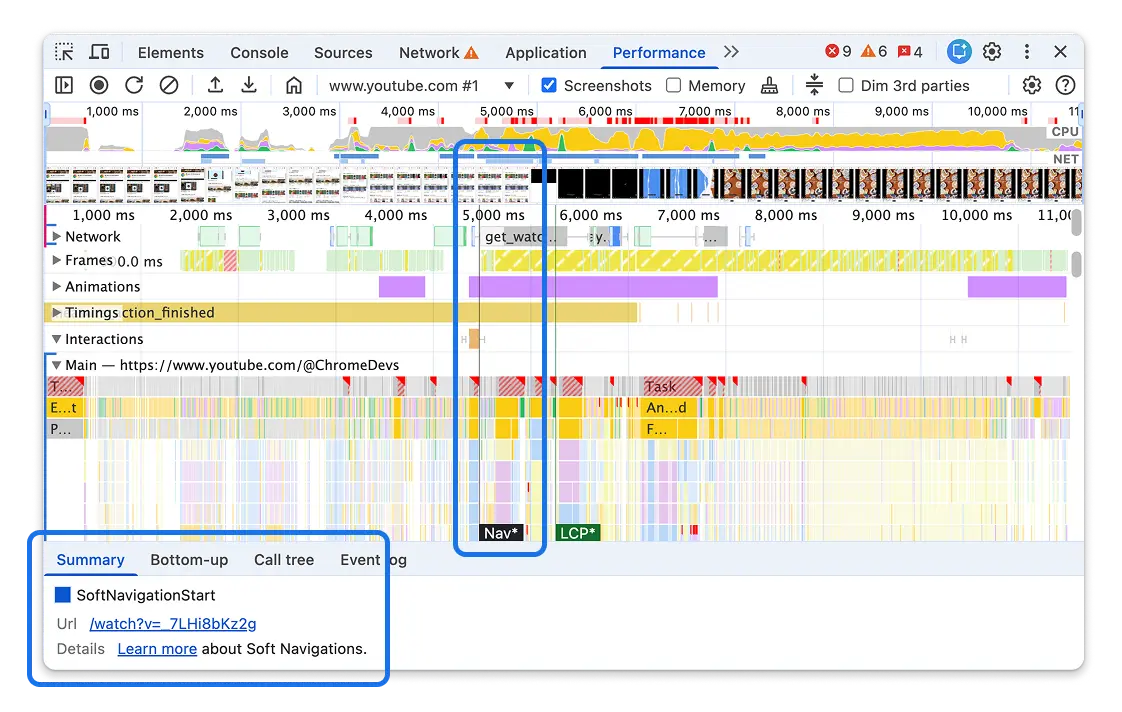
You can see markers for soft navigations and LCP, both of which are marked with a * to help differentiate them from the usual hard navigation entries. This is enabled by default and is separate to the performance API changes we will discuss next. It's a quick way to test whether the soft navigations experiment works correctly for your site.
For now, this only shows the soft navigation and LCP timestamps in the trace view. Other metrics (for example LCP) and support in the Live Metrics view will be added later.
How does Chrome implement soft navigations for web developers?
Once the soft navigation heuristics are enabled (more on this in the next section), Chrome will change the way it reports some performance metrics:
- A
soft-navigationPerformanceTimingevent will be emitted after each soft navigation is detected. - This
soft-navigationentry will include anavigationId, the new URL in thenameattribute, as well as aninteractionIdof the initiating interaction. - One or more
interaction-contentful-paintentries will be emitted after interactions that cause a contentful paint. This can be used to measure Largest Contentful Paint (LCP) for soft navigations when the interaction emits a soft navigation. - The
navigationIdattribute is added to each of performance timings (first-paint,first-contentful-paint,largest-contentful-paint,interaction-contentful-paint,first-input-delay,event, andlayout-shift). This corresponds to the navigation entry the event was emitted under. Note that when these entries span soft navigations, they may contain the previous or nextnavigationIddepending on when the entry was emitted. More on this in the Report the metrics against the appropriate URL section. - The
soft-navigationwill include alargestInteractionContentfulPaintentry including the largestinteraction-contentful-paintentry emitted as part of the navigation. This can then be used as the initial LCP for that navigation, and that LCP can then be updated as moreinteraction-contentful-paintentries for that interaction are observed. - Potentially some
interaction-contentful-paintentries may have happen before the soft navigation takes place (if the URL update does not happen until after those paints). In these cases the largestlargestInteractionContentfulPaintentry avoids needing to buffer and look back over old entries. Note that thelargestInteractionContentfulPaintis an exact copy of the largestinteraction-contentful-paintentry, so that entry will have used the previousnavigationIdsince that is when the paint happened, but these paints should be measured against the newnavigationId. - The
soft-navigationentry will also includepaintTimeandpresentationTimeas the FCP for that navigation. - Be aware that
interaction-contentful-paintentries will also be emitted after further interactions, but LCP for a URL should be restricted tointeraction-contentful-paintentries that match the soft navigationsinteractionIdto exclude these.
These changes will allow the Core Web Vitals—and some of the associated diagnostic metrics—to be measured per page navigation, though there are some nuances that need to be considered.
What are the implications of enabling soft navigations in Chrome?
The following are some of the changes that sites owners need to consider after enabling this feature:
- Monitoring the
soft-navigationentries allows "slicing" of the performance entries into each "navigation". - CLS and INP metrics can already be sliced at your discretion, rather than be measured over the duration of the whole page lifecycle, but the Soft Navigation API gives a standardized measure of when this happens, regardless of underlying technology used.
- The
largest-contentful-paintentry is finalized on an interaction (which is necessary to start a soft navigation), so it can only be used to measure for the initial "hard" navigation LCP. This means this won't change when soft navigations are measured so LCP for the initial, hard navigation, page load can be measured as it always was. - The new
interaction-contentful-paintentry that will be emitted from interactions can be used to measure LCP for soft navigations, but there are some considerations for how to use this entry we will discuss in thie article. - Note that not all users will support this soft navigation API, particularly for older Chrome versions, and for those using other browsers. Be aware that some users may not report soft-navigation-based metrics, even if they report Core Web Vitals metrics.
- As an experimental new feature that is not enabled by default, sites should test this feature for unintended side-effects.
Check with your RUM provider if they support measuring Core Web Vitals by soft navigation. Many are planning on testing this new standard, and will take the previous considerations into account. In the meantime, some providers also allow limited measurements of performance metrics based on their own heuristics.
For more information on how to measure the metrics for soft navigations, see the Measuring Core Web Vitals per soft navigation section.
How do I enable soft navigations in Chrome?
Soft navigations are not enabled by default in Chrome, but are available for experimentation by explicitly enabling this feature.
For developers, this can be enabled by turning on the flag at chrome://flags/#soft-navigation-heuristics. Alternatively it can be enabled by using the --enable-features=SoftNavigationHeuristics command line arguments when launching Chrome. Enabling the chrome://flags/#enable-experimental-web-platform-features flag also enables the soft navigations.
For a website that wishes to enable this for all their visitors to see the impact, there will be an origin trial running from Chrome 147 which can be enabled by signing up for the trial and including a meta element with the origin trial token in the HTML or HTTP header. See the Get started with origin trials post for more information.
Site owners can choose to include the origin trial on their pages for all, or for just a subset of users. Be aware of the preceding implications section as to how this changes how your metrics may be reported, especially if enabling this origin trial for a large proportion of your users. Note that CrUX will continue to report the metrics in the existing manner regardless of this soft navigation setting so is not impacted by those implications. It should also be noted that origin trials are also limited to enabling experimental features on a maximum of 0.5% of all Chrome page loads as a median over 14 days, but this should only be an issue for very large sites.
Feature detecting Soft Navigations API support
You can use the following code to test if the API is supported:
if (PerformanceObserver.supportedEntryTypes.includes('soft-navigation')) {
  // Monitor Soft Navigations
}
Note that supportedEntryTypes is frozen on first use so if soft navigations support is added dynamically by an origin trial token injected into the page, then this may return the original value, prior to that feature being activated.
The following alternative can be used in this case while soft navigations is not yet supported by default and is in this transition state:
if ('SoftNavigationEntry' in window) {
  // Monitor Soft Navigations
}
How can I measure soft navigations?
Once the soft navigations experiment is enabled, the metrics will be reporting using the PerformanceObserver API as per other metrics. However, there are some extra considerations that need to be taken into account for these metrics.
Report soft navigations
You can use a PerformanceObserver to observe soft navigations. Following is an example code snippet that logs soft navigation entries to the console—including previous soft navigations on this page using the buffered option:
const observer = new PerformanceObserver(console.log);
observer.observe({ type: "soft-navigation", buffered: true });
This can be used to finalize full-life page metrics for the previous navigation.
Report the metrics against the appropriate URL
When a soft navigations is seen, the previous page's Core Web Vitals should be finalized, and then reported for the previous URL, and new monitoring should be started for the new URL.
The name attribute of the appropriate soft-navigation entry will contain the new URL to report metrics for, and the navigationId will be the unique reference for this navigation (since the same URL may be visited multiple times over the life of a single page application). This can be looked up with the PerformanceEntry API:
const softNavEntry =
  performance.getEntriesByType('soft-navigation').filter(
    (entry) => entry.navigationId === navigationId
  )[0];
const hardNavEntry = performance.getEntriesByType('navigation')[0];
const navEntry = softNavEntry || hardNavEntry;
const pageUrl = navEntry?.name;
Report the correct URL for interaction-contentful-paint
Extra considerations are needed to calculating LCP from interaction-contentful-paint entries, since not all interaction-contentful-paint entries should be mapped using the navigationId and reported as LCP for that URL:
- The first issue is that
interaction-contentful-paintentries may be emitted before the soft navigation occurs if a paint occurs before the URL update. In these cases thenavigationIdwill be for the old URL. If the URL is updated first, then the paint will complete the soft navigation and in that case thesoft-navigationentry will be emitted first, and theinteraction-contentful-paintwill have the new URL. - The second issue is that
interaction-contentful-paint, entries will continue to be emitted for newer interactions, as the scope of this performance metric extends beyond just LCP for soft navigations. We only want to consider the paints for the soft navigation load for LCP and not those for subsequent interactions.
Therefore, the interactionId rather than the navigationId should be used to map interaction-contentful-paint entries to soft-navigation-entries to obtain the correct URL. This will handle any entries with old navigationIds as well as filter out any interaction-contentful-paint entries that shouldn't be considered for LCP.
Additionally, you should consider processing the largestInteractionContentfulPaint entry of the soft-navigation entries as well, to more easily handle interaction-contentful-paint entries that occur before the soft-navigation entries is emitted.
Getting the startTime of soft navigations
All performance timings, including those for soft navigations, and the entries used to calculate the Core Web Vitals metrics are reported as a time from the initial "hard" page navigation time. Therefore, the soft navigation start time should be subtracted from soft navigation loading metric times (for example LCP), to report them relative to this soft navigation time instead.
The navigation start time can be obtained in a similar manner by mapping to the appropriate soft-navigation entry and using its startTime.
The startTime is the time of the initial interaction (for example, a button click) that initiated the soft navigation. This is somewhat different to "hard navigations", where the "start time" is when the new page is "committed", to the browser, and after some of the event handler code is run. Soft navigation start times also include that event handler code since we measure from the interaction start time.
Measure Core Web Vitals per soft navigation
To measure Core Web Vitals, listen to soft-navigation entries, reset the metrics on receiving these. FCP can be emitted based on the presentationTime and LCP can be initialized to the largestInteractionContentfulPaint. INP, CLS, should be initialized to 0 as they would be for a page load.
The LCP, INP, and CLS can then be measured and monitored as usual (with the exception of using interaction-contentful-paint for LCP providing the interactionId matches). The interactionId and navigationId can be used to name the entries to a URL as discussed previously.
Timings will still be returned relative to the original "hard" navigation start time. So to calculate LCP for a soft navigation for example, you will need to take the interaction-contentful-paint timing and subtract the appropriate soft navigation start time as detailed previously to get a timing relative to the soft navigation.
Some metrics have traditionally been measured throughout the life of the page: LCP, for example, can change until an interaction occurs. CLS and INP can be updated until the page is navigated away from, regardless of any interactions. Therefore the previous navigation's metrics should be finalized as each new soft navigation occurs. This means the initial "hard" navigation metrics may be finalized earlier than usual when measuring Core Web Vitals with soft navigations.
Similarly, when starting to measure the metrics for the new soft navigation of these long-lived metrics, metrics will need to be "reset" or "reinitialized" and treated as new metrics, with no memory of the values that were set for previous "pages". That is, the understanding of what the "largest" paint, interaction to next paint, or layout shift is reset to allow measuring again from scratch.
How should content that remains the same between navigations be treated?
LCP for soft navigations (calculated from interaction-contentful-paint) will measure new paints only, and only paints associated with the interaction that caused the navigation. This can result in a different LCP, for example, from a cold load of that soft navigation to a soft load.
For example, take a page that includes a large banner image that is the LCP element, but the text beneath it changes with each soft navigation. The initial page load will flag the banner image as the LCP element and base the LCP timing on that. For subsequent soft navigations, the text beneath will be the largest element painted after the soft navigation and will be the new LCP element. However, if the page is loaded with a deep link into the soft navigation URL, the banner image will be a new paint and therefore will be eligible to be considered as the LCP element.
Similarly, an animation may be updating part of the page continually—unrelated to any soft navigation that happens. Any new paints due to that background animation wouldn't be considered for LCP for the new soft navigation. However they may be considered for LCP it the page was reloaded from this URL.
As these examples show, the LCP element for the soft navigation can be reported differently depending on how the page is loaded—in the same way as loading a page with an anchor link further down the page can result in a different LCP element for hard navigations.
How to measure TTFB?
Time to First Byte (TTFB) for a conventional page load represents the time that the first bytes of the original request are returned.
For a soft navigation this is a more tricky question. Should we measure the first request made for the new page? What if all the content already exists in the app and there are no additional requests? What if that request is made in advance with a prefetch? What if a request unrelated to the soft navigation from a user perspective (for example, it's an analytics request)?
A simpler method is to report TTFB of 0 for soft navigations—in a similar manner as we recommend for back/forward cache restores. This is the method the web-vitals library uses for soft navigations and what we recommend for this metric at this time.
Should you measure Core Web Vitals with both methodologies?
During this experiment, it is recommended to continue to measure your Core Web Vitals in the current manner, based on "hard" page navigations as the new implementation may have issues or change before it is finally shipped. This will also match what CrUX measures for now (more on this later).
Soft navigations should be measured in addition to these to allow you to see how these might be measured in the future, and to give you the opportunity to provide feedback to the Chrome team about how this implementation works in practice. This will help you and the Chrome team to shape the API going forward.
For LCP, then means considering just largest-contentful-paint entries for the current way, and both largest-contentful-paint and interaction-contentful-paint entries for the new way.
For CLS and INP, this means measuring these across the whole page lifecycle as is the case for the current way, and separately slicing the timeline by soft navigations to measure separate CLS and INP values for the new.
Use the web-vitals library to measure Core Web Vitals for soft navigations
The easiest way to take account of all the nuances, is to use the web-vitals JavaScript library which has experimental support for soft navigations in a separate soft-navs branch (which is also available on npm and unpkg). This can be measured in the following way (replacing doTraditionalProcessing and doSoftNavProcessing as appropriate):
import {
  onTTFB,
  onFCP,
  onLCP,
  onCLS,
  onINP,
} from 'https://unpkg.com/web-vitals@soft-navs/dist/web-vitals.js?module';

function doTraditionalProcessing(callback) {
  ...
}

function doSoftNavProcessing(callback) {
  ...
}

onTTFB(doTraditionalProcessing);
onFCP(doTraditionalProcessing);
onLCP(doTraditionalProcessing);
onCLS(doTraditionalProcessing);
onINP(doTraditionalProcessing);

onTTFB(doSoftNavProcessing, {reportSoftNavs: true});
onFCP(doSoftNavProcessing, {reportSoftNavs: true});
onLCP(doSoftNavProcessing, {reportSoftNavs: true});
onCLS(doSoftNavProcessing, {reportSoftNavs: true});
onINP(doSoftNavProcessing, {reportSoftNavs: true});
The web-vitals library also ensures you report the metrics are reported against the correct URL as noted previously, as they include both the navigationId and a navigationURL in the entries provided to the callback.
The web-vitals library reports the following metrics for soft navigations:
| Metric | Details |
|---|---|
| TTFB | Reported as 0. |
| FCP | The time of the first contentful paint, relative to the soft navigation start time, from the interaction that triggered the soft navigation. Existing paints present from the previous navigation, or not associated with the interaction, are not considered. |
| LCP | The time of the largest contentful paint, relative to the soft navigation start time, from the interaction that triggered the soft navigation. Existing paints present from the previous navigation, or not associated with the interaction, are not considered. As usual, this will be reported upon an interaction, or when the page is backgrounded, as only then can the LCP be finalized. |
| CLS | The largest window of shifts between the navigation times. As usual, this when the page is backgrounded as only then can the CLS be finalized. A 0 value is reported if there are not shifts. |
| INP | The INP between the navigation times. As usual this will be reported upon an interaction, or when the page is backgrounded as only then can the INP be finalized. A 0 value is not reported if there are not interactions. |
Will these changes become part of the Core Web Vitals measurements?
We want to evaluate the heuristics and see if they more accurately reflect the user experience before we make any decision on whether this will be integrated in the Core Web Vitals initiative. The ultimate aim is to provide a means to better measure performance as experiences by real users. So yes the aim is to include these in Core Web Vitals measurements as exposed by all tools should this experiment prove successful.
We value web developers' feedback on the experiment, the heuristics used, and whether you feel it more accurately reflects the experience. The soft navigation GitHub repository is the best place to provide that feedback, though individual bugs with Chrome's implementation of that should be raised in the Chrome issue tracker.
How will soft navigations be reported in CrUX?
How exactly soft navigations will be reported in CrUX, should this experiment be successful, is also still to be determined. It is not necessarily a given that they will be treated the same as current "hard" navigations are treated.
In some web pages, soft navigations are almost identical to full page loads as far as the user is concerned and the use of Single Page Application technology is just an implementation detail. In others, they may be more akin to a partial load of additional content.
Therefore, we may decide to report these soft navigations separately in CrUX, or perhaps weight them when calculating the Core Web Vitals for a given page or group of pages. We may also be able to entirely exclude partial load soft navigation, as the heuristic evolves.
The team is concentrating on the heuristic and technical implementation, which will allow us to judge the success of this experiment, so no decision has been made on these fronts.
Feedback
We are actively seeking feedback on this experiment at the following places:
- Feedback on the API should be raised as issues on GitHub.
- Bugs on the Chromium implementation should be raised on Chrome's issue tracker, if this is not one of the known issues yet.
- General web vitals feedback can be shared at web-vitals-feedback@googlegroups.com.
If in doubt don't worry too much, we'd rather hear the feedback in either place and will happily triage the issues in both places and redirect issues to the correct location.
Changelog
As this API is in experimentation, a number of changes are happening to it, more so than with stable APIs. You can see the Soft Navigation Heuristics Changelog for more details.
Conclusion
The soft navigations experiment is an exciting approach to how the Core Web Vitals initiative might evolve to measure a common pattern on the modern web that is missing from our metrics. While this experiment is in its early days yet—and there is much still to do—making the progress available so far to the broader web community to experiment with is an important step. Gathering the feedback from this experiment is another crucial part of the experiment, so we strongly encourage those interested in this development to use this opportunity to help shape the API to ensure it is representative of what we hope to be able to measure with this.
Acknowledgements
Thumbnail image by Jordan Madrid on Unsplash
This work is a continuation of work first started by Yoav Weiss when he was at Google. We thank Yoav for his efforts on this API.