
A context menu appears for the alternate click (frequently called the right click)
of a mouse. This page describes how to implement a context menu. For a complete
list of the related APIs members, see
browser.contextMenu.
To build a context menu, first add the "contextMenus" permission to the manifest.json file.
manifest.json:
  "permissions": [
    "contextMenus"
  ],
Optionally, use the "icons" key if you want to show an icon next to a menu item. In this example, the menu item for the "Global Google Search" extension uses a 16 by 16 icon.
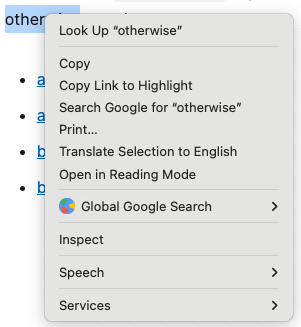
The rest of this example is taken from the Global Google Search context menu sample, which provides multiple context menu options. When an extension contains more than one context menu, Chrome automatically collapses them into a single parent menu as shown here:
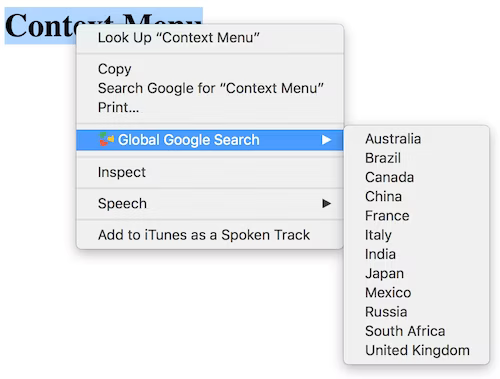
The sample shows this by calling contextMenus.create() in the extension service worker. Sub menu items are imported from the locales.js file. Then runtime.onInstalled iterates over them.
service-worker.js:
const tldLocales = {
  'com.au': 'Australia',
  'com.br': 'Brazil',
  ...
}

browser.runtime.onInstalled.addListener(async () => {
  for (let [tld, locale] of Object.entries(tldLocales)) {
    browser.contextMenus.create({
      id: tld,
      title: locale,
      type: 'normal',
      contexts: ['selection'],
    });
  }
});